










![3D Explainer Video - ScribbleLive.mp4_snapshot_00.12_[2022.03.09_03.14.16]](https://increditors.com/wp-content/uploads/elementor/thumbs/3D-Explainer-Video-ScribbleLive.mp4_snapshot_00.12_2022.03.09_03.14.16-r7wb53mx72rxst3qcqyrfxdmeyzb5r9jbl0wbjujh4.png "3D Explainer Video – ScribbleLive.mp4_snapshot_00.12_[2022.03.09_03.14.16]")
































You know you need more video. Every platform rewards it. Your competitors are publishing weekly. Your audience expects it. But right now, producing a single video feels like a multi-day ordeal — and the idea of shipping 20, 30, or 40 videos a month seems impossible.
It’s not. You just need a system.
At Increditors, we help brands go from “we should do more video” to consistently shipping 10-40+ pieces of video content every month. We’ve seen the exact inflection point where video production goes from a bottleneck to a machine — and it always comes down to the same things: the right team structure, the right tools, and repeatable processes that don’t depend on any single person.
This guide is the complete blueprint. Whether you’re a solo creator trying to go from 1 video/week to 4, or a brand building a content operation from scratch, here’s exactly how to build a video content machine that runs without burning you out.
What’s in This Guide
- Why Video Production Stalls (The Real Bottleneck)
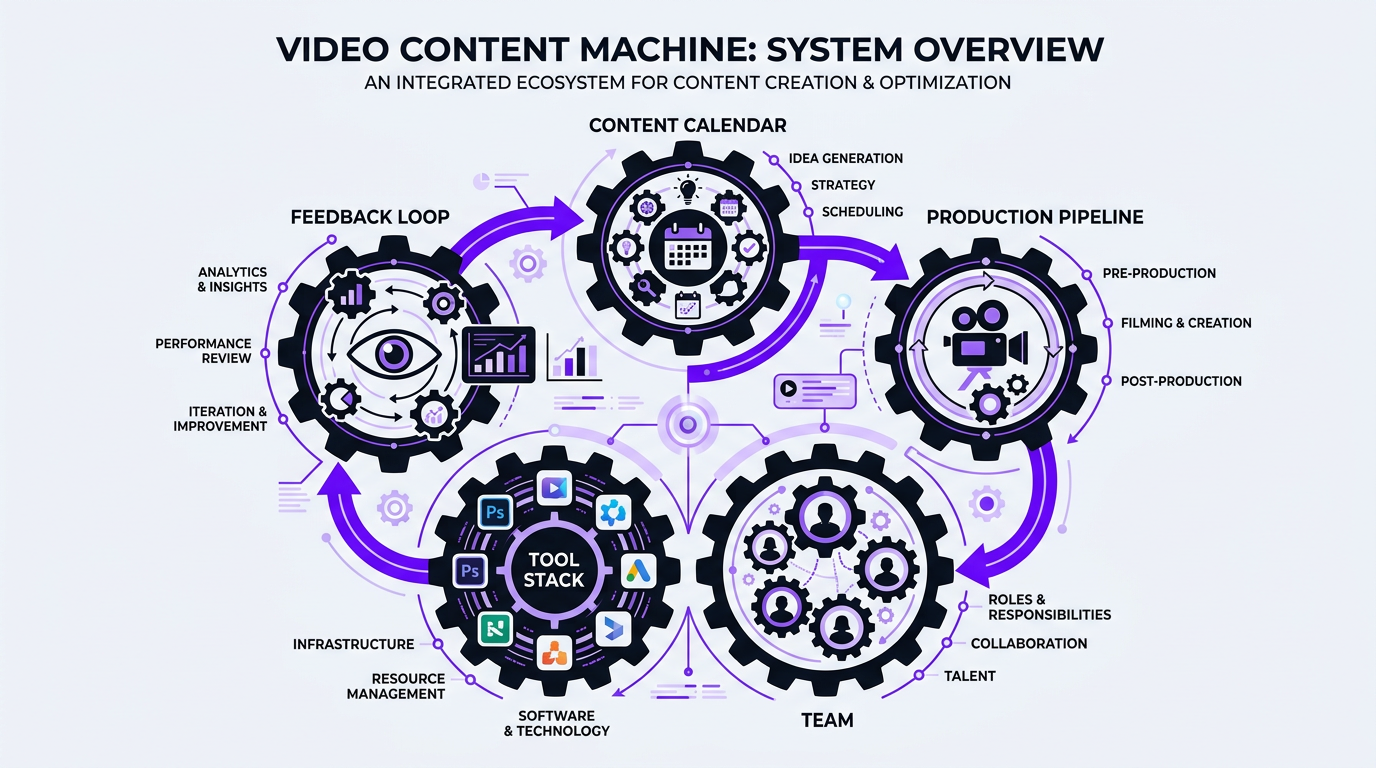
- Anatomy of a Video Content Machine
- Building the Team: Roles & Structure
- The Tool Stack That Actually Works
- The Production Workflow: Step by Step
- Batching: The 10x Productivity Multiplier
- Content Repurposing: 1 Video → 10 Assets
- Scaling from 4 to 40+ Videos per Month
- Case Studies
- FAQ
Why Video Production Stalls (The Real Bottleneck)
Before we build the machine, let’s diagnose why it’s broken.
Most creators and brands hit a ceiling not because they run out of ideas, and not because they can’t film. They stall because of editing.
Here’s the time math that kills video production:
| Production Stage | Time per Video | % of Total Time | Can Be Outsourceda |
|---|---|---|---|
| Ideation & scripting | 1-3 hours | 10-15% | Partially (writers, AI assist) |
| Filming / recording | 30 min – 2 hours | 10-15% | Rarely (this is your face/voice) |
| Editing | 4-12 hours | 50-65% | ✅ Yes — fully |
| Thumbnails & graphics | 30 min – 2 hours | 5-10% | ✅ Yes |
| Publishing & optimization | 30 min – 1 hour | 5-10% | ✅ Yes |
Editing consumes 50-65% of total production time. For a 15-minute YouTube video with motion graphics, b-roll, and sound design, you’re looking at 6-10 hours of editing work. If you’re doing this yourself while also filming, scripting, and running a business, the math simply doesn’t work beyond 1-2 videos per week.
This is why outsourcing video editing is the single highest-leverage move for scaling content. You’re removing the biggest bottleneck from the process and freeing yourself to focus on what only you can do: creating, strategizing, and growing.
Anatomy of a Video Content Machine
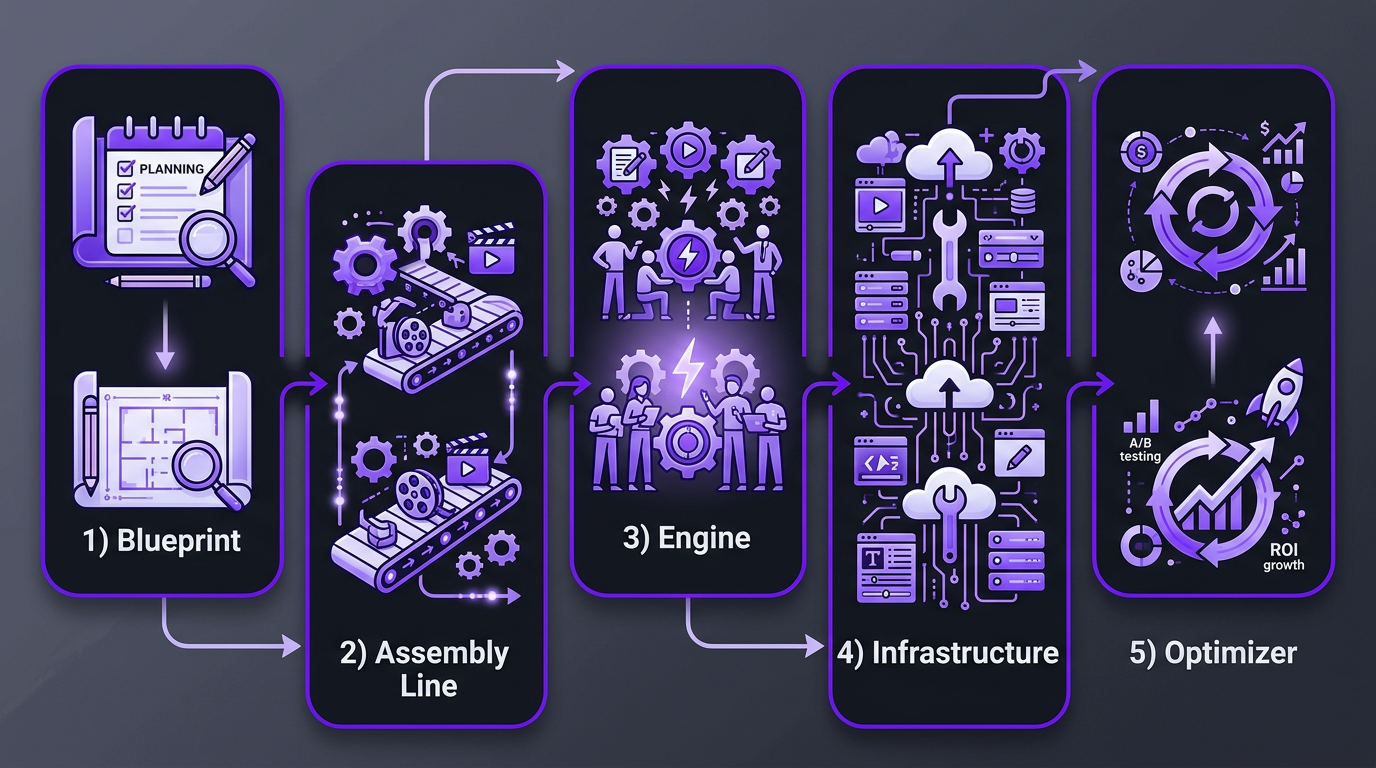
A video content machine has five components. Remove any one of them and production breaks down:
1. Content Calendar (The Blueprint)
You can’t produce consistently without a plan. A content calendar maps out what you’re publishing, when, and on which platform — at least 30 days in advance. It includes topics, target keywords, formats (long-form, short-form, Reels), and deadlines for each production stage.
Without a calendar, production becomes reactive. Someone says “we should post something about X” and the whole team scrambles. With a calendar, everyone knows what’s coming and can prepare.
2. Production Pipeline (The Assembly Line)
Each video moves through defined stages: Idea → Script → Film → Edit → Review → Publish. Each stage has a clear owner, a deadline, and a handoff protocol. When videos move through the pipeline predictably, you can have multiple videos at different stages simultaneously — which is how you go from 4/month to 40/month.
3. Team (The Engine)
Even solo creators need a team for the editing stage. As you scale, you add roles: writer, editor, motion graphics designer, thumbnail designer, project manager, strategist. The key insight is that you don’t need all these people on payroll — an editing agency can provide most of them.
4. Tool Stack (The Infrastructure)
The right tools connect your team and automate the boring parts. Project management, file sharing, communication, scheduling — each needs a dedicated tool that everyone uses consistently.
5. Feedback Loop (The Optimizer)
Every published video generates data: views, retention, CTR, engagement. A content machine uses this data to improve future videos. Without a feedback loop, you’re producing content blindly. With one, every video makes the next one better.
Building the Team: Roles & Structure
The team structure depends entirely on your volume. Here’s what works at each stage:
Solo Creator (4-8 videos/month)
You do: ideation, scripting, filming, on-camera performance.
You outsource: editing, thumbnails, publishing.
Team size: You + 1 dedicated editor (or an editing agency).
Monthly cost: $1,500–$3,000 for editing services.
Your time: 15-20 hours/month (down from 60-80 doing everything).
This is the starting point for most creators. Riley Coleman, a fitness creator we work with, went from 2 videos/month to 8 by doing nothing except outsourcing editing. Same filming schedule, same ideas, triple the output — because editing was no longer the bottleneck.
Small Team (8-20 videos/month)
You do: creative direction, scripting, on-camera.
Team handles: project management, editing, thumbnails, scheduling, analytics.
Team structure:
- 1 project manager / content coordinator (part-time or VA)
- 1-2 dedicated editors (via agency)
- 1 thumbnail designer (freelance or agency-included)
- You — the creative lead and face
Monthly cost: $3,000–$6,000 for the external team.
Your time: 20-30 hours/month focused exclusively on creation and strategy.
Brand Team (20-50+ videos/month)
At this volume, you need a proper production operation:
Team structure:
- 1 content strategist / head of video
- 1-2 hosts / on-camera talent
- 1 dedicated project manager
- 2-4 editors (dedicated team via agency like Increditors Enterprise)
- 1 motion graphics specialist
- 1 thumbnail / graphic designer
- 1 distribution / SEO specialist
Monthly cost: $8,000–$15,000 for editing and production support.
Founder time: 5-10 hours/month for review and strategic decisions.
| Volume | Team Size | Monthly Cost | Your Weekly Hours | Videos per Week |
|---|---|---|---|---|
| Solo + agency | 1 + editing partner | $1,500–$3,000 | 4-5 hours | 1-2 |
| Small team | 2-3 + editing partner | $3,000–$6,000 | 5-7 hours | 2-5 |
| Brand team | 4-6 + editing partner | $8,000–$15,000 | 2-3 hours | 5-12+ |
Ready to Build Your Video Content Machinea
We provide the editing engine — dedicated editors, project management, and quality control. You focus on creating. We handle the rest.
The Tool Stack That Actually Works
There are hundreds of tools claiming to streamline video production. Most of them add complexity instead of reducing it. Here’s the lean stack we see working across our most productive clients:
| Category | Tool | Why This One | Monthly Cost |
|---|---|---|---|
| Project management | Notion or Asana | Flexible boards, calendar view, custom fields | Free–$25/user |
| Content calendar | Notion or Airtable | Visual calendar + database for all content metadata | Free–$20/user |
| Video review | Frame.io | Timestamped comments, version control, approval workflows | $15–$25/user |
| File storage | Google Drive or Dropbox | Affordable bulk storage for raw footage | $10–$20/user |
| Communication | Slack | Channels per client/project, integrations with everything | Free–$8/user |
| Transcription | Descript | AI transcription, rough-cut editing, repurposing clips | $24–$33/user |
| Analytics | YouTube Studio + VidIQ | Performance data, keyword research, competitor analysis | Free–$49 |
| Scheduling | Native platform tools | YouTube Studio, Meta Business Suite — free and reliable | Free |
Total tool cost: $50–$200/month for a lean setup. The tools don’t make the machine — the workflows do. Don’t over-invest in tools before you’ve nailed the process.
The One Tool Most Teams Are Missing: A Brief Template
The most impactful “tool” isn’t software — it’s a standardized brief template that every video starts from. A good brief includes:
- Working title and target keyword
- Video format and target length
- Key points to cover (with timestamps from raw footage)
- B-roll directions
- Music mood / reference
- Graphics and text overlay requirements
- Reference videos for style
- Deadline
We published a complete video editing brief template that you can download and customize. Clients who use structured briefs see 40% fewer revision rounds on average.
The Production Workflow: Step by Step
Here’s the exact workflow used by our highest-output clients. This system works whether you’re producing 4 or 40 videos per month — the only difference is how many videos are in the pipeline simultaneously.
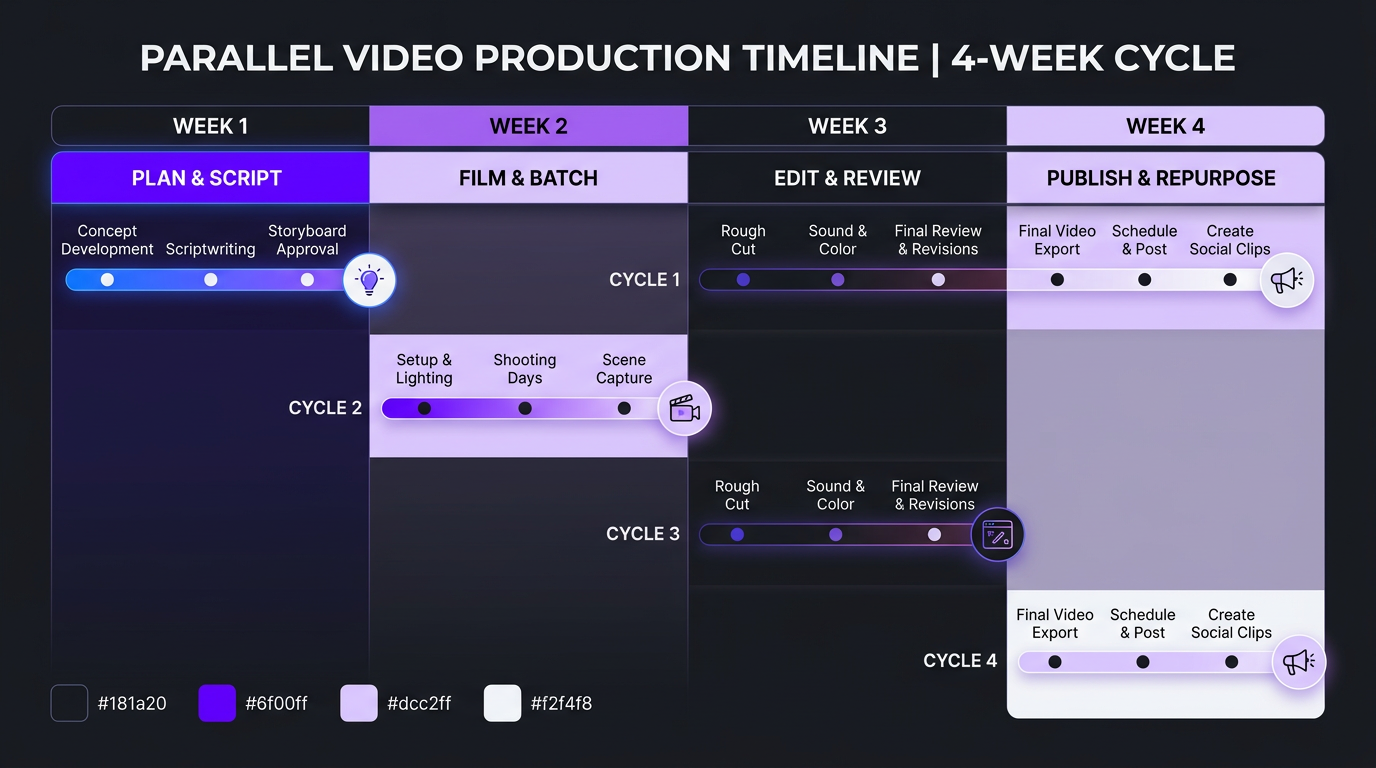
Week 1: Plan & Script
Day 1-2: Content planning session
- Review last month’s analytics: what worked, what didn’t
- Update content calendar for the next 30 days
- Assign topics to specific dates
- Identify repurposing opportunities from existing content
Day 3-5: Scripting / outlining
- Write scripts or detailed outlines for each video
- Research keywords and optimize titles/descriptions
- Plan b-roll and visual elements
- Queue scripts for filming sessions
Week 2: Film (Batch Everything)
Day 1: Prep day
- Set up studio/filming location
- Test audio and lighting
- Print/load scripts
Day 2-3: Batch filming
- Film 4-8 videos in 1-2 days
- Change shirts between takes for visual variety
- Record each video’s intro and CTA separately for flexibility
Day 4-5: Upload and brief
- Upload raw footage to shared drive
- Complete editing brief for each video
- Submit to editing team
Week 3: Edit & Review
Day 1-3: Editing in progress
- Editors work on first cuts (24-48 hours per video)
- Multiple videos in parallel — this is where a team matters
Day 4-5: Review cycle
- Review first cuts, provide timestamped feedback
- Editors apply revisions (12-24 hours)
- Final approval
Week 4: Publish & Repurpose
Day 1-2: Finalize and schedule
- Add thumbnails, titles, descriptions, tags
- Schedule publishing across platforms
Day 3-5: Repurpose
- Extract 3-5 short-form clips per long-form video
- Create audiograms, quote graphics, blog posts from video content
- Schedule short-form content for the next 2-4 weeks
This 4-week cycle produces 4-8 long-form videos plus 15-30 short-form pieces. Once the machine is running, cycles overlap — you’re filming Week 2’s content while editing Week 1’s and publishing content from the previous cycle.
Batching: The 10x Productivity Multiplier
Batching is the single most impactful productivity technique for video production. Instead of doing every step for one video before starting the next, you do the same step for multiple videos at once.
Why Batching Works
- Reduced setup time: You set up your studio once and film 6 videos instead of setting up 6 times
- Deep focus: Scripting 5 videos in one session is faster than scripting 1 video five separate times
- Editing efficiency: Your editor works faster when they process similar content back-to-back
- Buffer creation: Batching creates a content buffer that protects you during sick days, vacations, or creative blocks
The Batching Math
| Task | Per-Video (Sequential) | Per-Video (Batched, 6 at once) | Time Saved |
|---|---|---|---|
| Studio setup | 45 min | 8 min (45 min ÷ 6) | 82% |
| Scripting | 2 hours | 1.5 hours | 25% |
| Filming | 1.5 hours | 45 min | 50% |
| Brief writing | 30 min | 15 min | 50% |
| Review & feedback | 30 min | 20 min | 33% |
| Total per video | 5.25 hours | 2.9 hours | 45% |
By batching, you produce 6 videos in roughly 17.5 hours instead of 31.5 hours. That’s 14 hours saved every cycle — almost two full workdays.
TuMeke, a sports analytics brand we work with, adopted a batching workflow and went from 6 videos/month to 16 videos/month without adding a single person to their team. The only change was how they structured their production time.
Content Repurposing: 1 Video → 10 Assets
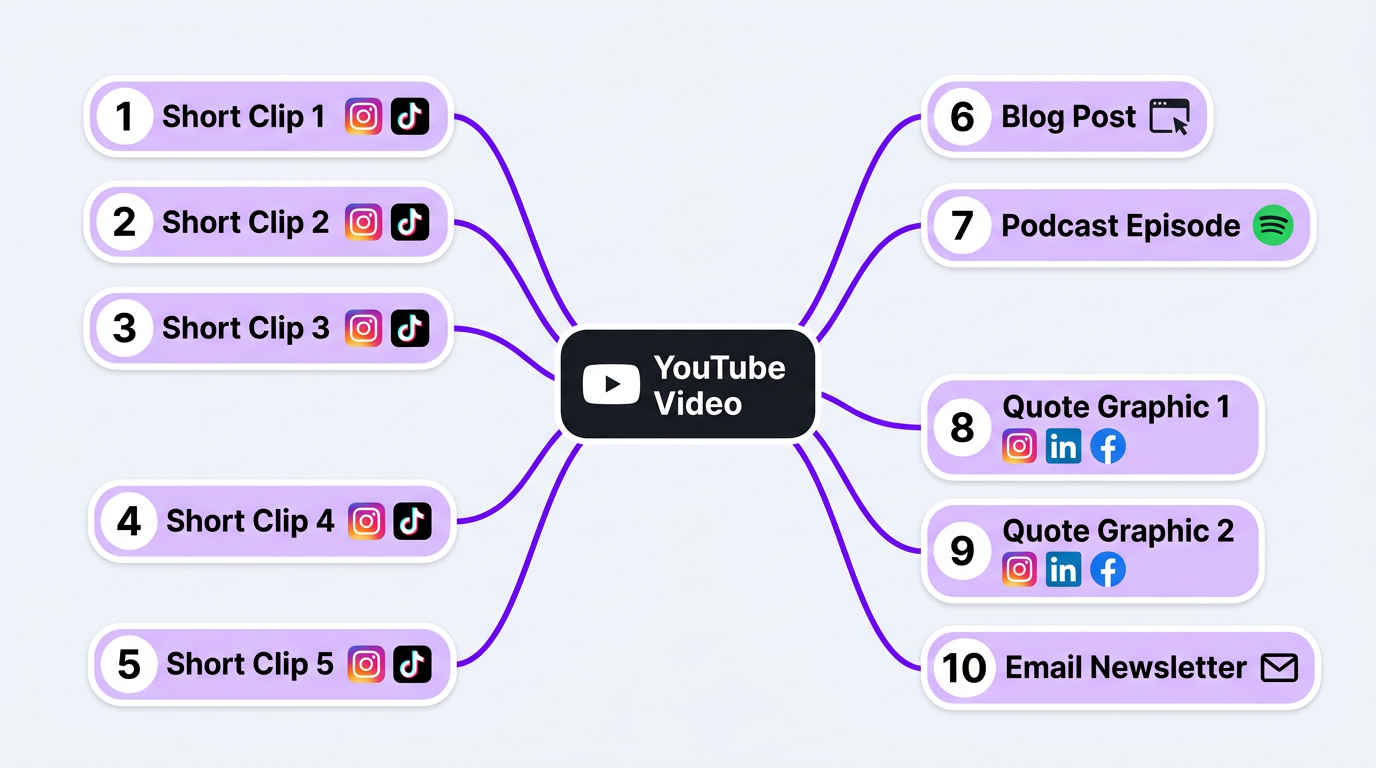
The highest-output brands don’t create 40 pieces of content from scratch every month. They create 8-10 cornerstone pieces and repurpose them into 30-40 derivative assets.
Here’s the repurposing multiplier in action:
| Source | Derivative Asset | Platform | Effort to Create |
|---|---|---|---|
| 1 YouTube video (15 min) | 3-5 short clips (30-60 sec each) | Reels, Shorts, TikTok | 30 min editing |
| Full transcript → blog post | Website / SEO | 1 hour editing | |
| Audio extract → podcast episode | Spotify, Apple | 15 min processing | |
| 5-10 quote graphics | Instagram, LinkedIn, X | 30 min design | |
| Email newsletter with key insights | Email list | 30 min writing |
One 15-minute video becomes 10+ pieces of content across 6+ platforms. That’s a 10x multiplier on your creative investment.
Our social media editing packages are specifically designed for this repurposing workflow. We take your long-form YouTube content and extract, edit, and optimize short-form clips for every platform — with captions, aspect ratio adjustments, and platform-specific pacing.
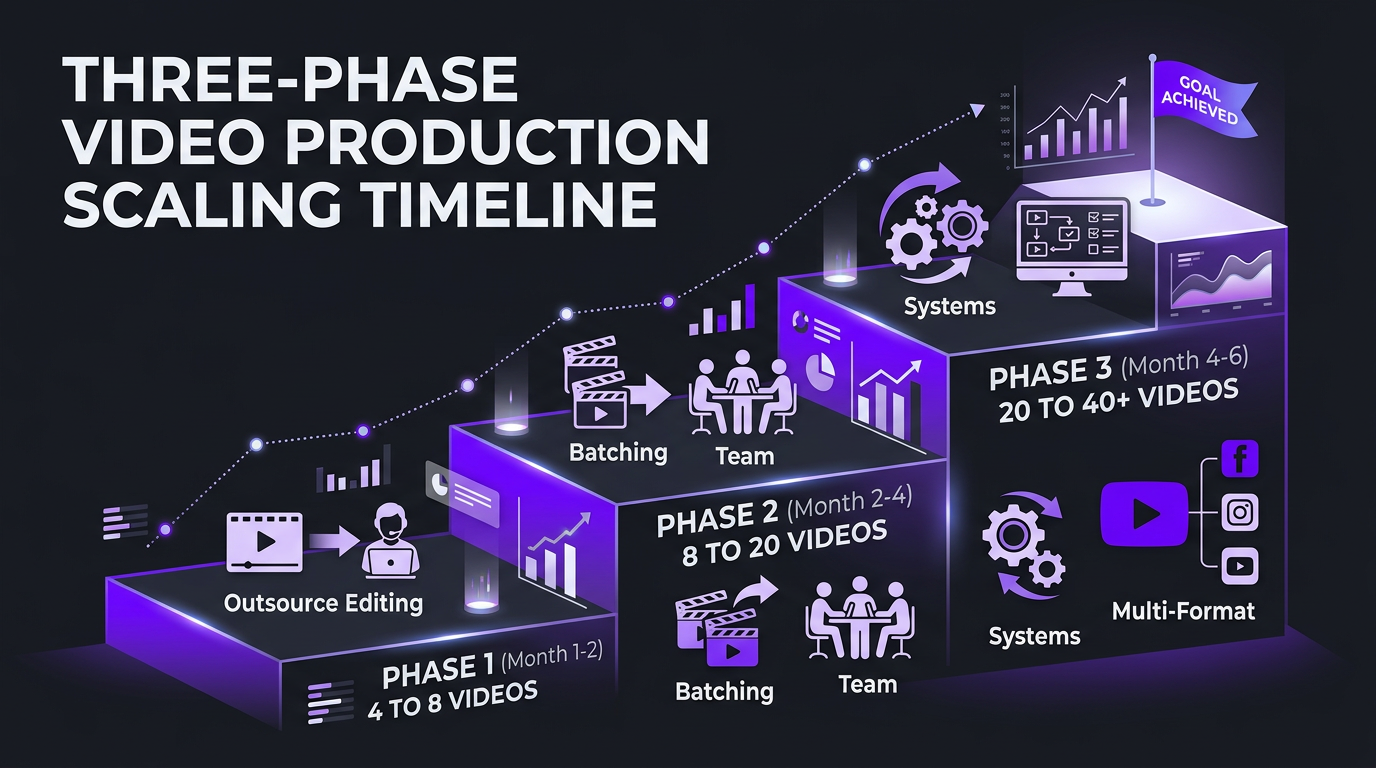
Scaling from 4 to 40+ Videos per Month
Scaling isn’t linear. You don’t just “do more of the same.” Each growth phase requires different approaches:
Phase 1: 4 → 8 videos/month (Outsource editing)
The single move that doubles output. Stop editing your own videos. Period. Use the saved time to film and script more content. This is where 90% of solo creators should start.
Investment: $1,500–$3,000/month for an editing partner
Time freed: 20-40 hours/month
Timeline: Immediate — you can double output within 2 weeks of onboarding an editor
Phase 2: 8 → 20 videos/month (Add batching + team)
Implement batch filming (2 filming days per month producing 8-12 raw videos). Add a project manager or coordinator. Start repurposing long-form into short-form. You’re now operating a system, not just grinding.
Investment: $3,000–$6,000/month for editing + PM
Time freed: You shift from doing to overseeing
Timeline: 30-60 days to build the workflow
Phase 3: 20 → 40+ videos/month (Systems + multiple formats)
At this level, you need dedicated editor pods (teams assigned to specific content types), documented SOPs for every workflow, automated scheduling and distribution, and a full-time content strategist.
VYVE Wellness reached this phase in 6 months. They started with 4 YouTube videos per month and now publish 35+ pieces of content monthly across YouTube, Instagram, TikTok, and LinkedIn — using a dedicated Increditors team of 3 editors, 1 motion designer, and a PM.
Investment: $8,000–$15,000/month for a dedicated production team
Output: 8-12 long-form + 20-30 short-form per month
Timeline: 90 days to reach full velocity
Case Studies: Building the Machine in Practice
Trade with Pat: From Overwhelmed to 24 Videos/Month
Trade with Pat is a finance education channel that was producing 6 videos/month with the host doing all editing personally. Pat was spending 30+ hours per month editing — time that should have gone to research, market analysis, and creating content.
After onboarding with Increditors:
- Month 1: Transitioned editing to a dedicated editor. Output stayed at 6 but Pat’s time dropped from 30 hours to 8 hours.
- Month 2: Implemented batch filming (2 filming days). Output jumped to 12 videos.
- Month 3: Added short-form repurposing. Total output: 12 long-form + 12 Shorts = 24 pieces/month.
- Month 6: Subscriber growth rate tripled. Revenue from sponsorships increased 150% due to higher content volume and consistency.
Pat now spends 10 hours/month on video — filming and reviewing. Everything else runs through the system.
Blue Zones Health: Content Operation from Zero
Blue Zones Health is a wellness brand that launched their video channel from scratch. They had no existing content, no studio setup, and no video team. Their goal: 20+ videos/month within 90 days.
The build plan:
- Days 1-14: Content strategy, editorial calendar, style guide creation
- Days 15-30: Studio setup, test filming sessions, editing partner onboarding
- Days 31-60: First production cycle — 8 videos published, workflow tested and refined
- Days 61-90: Full production — 22 videos published (8 long-form + 14 short-form)
They hit their 20-video target in month 3 and have maintained it for over a year. The total team: 2 hosts, 1 content strategist, and an Increditors editing team of 2 editors + 1 PM.
Build Your Video Machine with Increditors
We’ve helped dozens of creators and brands build sustainable video production systems. Let us design the editing operation that fits your goals and budget.
Frequently Asked Questions
For YouTube, 4-8 long-form videos per month is the sweet spot for growth. Adding 15-30 short-form clips (Reels, Shorts, TikTok) per month maximizes reach. Brands consistently publishing 20+ pieces of video content per month see compounding organic growth within 6-12 months.
The essential stack includes: project management (Asana, Monday, or ClickUp), file sharing (Frame.io or Google Drive), communication (Slack), content calendar (Notion or Airtable), editing software (Premiere Pro or DaVinci Resolve), and analytics (YouTube Studio, VidIQ, or TubeBuddy). Most teams also add AI transcription tools like Descript.
For 10-30 videos per month, an agency is usually more cost-effective and scalable. For 40+ videos with highly specific brand requirements, a hybrid model works best — in-house creative director plus agency editing team. Pure in-house only makes sense at 50+ videos per month with predictable, consistent demand.
Expect 30-60 days to set up systems and onboard your team or editing partner. Within 90 days, you should have a repeatable workflow producing consistent content. By 6 months, the system should run semi-autonomously with minimal founder involvement in day-to-day production.
Editing is the #1 bottleneck for most content teams. Filming a 15-minute video takes 30-60 minutes, but editing it takes 4-12 hours. This is why outsourcing editing is the single highest-leverage move for scaling video output — it removes the bottleneck entirely.
Create detailed style guides and templates for every video type, implement multi-layer quality control (editor self-check, QC reviewer, creative director approval), batch similar content together, and use standardized briefs. Quality drops when processes are ad hoc — systematize everything.