










![3D Explainer Video - ScribbleLive.mp4_snapshot_00.12_[2022.03.09_03.14.16]](https://increditors.com/wp-content/uploads/elementor/thumbs/3D-Explainer-Video-ScribbleLive.mp4_snapshot_00.12_2022.03.09_03.14.16-r7wb53mx72rxst3qcqyrfxdmeyzb5r9jbl0wbjujh4.png "3D Explainer Video – ScribbleLive.mp4_snapshot_00.12_[2022.03.09_03.14.16]")
































Video editing subscription services have exploded over the past three years. The pitch is compelling: pay a flat monthly fee, send in your raw footage, get polished videos back. No hiring, no contracts, no project-by-project negotiations. It sounds like the Netflix of video editing.
But here’s the question nobody in these companies’ marketing departments wants you to ask: is a video editing subscription service actually worth ita
The honest answer: it depends on which tier you’re buying, what you’re comparing it against, and whether you understand what “unlimited” really means (spoiler: it doesn’t mean unlimited).
We run a video editing service that operates on both subscription and retainer models. We’ve also worked with creators who came to us after trying every subscription service on the market — from $300/month basic plans to $2,000/month “premium” tiers. We know where the value is, where the marketing overpromises, and where specific models genuinely outperform alternatives.
Let’s break it all down.
What’s in This Guide
- How Video Editing Subscriptions Work
- Subscription Pricing Tiers Compared
- The “Unlimited” Editing Myth
- 6 Genuine Advantages of Subscription Editing
- 7 Downsides Nobody Mentions
- Subscription vs Freelancer: Cost and Quality
- Subscription vs Full-Service Agency
- Calculating the ROI of a Subscription
- Who Should (and Shouldn’t) Use a Subscription
- Real Client Experiences
- FAQ
How Video Editing Subscription Services Work
The subscription model for video editing follows a simple structure that most services share:
- You choose a plan — typically based on video quantity, turnaround speed, or editor dedication level.
- You upload raw footage — via Google Drive, Dropbox, Frame.io, or the service’s own portal.
- You submit a brief — describing what you want: references, style notes, music preferences, pacing.
- An editor works on your project — either a dedicated editor (premium plans) or from a pool (basic plans).
- You review and request revisions — most plans include 2–3 revision rounds.
- You receive the final file — typically within 1–5 business days depending on the plan.
The model’s appeal is predictability. You know exactly what you’re spending each month, you don’t negotiate per-project quotes, and the process stays consistent. For creators who’ve dealt with the chaos of freelancer negotiations and ghosting, the subscription model feels like a breath of organized air.
But the model’s simplicity is also its limitation. Standardized workflows work great for standardized content. When your needs are more complex — multi-format content, creative strategy input, VFX, or rapid scaling — the subscription model starts showing cracks.
The Key Players in 2026
The subscription video editing market has matured considerably. Here’s the competitive landscape:
| Service | Starting Price | Videos/Month | Dedicated Editor | Best For |
|---|---|---|---|---|
| Vidchops | $395/mo | 2–4 | Pool-based | Budget YouTube creators |
| Video Husky | $549/mo | 4 | Dedicated | Growing YouTubers |
| Tasty Edits | Per-video ($278–$327) | Buy as needed | Dedicated | Established creators |
| beCreatives | $995/mo | 4–6 | Dedicated | Brands and creators |
| VeedYou | $599/mo | 4 | Pool/Dedicated | YouTube-focused creators |
| Increditors | $2,500/mo | 8–30+ | Dedicated team | Serious creators, brands, enterprises |
Notice the gap between the $300–$1,000 tier and the $2,500+ tier. That gap isn’t just about price — it represents a fundamentally different service model. We’ll dig into what changes at each level.
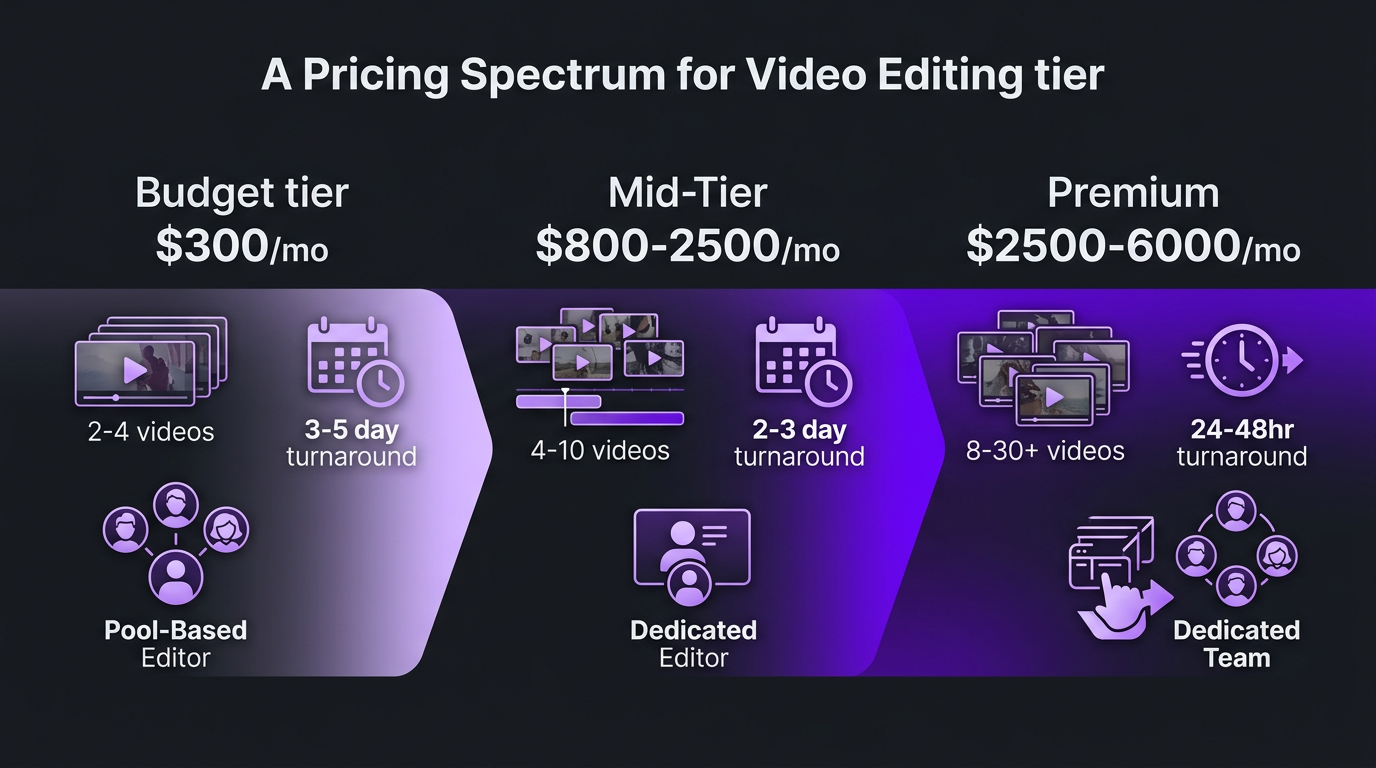
Subscription Pricing Tiers: What You Actually Get at Each Level
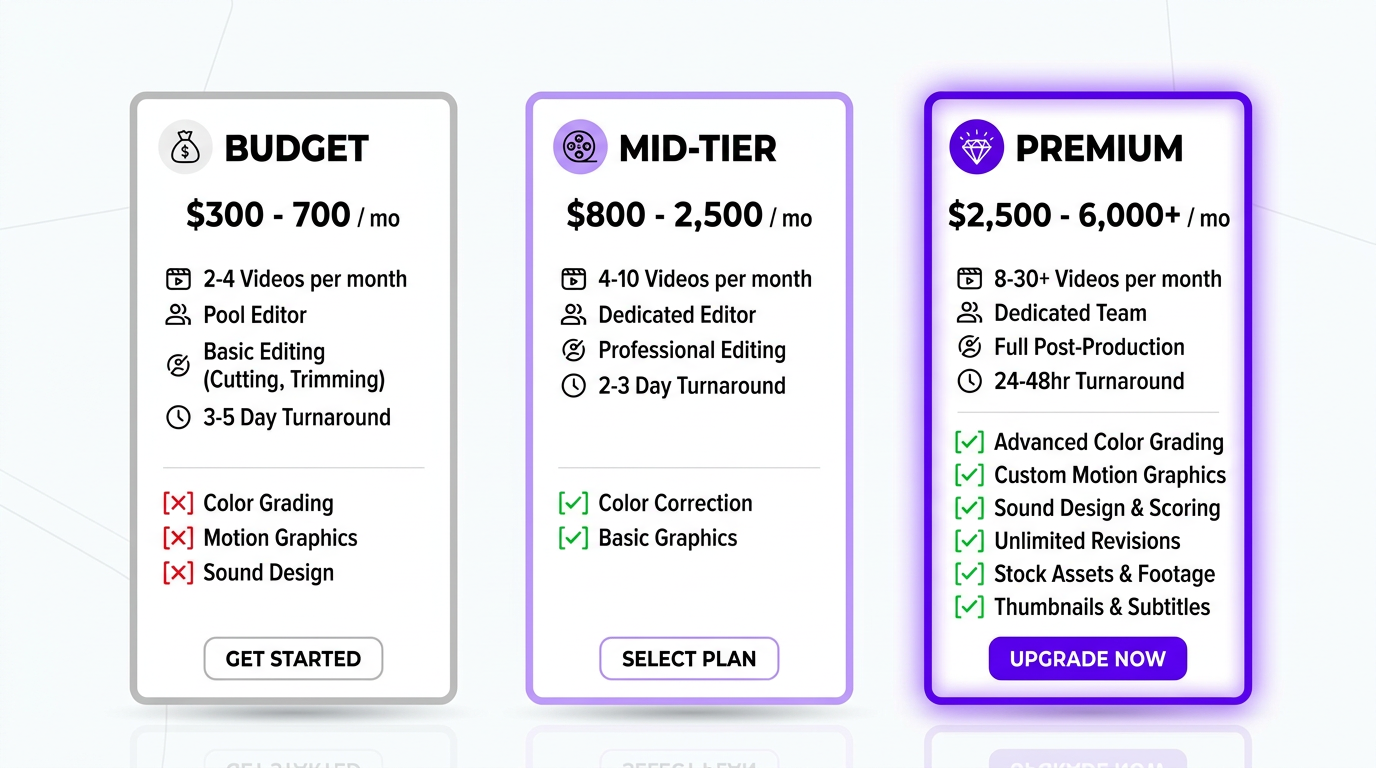
Budget Tier: $300–$700/month
At this price point, you’re getting the bare essentials:
- Volume: 2–4 videos per month
- Editing style: Jump cuts, basic text overlays, stock music, captions
- Editor: Often from a rotating pool — you might get a different person each time
- Turnaround: 3–5 business days per video
- Revisions: 1–2 rounds included
- What’s missing: Color grading, motion graphics, sound design, strategic pacing, brand consistency across videos
The per-video effective rate is $100–$300, which sounds reasonable until you compare the output against what you’d get from a skilled freelancer at the same price. Budget subscriptions trade quality ceiling for convenience. You’re paying for the process, not for premium craftsmanship.
Who it works for: Brand-new YouTubers with under 10K subscribers who need to focus on creating content, not editing. The output won’t win awards, but it’s functional — and infinitely better than not publishing because you’re stuck in the editing timeline.
Mid-Tier: $800–$2,500/month
This is where subscription editing starts to deliver meaningful value:
- Volume: 4–10 videos per month
- Editing style: Professional pacing, color correction, custom graphics (basic), B-roll integration
- Editor: Dedicated editor who learns your brand and style
- Turnaround: 2–3 business days
- Revisions: 2–3 rounds, sometimes “unlimited”
- Added value: Brand consistency, faster iteration, editor who improves over time
The dedicated editor is the game-changer at this tier. Instead of re-explaining your brand style with every project, you build a working relationship. By the second month, a good dedicated editor anticipates your preferences. By the third month, revision rounds drop significantly because they already know what you want.
Services like beCreatives live in this space, and Tasty Edits sits alongside them with per-video packages rather than a subscription; for creators producing weekly YouTube content, the value proposition is strong. You’re paying roughly $200–$400 effective per video for professional-quality output with minimal management overhead.
Premium Tier: $2,500–$6,000+/month
At the premium level, “subscription” starts to look more like “retainer” — and the distinction matters:
- Volume: 8–30+ videos per month (long-form + short-form bundled)
- Editing style: Full post-production pipeline — editing, color grading, motion graphics, sound design
- Team: Dedicated editor + colorist + motion designer + project manager
- Turnaround: 24–48 hours for standard content
- Revisions: Unlimited within reason
- Strategic input: Content pacing optimization, retention analysis, format recommendations
This is the tier where Increditors operates. At $2,500–$6,000/month, you’re not just subscribing to editing — you’re subscribing to a production team. The difference in output quality between a $500/month plan and a $4,000/month plan is visible within the first 30 seconds of any video.
The unlimited editing model at this tier genuinely means high-volume output because you have a dedicated team with allocated capacity, not a queue system throttling throughput.
The “Unlimited” Editing Myth: What It Actually Means
Several subscription services market “unlimited video editing” as a core feature. Let’s be blunt about what this actually means in practice.
How “Unlimited” Actually Works
“Unlimited” editing subscriptions don’t give you unlimited editor hours. They give you unlimited requests processed through a queue. The service assigns one editor (or a small team) to your account. That editor can realistically handle 1–2 projects at a time. When you submit a new project, it enters the queue.
The result: you can submit unlimited requests, but each one takes 2–5 business days. If you submit 10 requests at once, you’re waiting 4–10 weeks for all of them. The “unlimited” label is technically accurate but practically misleading — you’re limited by throughput, not by request count.
The Math Behind “Unlimited”
A single editor working full-time can typically produce:
- YouTube long-form (10–20 min): 3–5 videos per week, depending on complexity
- Short-form (Reels/Shorts): 5–10 clips per week
- Podcast edits: 2–3 per week
If you’re on a $500/month “unlimited” plan with one editor working across 8–12 clients, your realistic allocation is 4–8 editing hours per week. That translates to 4–6 YouTube videos per month — not “unlimited.”
This isn’t a scam — it’s a business model. The subscription service is betting that most clients won’t actually submit enough to max out the queue. The clients who do submit heavily subsidize the ones who don’t. It’s the gym membership model applied to video editing.
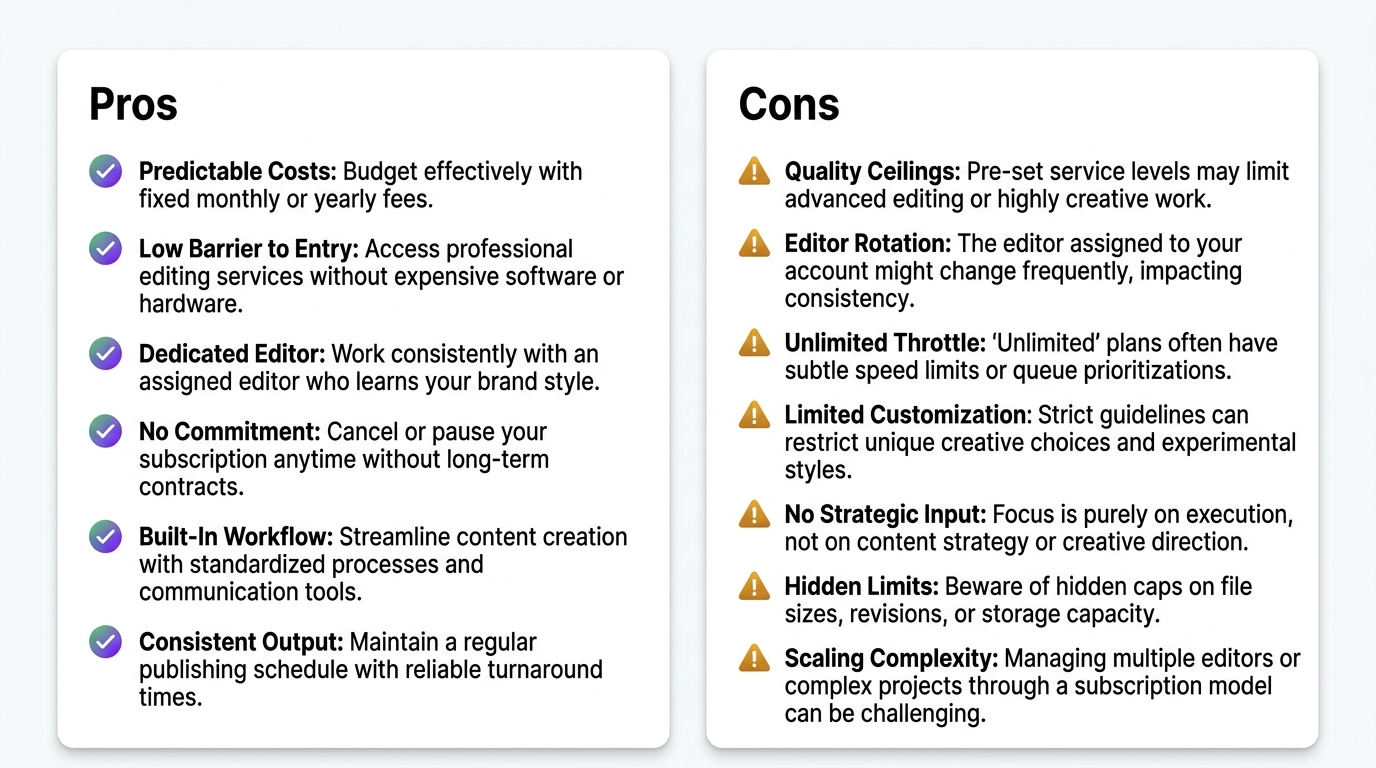
6 Genuine Advantages of Video Editing Subscription Services
Despite the caveats, subscription editing has real, meaningful benefits. Here’s where the model genuinely delivers:
1. Predictable Monthly Costs
No per-project negotiations, no surprise invoices, no scope creep discussions. You know exactly what you’re spending every month, which makes budgeting infinitely easier — especially for creators funding their content from variable revenue like AdSense or sponsorships.
2. Lower Barrier to Entry
Hiring a freelancer requires vetting portfolios, conducting test edits, negotiating rates, and drafting contracts. A subscription requires a credit card and a 5-minute signup. For creators who’ve been paralyzed by the hiring process, subscriptions remove the friction entirely.
3. Dedicated Editor Relationships (Mid-Tier+)
At $800+/month, most subscriptions assign a dedicated editor. This relationship compounds in value over time. By month three, your editor knows your pacing preferences, your graphics style, your audio levels, and your revision patterns. The quality gap between month one and month six is substantial.
4. No Commitment (Usually)
Most subscription services operate month-to-month. If the quality drops, if your budget tightens, or if you simply want to try someone else — cancel. No severance, no awkward conversations, no contractual penalties. This flexibility is genuinely valuable, especially for businesses with uncertain content roadmaps.
5. Built-In Workflow
Subscription services have figured out the operational workflow: upload portals, brief templates, review processes, revision tracking. You don’t have to build these systems yourself. For creators coming from chaotic freelancer arrangements where files live in random email threads, this structure alone is worth the price of admission.
6. Consistent Output Even When You’re Busy
The biggest enemy of consistent publishing isn’t lack of ideas — it’s bottlenecks in post-production. A subscription ensures that as long as you’re producing raw footage, edited content comes out the other end on a predictable schedule. Your content calendar survives your busy weeks.
7 Downsides of Video Editing Subscriptions Nobody Mentions
1. Quality Ceilings at Budget Tiers
At $300–$700/month, you get what you pay for. The editors working these accounts are typically junior — they can execute clean cuts but lack the experience for sophisticated pacing, advanced color grading, or creative problem-solving. If your content needs to look premium, budget subscriptions will hold you back.
2. Editor Rotation at Lower Tiers
Budget and some mid-tier services use editor pools. You might get Editor A this week and Editor B next week. Each has different strengths, different stylistic instincts, and different levels of familiarity with your brand. The result: inconsistent output. One video looks great, the next feels off. Your audience notices — even if they can’t articulate why.
3. The “Unlimited” Throttle
As discussed above, “unlimited” plans throttle through turnaround time. If you’re producing time-sensitive content (trend-based videos, reaction content, news commentary), a 3–5 day turnaround makes the subscription useless for those specific pieces.
4. Limited Customization
Subscription services are productized — that’s how they achieve consistent margins. This means standardized workflows, templated graphics, and predefined style options. If you need something outside the standard menu (complex VFX, custom animation, multi-format repurposing from a single shoot), most subscriptions can’t accommodate it without expensive add-on fees.
5. No Strategic Input
A subscription editor edits what you give them. They follow your brief. They don’t typically offer strategic input on content structure, retention optimization, or format experimentation. That’s fine if you have strong content strategy in-house, but it means you’re missing the “production partner” element that premium agencies provide.
6. Hidden Limits on “Included” Features
Read the fine print. Many subscriptions that claim to include “motion graphics” mean basic text animations and templated lower thirds — not custom animated sequences. “Color grading” often means auto-correction, not creative look development. “Sound design” might just be background music from a free library. The feature list sounds comprehensive; the execution is baseline.
7. Scaling Complexity
What happens when you need to go from 8 videos/month to 20 Most subscriptions require you to upgrade to the next plan tier, which often doubles the price for incremental capacity. The pricing steps don’t always align with your growth curve — you might be overpaying for capacity you don’t fully use, or constrained below the capacity you actually need.
Subscription vs Freelancer: Which Delivers More Valuea
If you’re comparing a subscription service against hiring a freelance editor directly, here’s how the models stack up:
| Factor | Freelancer ($300–$500/video) | Mid-Tier Subscription ($1,000–$2,000/mo) |
|---|---|---|
| Cost for 8 videos/month | $2,400–$4,000 | $1,000–$2,000 |
| Editor quality | Variable — depends on who you find | Consistent — vetted by the service |
| Brand familiarity | High (if same freelancer stays) | High (dedicated editor plans) |
| Reliability | Risk of ghosting, missed deadlines | SLA-backed turnaround times |
| Revisions | Often charged extra after 2 rounds | Included in plan (2–3 rounds) |
| Management overhead | High — you manage everything | Low — structured workflow |
| Flexibility | High — negotiate per project | Medium — fixed plans |
| Backup if unavailable | None — you scramble | Service assigns replacement |
The subscription wins on cost-efficiency and convenience. A freelancer at $350/video × 8 videos = $2,800/month. A mid-tier subscription handles the same volume for $1,200–$2,000 — a 28–57% savings. Add in the management time you save (5–10 hours/month), and the subscription model is significantly more efficient for consistent, ongoing production.
Where freelancers win: maximum flexibility and potentially higher skill ceilings. A top-tier freelancer charging $500+ per video may produce work that exceeds what mid-tier subscriptions deliver. But that freelancer also requires more of your management time, has no backup, and can disappear at any moment.
The Sweet Spot
For 4–10 videos per month of standard YouTube content, a mid-tier subscription ($1,000–$2,000/month) is almost always better value than a freelancer. For fewer than 4 videos per month or for specialized one-off projects, a freelancer’s per-project flexibility makes more sense.
Want the Subscription Convenience with Agency-Level Qualitya
Our plans combine flat monthly pricing with dedicated teams, motion graphics, and strategic production support. No cookie-cutter templates.
Subscription vs Full-Service Agency: What’s the Differencea
This is where the conversation gets nuanced. The line between “subscription service” and “agency” has blurred significantly, but meaningful differences remain.
Subscription Service (Productized)
- Fixed plans with predefined deliverables
- Standardized workflow — you fit into their system
- Editor executes your brief — limited creative input
- Support via ticket/chat — no dedicated project manager
- Focus on editing — doesn’t extend to strategy, repurposing, or multi-platform optimization
Full-Service Agency (Customized)
- Custom packages built around your specific needs
- Flexible workflow — they adapt to your production process
- Creative partnership — team offers strategic input on content
- Dedicated project manager as your single point of contact
- Full post-production: editing + color + motion graphics + sound + repurposing
| Dimension | Subscription Service | Full-Service Agency |
|---|---|---|
| Pricing model | Fixed tiers | Custom quote or flexible retainer |
| Team structure | 1 dedicated editor (maybe) | Dedicated team: editor + colorist + motion designer + PM |
| Creative input | Minimal — they execute your vision | Active — they help shape content strategy |
| Scalability | Jump to next plan tier | Gradual scaling with proportional pricing |
| Multi-format | Usually YouTube-focused | YouTube + Reels + LinkedIn + product videos + brand content |
| VFX/Animation | Basic or add-on | Included with specialist team members |
| Typical monthly cost | $500–$2,500 | $2,500–$8,000 |
At Increditors, we’ve intentionally designed our model to bridge this gap. Our pricing is subscription-style (predictable monthly fees, no per-project billing) but our delivery is agency-grade (dedicated teams, creative input, multi-format capability, VFX and motion graphics included). It’s the subscription convenience without the subscription ceiling.
For content creators producing 8+ videos per month who’ve outgrown mid-tier subscriptions, this hybrid model is where the best ROI typically lives.
Calculating the ROI of a Video Editing Subscription
Let’s put real numbers to the question: is a video editing subscription service worth it financiallya
The Time-Value Calculation
The most straightforward ROI calculation compares the subscription cost against the value of time you reclaim.
| Metric | DIY Editing | $1,500/mo Subscription | $4,000/mo Agency |
|---|---|---|---|
| Videos per month | 8 | 8 | 8 long-form + 16 shorts |
| Your editing time | 40+ hours | 4 hours (reviews only) | 2 hours (approvals only) |
| Time saved | — | 36 hours/month | 38 hours/month |
| Value of saved time (at $75/hr) | — | $2,700 | $2,850 |
| Monthly cost | $0 | $1,500 | $4,000 |
| Net ROI (time value – cost) | — | +$1,200/month | -$1,150/month (but +16 shorts included) |
For most creators, the mid-tier subscription generates positive ROI purely from time savings — before you even factor in quality improvements driving better metrics. The premium agency tier has a higher monthly cost, but when you account for the 16 additional short-form videos (which would cost $1,600–$3,200 at per-video rates), the effective value exceeds the price.
The Quality-Driven ROI
Professional editing improves viewer retention, which improves algorithmic distribution, which increases views and revenue. We’ve seen this compounding effect consistently:
- Average retention improvement: 15–30% increase in watch percentage when switching from DIY to professional editing
- View growth: 30–80% more views within 90 days due to better retention signals
- Revenue impact: For a monetized channel, that translates directly to ad revenue, sponsorship rate increases, and product conversion improvements
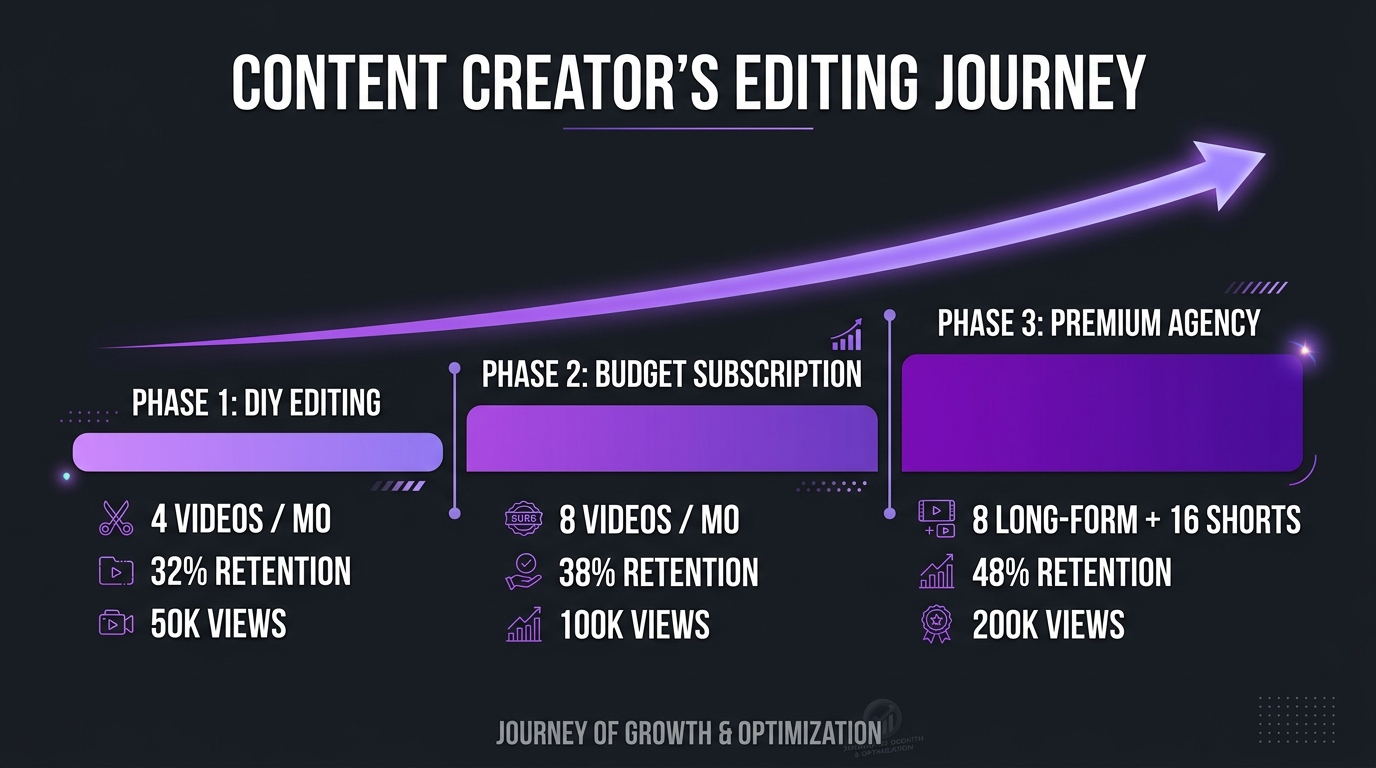
This is where the Riley Coleman example is instructive. Riley, a YouTube creator who came to us producing consistent content with stagnant growth, wasn’t making bad videos — he was under-editing them. The pacing was too slow for YouTube’s retention curve, the hooks weren’t sharp enough for the first 30 seconds, and the visual variety was insufficient to maintain attention through the full video.
After switching to our team, his average viewer retention jumped from 32% to 48% — a 50% improvement in the metric that matters most for YouTube growth. His views didn’t just increase linearly; they compounded as the algorithm started pushing his content more aggressively. Within four months, his per-video performance had roughly doubled.
The subscription cost was a fraction of the additional revenue generated. That’s the ROI calculation that matters — not just time saved, but the compound growth effect of consistently professional editing on your channel’s trajectory.
Who Should (and Shouldn’t) Use a Video Editing Subscription
Subscription Editing Is Perfect For:
- YouTube creators producing 4–12 videos per month — predictable cost, dedicated editor, builds consistency
- Podcasters who repurpose video — standard workflow, high volume of clips
- Small businesses with regular social media content — structured delivery without hiring
- Course creators editing educational content — repetitive format, high volume, benefits from dedicated editor who learns the style
- Anyone who’s been procrastinating on outsourcing — the low barrier to entry breaks the inertia
Subscription Editing Is NOT Right For:
- Sporadic producers (1–2 videos/month) — per-project freelancer pricing is more cost-effective
- Brands needing high-end production — VFX, custom animation, and cinematic grading require agency-level teams
- Enterprises with complex approval workflows — subscription services aren’t built for multi-stakeholder review processes
- Time-sensitive content (daily news, reactions, trends) — 2–5 day turnaround doesn’t work for same-day publishing
- Multi-platform campaigns needing strategic coordination — subscriptions edit videos, they don’t plan campaigns
The Outgrowth Moment
Most creators hit a point where they’ve outgrown their subscription tier but aren’t sure when to upgrade or switch to an agency. The signals are clear:
- You’re consistently maxing out your plan’s capacity
- You need formats your subscription doesn’t support well (Reels, product videos, brand content)
- You’re spending significant time on detailed briefs because the editor can’t anticipate your preferences
- Quality has plateaued and more revisions aren’t fixing the fundamental issue
- You need motion graphics or VFX that are “extra” on your current plan
When you hit 3+ of these signals, it’s time to explore a full-service agency model. The transition doesn’t have to be abrupt — run both in parallel for one month to validate quality before fully switching.
Real Client Experiences
Riley Coleman: From Budget Subscription to Premium Agency
Riley started his YouTube journey editing everything himself, then moved to a $600/month subscription service that handled basic cuts. The videos were functional but lacked the dynamic pacing and visual storytelling needed to break through the algorithmic noise at his level.
“The subscription got me publishing consistently, which was huge,” Riley noted. “But after six months, I could feel the quality ceiling. Every video looked the same — clean but flat. I needed an editor who didn’t just follow my brief but actually elevated the content.”
His move to Increditors was a 4x increase in monthly cost ($600 to $2,500). The results justified the investment within two months: significantly improved retention, growing view counts, and enough freed time to launch a second content vertical. The $600 subscription was “worth it” for its stage of his growth. The premium agency became worth it once his channel’s revenue potential justified the higher investment.
eSafety: Government Content That Needed Reliability Over Flash
eSafety, an online safety organization, needed video editing for educational content at scale — community awareness videos, training modules, and social media clips. Their challenge wasn’t creative flair; it was consistency, reliability, and adherence to strict brand guidelines across 15+ videos per month.
They evaluated multiple subscription services and found the budget tiers couldn’t maintain brand consistency (editor rotation was the killer), while mid-tier subscriptions didn’t have the capacity for their volume. Our enterprise model provided the structured workflow and dedicated team they needed — consistent editors who internalized eSafety’s accessibility requirements and government communication standards, a project manager who tracked deadlines across their content calendar, and quality control that ensured every video met their compliance standards.
For eSafety, the subscription model would have been “worth it” at the surface level — cheaper per video. But the reliability gaps and brand consistency issues would have created downstream costs in rework, missed deadlines, and non-compliant content. The agency premium was effectively an insurance policy against those hidden costs.
Frequently Asked Questions
A video editing subscription service charges a flat monthly fee for a set number of video edits. Plans typically include a dedicated editor, defined turnaround times, and revision rounds. Pricing ranges from $300/month for basic services (2–4 videos) to $5,000+/month for premium agencies with dedicated teams handling 10–40+ videos per month.
Yes, if you produce 4+ videos per month consistently. Subscriptions are 20–40% cheaper per video than one-off pricing, provide predictable budgeting, and build editor familiarity with your brand. They’re not worth it if your output is sporadic (fewer than 2 videos per month) or if you need highly specialized VFX and animation that budget plans can’t deliver.
Budget subscriptions: $300–$700/month for 2–4 basic videos. Mid-tier: $1,000–$2,500/month for 4–10 videos with a dedicated editor. Premium: $2,500–$6,000+/month for 8–30+ videos with a full team. See our pricing page for current Increditors rates.
Subscription services are productized — fixed plans, standardized workflows, limited customization. Agencies offer custom team structures, strategic creative input, and multi-format expertise. Premium agencies like Increditors combine subscription-style pricing with agency-level customization and dedicated production teams.
Most services offer month-to-month plans with no long-term commitment. Some discount for quarterly or annual prepayment. Check cancellation terms — some require 30 days notice, others allow immediate end-of-cycle cancellation. At Increditors, we operate on month-to-month retainers with no lock-in.
Quality ceilings at budget tiers, editor rotation causing inconsistency, “unlimited” plans that throttle through slow turnaround, limited customization, no strategic input, and scaling complexity when you outgrow your plan tier. The severity of these issues varies dramatically between budget ($300–$700) and premium ($2,500+) tiers.
Ready to See If a Subscription or Retainer Fits Your Contenta
We’ll assess your volume, formats, and goals to recommend the right model — even if it’s not us. Honest advice, no sales pitch.
Pricing data reflects 2026 market rates from publicly available subscription service websites. Competitor pricing may have changed since publication. For current Increditors pricing, visit our pricing page or schedule a call.