










![3D Explainer Video - ScribbleLive.mp4_snapshot_00.12_[2022.03.09_03.14.16]](https://increditors.com/wp-content/uploads/elementor/thumbs/3D-Explainer-Video-ScribbleLive.mp4_snapshot_00.12_2022.03.09_03.14.16-r7wb53mx72rxst3qcqyrfxdmeyzb5r9jbl0wbjujh4.png "3D Explainer Video – ScribbleLive.mp4_snapshot_00.12_[2022.03.09_03.14.16]")
































You create content. Videos, Reels, Shorts, podcasts — whatever format you’ve chosen, you’re producing consistently and it’s working. Audience is growing, opportunities are appearing, and suddenly the bottleneck isn’t ideas or filming. It’s editing.
The editing backlog is the silent killer of content creator careers. You know what you want your videos to look and feel like, but you’re spending 15-25 hours a week in Premiere Pro instead of creating, networking, or building your business. Or worse — you’re burning out and your upload schedule is slipping.
Video editing for content creators is a different animal than corporate video production or film post-production. The expectations, pricing, workflows, and deliverables don’t translate directly from other industries. And if you’ve never outsourced editing before, you probably have questions about what’s normal, what’s fair, and what to watch out for.
This guide covers all of it — from what you’ll actually receive from an editing service to what you should pay, how the process works, and how to maximize your investment. We’re a YouTube editing agency that works exclusively with content creators and brands, so this is based on what we see every day, not what we’ve read on other blogs.
What’s in This Guide
- What Video Editing Services Actually Include
- Editing Tiers Explained (Basic → Premium)
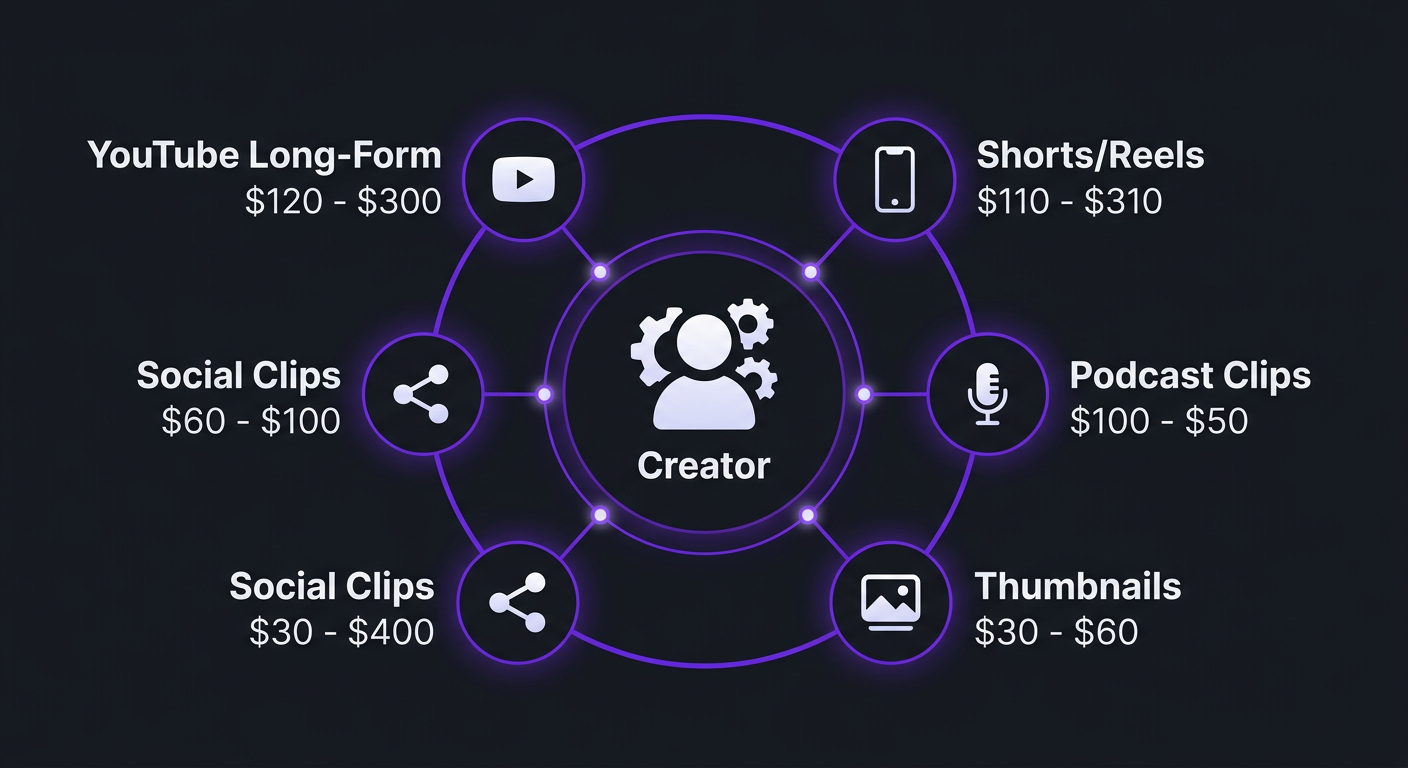
- Pricing for Content Creators: The Full Picture
- Turnaround Times: What’s Realistic
- Editing by Platform: YouTube vs Reels vs TikTok vs Podcasts
- The Content Creator Editing Workflow
- DIY vs Outsourcing: The Break-Even Point
- How to Get the Most From Your Editing Budget
- Scaling Your Content: From 4 to 40 Videos a Month
- Common Mistakes Creators Make With Editing
- FAQ
What Video Editing Services Actually Include (And What They Don’t)
The phrase “video editing” covers a massive range of work. When you sign up for a service or hire a freelancer, the deliverables vary enormously depending on the tier. Here’s what’s typically included — and what costs extra.
Standard Inclusions (Almost Every Service)
- Raw footage assembly: Organizing and assembling your clips into a coherent timeline
- Jump cuts and trimming: Removing dead air, mistakes, “ums,” and tangents
- Basic transitions: Clean cuts, dissolves, and simple motion transitions between segments
- Background music: Selection and placement of music from royalty-free libraries
- Text overlays: Titles, lower thirds, and key point callouts
- Basic color correction: White balance, exposure, and contrast adjustments to make footage look natural
- Audio cleanup: Noise reduction, leveling, and basic EQ
- Export in platform-correct format: Resolution, codec, and aspect ratio for your target platform
Premium Add-Ons (Usually Separate or Higher Tier)
- Motion graphics: Animated charts, custom lower thirds, logo animations, visual effects
- Cinematic color grading: Stylistic color work beyond basic correction (film looks, brand-specific palettes)
- Sound design: Custom sound effects, foley, ambient audio layers, and advanced audio mixing
- Thumbnail creation: Still frame selection, compositing, text overlay, and design for YouTube thumbnails
- Short-form repurposing: Extracting and reformatting highlights from long-form into vertical Shorts/Reels/TikToks
- Subtitles and captions: Burned-in captions with custom styling (increasingly standard, but still premium at some services)
- B-roll sourcing: Finding and licensing supplementary footage to enhance the edit
- Multi-language versions: Creating versions with different subtitle tracks or dubbed audio
What’s Almost Never Included
- Filming and production: Editing services edit — they don’t shoot
- Script writing or content strategy: Some agencies offer this as a separate service, but it’s not standard
- Stock footage licensing: The cost of premium stock clips is typically passed through to you
- Channel management: Uploading, SEO optimization, community management — that’s a separate service
Editing Tiers Explained: What You Get at Each Level
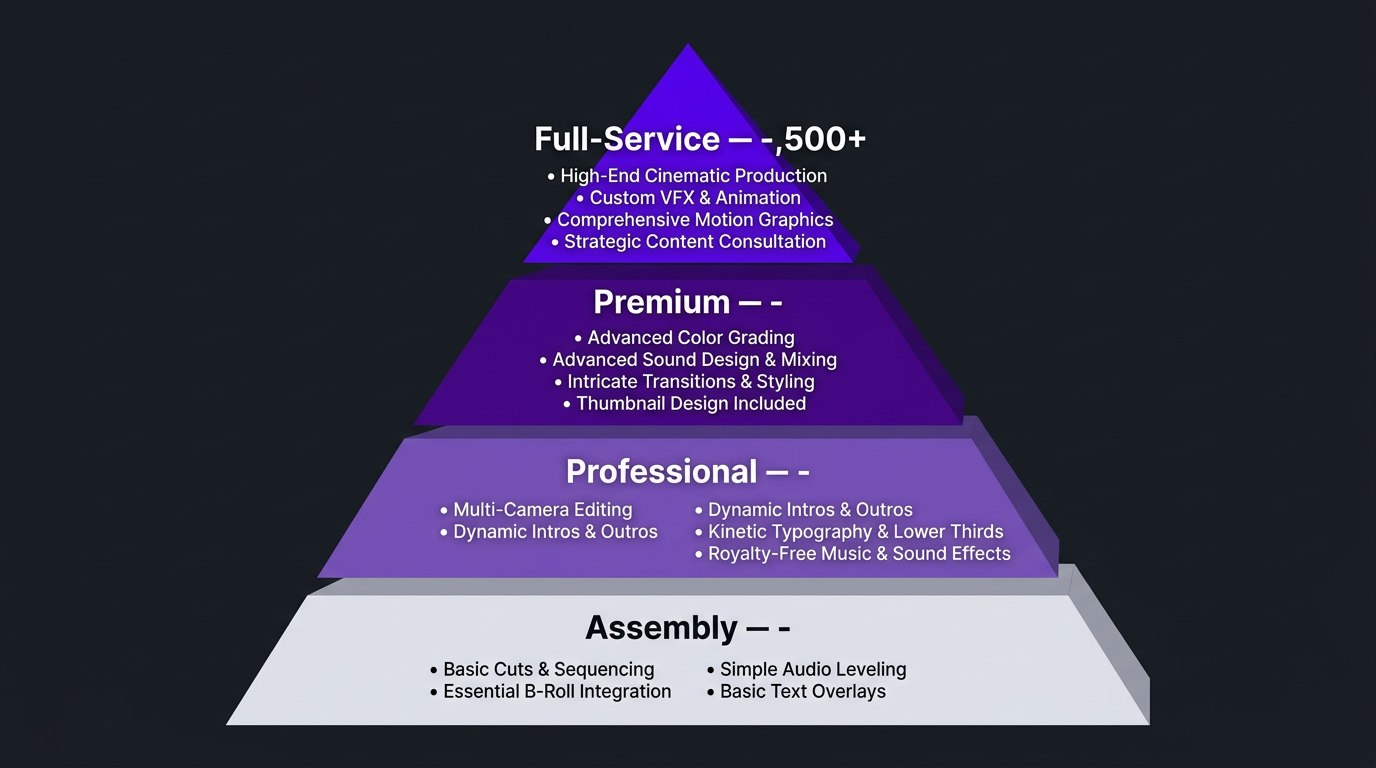
The market for video editing for content creators has settled into roughly four tiers. Understanding these will save you from either overpaying for basic work or being disappointed by budget services.
| Tier | Per-Video Cost | What’s Included | Who It’s For |
|---|---|---|---|
| Assembly | $50–$150 | Jump cuts, basic text, stock music, 1 revision | Hobby creators, low-stakes content |
| Professional | $200–$400 | Paced editing, color correction, audio mix, graphics, B-roll, 2-3 revisions | Growing creators, consistent uploaders |
| Premium | $400–$800 | Everything above + motion graphics, sound design, retention optimization, thumbnails | Monetized creators, brands using video for revenue |
| Full-Service | $600–$1,500+ | Dedicated team, creative direction, multi-format delivery, strategy input | High-volume creators, media companies, agencies |
Assembly Tier ($50–$150): The “Better Than Nothing” Level
At this price point, you’re getting an assembly edit. Someone will organize your footage chronologically, remove obvious mistakes, add basic text, and slap on background music. It’s functional editing — your video will make sense and be watchable — but it won’t be optimized for anything.
There’s no retention strategy. No creative pacing decisions. No audio finesse. It’s the video editing equivalent of a first draft — clean enough to publish, but not refined enough to perform.
This works if you’re posting daily vlogs where volume matters more than polish, or if you’re just starting out and any editing is better than the nothing you can currently afford.
Professional Tier ($200–$400): Where Most Serious Creators Should Start
This is the tier where editing becomes a creative act rather than a mechanical process. Professional editors at this price point make intentional decisions about pacing, visual rhythm, and audience engagement. Your videos will feel noticeably better than DIY — not just “cleaner,” but more watchable, more engaging, and more likely to keep viewers through to the end.
When Riley Coleman first came to us, he was producing strong content that was underperforming on YouTube. The footage was good. His on-camera presence was strong. But the editing was basic — solid cuts, decent audio, but no strategic pacing, no visual hooks, and no retention optimization. His videos were watchable but not compelling.
We moved his editing into the professional tier. Our editors restructured how his videos opened (pulling the most interesting moment forward as a cold open), introduced B-roll pattern interrupts every 30-45 seconds, and tightened the overall pacing by about 20%. Same content, same creator — dramatically different viewing experience. His view count doubled over the following months. Not because of thumbnails or titles or algorithm tricks, but because viewers who clicked were actually staying to watch.
Premium Tier ($400–$800): For Creators Who Treat Video as a Business
Premium editing adds layers that casual viewers may not consciously notice but absolutely feel. Custom motion graphics that reinforce key points. Color grading that creates a consistent visual brand across every video. Sound design that adds texture and energy. Retention-optimized pacing based on actual platform data.
At this tier, your editor isn’t just making your video look good — they’re engineering it for performance. They understand that the transition at the 3-minute mark isn’t just aesthetic; it’s placed specifically where retention data shows viewers typically drop off.
Full-Service Tier ($600–$1,500+): The Production Partner Model
This isn’t just editing — it’s a production partnership. You get a dedicated team (editor, colorist, motion designer, project manager) that functions as an extension of your creative operation. They handle everything from raw footage to finished multi-format deliverables: YouTube long-form, Shorts, Reels, TikToks, podcast clips, and audiograms — all from the same source material.
This tier makes financial sense when you’re producing high volumes of content and your time is worth more spent on creation, sponsorship negotiations, or business development than on managing individual editors.
Pricing for Content Creators: The Full Picture
Let’s get specific with numbers. These are 2026 market rates based on what we see across the industry, including our own pricing and our competitors’.
Per-Video Pricing
| Content Type | Budget | Professional | Premium |
|---|---|---|---|
| YouTube long-form (10-20 min) | $100–$200 | $250–$450 | $500–$800 |
| YouTube long-form (20-45 min) | $200–$350 | $400–$650 | $700–$1,200 |
| Short-form (Reels/Shorts/TikTok) | $30–$75 | $75–$150 | $150–$300 |
| Podcast video (60-90 min) | $150–$300 | $300–$500 | $500–$900 |
| Course/tutorial module | $75–$200 | $200–$400 | $400–$700 |
Monthly Retainer Pricing
Retainers are almost always more cost-effective than per-video pricing if you’re publishing weekly or more. Here’s what the market looks like:
| Monthly Volume | Budget Service | Mid-Tier Agency | Premium Agency |
|---|---|---|---|
| 4 YouTube videos/mo | $500–$800 | $1,200–$1,800 | $2,500–$3,500 |
| 8 YouTube videos/mo | $800–$1,400 | $2,000–$3,200 | $4,000–$5,500 |
| 4 YouTube + 12 Shorts/mo | $800–$1,200 | $1,800–$2,800 | $3,500–$5,000 |
| 8 YouTube + 20 Shorts/mo | $1,200–$2,000 | $3,000–$4,500 | $5,000–$8,000 |
At Increditors, our content creator packages start at $2,500/month for short-form focused content (Reels, Shorts, TikToks) and $5,000/month for comprehensive YouTube long-form with a dedicated editor, project manager, and quality review layer. We sit in the premium tier because we’re providing a team — not a single overwhelmed freelancer.
What Affects Your Price
Two creators paying the same monthly retainer can get wildly different value depending on these variables:
- Raw footage quality: Clean, well-lit footage with decent audio is faster to edit. Shaky handheld footage with room echo takes more work.
- Footage ratio: 30 minutes of raw for a 10-minute final is standard. 4 hours of raw for a 10-minute final is significantly more work.
- Complexity per video: A talking head with B-roll is simpler than an educational video requiring custom data visualizations and screen recordings.
- Number of revision rounds: 1-2 rounds is efficient. 5+ rounds per video indicates either a communication problem or a skills mismatch.
- Speed requirements: Same-week turnaround is standard. Same-day or next-day is premium.
Get a Price Tailored to Your Content
We price based on your actual needs — not cookie-cutter packages. Tell us what you produce and we’ll give you a straight number.
Turnaround Times: What’s Realistic for Content Creators
Turnaround expectations are one of the biggest sources of friction between creators and editors. Here’s what’s actually achievable at each service level:
| Service Type | First Draft | Revision Round | Final Delivery |
|---|---|---|---|
| Budget freelancer | 3-5 business days | 2-3 business days | 5-8 business days total |
| Mid-tier freelancer/service | 2-3 business days | 1-2 business days | 3-5 business days total |
| Premium agency | 1-2 business days | Same day – 1 day | 2-3 business days total |
| Dedicated team (full-time) | Same day – next day | Same day | 1-2 business days total |
Why Turnaround Matters More Than You Think
Content creation is time-sensitive. Trending topics expire. Seasonal content has windows. And your upload schedule — whether it’s Tuesday/Thursday or every Monday — is a promise to your audience that directly affects algorithmic performance.
A 5-day turnaround sounds fine until you factor in re-shoots, revision rounds, and the occasional holiday. Suddenly, that video you filmed on Monday isn’t ready until the following Monday — and your upload schedule just slipped by a week.
This is why many serious creators prefer agencies with dedicated teams. When you have editors who work exclusively on your content, turnaround isn’t measured in “business days from submission” — it’s measured in “hours from when you upload the raw footage.”
How to Optimize Your Turnaround
Regardless of your editor’s speed, you can dramatically improve turnaround by tightening your own part of the process:
- Film cleanly. Good lighting, clear audio, and organized footage reduce editing time by 30-50%.
- Provide clear briefs. Timestamped notes (“use this take at 14:32, skip the section from 22:00-28:00”) save your editor hours of review.
- Send complete assets. Don’t drip-feed B-roll, logos, and music preferences over 3 days. Send everything at once.
- Consolidate revision feedback. One comprehensive round of notes beats four separate emails with one change each.
- Use Frame.io or similar. Timestamped video comments eliminate “around the 3 minute mark” confusion.
Editing by Platform: YouTube vs Reels vs TikTok vs Podcasts
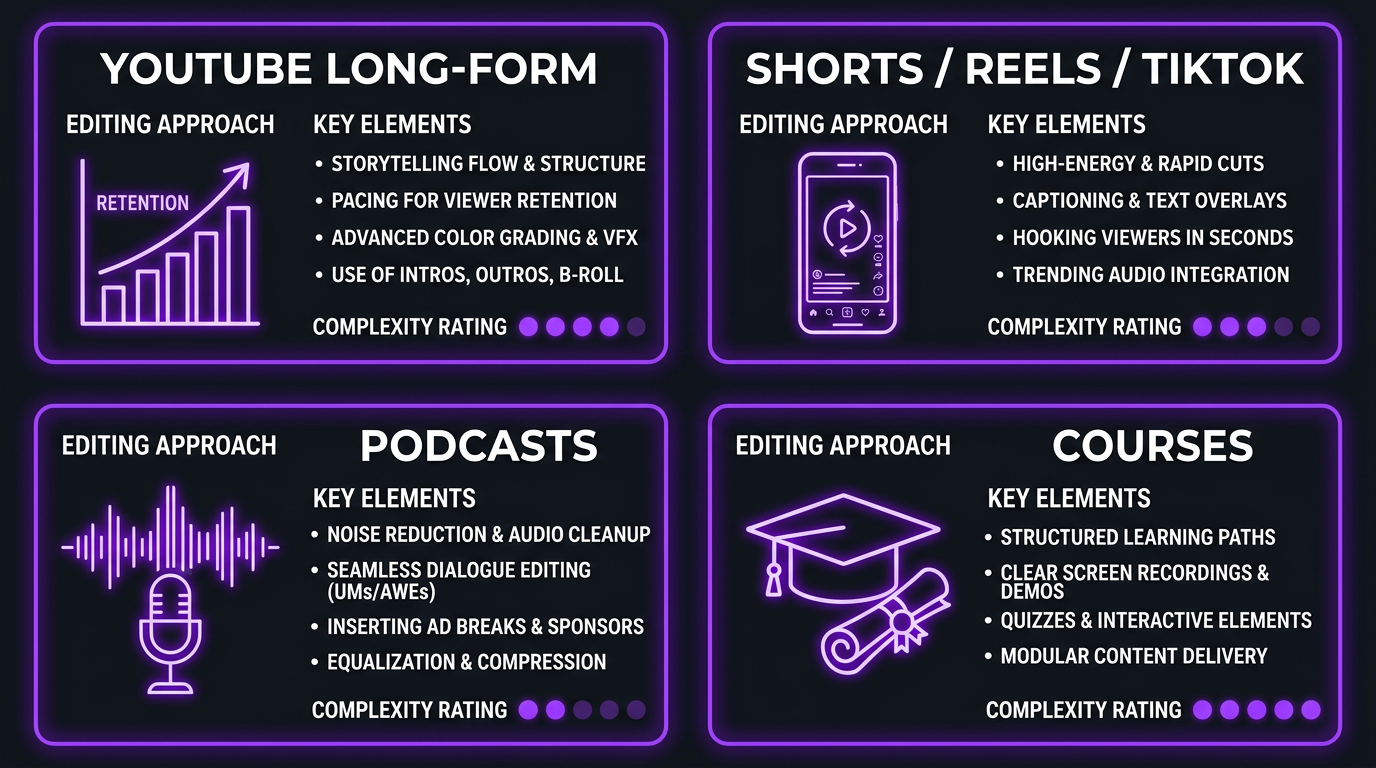
Not all content edits the same. The platform dictates the approach, and an editor who excels at YouTube long-form may not understand the rhythm of TikTok. Here’s how editing differs across major platforms:
YouTube Long-Form (8-45 minutes)
YouTube editing is about retention architecture. The edit needs to hook viewers in the first 5-10 seconds, maintain engagement through pattern interrupts every 30-60 seconds, and build toward satisfying payoffs that encourage viewers to watch the next video.
Key elements: cold opens, chapter markers, strategic B-roll, lower thirds, end screens, subscriber CTAs, and audience retention optimization.
Typical editing time: 4-12 hours per video depending on complexity.
YouTube Shorts / Instagram Reels / TikTok (15-90 seconds)
Short-form is a completely different discipline. The hook must happen in the first 1-2 seconds (not 5-10). Pacing is rapid-fire. Captions are mandatory (85% of mobile viewers watch without sound). Trending audio and formats drive discoverability.
Key elements: attention-grabbing first frame, burned-in captions with styling, on-trend transitions, vertical framing, and loop-friendly endings.
Typical editing time: 30 minutes – 2 hours per clip depending on whether it’s repurposed from long-form or original.
Video Podcasts (30-120 minutes)
Podcast editing is about clarity and accessibility. Multi-camera switching (if applicable), speaker identification, chapter markers, removal of crosstalk and awkward pauses, and consistent audio levels throughout.
The real value-add for podcast editing is clip extraction — pulling 5-15 highlight clips from a single episode for distribution on YouTube Shorts, Reels, TikTok, Twitter, and LinkedIn. This multiplies the reach of a single recording session.
Key elements: multi-cam sync, dynamic speaker switching, chapter markers, clip extraction, and audiogram creation.
Typical editing time: 2-6 hours for the full episode, plus 30-60 minutes per extracted clip.
Course and Tutorial Content
Educational content editing prioritizes clarity above all else. Screen recordings need clean transitions between sections. Camera + screen picture-in-picture needs consistent formatting. Graphics reinforce key concepts. Pacing is deliberate — fast enough to keep attention but slow enough for comprehension.
Key elements: screen recording polish, chapter markers, key concept callouts, consistent formatting across modules, and accessibility features (captions, visual cues).
The Content Creator Editing Workflow (Step by Step)
If you’ve never outsourced editing before, here’s what the process actually looks like from start to finish:
Step 1: Upload Raw Footage
Most creators use Google Drive, Dropbox, or Frame.io to share footage. You’ll upload your raw files along with any supplementary materials — B-roll, music files, brand assets, and an editing brief.
A good brief includes: video topic and title, target length, key timestamps (moments to include or exclude), style references, and any specific requests (captions, graphics, music mood).
Step 2: Editor Reviews and Edits
Your editor reviews the footage and brief, then produces the first cut. This is where the creative work happens — structuring the narrative, choosing the best takes, setting the pacing, adding music and graphics, and optimizing the opening hook.
Step 3: First Draft Review
You receive the first draft and review it. Use timestamped comments (Frame.io is ideal) to note any changes. Good editors will nail about 80-90% on the first draft. If you’re regularly seeing less than 70% accuracy, there’s a communication or skill gap.
Step 4: Revisions (1-2 Rounds)
The editor implements your feedback and returns the revised version. For professional and premium services, this usually takes 24-48 hours per round. Most projects are finalized after 1-2 revision rounds.
Step 5: Final Delivery
You receive the final export in your preferred format and resolution, ready for upload. Some services will also provide project files if you need them for archiving or future re-edits.
The Repurposing Extension
For creators who also want short-form content, there’s often a step 6: the editor extracts 3-5 highlight moments from the long-form video and edits them as vertical Shorts/Reels/TikToks. This is increasingly included in monthly retainer packages and is one of the highest-ROI editing services you can buy — it multiplies your content output without additional filming time.
DIY vs Outsourcing: The Break-Even Point
Every content creator asks this question: “Can I really justify paying someone else to edit?” The answer depends on math, not feelings.
Calculate Your Editing Time Cost
How many hours per week do you spend editing? Multiply that by what your time is worth — either your freelance rate, your effective hourly rate from other income, or the opportunity cost of what you could do instead.
| Your Time Value | Hours/Week Editing | Monthly “Cost” of DIY | Break-Even Editing Budget |
|---|---|---|---|
| $25/hr | 10 | $1,000 | $1,000/mo |
| $50/hr | 10 | $2,000 | $2,000/mo |
| $50/hr | 15 | $3,000 | $3,000/mo |
| $100/hr | 10 | $4,000 | $4,000/mo |
| $100/hr | 20 | $8,000 | $8,000/mo |
If you value your time at $50/hour and spend 15 hours per week editing, DIY editing is “costing” you $3,000/month. A premium agency retainer at $3,000-$5,000/month is essentially break-even on time alone — before factoring in the quality improvement that professional editing brings to your content.
The Quality Multiplier
Time savings are only half the equation. Professional editing for content creators also improves your metrics. Better pacing increases retention. Better hooks reduce early drop-off. Better visual quality improves perceived production value, which affects sponsorship rates and audience trust.
Blue Zones Health, a wellness content brand, was producing educational videos with decent production value but plateau-level engagement. Their in-house team could film and write effectively, but the editing was handled as an afterthought — whoever had bandwidth that week would assemble the footage.
When they moved to a structured editing workflow with our team, two things happened. First, the consistency improved dramatically — every video had the same level of polish, pacing, and professional feel. Second, the strategic editing (optimized hooks, better visual storytelling, tighter pacing) boosted their average retention by meaningful percentages. The content was the same. The editing approach was the variable.
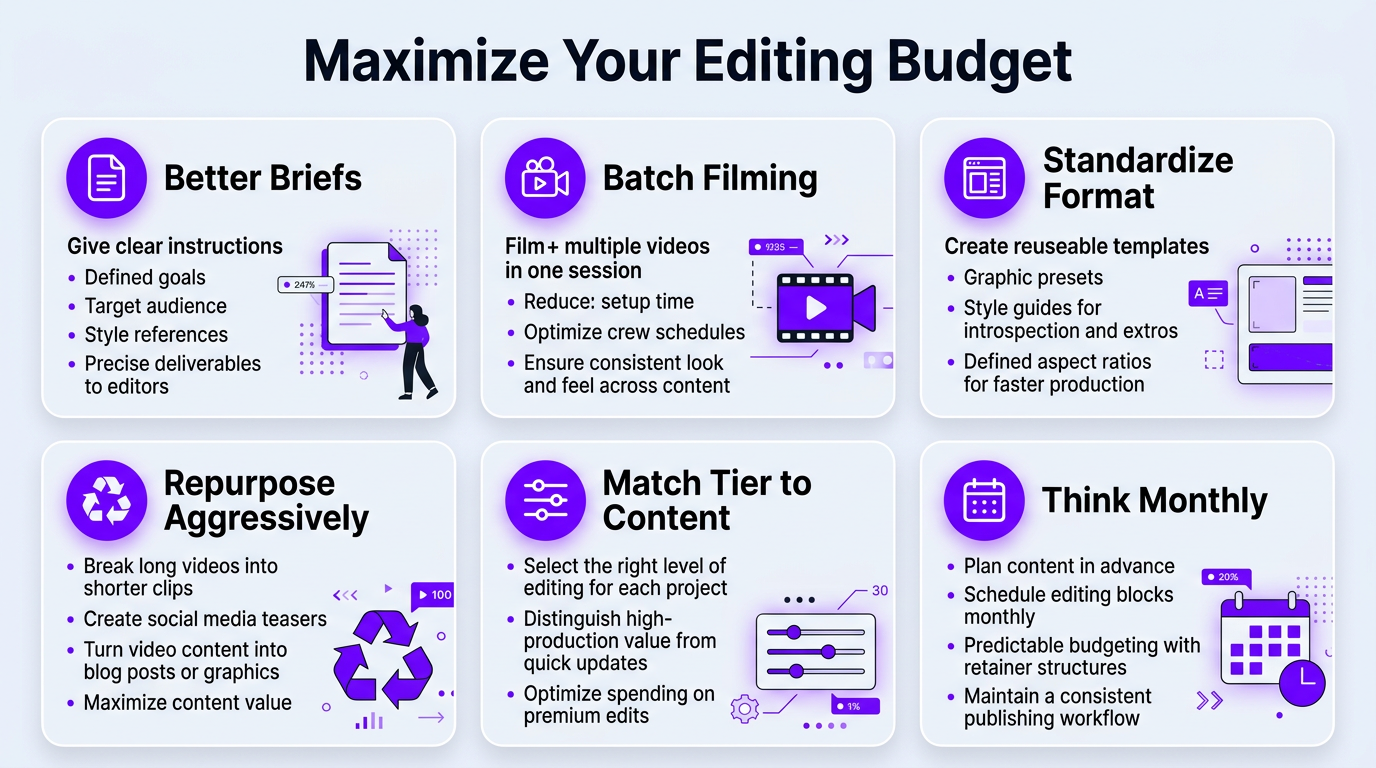
How to Get the Most From Your Editing Budget
Whether you’re spending $1,000/month or $8,000/month on editing, these strategies ensure you’re maximizing every dollar:
1. Invest in Better Briefs, Not More Revisions
The #1 budget killer in video editing for content creators is excessive revision rounds caused by unclear communication. Every revision round costs time (yours and the editor’s) and pushes back delivery. A 10-minute brief document saves 2-3 hours of revisions per video.
Include in every brief: video topic, target length, key talking points to emphasize, timestamps of must-use moments, music mood preference, reference videos for style, and any specific graphics or text needed.
2. Batch Your Filming
Film 3-4 videos in one session. This gives your editor a batch to work through, enabling more efficient workflows and faster turnaround per video. Editors work faster when they can flow through multiple videos in the same style rather than context-switching between unrelated projects.
3. Standardize Your Format
Create templates for recurring elements — intro, outro, lower thirds, transition style, caption format. Once your editor has templates, assembly time drops dramatically for every subsequent video. This is one reason monthly retainers are more efficient than per-video pricing: the editor builds institutional knowledge about your brand.
4. Repurpose Aggressively
Every long-form video should generate 3-5 short-form clips. This is the highest-ROI editing work available because the content already exists — you’re just reformatting it. If your editing service charges $75-$150 per short, 4 shorts from a long-form video costs $300-$600 and potentially triples your reach across platforms.
5. Use the Right Service Level for the Content
Not every video needs premium editing. A casual Q&A or behind-the-scenes vlog can work fine with professional-tier editing. Reserve premium budgets for hero content, cornerstone videos, and sponsored content where production value directly affects revenue.
6. Think in Monthly Retainers, Not Per-Video
Per-video pricing encourages you to minimize the number of videos to control costs. Monthly retainers encourage you to maximize output, since you’re paying the same whether you produce 6 or 8 videos. For content creators, more content (at consistent quality) almost always wins.
Want to See What Your Budget Can Get?
Tell us your volume, platforms, and content type. We’ll show you exactly what’s possible — no fluff pricing, no hidden costs.
Scaling Your Content: From 4 to 40 Videos a Month
The creators who grow fastest aren’t the ones who make the best single video — they’re the ones who build systems to produce consistently at volume. Here’s how editing scales at different stages:
Stage 1: 4 Videos/Month (Solo Creator)
You’re the creator, the editor, and the business. At this stage, a single freelancer or budget service handles your workload. Management is minimal. Budget: $500–$1,500/month.
Stage 2: 8-12 Videos/Month (Growing Creator)
You’ve added Shorts, Reels, or a second content format. One freelancer may struggle to keep up with both volume and quality. This is where creators typically transition to a small agency or a dedicated editor on retainer. Budget: $2,000–$4,000/month.
Stage 3: 15-25 Videos/Month (Creator Business)
You’re producing long-form, short-form, and possibly podcast content across multiple platforms. You need a team — not a person. A dedicated editing team with a project manager becomes essential for maintaining quality and turnaround at this volume. This is where Increditors’ creator packages are designed to operate. Budget: $4,000–$6,000/month.
Stage 4: 30-50+ Videos/Month (Media Company)
You’re running a content operation. Multiple shows, multiple formats, potentially multiple creators under one brand. You need a production partnership with dedicated editors, quality control layers, and the infrastructure to handle volume spikes. Budget: $6,000–$10,000+/month.
The key insight at every stage: your editing system should scale one step ahead of your content production. If you wait until you’re drowning in footage to upgrade your editing setup, you’ll lose consistency and momentum during the transition.
Common Mistakes Creators Make With Video Editing Services
We’ve onboarded hundreds of content creators over the years. These are the patterns that consistently lead to frustration and wasted money:
Mistake 1: Prioritizing Price Over Consistency
Switching editors every 2-3 months to save $200/month is one of the most expensive decisions a creator can make. Every new editor needs 3-5 videos to calibrate to your style. During that ramp-up, quality drops, revisions increase, and your content suffers. A consistent editor at a slightly higher rate produces exponentially better results over 12 months than a rotating cast of budget editors.
Mistake 2: Not Providing Feedback
“Looks good, ship it” on every video means your editor never improves for your specific channel. Constructive, specific feedback — even on videos you’re happy with — helps your editor refine their understanding of your preferences. “The cold open was perfect” is as valuable as “please fix the music at 4:15.”
Mistake 3: Treating Short-Form as an Afterthought
Many creators bolt on short-form content after the long-form edit is done, often with a different (cheaper) editor. The result is inconsistent branding between your long-form and short-form content. Ideally, the same team handles both, extracting shorts from the long-form edit while the project is still fresh.
Mistake 4: Not Sharing Analytics
Your editor can’t optimize for retention if they never see your retention data. Share your YouTube Analytics (at minimum: audience retention graphs, click-through rates, and watch time by video) with your editor monthly. This data loop is what separates editors who make videos “look good” from editors who make videos perform.
Mistake 5: Expecting Agency Quality at Freelancer Prices
If you want a dedicated editor, project manager, quality control, motion graphics, and same-day turnaround for $500/month — you’ll be disappointed. Be realistic about what your budget buys. A good $1,500/month freelancer setup is better than a bad $1,500/month “agency” that’s just one person with a website.
Mistake 6: Ignoring the Onboarding Process
Rushing through onboarding — “just watch my last 3 videos, you’ll get it” — guarantees a rocky first month. Invest 2-3 hours upfront creating a proper brand guide, style references, and editorial preferences document. That small investment saves dozens of hours in revision time over the life of the relationship.
Frequently Asked Questions
Content creators typically pay $100–$500 per video for YouTube long-form, $50–$200 per short-form clip (Shorts/Reels/TikTok), or $1,500–$5,000+ per month on retainer for consistent weekly content. Pricing varies by video complexity, editor experience, turnaround requirements, and whether you’re working with a freelancer or dedicated agency team.
Standard services include raw footage assembly, jump cuts, B-roll insertion, color correction, audio cleanup, music selection, lower thirds, text overlays, and 2-3 revision rounds. Premium services add motion graphics, custom animations, sound design, thumbnail creation, and short-form repurposing from long-form content. See our pricing page for specific package details.
Budget services deliver first drafts in 3-5 business days. Mid-tier freelancers and agencies deliver in 2-3 business days. Premium agencies with dedicated teams deliver in 24-48 hours. Rush delivery (same-day or next-day) is available from most agencies at a 25-50% surcharge. Total delivery including revisions typically adds 1-2 business days.
If content creation is a hobby, DIY editing works fine. If you’re monetizing through ads, sponsorships, courses, or lead generation, outsourcing typically pays for itself through improved quality (higher retention, more views) and freed-up time. The break-even point is roughly when your time is worth $50+/hour and you’re editing 10+ hours weekly.
Freelancers work well for creators producing 1-4 videos per month with budgets under $2,000. Agencies are better for 4+ videos monthly because they provide backup editors, project management, quality control, and consistent quality without you managing everything. The total cost difference narrows when you factor in your own management time.
Basic editing covers cuts, transitions, simple text, and background music ($100-$200/video). Premium editing includes strategic pacing for retention, custom motion graphics, cinematic color grading, professional sound design, and platform-specific optimization ($400-$800/video). The difference shows directly in viewer retention metrics and overall production value.
Some agencies bundle thumbnail design with editing packages, while most freelancers treat it as a separate service. At Increditors, thumbnail concepts can be included as part of a monthly retainer. Standalone thumbnail designers typically charge $25-$100 per thumbnail. For best results, have the same team handle both so they can pull the most clickable frame during the edit itself.
Ready to Level Up Your Content?
We’ve helped content creators go from stressed and behind schedule to consistently publishing polished content across every platform. See our creator portfolio, then let’s talk.
Pricing and turnaround data in this article reflects 2026 market rates across the content creator editing industry. Individual rates vary by region, complexity, and volume. For current Increditors packages, visit our pricing page or schedule a call.