










![3D Explainer Video - ScribbleLive.mp4_snapshot_00.12_[2022.03.09_03.14.16]](https://increditors.com/wp-content/uploads/elementor/thumbs/3D-Explainer-Video-ScribbleLive.mp4_snapshot_00.12_2022.03.09_03.14.16-r7wb53mx72rxst3qcqyrfxdmeyzb5r9jbl0wbjujh4.png "3D Explainer Video – ScribbleLive.mp4_snapshot_00.12_[2022.03.09_03.14.16]")
































You built a coaching business on your expertise. You’ve got frameworks, client results, and the kind of knowledge people pay thousands for. But somewhere between recording course modules, hosting live webinars, posting on social media, and actually coaching clients — you hit a wall.
The wall isn’t content ideas. It’s production. Specifically, video editing for coaches has become the single biggest bottleneck between having great content and actually getting it in front of the people who need it.
Here’s the reality: the coaching industry hit $6.25 billion in 2024 and continues growing. Competition for attention is fierce. The coaches winning right now aren’t necessarily the best coaches — they’re the ones with the best content systems. And the centerpiece of every content system in 2026 is video.
This guide breaks down everything coaches and course creators need to know about professional video editing — what to edit, how to structure it, what it costs, and how to build a system that scales your reach without scaling your hours.
What’s in This Guide
- Why Video Is Non-Negotiable for Coaches in 2026
- The 7 Video Types Every Coach Needs
- Course Content Editing: Making Modules That Convert
- Webinar Polish: Turning Recordings Into Assets
- Social Clips: Repurposing for Maximum Reach
- Sales Videos That Actually Close
- Testimonial Videos: Your Most Powerful Sales Tool
- What Video Editing Costs for Coaches
- DIY vs Professional: The Real Math
- Building Your Content Production System
- FAQ
Why Video Is Non-Negotiable for Coaches in 2026
Ten years ago, coaches built businesses on blog posts and email lists. Five years ago, podcasts were the growth hack. In 2026, video is the primary trust-building medium — and it’s not close.
Here’s why video editing for coaches matters more than ever:
Trust Transfers Faster Through Video
Coaching is a relationship business. People buy from coaches they trust, and trust requires familiarity. A well-edited video does in 5 minutes what a blog post does in 50: it lets potential clients hear your voice, see your mannerisms, and evaluate whether you’re the right fit. That evaluation happens subconsciously — and production quality is a major factor.
Research from Wyzowl’s 2025 State of Video Marketing report found that 91% of consumers say video quality directly affects their trust in a brand. For coaches, where the “brand” is literally you, this effect is amplified.
Algorithm Preference Is Real
Every major platform — YouTube, Instagram, LinkedIn, TikTok — prioritizes video content in their algorithms. LinkedIn posts with video get 5x the engagement of text-only posts. Instagram’s algorithm pushes Reels to non-followers at rates that static posts can’t match. If you’re not producing video, you’re fighting for organic reach with one hand tied behind your back.
Course Completion Rates Depend on Production Quality
The average online course completion rate sits around 15%. The top-performing courses with professional production — clean audio, engaging visuals, proper pacing — see completion rates of 40-60%. That’s not a small difference. Higher completion rates mean better client results, better testimonials, fewer refund requests, and higher lifetime value per student.
The 7 Video Types Every Coach Needs (And How Each Should Be Edited)
Not all coaching videos are the same, and they shouldn’t be edited the same way. Here’s the complete breakdown:
| Video Type | Purpose | Typical Length | Editing Complexity | Cost per Video |
|---|---|---|---|---|
| Course modules | Deliver curriculum | 10-45 min | Medium-High | $200–$600 |
| Webinar recordings | Evergreen lead magnets | 45-90 min | Medium | $300–$800 |
| Social clips | Audience building | 30-90 sec | Low-Medium | $50–$150 |
| Sales/launch videos | Convert prospects | 5-20 min | High | $400–$1,200 |
| Testimonials | Social proof | 2-5 min | Medium | $150–$400 |
| YouTube content | Discovery & authority | 10-25 min | Medium-High | $250–$600 |
| Podcast video | Long-form trust | 30-90 min | Low-Medium | $200–$500 |
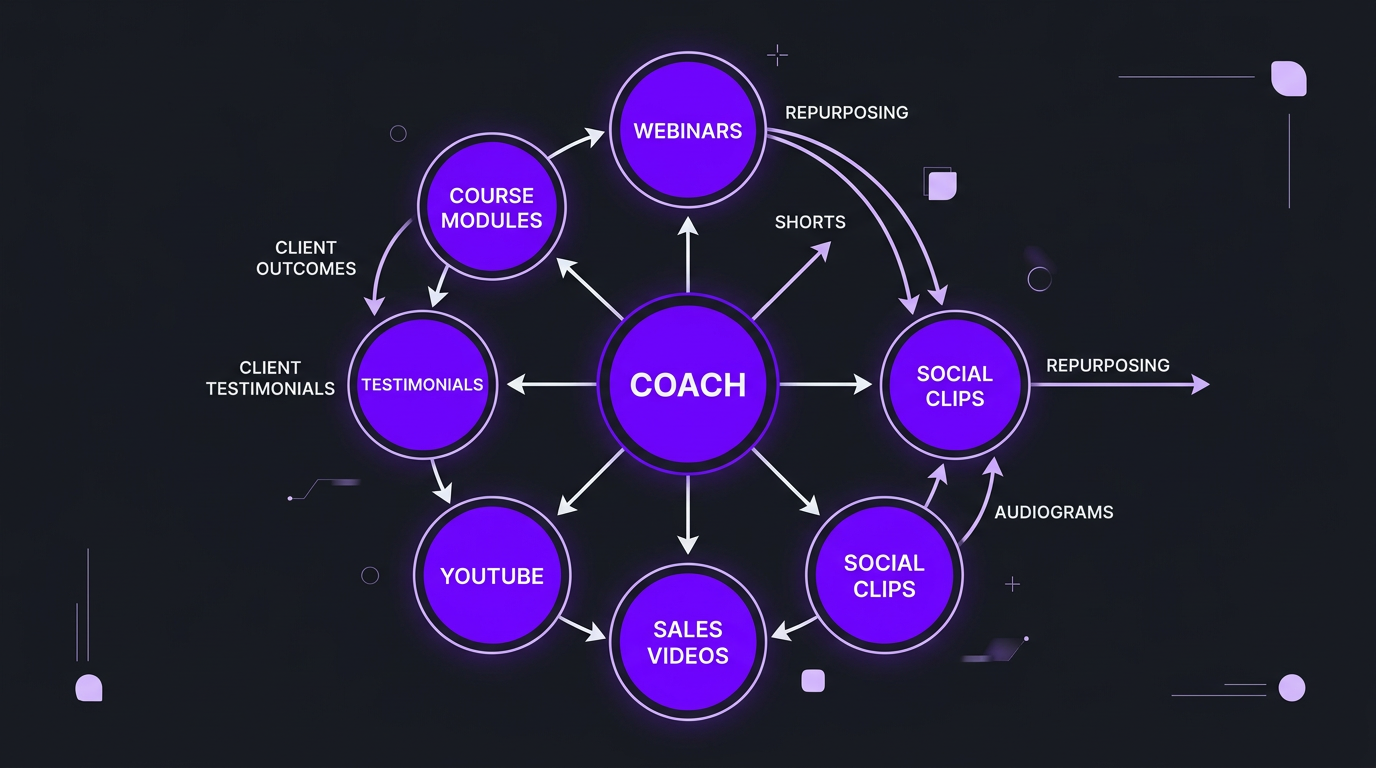
The coaches growing fastest in 2026 aren’t producing all seven from scratch. They’re recording strategically and letting their editing team repurpose one recording into multiple formats. A single 60-minute webinar can become 5-10 social clips, a YouTube video, a podcast episode, and a course module supplement — if it’s edited properly.
Course Content Editing: Making Modules That Convert and Complete
Your course is your core product. It’s what people pay $500 to $10,000 for. And yet most coaches treat course video editing as an afterthought — recording on Zoom, doing a rough trim, and uploading.
That’s leaving completion rates (and revenue) on the table.
What Professional Course Editing Actually Includes
- Audio cleanup: Removing background noise, normalizing levels, reducing room echo. Bad audio is the #1 reason students skip modules.
- Pacing optimization: Cutting dead air, long pauses, and verbal fillers (“um,” “uh,” “you know”). This alone can reduce a 45-minute module to 30 minutes of tighter, more engaging content.
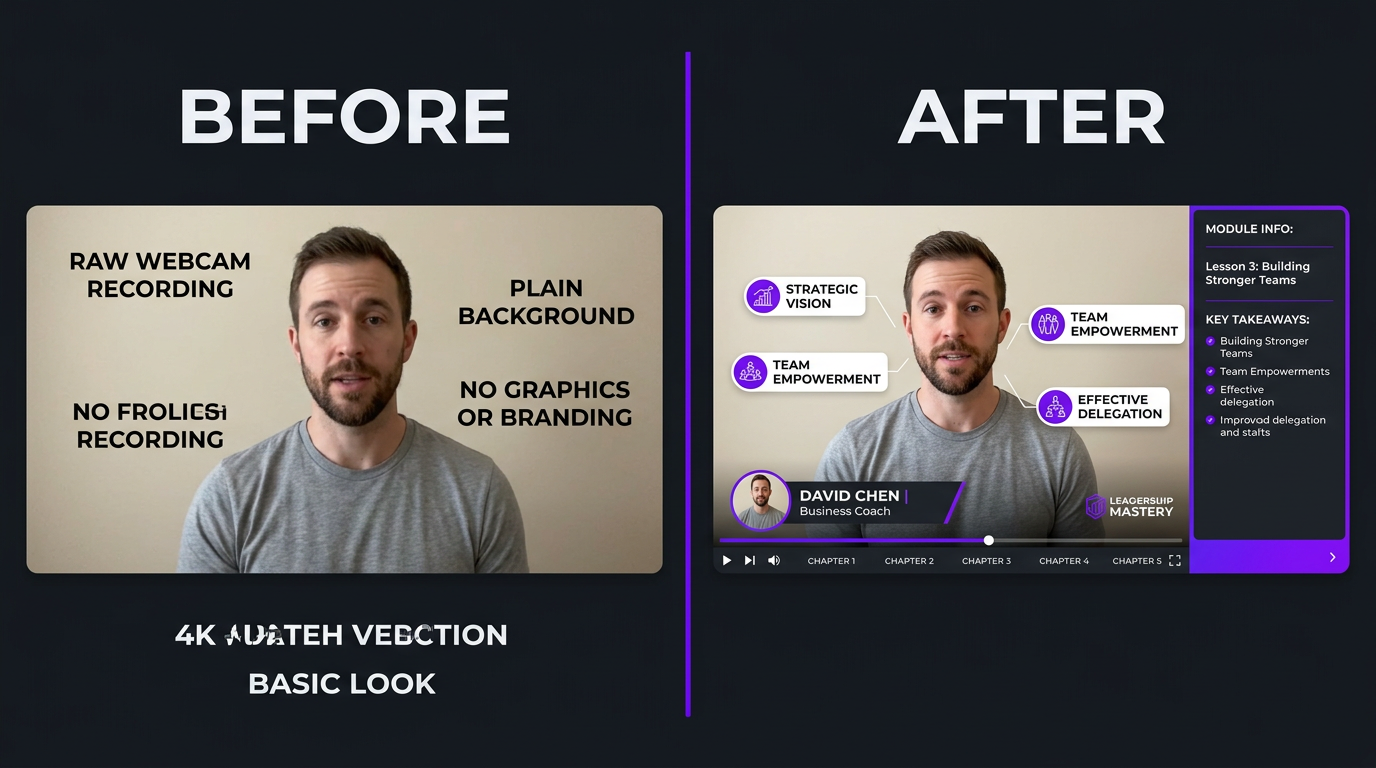
- Visual structure: Adding chapter markers, title cards for each section, branded lower thirds, and transition screens between topics.
- Screen recording polish: If you’re sharing slides or demonstrating software, professional editing includes zoom-ins on relevant areas, cursor highlights, and smooth transitions between camera and screen.
- Branded consistency: Matching intros, outros, color grading, and graphic style across all modules so the course feels cohesive and premium.
- Callout graphics: Key terms, formulas, or frameworks displayed on screen as you discuss them, reinforcing learning through visual repetition.
The Trade with Pat Case: From Raw Recordings to a Premium Course
Trade with Pat is a trading education brand that came to us with a massive library of content — live trading sessions, educational walkthroughs, and Q&A recordings. The raw content was excellent. The presentation was holding it back.
Their challenge was one we see constantly with coaches: deep expertise, inconsistent production. Some recordings had great audio, others had echo. Some sessions were tight and focused, others needed heavy trimming. The brand identity across modules was inconsistent.
Our team restructured their post-production workflow from the ground up. We standardized audio processing across all recordings, created a branded template system for lower thirds, chapter cards, and transitions. We added visual callouts for key trading concepts — highlighting chart patterns, annotating price movements, overlaying data when Pat referenced specific metrics.
The result wasn’t just better-looking videos. Students engaged longer, completed more modules, and — critically — demonstrated better learning outcomes. For a course-based coaching business, that translates directly into lower refund rates, higher testimonial volume, and stronger word-of-mouth growth.
Course Editing Best Practices for Coaches
| Element | Why It Matters | Impact on Completion Rate |
|---|---|---|
| Clean audio | Students abandon modules with bad sound within 60 seconds | +25-35% |
| Chapter markers | Allows skipping to relevant sections, reduces overwhelm | +15-20% |
| Visual callouts | Reinforces key concepts, aids different learning styles | +10-15% |
| Module length under 20 min | Matches attention spans, creates sense of progress | +20-30% |
| Branded consistency | Signals professionalism, justifies premium pricing | Indirect (reduces refunds) |
Webinar Polish: Turning Recordings Into Evergreen Assets
Most coaches run webinars to sell — a live presentation that ends with an offer. The webinar performs well live, so you throw the recording on a landing page as an “evergreen replay.” And then wonder why the replay converts at half the rate of the live version.
The reason is simple: live webinars have energy, urgency, and momentum. A raw recording has dead air, awkward transitions, and 15 minutes of “can everyone hear me?” at the start.
What Webinar Polish Looks Like
- Trimming the fat: Remove the first 5-10 minutes of “waiting for people to join,” tech issues, and small talk. Start with the hook.
- Tightening transitions: Cut pauses between slides, remove tangents that work live but drag on replay.
- Adding visual cues: Highlight key slides, add text overlays for main points, insert chapter cards for navigation.
- Audio mastering: Normalize levels, remove background noise, compress dynamics so the whole presentation sounds broadcast-ready.
- Strategic cuts: Remove Q&A sections that reference specific live attendees, or move them to a bonus section.
- Urgency elements: Add countdown overlays, “limited spots” graphics, or CTA bumpers that replace the live urgency with produced urgency.
A well-polished webinar replay can convert at 70-80% of the live rate — compared to 30-40% for raw recordings. For a coaching funnel where the webinar drives $100K+ in annual revenue, that difference in conversion is worth tens of thousands of dollars.
Social Clips: Repurposing for Maximum Reach
This is where most coaches leave the biggest opportunity on the table. You’re already recording hours of content — courses, webinars, YouTube videos, coaching calls (with permission). Every single recording contains 5-15 moments that would make excellent social media clips.
The problem is extraction. Finding those moments, cutting them, formatting for vertical, adding captions, creating hooks — it takes time. Time most coaches don’t have.
The Repurposing Framework
Here’s how a systematic repurposing process works:
| Source Content | Clips Per Recording | Best Platforms | Editing Needs |
|---|---|---|---|
| 60-min webinar | 8-12 clips | Instagram Reels, TikTok, LinkedIn | Vertical crop, captions, hook text, CTA |
| 20-min YouTube video | 4-6 clips | YouTube Shorts, Instagram, TikTok | Vertical crop, captions, platform-specific formatting |
| 45-min course module | 5-8 clips | Instagram, TikTok, LinkedIn | Context framing, captions, teaser formatting |
| 60-min podcast | 6-10 clips | All platforms | Audiogram or video clip, captions, highlight text |
One coaching client of ours records a single 90-minute live session per week. From that one session, our team produces: 1 long-form YouTube video, 8-10 short-form clips, and supplemental course content. That’s 10+ pieces of content from one recording session.
What Makes a Coaching Clip Perform
Not every 60-second excerpt makes a good clip. The moments that perform are:
- Contrarian takes: “Most coaches tell you to X. Here’s why that’s wrong.” These generate debate and shares.
- Framework reveals: When you explain a proprietary method in 60 seconds. People save these.
- Transformation stories: “My client was doing X, we changed to Y, and the result was Z.” Narrative hooks outperform tips.
- Emotional moments: Genuine passion, frustration, or excitement. Authenticity outperforms polish on social.
Professional editing takes these raw moments and optimizes them: adding a text hook in the first second, burning in captions (80%+ of social video is watched on mute), formatting for vertical, and ending with a clear CTA — follow, comment, or visit the link in bio.
Drowning in Content You Can’t Edit Fast Enough?
Our team turns your existing recordings into a full content calendar — course modules, YouTube videos, and social clips from the content you’ve already created.
Sales Videos That Actually Close
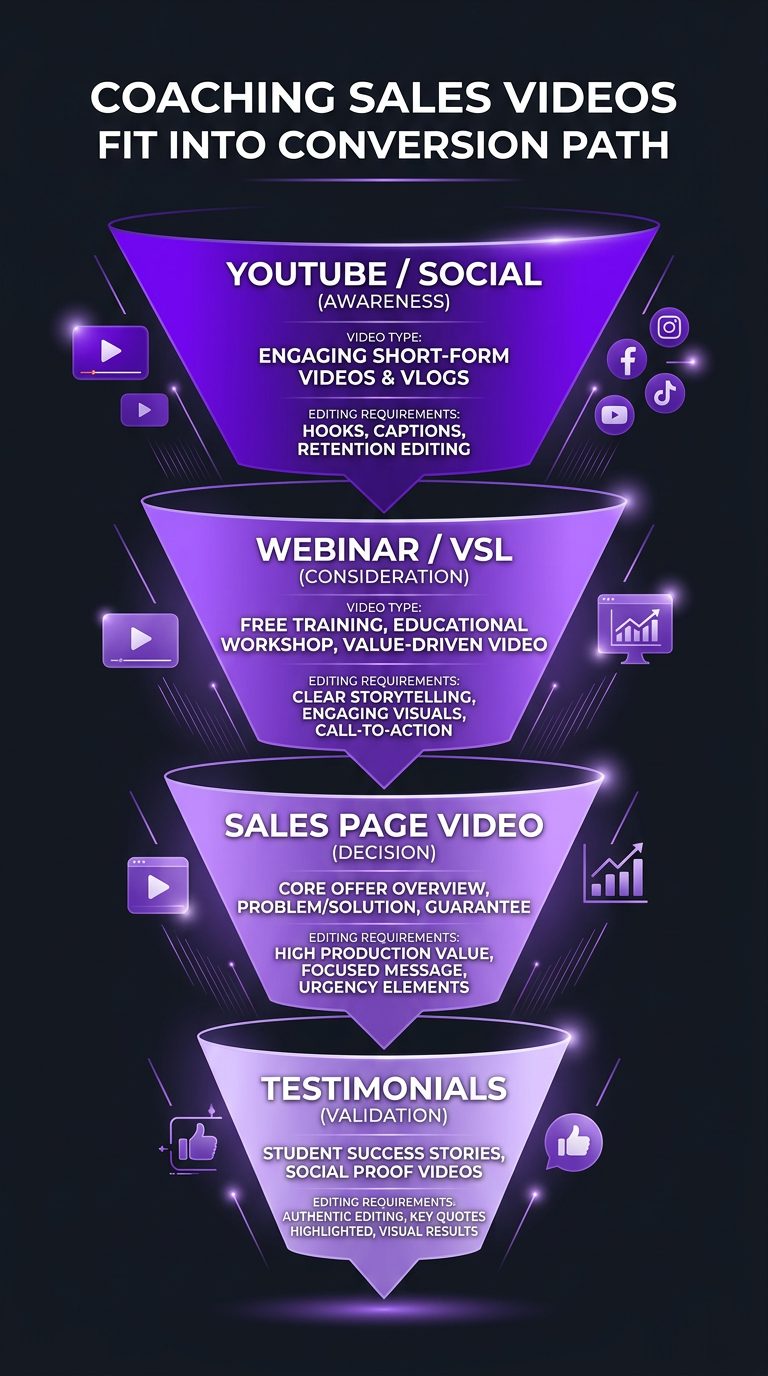
Every coaching business has a sales mechanism — a VSL (video sales letter), a webinar with an offer, a launch sequence, or a sales page with an embedded video. The quality of that video directly impacts conversion rate.
And yet, the sales video is often the most neglected piece of the coaching content stack. Coaches spend weeks perfecting their curriculum but record their sales video in one take on a Tuesday afternoon.
Types of Sales Videos for Coaches
- VSL (Video Sales Letter): 15-45 minute presentation designed to sell a specific offer. Needs tight scripting, professional pacing, visual proof elements, and a compelling CTA sequence.
- Sales page video: 3-8 minute overview video embedded on a sales page. Summarizes the offer, builds trust, addresses objections. Needs to be concise and high-energy.
- Launch sequence videos: 3-4 videos in a product launch formula (PLF-style). Each needs consistent branding, escalating urgency, and value-packed content.
- Application/enrollment video: Used for high-ticket coaching ($5K+). More personal, less produced — but still needs clean audio, proper lighting correction, and tight editing.
The Riley Coleman Story: Editing as a Growth Lever
Riley Coleman is a creator who came to Increditors producing solid content with a growing audience — but the content wasn’t converting the way it should. The ideas were sharp, the delivery was engaging, but the post-production wasn’t matching the quality of the content itself.
Our team took over the full editing workflow. We restructured video pacing to maintain engagement through longer watches. We added strategic visual elements — graphics that reinforced key points, B-roll that broke up talking head segments, and retention hooks at the moments where analytics showed viewers typically dropped off.
We also built a repurposing system around his long-form content, creating short-form clips optimized for each platform. The combination of better long-form editing and a systematic short-form pipeline changed his growth trajectory. Views increased significantly, but more importantly, the audience he was attracting through better-edited content was more engaged and more likely to convert on offers.
For coaches specifically, this is the lesson: your content’s production quality is a proxy for your coaching quality. Prospects watching a sales video or YouTube video are subconsciously evaluating whether you run a professional operation. Choppy editing, poor audio, and inconsistent branding tell them “this person cuts corners.” That might not be true — but perception drives purchase decisions.
Sales Video Editing Checklist for Coaches
| Element | Purpose | Priority |
|---|---|---|
| Hook in first 5 seconds | Prevent immediate bounce | 🔴 Critical |
| Proof elements (screenshots, data) | Build credibility during claims | 🔴 Critical |
| Clean audio | Maintain attention and trust | 🔴 Critical |
| Testimonial clips inserted | Social proof at key decision points | 🟡 High |
| Pacing changes every 2-3 min | Prevent monotony | 🟡 High |
| CTA graphics and overlays | Drive action at offer reveal | 🟡 High |
| Branded color grading | Premium perception | 🟢 Medium |
| Motion graphics for concepts | Visual reinforcement of frameworks | 🟢 Medium |
Testimonial Videos: Your Most Powerful Sales Tool
A coaching business lives and dies by its testimonials. Written testimonials are good. Video testimonials are 10x more powerful. But raw, unedited testimonial videos — shaky phone recordings with bad audio and a client rambling for 8 minutes — actually hurt more than they help.
The Anatomy of a High-Converting Testimonial Video
Professional testimonial editing transforms raw client recordings into compelling 2-3 minute stories that follow a proven structure:
- The “before” state (15-30 sec): Where was the client before working with you? What was the pain point? This creates relatability for prospects in the same situation.
- The turning point (15-20 sec): What made them choose you? What was the experience like? This builds confidence in the buying decision.
- The transformation (30-60 sec): What changed? Be specific — numbers, outcomes, emotional shifts. This is the proof element.
- The recommendation (10-15 sec): Would they recommend you? Why? This gives prospects permission to buy.
Professional editing means cutting a rambling 10-minute recording into a tight 2-3 minute narrative that hits each beat. It means color correcting the phone recording so the client looks good (which makes them more credible). It means adding your brand’s lower thirds, a title card, and music that supports the emotional arc without overwhelming the dialogue.
Testimonial Compilation Videos
Even more powerful than individual testimonials is a compilation — 3-5 clients in a single 5-8 minute video, each telling their story, edited together with branded transitions. These work exceptionally well on sales pages and in ad campaigns because they create a cascade of social proof.
We’ve seen testimonial compilations outperform single testimonials by 3-4x in conversion tests. The key is in the editing: each story needs to stand alone (for anyone who only watches 60 seconds) while building on the previous one (for anyone watching the full video).
What Video Editing Costs for Coaches: Real Numbers
Let’s get specific about pricing. Here’s what coaches should expect to pay based on their content volume and quality requirements:
| Coach Level | Monthly Content Volume | Monthly Editing Cost | What You Get |
|---|---|---|---|
| Starting out ($0-$5K/mo revenue) |
2-4 YouTube + 8 clips | $500–$1,200/mo | Basic editing, captions, simple graphics |
| Growing ($5K-$20K/mo revenue) |
4-8 YouTube + 16 clips + course content | $1,500–$3,500/mo | Professional editing, branded templates, repurposing |
| Established ($20K-$100K/mo revenue) |
8+ YouTube + 20+ clips + webinars + sales | $3,000–$6,000/mo | Dedicated team, motion graphics, full production pipeline |
| Scale ($100K+/mo revenue) |
Daily content across all platforms | $5,000–$10,000+/mo | Full-time team, VFX, launch content, multi-brand |
At the “growing” tier, where most coaches land when they first consider outsourcing, you’re looking at $1,500-$3,500/month for a comprehensive editing solution. That includes YouTube long-form, short-form clips for social, and periodic course or sales video editing.
For context, the Increditors pricing model starts at $2,500/month for short-form packages and $5,000/month for full YouTube + shorts packages. These include a dedicated editor, project manager, and quality review — not a rotating roster of whoever’s available.
DIY vs Professional Editing: The Real Math for Coaches
Let’s run the numbers coaches actually care about:
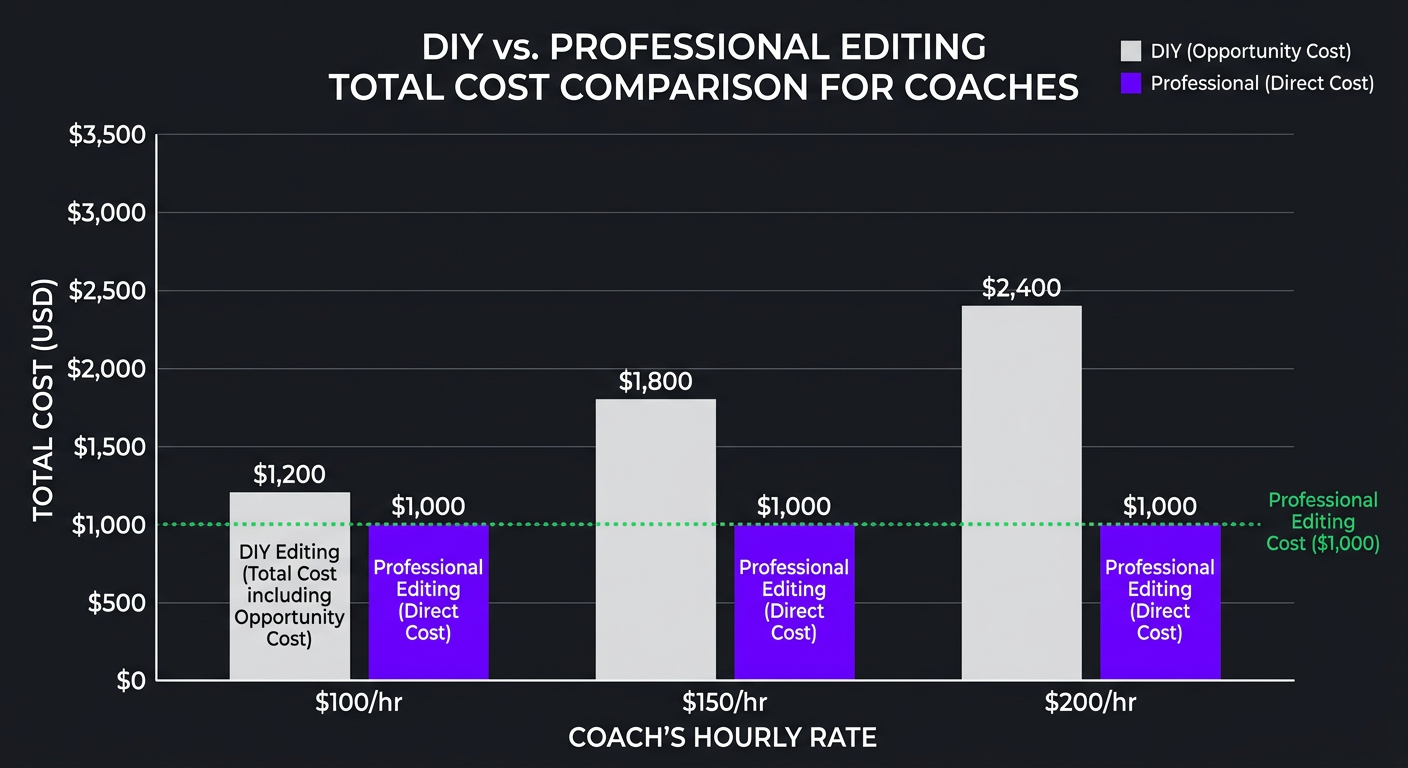
Scenario: Coach earning $200/hour, producing 6 videos/month
| Factor | DIY Editing | Professional Editing |
|---|---|---|
| Hours spent editing/month | 18-25 hours | 2-3 hours (review only) |
| Opportunity cost (at $200/hr coaching rate) |
$3,600–$5,000/mo | $400–$600/mo |
| Editing expense | $0 | $2,000–$4,000/mo |
| Total real cost | $3,600–$5,000/mo | $2,400–$4,600/mo |
| Content quality | Inconsistent | Consistently professional |
| Hours freed for coaching | 0 | 15-22 hours/month |
The math is clear: DIY editing is more expensive for any coach billing $100+/hour. You’re paying with time instead of money — and that time has a quantifiable value.
But it goes beyond direct cost. Those 15-22 freed hours aren’t just available for coaching. They’re available for content creation (recording more, not editing more), business development, program creation, or rest. Burnout is the silent killer of coaching businesses, and editing is one of the biggest contributors to the content creation grind.
The “I’ll Just Hire a VA” Trap
Many coaches try to split the difference by hiring a virtual assistant to edit. VAs are fantastic for administrative tasks. Most are terrible at video editing. It’s a specialized skill — not something you learn from a 2-hour Udemy course.
What typically happens: you hire a VA at $8-$15/hour, they produce mediocre edits, you spend 2-3 hours per video giving feedback and requesting revisions, and the final product is still below what a professional editor would produce in a single pass. Your $15/hour “savings” costs you more in supervision time than just hiring a professional.
Building Your Content Production System
The ultimate goal isn’t just “hire an editor.” It’s building a content production system that runs with minimal involvement from you — the coach.
The One-Recording-Per-Week System
Here’s a production system that works for coaches at any scale:
- Record one 60-90 minute session per week. This can be a YouTube video, a webinar, a live coaching demo, or a course module. One recording session.
- Send raw footage to your editing team. Drop the file in a shared folder with a 2-sentence brief. That’s it. Your involvement ends here (until review).
- Editing team produces:
- 1 long-form video (YouTube or course)
- 6-10 short-form clips (Reels, Shorts, TikTok, LinkedIn)
- 1 polished webinar replay (if applicable)
- Audiogram or podcast episode (if applicable)
- Review and approve. 30-60 minutes of your time to review edits, request minor tweaks, and approve for publishing.
- Content published across all platforms. If your team handles scheduling (many agencies do), this is fully hands-off.
Total time investment per week: 2-3 hours (recording + review). Content output: 8-12 pieces across all platforms.
This is exactly the system we build for coaching clients at Increditors. The recording is yours — the expertise, the personality, the teaching. Everything after “stop recording” is ours.
Choosing the Right Editing Partner
For coaches specifically, the right video editing partner needs to understand:
- Your niche: A business coach and a fitness coach need different editing styles. Your editor should understand your audience’s expectations.
- Course platforms: Editing for Kajabi, Teachable, or Thinkific has specific requirements (chapter markers, format specs, embed compatibility).
- Sales psychology: Your sales videos need to be edited for conversion, not just aesthetics. The pacing, proof placement, and CTA timing matter.
- Repurposing workflows: The editor who cuts your YouTube videos should also be creating your social clips — consistency matters.
- Turnaround reliability: Coaches run on schedules — launch dates, webinar schedules, course release timelines. A missed deadline can cost thousands.
This is where agencies have a structural advantage over freelancers. A single freelancer is a single point of failure — if they’re sick, traveling, or overbooked, your launch video doesn’t get done. An agency with a team structure has built-in redundancy. Somebody always has your back.
Ready to Stop Editing and Start Scaling?
Join coaches like Trade with Pat and Riley Coleman who’ve built content systems that run without them. Let’s design yours.
Frequently Asked Questions
Video editing for coaches typically costs $150-$500 per video for course content, $50-$200 per short-form clip, or $2,000-$5,000/month on retainer for ongoing production. The right budget depends on your revenue level — coaches earning $10K+/month generally find that outsourcing editing pays for itself through time savings and quality improvements. See our pricing page for current rates.
Coaches typically need editing for seven content types: course modules, webinar recordings, social media clips (Reels/Shorts), sales and launch videos, testimonial compilations, YouTube content for audience building, and podcast video episodes. The most efficient approach is recording once and repurposing into multiple formats.
If your coaching rate is $100+/hour, DIY editing costs more than outsourcing when you account for opportunity cost. A coach billing $200/hour who spends 20 hours/month editing is spending $4,000 in lost coaching revenue — more than most professional editing retainers. Outsource to a team that understands coaching content so you can focus on what generates revenue.
Professional course videos require: clean audio (noise removal, level normalization), consistent color grading, branded lower thirds and title cards, chapter markers, screen recording polish with zoom-ins, smooth transitions between segments, and visual callout graphics for key concepts. Most coaches should outsource this to a professional editing team for consistency.
Yes. Agencies like Increditors handle end-to-end course post-production: module editing, intro/outro creation, motion graphics, screen recording polish, and repurposing course content into social clips and promotional videos. We also format deliverables for specific platforms (Kajabi, Teachable, Thinkific). Book a call to discuss your course.
Short-form vertical video (60-90 seconds) performs best for coaches on Instagram Reels, TikTok, and YouTube Shorts. The winning formula: strong hook in the first 3 seconds, one actionable insight per clip, burned-in captions (80%+ of viewers watch on mute), and a clear CTA. Extract clips from your existing long-form content rather than creating social-first content from scratch.
Your Expertise Deserves Professional Production
You didn’t build a coaching business to spend your nights in Premiere Pro. Let’s build a content system that scales your impact without scaling your hours.
This guide is based on our experience editing content for coaches and course creators across business, fitness, finance, and wellness niches. For current Increditors pricing and packages, visit our pricing page or schedule a discovery call.