










![3D Explainer Video - ScribbleLive.mp4_snapshot_00.12_[2022.03.09_03.14.16]](https://increditors.com/wp-content/uploads/elementor/thumbs/3D-Explainer-Video-ScribbleLive.mp4_snapshot_00.12_2022.03.09_03.14.16-r7wb53mx72rxst3qcqyrfxdmeyzb5r9jbl0wbjujh4.png "3D Explainer Video – ScribbleLive.mp4_snapshot_00.12_[2022.03.09_03.14.16]")
































Outsourcing video editing sounds simple — hand off footage, get back a finished video. But everyone who’s tried it knows the reality: missed deadlines, videos that don’t match your style, revision cycles that eat more time than editing yourself, and the nagging feeling you’re paying for mediocre work.
The difference between outsourcing that saves you 20 hours a week and outsourcing that creates 20 hours of new headaches comes down to preparation. Most creators and brands skip the groundwork, then blame the editor when things go wrong.
We’ve built this checklist from the inside. As a video editing agency that’s onboarded hundreds of clients, we’ve seen every mistake, every shortcut, and every workflow that actually works. This is the complete, no-fluff guide to outsourcing video editing the right way — from vetting editors to building systems that run without you.
What’s in This Checklist
- Before You Start: Define Your Needs
- Finding & Vetting Editors or Agencies
- The Test Project: How to Run One Right
- Building Your Editing Brief Template
- File Sharing & Communication Workflow
- Contracts, Pricing & Payment Terms
- Onboarding Your New Editing Partner
- Quality Control & Feedback Systems
- Scaling: From 1 Editor to a Full Team
- Red Flags & When to Switch
- The Complete Checklist (Downloadable)
- FAQ
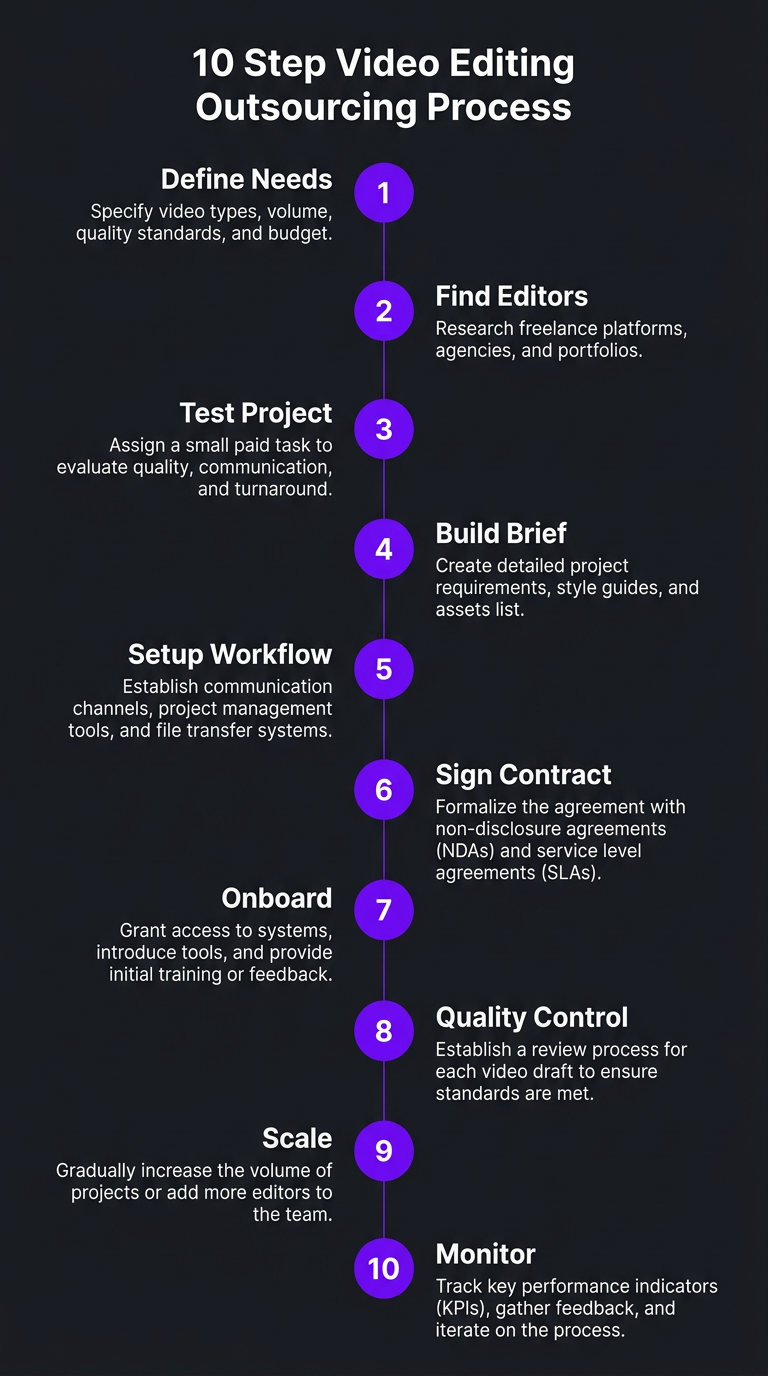
Phase 1: Before You Start — Define Your Needs
The number one reason outsourcing fails is starting without clear parameters. Before you contact a single editor or agency, you need to answer these questions honestly:
Content Volume & Frequency
How many videos do you need edited per week or month This single number determines whether you need a freelancer, subscription service, or full agency. Here’s the general breakdown:
| Monthly Volume | Best Option | Typical Cost Range | Why |
|---|---|---|---|
| 1–4 videos | Freelancer | $150–$500/video | Not enough volume to justify retainer |
| 4–8 videos | Subscription service or freelancer retainer | $800–$2,500/month | Predictable volume justifies monthly commitment |
| 8–20 videos | Agency retainer | $2,500–$5,000/month | Need dedicated editor, PM, and backup coverage |
| 20+ videos | Dedicated agency team | $4,000–$8,000+/month | Full-time editor(s) working exclusively on your content |
When Trade with Pat first approached us, they were producing 3 YouTube videos per week plus daily shorts — roughly 12 long-form and 30 short-form pieces per month. They’d been using two freelancers who couldn’t keep up with the volume. The inconsistency was hurting their brand. Moving to a dedicated team with Increditors’ creator package gave them one point of contact, consistent style, and zero missed deadlines.
Video Types & Complexity
Not all videos require the same editing skill set. Map out exactly what you’re producing:
- Talking head / interview: Simpler edits, multi-cam sync, lower thirds
- YouTube essays / educational: Heavy graphics, B-roll, screen recordings
- Vlogs / lifestyle: Color grading emphasis, music-driven pacing
- Product demos / SaaS: Screen capture, annotations, motion graphics
- Short-form (Reels, Shorts, TikTok): Fast cuts, trending formats, text overlays
- Brand / commercial: Cinematic editing, VFX, sound design
An editor who crushes talking-head content might struggle with motion-heavy explainer videos. Make sure your prospective editor’s portfolio matches your actual content types — not just your industry.
Budget Reality Check
Set a realistic monthly budget before you start looking. The market has options at every price point, but you need to know your ceiling. A useful framework:
- Revenue-generating content: Allocate 20-30% of the revenue that content drives
- Brand-building content: Allocate 15-25% of your overall marketing budget
- Minimum viable budget: If you can’t afford at least $150/video for professional quality, consider waiting until you can
Brand Guidelines Document
If you don’t have one, create a simple brand guide before outsourcing. It doesn’t need to be 50 pages. At minimum, include:
- Brand colors (hex codes) and fonts
- Logo files and usage rules
- Tone of voice (formal, casual, energetic, calm)
- 3-5 reference videos that capture your desired style
- Things to avoid (specific transitions, stock music genres, editing clichés)
- Intro/outro templates or specifications
This document becomes your editor’s north star. Without it, they’re guessing — and guessing means more revisions, more frustration, and a longer path to consistent output.
Phase 2: Finding & Vetting Editors or Agencies
You’ve defined what you need. Now you need to find who can deliver it. The market is massive and noisy, so here’s a systematic approach to cutting through the clutter.
Where to Find Editors
| Source | Best For | Pros | Cons |
|---|---|---|---|
| Upwork / Fiverr | Budget, one-off projects | Large pool, payment protection | Quality varies wildly, race to bottom on price |
| YouTube / creator communities | Finding niche-specific editors | Pre-vetted by community, understand platform | Smaller pool, may lack business process |
| Referrals from other creators | High-trust options | Proven track record, real feedback | Limited options, may not match your niche |
| Subscription services | Predictable volume at mid-tier | Structured process, fixed pricing | Less customization, shared editors |
| Dedicated agencies | Serious creators & brands | Full teams, PM, QC, backup editors, consistency | Higher price point |
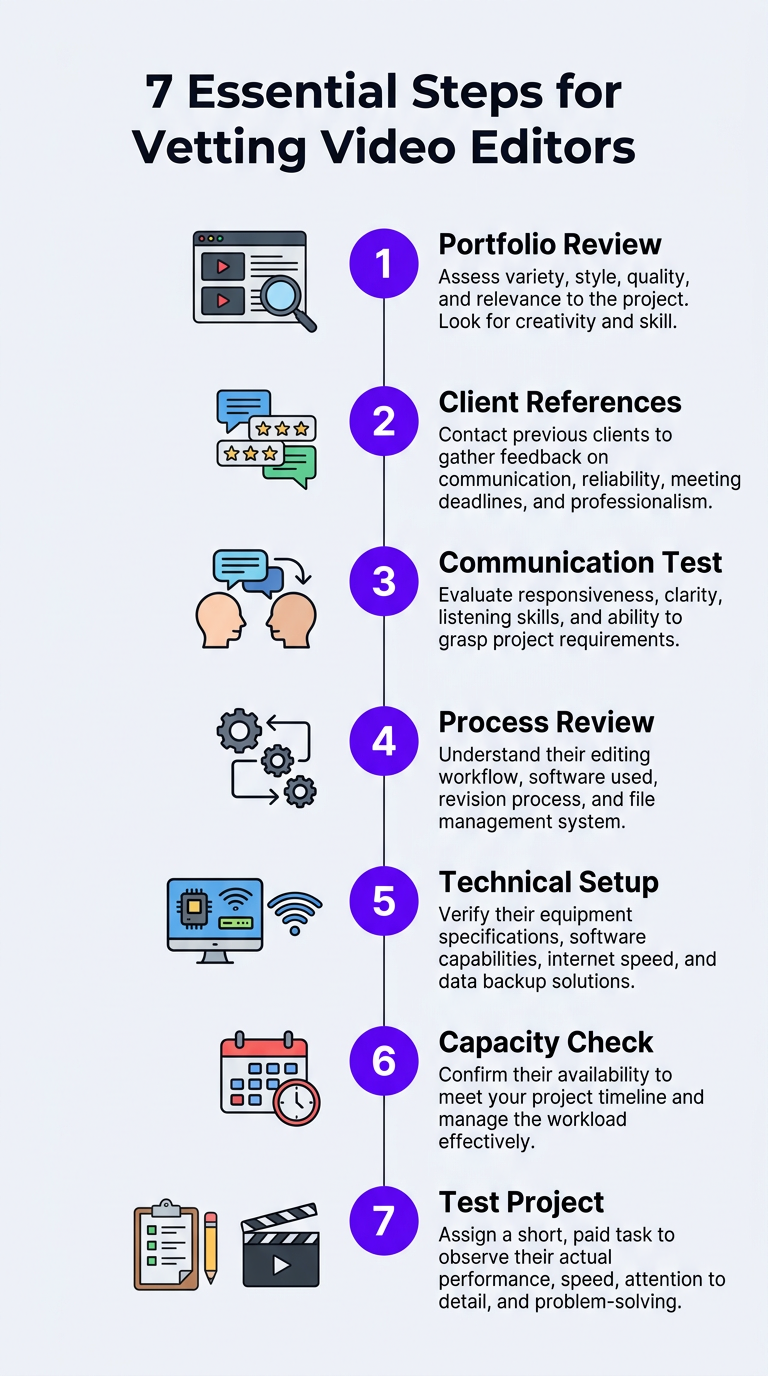
The Vetting Process: 7 Non-Negotiable Steps
Whether you’re evaluating a freelancer or an agency, run every candidate through this process:
Step 1: Portfolio Review (Match, Don’t Impress)
Don’t just ask “is their work gooda” Ask “is their work like what I needa” A brilliant wedding video editor might be terrible at YouTube content. Look for:
- Videos in your specific niche or format
- Consistent quality across multiple samples (not just their best one)
- Pacing and style that resonates with your audience
- Technical competence: clean audio, smooth transitions, proper color
Step 2: Client References
Ask for 2-3 current or recent clients you can contact. If they won’t provide references, that’s a red flag. Questions to ask references:
- How many revision rounds do you typically needa
- Have they ever missed a deadlinea
- How do they handle feedback — defensive or collaborativea
- Would you rehire thema
Step 3: Communication Test
Pay attention to how quickly and clearly they respond during the evaluation phase. If communication is slow or vague before they have your money, it will only get worse after.
Step 4: Process Review
Ask them to walk you through their editing process from receiving footage to delivering the final cut. Good editors have a system. Great editors can explain it clearly. If the answer is “I just start editing,” move on.
Step 5: Technical Setup
Confirm they use professional software (Premiere Pro, DaVinci Resolve, Final Cut), have reliable internet for file transfers, and work on hardware that can handle your footage resolution. Remote editors in regions with spotty internet will cause delivery delays.
Step 6: Capacity Check
Ask how many clients they currently serve and what their maximum capacity is. An editor juggling 20 clients will not give you the same attention as one managing 5-8. Agencies should be transparent about team size and dedicated vs. shared editor models.
Step 7: Paid Test Project
Never skip this. We’ll cover it in detail in the next section.
Phase 3: The Test Project — How to Run One Right
The test project is the single most important step in your outsourcing checklist. It eliminates 90% of bad hires before you commit to anything long-term. But most people run test projects wrong.
What Makes a Good Test Project
- Use real footage. Don’t send them your “best” footage or your “worst.” Send a typical project that represents your average editing needs.
- Include your brief template. Give them the same level of guidance you’ll provide on regular projects. This tests whether your brief is clear enough and whether they follow instructions.
- Set a realistic deadline. If your normal turnaround is 48 hours, give them 48 hours. Don’t give extra time — you need to see how they perform under real conditions.
- Pay a fair rate. Free test projects attract desperate editors. Pay your normal per-video rate or at minimum 50% of it. You want to see their real quality level, not their “free sample” effort.
What to Evaluate
| Criteria | What to Look For | Red Flag |
|---|---|---|
| First-draft quality | How close is the first version to your visiona | Completely off-brief, ignoring your reference videos |
| Turnaround time | Did they hit the deadlinea | Late delivery with excuses, no communication about delays |
| Revision handling | How quickly and accurately do they implement feedbacka | Defensive responses, incomplete revisions, introducing new errors |
| Communication | Proactive updates, questions when brief is unclear | Radio silence for 24+ hours, no questions about ambiguous instructions |
| Technical quality | Clean audio, proper export settings, no artifacts | Audio sync issues, wrong aspect ratio, compression artifacts |
When VYVE Wellness was evaluating editing partners, they ran test projects with three agencies simultaneously. Two delivered polished first drafts but missed the turnaround deadline. One — us — delivered on time with a first draft that needed only minor tweaks. The test project saved them from a partnership that would have caused weekly deadline chaos for their YouTube channel.
Phase 4: Building Your Editing Brief Template
Your editing brief is the communication backbone of the entire outsourcing relationship. A great brief cuts revision rounds in half. A vague brief guarantees frustration on both sides.
Here’s the template we recommend to every client who works with our YouTube editing team:
The Essential Editing Brief Template
Section 1: Project Basics
- Video title / working title
- Target platform (YouTube, Instagram, LinkedIn, etc.)
- Target length (range is fine: “12-15 minutes”)
- Publish date / delivery deadline
- Priority level (standard, rush, flexible)
Section 2: Content Direction
- Video summary in 2-3 sentences
- Key moments / timestamps to highlight
- Sections to cut or de-emphasize
- Desired hook for the first 30 seconds
- Call-to-action placement and messaging
Section 3: Style & Technical
- Reference videos (links to 1-3 videos with similar style)
- Music mood / tempo (or specific tracks)
- Graphics and text overlay requirements
- Color grade preferences (or “match previous videos”)
- B-roll direction (stock footage, screen recordings, provided clips)
Section 4: Assets & Files
- Links to raw footage (Google Drive, Dropbox, Frame.io)
- Separate audio files (if applicable)
- Graphics, logos, or overlay files
- Thumbnail requirements (if editor handles thumbnails)
This template takes 10-15 minutes to fill out per video. That investment eliminates hours of revision back-and-forth. We’ve seen clients reduce their average revision rounds from 4 to 1.5 simply by implementing a structured brief.
Want a Team That Runs on Systems, Not Guessworka
Increditors handles 10-40+ videos per month with structured briefs, dedicated editors, and a quality control process that catches issues before you see them.
Phase 5: File Sharing & Communication Workflow
The operational mechanics of outsourcing trip up more partnerships than creative differences. You need a clear system for transferring footage, communicating feedback, and tracking project status.
File Transfer Setup
| Tool | Best For | Monthly Cost | Upload Speed |
|---|---|---|---|
| Google Drive | Most creators (already using it) | Free–$20/mo | Good |
| Dropbox | Large files, team access | $12–$24/mo | Fast |
| Frame.io | Review + feedback (timestamped comments) | $15–$25/mo | Fast |
| Dropbox Replay | Combined storage + review | $24+/mo | Fast |
| WeTransfer | One-off large file transfers | Free–$12/mo | Moderate |
Pro tip: Set up a shared folder structure before your first project. Something like:
📁 [Channel Name] Editing📁 01 - Raw Footage(organized by date or video title)📁 02 - Assets(logos, fonts, music, templates)📁 03 - Drafts(editor uploads here)📁 04 - Finals(approved, ready-to-publish versions)📁 05 - Briefs(all editing briefs for reference)
Communication Channels
Define where different types of communication happen:
- Quick questions / updates: Slack or WhatsApp (instant, low-friction)
- Detailed feedback: Frame.io or Loom videos (visual, timestamped)
- Project tracking: Trello, Notion, or Asana (status visibility)
- Contracts / formal: Email (paper trail)
Don’t spread communication across 5 platforms. Pick 2-3 maximum: one for real-time chat, one for project tracking, one for video review. Our team at Increditors uses a combination of Slack for communication, Frame.io for review, and an internal PM dashboard for tracking — and it works seamlessly for clients producing 20+ videos per month.
Feedback Best Practices
How you give feedback directly impacts how fast your editor improves and how many revision rounds you need. Follow these principles:
- Be specific. “I don’t like the intro” is useless. “The intro is too slow — cut the first 8 seconds and start at the hook” is actionable.
- Use timestamps. Always reference specific moments: “At 3:42, the transition feels jarring. Try a J-cut instead.”
- Distinguish “must change” from “nice to have.” Label feedback as Priority 1 (must fix) or Priority 2 (if time allows). This prevents editors from spending hours on minor preferences while missing critical issues.
- Consolidate feedback. Send one comprehensive feedback message, not 12 separate texts. Scattered feedback leads to missed notes.
- Use Loom for complex feedback. A 3-minute screen recording explaining your vision is worth more than 500 words of written notes.
Phase 6: Contracts, Pricing & Payment Terms
Handshake deals work until they don’t. Even with a trusted freelancer, put the important terms in writing. Here’s what to cover:
Essential Contract Terms
- Scope of work: Number of videos per month, maximum length per video, included deliverables (thumbnails Shorts repurposinga)
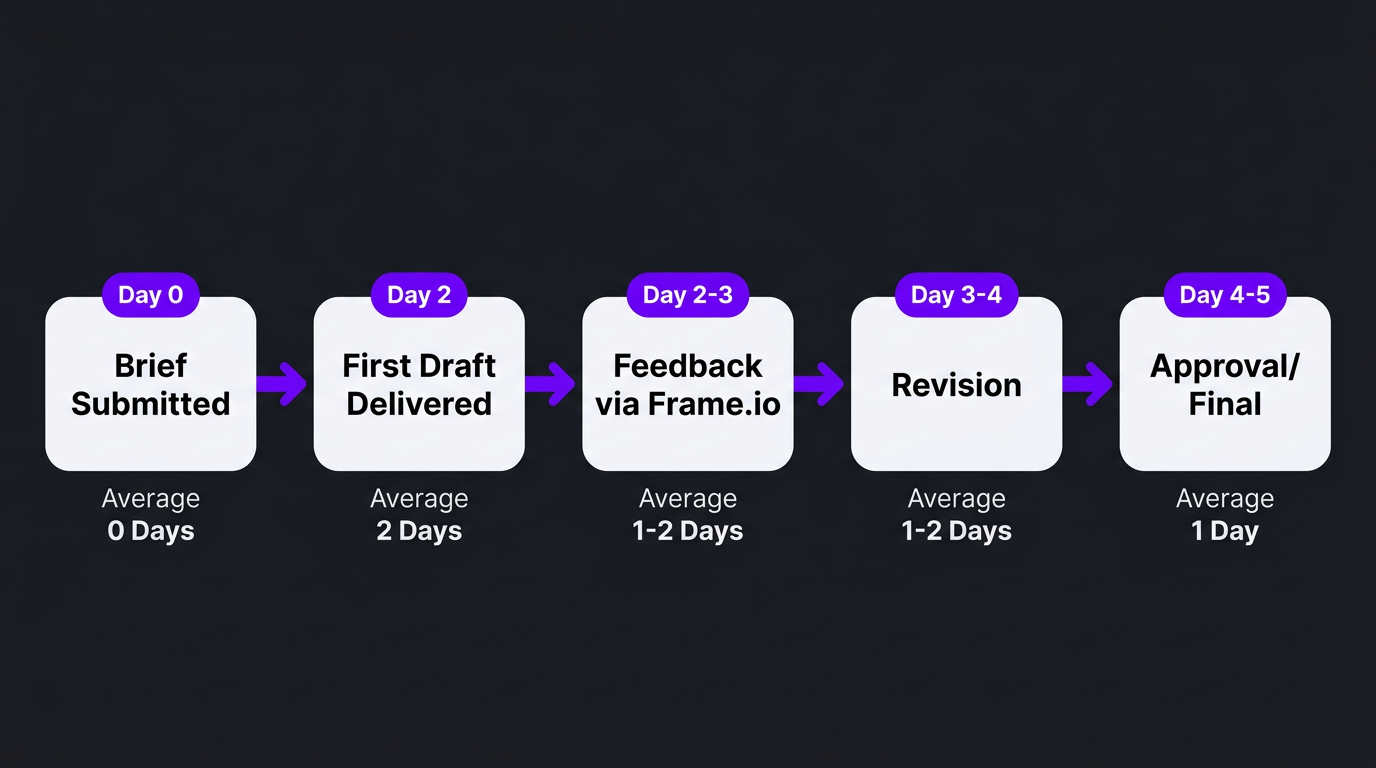
- Turnaround time: Standard delivery window (e.g., 48 hours from footage upload), rush surcharges
- Revision policy: Number of included revision rounds, cost for additional rounds, definition of what counts as a “revision” vs. a “new request”
- Payment terms: Monthly retainer due date, per-video invoicing schedule, accepted payment methods
- Cancellation policy: Notice period (30 days is standard), early termination fees if applicable
- Intellectual property: You own the final content. The editor retains the right to use clips in their portfolio unless specified otherwise.
- Confidentiality: NDA if you’re sharing proprietary information, unreleased content, or financial data
Pricing Model Comparison
| Model | Pros | Cons | Best For |
|---|---|---|---|
| Per video | Predictable cost per piece, easy to budget | Incentivizes editor to rush, no discount for volume | Low volume (1-4/month) |
| Hourly | Fair for variable-length projects | Incentivizes slow work, unpredictable costs | One-off complex projects |
| Monthly retainer | Volume discount, predictable budget, dedicated attention | Commitment required, may overpay in slow months | Regular content (8+/month) |
| Dedicated team | Full-time focus, deepest brand knowledge, fastest turnaround | Highest price point | High-volume brands (20+/month) |
For most serious creators and brands, the monthly retainer model offers the best balance of cost efficiency and quality consistency. Check our pricing page to see how Increditors structures retainer packages across different volume tiers.
Phase 7: Onboarding Your New Editing Partner
You’ve found your editor, run the test, and signed the agreement. Now comes the onboarding phase — the 2-4 weeks where you build the foundation for a long-term, low-maintenance workflow.
Week 1: The Deep Dive
- Share your complete brand guidelines document
- Walk through 3-5 of your best-performing videos and explain what made them work
- Show them 1-2 videos you weren’t happy with and explain why
- Set up shared folders, communication channels, and project tracking
- Send your first real project with a detailed brief
Week 2: First Feedback Cycle
- Review the first deliverable and provide thorough, structured feedback
- Pay attention to how they interpret your brief — are there consistent gapsa
- Refine the brief template based on what was unclear
- Establish the revision cadence (e.g., feedback within 12 hours, revision within 24)
Weeks 3-4: Building Rhythm
- Reduce brief detail as the editor learns your style
- Track first-draft accuracy — it should improve with each video
- Address any process bottlenecks (slow uploads, unclear feedback, timezone conflicts)
- By the end of week 4, the editor should need minimal guidance on standard videos
Brightwell went through this exact process with us. Their first two videos required 3 revision rounds each. By video 5, we were down to 1 round. By video 10, most deliveries were approved on the first draft. That’s the natural trajectory when onboarding is done right — it just requires patience in the first few weeks.
Phase 8: Quality Control & Feedback Systems
Once you’re past the onboarding phase, you need a sustainable quality control system — something that catches issues without requiring you to watch every edit frame-by-frame.
The QC Checklist
Create a simple quality checklist that you (or a team member) run through for every deliverable:
- ✅ Audio: Levels consistent, no background noise, music balanced properly
- ✅ Visual: Color grading consistent with brand, no artifacts or glitches
- ✅ Pacing: Hook in first 10 seconds, no dead spots longer than 3 seconds
- ✅ Graphics: Lower thirds correct, no typos, brand colors accurate
- ✅ Transitions: Smooth, purposeful (not distracting)
- ✅ CTA: Present and properly placed
- ✅ Export: Correct resolution, aspect ratio, format, and file size
- ✅ Metadata: Correct filename, chapters/timestamps if applicable
This checklist takes 5-10 minutes per video once you’re familiar with it. Much faster than reviewing from scratch.
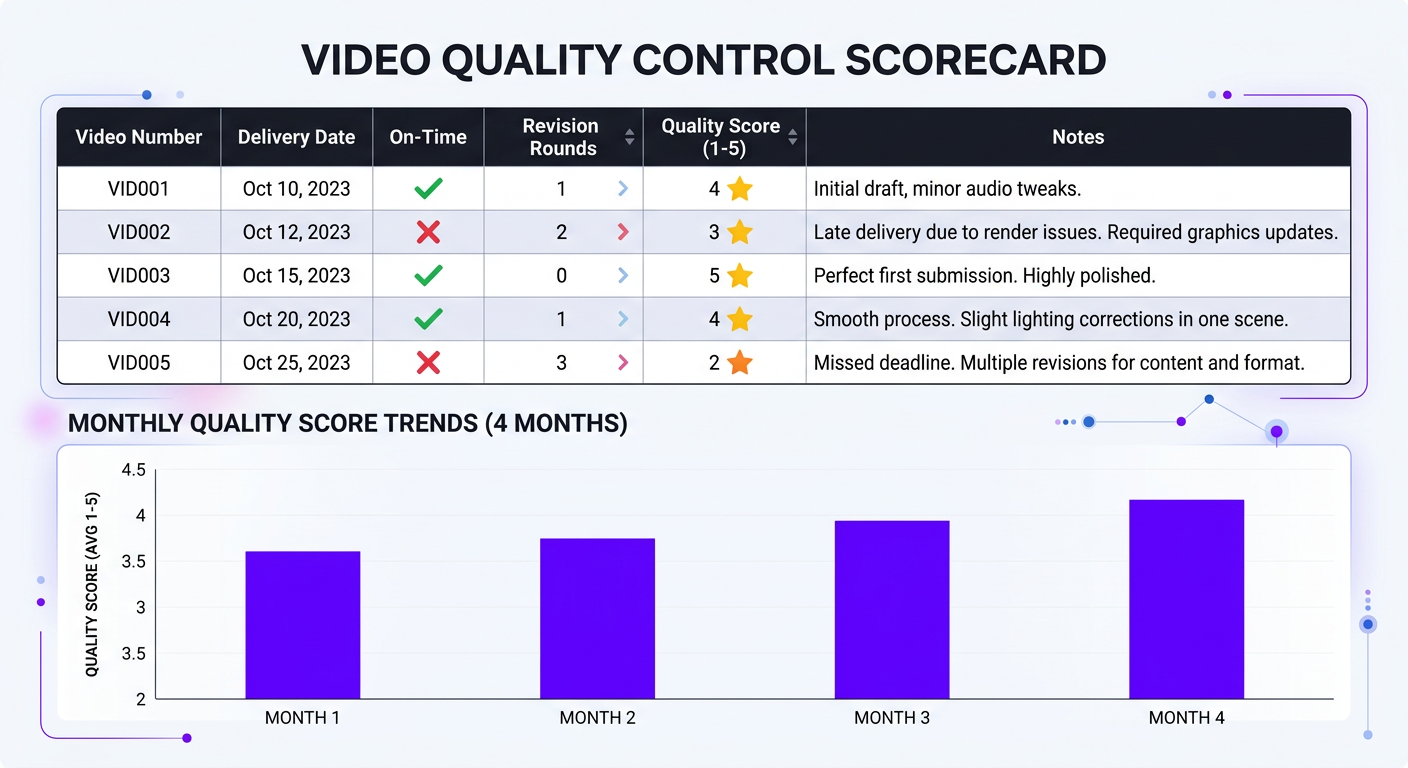
Tracking Performance Over Time
Keep a simple spreadsheet tracking these metrics for each video:
- Number of revision rounds
- On-time delivery (yes/no)
- First-draft quality score (1-5)
- Any brief compliance issues
Review this monthly. If revision rounds trend upward or quality scores decline, address it immediately. If everything is stable or improving, you’ve built a system that works.
Phase 9: Scaling — From 1 Editor to a Full Team
Your outsourcing relationship is working. Now you want to produce more content. Here’s how to scale without breaking the system you’ve built.
When to Scale
- Your current editor is at 80%+ capacity
- Turnaround times are stretching beyond agreed deadlines
- You’re producing new content types that need different skill sets
- Your content is driving measurable business results and you want to double down
Scaling Options
| Approach | When to Use | Risk Level |
|---|---|---|
| Add a second freelancer | Need modest increase (4-8 more videos/month) | Medium — style consistency risk |
| Upgrade to agency retainer | Outgrowing freelancer capacity | Low — agency handles team management |
| Request dedicated team expansion | Already with agency, need higher volume | Low — existing systems scale up |
| Hire in-house + outsource overflow | Want creative control + high volume | High — managing two workflows |
When Riley Coleman’s YouTube channel scaled from weekly to daily uploads, they didn’t hire 5 separate freelancers. They moved to a dedicated agency team where Increditors assigned two editors and a project manager who worked exclusively on their content. Same style, same brand voice, 5x the output. That’s the power of scaling with a structured partner instead of stacking individual freelancers.
Maintaining Consistency at Scale
- Style guide updates: As your brand evolves, update the brand guidelines document. Every editor on your team should reference the same source of truth.
- Template library: Build a library of intro/outro templates, lower thirds, transitions, and graphics that all editors use. This ensures visual consistency regardless of who edits.
- Weekly sync: A 15-minute weekly call with your editing team prevents drift and catches issues early.
- Internal QC layer: At agencies like ours, a senior editor reviews every video before it reaches you. This catches inconsistencies between different editors on your team.
Phase 10: Red Flags & When to Switch
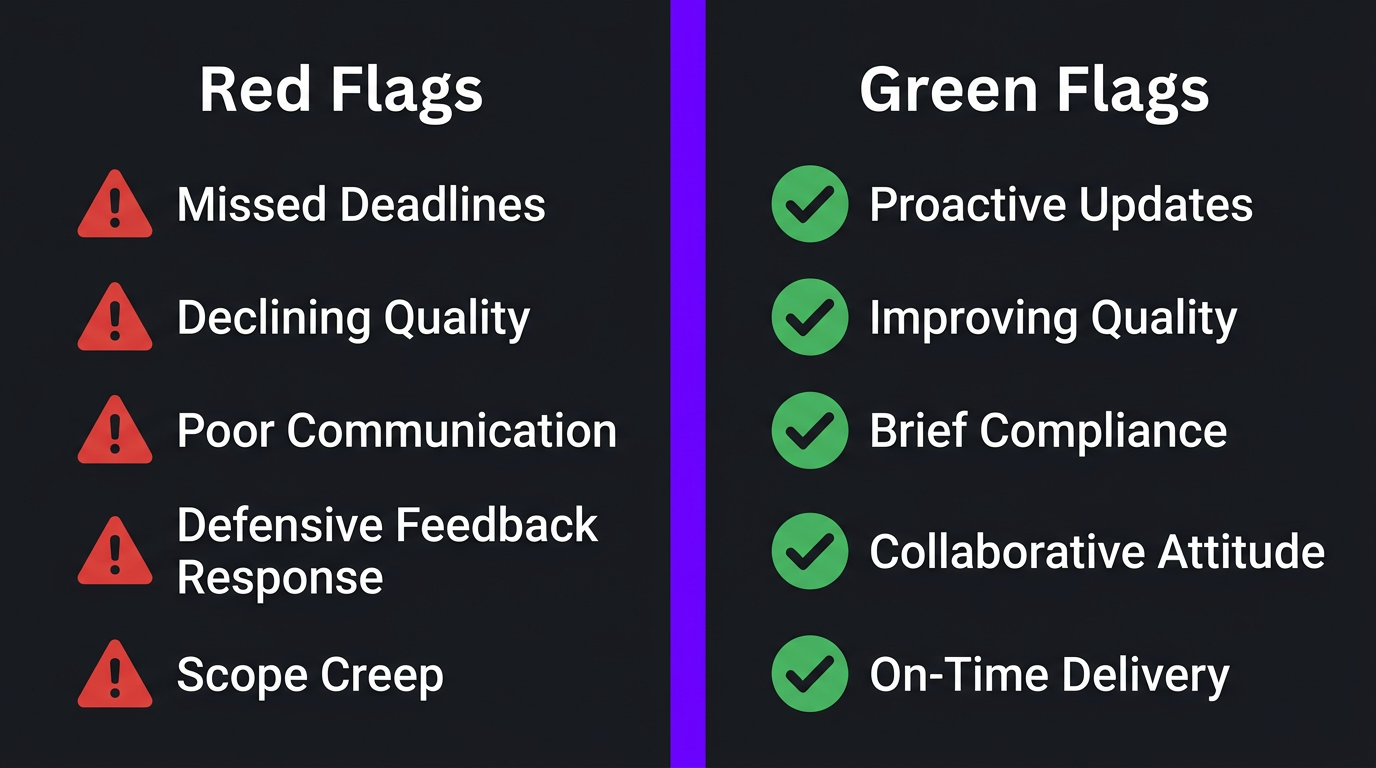
Even after thorough vetting and onboarding, sometimes a partnership doesn’t work out. Here are the red flags that indicate it’s time to make a change:
Immediate Red Flags (Address Within 1 Week)
- Missed deadlines without proactive communication
- Quality declining without explanation
- Ghosting — no response for 24+ hours during business days
- Delivered work that ignores the brief entirely
- Defensive or dismissive response to feedback
Pattern Red Flags (Address Within 1 Month)
- Revision rounds increasing instead of decreasing over time
- Same mistakes repeated after feedback
- Excuses becoming more frequent than deliverables
- Billing inconsistencies or scope creep charges
- Turnover — your “dedicated” editor keeps changing
How to Switch Editing Partners Cleanly
- Document the issues in writing before initiating the conversation
- Give a final chance if the issues are pattern-based (not immediate red flags)
- Start vetting replacements before ending the current arrangement — don’t create a content gap
- Honor your contract terms for notice period
- Retain all project files, templates, and brand assets — make sure nothing is locked in the editor’s personal accounts
- Conduct a brief exit conversation to understand what went wrong from their perspective
The Complete Video Editing Outsourcing Checklist
Here’s everything we’ve covered, condensed into a single checklist you can print or save. Check off each item as you work through the outsourcing process:
Pre-Outsourcing
- ☐ Defined monthly video volume and content types
- ☐ Set realistic monthly editing budget
- ☐ Created brand guidelines document (colors, fonts, tone, reference videos)
- ☐ Built editing brief template
- ☐ Identified 3-5 internal link/service pages for cross-referencing
Vetting & Selection
- ☐ Sourced 3-5 candidates (freelancers, agencies, or mix)
- ☐ Reviewed portfolios for niche relevance
- ☐ Contacted client references
- ☐ Assessed communication speed and clarity
- ☐ Confirmed technical setup and capacity
- ☐ Ran paid test project with top 2-3 candidates
- ☐ Evaluated test results using structured criteria
Setup & Onboarding
- ☐ Signed contract/agreement covering scope, turnaround, revisions, payment
- ☐ Set up shared folder structure
- ☐ Established communication channels (chat, review, project tracking)
- ☐ Completed week 1 deep dive (brand walk-through, reference videos)
- ☐ Delivered first project with detailed brief
- ☐ Provided thorough feedback on first deliverable
Ongoing Operations
- ☐ QC checklist applied to every deliverable
- ☐ Performance tracked monthly (revision rounds, on-time rate, quality score)
- ☐ Brief template refined based on common misunderstandings
- ☐ Brand guidelines updated as your brand evolves
- ☐ Weekly or bi-weekly sync with editing team
Scaling & Optimization
- ☐ Template library built for graphics, intros, transitions
- ☐ Scaling path identified (add editor, upgrade to agency, expand team)
- ☐ Red flag monitoring active — issues addressed within 1 week
- ☐ Content ROI tracked to validate editing investment
This checklist works whether you’re outsourcing for the first time or optimizing an existing editing workflow. The key is treating outsourcing as a system, not a transaction. Build the system once, and it runs with minimal intervention for years.
Creators like eSafety and Ink Magnet followed similar frameworks when they transitioned from DIY editing to working with professional teams. In both cases, the first month required significant setup investment. By month two, the system was running smoothly. By month three, they were producing 3x their original output with better quality and less personal involvement.
That’s the end game of well-executed outsourcing: you focus on creating content, strategy, and growing your brand. The editing happens reliably in the background, delivered by people who understand your vision as well as you do.
If you’re ready to skip the trial-and-error phase and work with a team that has this entire process built in, Increditors’ enterprise packages and startup packages come with structured onboarding, dedicated editors, and a project management layer that handles everything we’ve covered in this checklist.
Ready to Outsource the Right Waya
We’ve onboarded hundreds of creators and brands. Our team handles everything from briefs to QC — so you just focus on creating.
Frequently Asked Questions
A complete outsourcing checklist should cover: defining your content goals and brand guidelines, vetting editors or agencies with portfolio reviews and test projects, establishing a clear brief template, setting up file sharing and communication workflows, defining revision policies and turnaround expectations, agreeing on pricing and payment terms, and creating a quality control process with measurable benchmarks.
Request portfolio samples in your specific niche, ask for client references, run a paid test project before committing to a retainer, review their revision and communication processes, confirm turnaround times in writing, and check for backup editor availability. A quality agency will be transparent about all of these.
The biggest mistake is skipping the brief. Creators who hand over raw footage without clear direction on pacing, style references, brand guidelines, and target audience waste hours in revision cycles. A detailed editing brief cuts revision rounds by 50-70% and dramatically improves first-draft quality.
Freelancers work well for 1-4 videos per month with flexible timelines. Agencies are better for 8+ videos per month where consistency, backup coverage, and project management matter. If video is a core business function, an agency provides reliability that individual freelancers cannot guarantee.
Budget $150-500 per video for professional YouTube editing, or $1,500-5,000+ per month for retainer arrangements. Factor in test project costs ($200-500), potential revision overages, and communication tools. A good rule of thumb: allocate 20-30% of your content production budget to editing.
Google Drive and Dropbox are the most common for raw footage transfer. Frame.io is the industry standard for review and feedback with timestamped comments. For project management, most agencies use Notion, Trello, or Asana. Avoid email for file transfers — it’s too slow and lacks version control.
Expect 2-4 weeks of onboarding before an editor or agency fully understands your style. The first 3-5 videos typically require more revision rounds. By video 8-10, a good editor should be delivering near-final quality on the first draft. Agencies with structured onboarding processes can compress this to 1-2 weeks.