










![3D Explainer Video - ScribbleLive.mp4_snapshot_00.12_[2022.03.09_03.14.16]](https://increditors.com/wp-content/uploads/elementor/thumbs/3D-Explainer-Video-ScribbleLive.mp4_snapshot_00.12_2022.03.09_03.14.16-r7wb53mx72rxst3qcqyrfxdmeyzb5r9jbl0wbjujh4.png "3D Explainer Video – ScribbleLive.mp4_snapshot_00.12_[2022.03.09_03.14.16]")
































You spend 2-3 hours recording a podcast episode. You publish it. Maybe 500 people listen. And then it sits in your RSS feed, doing nothing.
Meanwhile, podcasters who work with a podcast video editing service are turning that same 60-minute episode into 10-15 social clips, 3-4 YouTube highlights, a full-length video episode, and a week’s worth of content across every platform. Same recording effort. Ten times the reach.
The difference isn’t production quality or guest booking or even content quality. It’s post-production. A professional video editing service that specializes in podcast content transforms long-form conversations into a content ecosystem that works across YouTube, Instagram, TikTok, LinkedIn, and X — without you lifting a finger after recording.
This guide covers everything you need to know about podcast video editing services: what they do, what they cost, how the workflow works, and how to choose the right one for your show.
What’s in This Guide
- Why Your Podcast Needs Video (The Numbers)
- What a Podcast Video Editing Service Actually Does
- The Content Multiplication Framework
- Essential Podcast Video Editing Elements
- Clip Extraction: The Real Value of Podcast Editing
- Platform-Specific Optimization for Podcast Clips
- Case Study: Emerge with Dan Fagello
- Remote vs Studio Podcast Editing
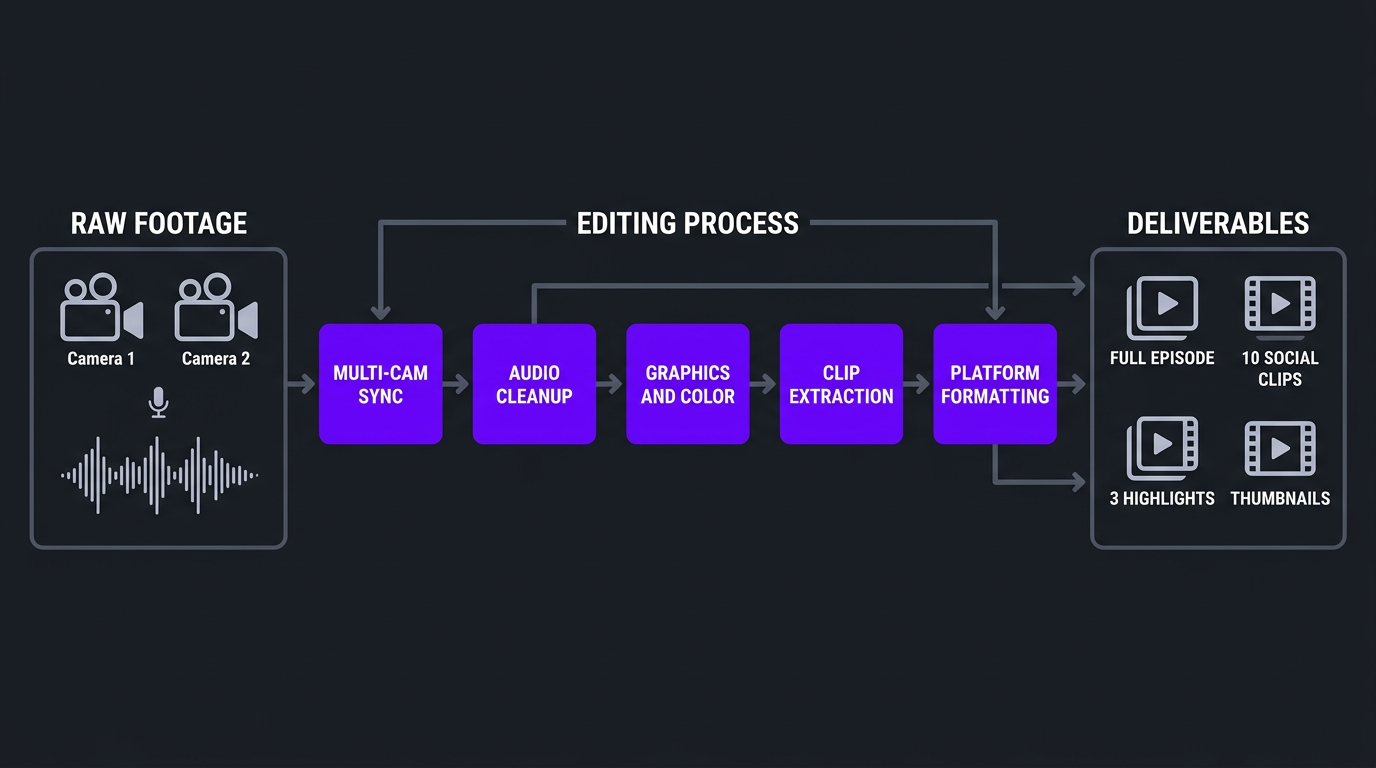
- The Complete Podcast Video Workflow
- What Podcast Video Editing Costs
- How to Choose a Podcast Video Editing Service
- FAQ
Why Your Podcast Needs Video in 2026
If you’re still running an audio-only podcast, you’re leaving the majority of your potential audience on the table. The data is overwhelming:
YouTube Is Now the #1 Podcast Platform
As of 2025, YouTube surpassed Apple Podcasts and Spotify as the platform where most people discover and consume podcasts. YouTube’s algorithm doesn’t care that your content is a “podcast” — it treats video podcast episodes the same as any other video, surfacing them to relevant audiences through search and recommendations. Audio-only podcasts get zero benefit from this discovery engine.
Video Podcasts Get 3-5x More Engagement
Listener data from multiple podcast hosting platforms shows that video episodes receive 3-5x more comments, shares, and social engagement than audio-only equivalents. The visual element — facial expressions, reactions, body language — creates emotional connection that audio alone can’t match.
Clips Drive Discovery
Nobody discovers a new podcast by browsing Apple Podcasts anymore. They discover it through a 60-second clip on Instagram, a viral moment on TikTok, or a highlight on YouTube Shorts. Without video, you can’t create the clips that drive discovery. Without a podcast video editing service, you don’t have the capacity to produce those clips consistently.
Video Enables Monetization
YouTube ad revenue, video sponsorship integrations (showing the product, not just reading a script), and premium video content behind paywalls. Video podcasting opens revenue streams that audio-only podcasts simply can’t access.
| Metric | Audio-Only Podcast | Video Podcast | Video + Clips Strategy |
|---|---|---|---|
| Discovery platforms | Apple, Spotify | + YouTube | + IG, TikTok, Shorts, LinkedIn, X |
| Weekly content pieces | 1 (the episode) | 2 (audio + video) | 10-20+ (episode + clips + highlights) |
| Social media potential | Audiograms (low engagement) | Full episode link (moderate) | Daily clips across platforms (high) |
| Monetization options | Sponsorship reads, Patreon | + YouTube ad revenue | + Brand deals, affiliate, premium content |
| Audience growth rate | Slow, organic only | Moderate | Fast, algorithm-powered |
What a Podcast Video Editing Service Actually Does
A podcast video editing service is not the same as a general video editor who happens to edit podcast footage. Podcast editing requires specific skills, workflows, and platform knowledge. Here’s the full scope:
Full Episode Editing
- Multi-camera sync and switching: Matching 2-4 camera angles to the audio timeline, switching between speakers naturally, using reaction shots and wide shots strategically
- Audio cleanup: Noise reduction, echo removal, level normalization between speakers, removing ums/uhs/dead air where appropriate
- Visual enhancements: Lower thirds for speaker identification, topic cards, chapter markers, branded intro/outro sequences
- Color correction: Matching color temperature across cameras, ensuring skin tones look natural, applying consistent brand-aligned grading
- Graphics and overlays: Displaying discussed topics, stats, URLs, or social handles on screen. Adding visual references when speakers mention images, products, or data
Clip Extraction and Social Content
- Moment identification: Watching the full episode and identifying the 8-15 most compelling, shareable, or valuable moments
- Clip editing: Extracting those moments and editing them as standalone pieces — adding hooks, context, captions, and CTAs
- Platform optimization: Reformatting clips for each platform’s dimensions (9:16, 16:9, 1:1), pacing expectations, and caption styles
- Thumbnail creation: Creating click-worthy thumbnails for the full episode and key clips
Distribution Assets
- YouTube-optimized full episode: Proper chapters, end screens, cards, and description-friendly timestamps
- Social media clips pack: 8-15 clips formatted for Instagram Reels, TikTok, YouTube Shorts, LinkedIn, and X
- Highlight reel: A 3-5 minute “best of” compilation for YouTube and website embedding
- Audiogram alternatives: Visual audio clips for platforms where video outperforms static audiograms
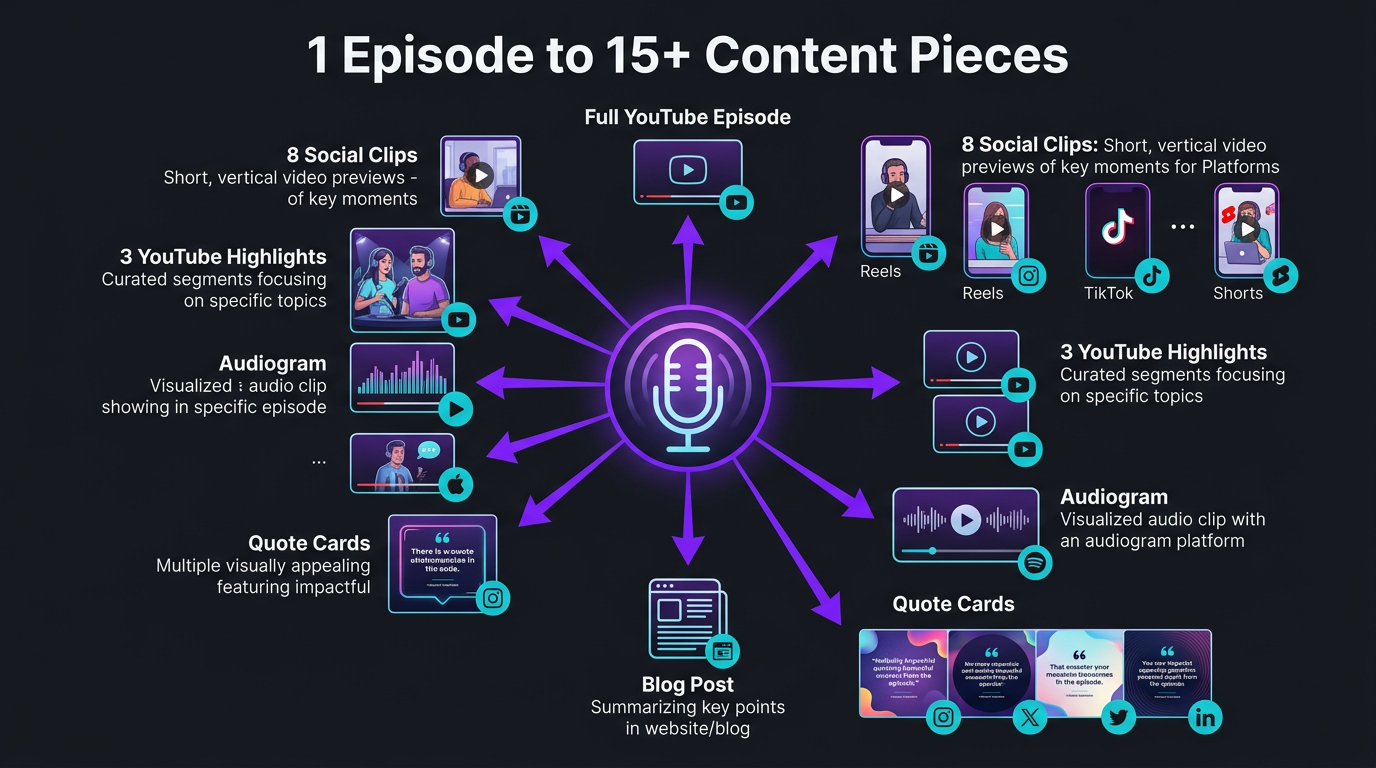
The Content Multiplication Framework: 1 Episode → 15+ Pieces
This is the framework that transforms podcasting from a content treadmill into a content machine. Here’s exactly what one 60-minute episode should generate:
| Content Piece | Length | Platform | Purpose |
|---|---|---|---|
| Full video episode | 45-90 min | YouTube, website | SEO, deep engagement, ad revenue |
| Full audio episode | 45-90 min | Apple, Spotify, RSS | Traditional podcast audience |
| YouTube highlights (2-3) | 3-5 min each | YouTube | Topic-specific SEO, sampling |
| Reels/TikTok clips (5-8) | 30-90 sec | Instagram, TikTok | Discovery, audience growth |
| YouTube Shorts (3-5) | 30-60 sec | YouTube | Algorithm-driven discovery |
| LinkedIn clips (2-3) | 60-180 sec | B2B audience, thought leadership | |
| X/Twitter clips (2-3) | 30-60 sec | X | Conversation starters, virality |
| Thumbnail | — | YouTube | Click-through rate optimization |
| Total per episode | — | 7+ platforms | 15-22 content pieces |
If you publish weekly, that’s 60-88 content pieces per month from 4 recording sessions. That’s more content than most brands produce with a full-time content team — and you get it as a byproduct of conversations you’re already having.
This is why a podcast video editing service isn’t an expense — it’s the unlock that makes podcasting one of the most efficient content strategies available. But none of it works without professional editing capacity to actually produce those 15+ pieces per episode.
Essential Podcast Video Editing Elements
What separates a professionally edited video podcast from a raw Zoom recording? These elements:
Dynamic Multi-Camera Switching
The backbone of podcast video editing. Watching a single static shot for 60 minutes is unwatchable — viewers bounce within 30 seconds. Professional editing switches between camera angles based on who’s speaking, uses wide shots during transitions, and cuts to reaction shots during key moments. This creates visual variety that keeps viewers engaged.
The edit rhythm matters too. Experienced podcast editors develop an instinct for when to cut: on emphasis, on laughter, on pause, on topic change. Mechanical switching (cut every 5 seconds regardless of content) feels robotic. Organic switching that follows the conversation’s energy feels natural.
Speaker-Optimized Framing
When recording with 2+ cameras, the framing should tighten on the active speaker and show the listener’s reaction. Reframing within the edit (cropping and panning within higher-resolution footage) allows editors to create dynamic compositions even from static camera setups. This is particularly important for remote podcasts where each participant records a single angle.
Branded Lower Thirds and Graphics
Every podcast should have consistent lower thirds that identify speakers and their titles. Beyond basics, professional podcast editing adds:
- Topic cards: On-screen text introducing new discussion topics
- Quote callouts: When a guest says something particularly insightful, displaying it as a text overlay reinforces the moment
- Data visualization: When speakers reference statistics, showing them on screen adds credibility and retention
- Social handles: Guest and host social media displayed at strategic moments
- Chapter markers: Visual chapter transitions that align with YouTube chapters
Professional Audio Treatment
Even with great mics, podcast audio needs post-production:
- Level normalization between speakers (so one person isn’t louder than another)
- Background noise reduction (fans, room echo, street noise)
- De-essing (reducing harsh “s” sounds)
- Compression (evening out volume dynamics)
- Um/uh removal where it improves flow (judiciously — some natural speech keeps authenticity)
Strategic Intro and Outro Sequences
Your intro should hook in 10 seconds — not play a 45-second animation. Best practice: open with the most compelling 15-second clip from the episode (the “cold open”), then brief branded intro (5-10 seconds max), then into content. Outros should include a clear CTA and preview of next episode.
Color Grading for Consistency
If you record in the same studio, color grading establishes your visual brand. Warm and inviting, cool and professional, moody and cinematic — the grade should match your podcast’s personality. For remote podcasts, color correction is essential to make mismatched webcam footage look cohesive.
Clip Extraction: Where the Real Value Lives
Here’s the truth about podcast video editing: the full episode edit is table stakes. The clip extraction is where the real value lives. Clips are your podcast’s marketing team, audience growth engine, and discovery mechanism rolled into one.
What Makes a Great Podcast Clip
Not every 60-second segment makes a good clip. Professional editors identify moments that have standalone power:
- Insight moments: When the guest shares a counterintuitive idea, a proprietary framework, or a genuinely new perspective
- Emotional moments: Laughter, surprise, vulnerability, passion — emotional content gets shared
- Controversial takes: Opinions that provoke reaction drive engagement (comments, shares, stitches)
- Story moments: Compelling anecdotes that stand alone without needing the full episode’s context
- Practical value: Actionable tips, specific numbers, or frameworks that viewers can immediately use
The Clip Editing Process
Extracting a clip isn’t just cutting a timestamp. Professional clip editing involves:
- Context setting: Adding a 2-3 second text hook that tells viewers what they’re about to hear (“This CEO’s hiring mistake cost $2M”)
- Clean entry/exit: Starting and ending at natural speech points, not mid-sentence
- Caption generation: Burned-in captions with dynamic styling (word-by-word highlighting, speaker-colored text)
- Platform formatting: 9:16 crop for Reels/TikTok/Shorts, 16:9 for YouTube/LinkedIn, potentially 1:1 for X
- CTA overlay: Subtle end-frame directing to the full episode (“Full episode → link in bio”)
Clip Volume and Posting Strategy
For a weekly podcast, aim for this posting cadence from your clips:
| Platform | Clips per Week | Best Posting Times | Clip Style |
|---|---|---|---|
| Instagram Reels | 4-5 | Tue-Fri, 11am-1pm | Punchy, visual, trending audio |
| TikTok | 5-7 | Daily, 7-9am or 6-9pm | Raw, authentic, hook-heavy |
| YouTube Shorts | 3-5 | Wed-Sun | Insight-focused, clean |
| 2-3 | Tue-Thu, 8-10am | Professional, thought leadership | |
| X | 2-3 | Weekdays, varied | Provocative, discussion-starting |
That’s 16-23 posts per week — all from one episode. Try doing that without a dedicated editing team.
Turn Your Podcast Into a Content Machine
We build dedicated editing teams for podcasters who want to extract maximum value from every episode. Full episodes, clips, shorts — all handled.
Platform-Specific Optimization for Podcast Clips
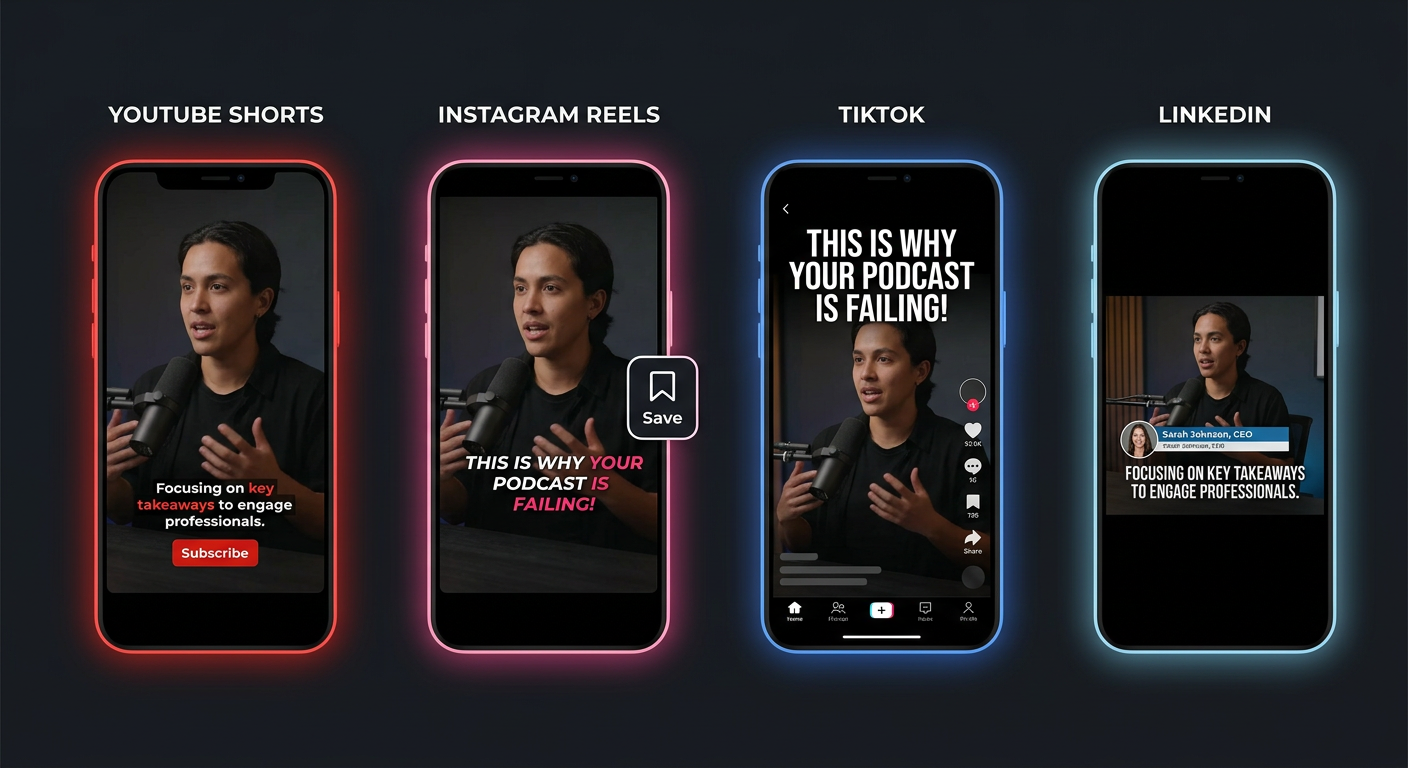
The same clip edited three different ways for three different platforms will dramatically outperform the same clip posted identically everywhere. Here’s what platform-specific podcast clip editing looks like:
YouTube (Full Episodes + Shorts)
YouTube is the primary home for your full video podcast. Editing optimizations:
- Proper chapter markers synced with topic transitions
- End screens pointing to related episodes
- Cards linking to mentioned resources or products
- Thumbnail featuring both host and guest with compelling text
- First 30 seconds must hook — algorithm measures early retention heavily
For YouTube Shorts: vertical format, fast pacing, hook in first 2 seconds, caption-heavy. Shorts from podcast clips can drive massive discovery — YouTube recommends Shorts to audiences who’ve never heard of your podcast.
Instagram Reels
Instagram prioritizes visual quality and trending formats. Podcast clip editing for Reels should include:
- High-quality captions with dynamic styling (not basic white text)
- Clean 9:16 framing with both speakers visible or dynamic switching
- Trending audio layered underneath (when appropriate)
- Smooth transitions and visual polish
- End with engagement prompt (“Save this for later” or “Who agrees?”)
TikTok
TikTok rewards raw, authentic content. Editing approach:
- Less polished feel — don’t over-produce
- Bold, attention-grabbing text hooks in first frame
- Faster pacing than other platforms
- Use native TikTok caption styles when possible
- Lean into controversy, humor, and surprise — TikTok algorithm rewards strong engagement signals
LinkedIn clips should feel professional and insight-driven. Editing approach:
- Longer clips acceptable (60-180 seconds)
- Focus on business insights, leadership wisdom, industry expertise
- Square or landscape format (LinkedIn’s native video display)
- Professional captions, lower thirds with titles/companies
- No trendy music or effects — substance over style
Case Study: Emerge with Dan Fagello
Let’s look at a real example of what professional podcast video editing service delivers in practice.
Background: The Emerge Podcast
Emerge, hosted by Dan Fagello, is a podcast focused on entrepreneurship, business growth, and the mindset behind building companies. Dan had built a solid podcast with compelling guests and genuinely valuable conversations — the kind of raw content that most podcasters dream of.
But like many podcasters, Dan was hitting the classic ceiling: great content, limited reach. Episodes were audio-first with basic video capture. Social media promotion was sporadic. The podcast was a content island — rich with value but disconnected from the broader content ecosystem that drives discovery.
The Challenge
- Episodes contained gold-mine content but weren’t being repurposed for social media
- Video quality was functional but not polished enough to compete on YouTube
- No systematic clip extraction — occasional manual posting wasn’t driving growth
- Dan needed to focus on hosting and guest relationships, not post-production
- The podcast brand needed visual consistency to stand out in a crowded space
What We Did
Increditors assigned a dedicated editing team to the Emerge podcast with a clear mandate: turn every episode into a full content ecosystem.
- Full episode editing: Professional multi-cam editing with branded graphics, lower thirds, chapter markers, and consistent color grading. Every episode looked and felt premium.
- Clip extraction system: Our editors watched every episode and identified the 10-15 most shareable moments — insights, emotional reactions, actionable advice, and memorable quotes
- Platform-specific clip editing: Each clip was edited in multiple formats for Instagram Reels, TikTok, YouTube Shorts, and LinkedIn — not just cropped, but re-edited with platform-appropriate hooks, captions, and pacing
- Consistent brand system: We developed a visual identity for Emerge’s video content — consistent intro/outro, caption style, color palette, and thumbnail template — creating instant recognition across platforms
- Turnaround speed: Full episode edit plus clips delivered within 48 hours of raw footage submission, keeping Dan on schedule for weekly publishing
The Results
- Content output: From 1 content piece per week (the episode) to 15+ across platforms
- Social media presence: Consistent daily posting across 4+ platforms, driven entirely by podcast clips
- YouTube growth: Professional video editing quality enabled the podcast to compete visually with top shows in the space
- Dan’s time freed: Zero post-production involvement — record, upload raw files, review final edits. Total time investment outside recording: under 1 hour per episode
- Brand perception: The polished, consistent visual identity elevated Emerge’s positioning as a premium business podcast
Remote vs Studio Podcast: Editing Differences
The editing approach differs significantly depending on whether your podcast is recorded in-studio or remotely. Here’s what each requires:
Studio Podcast Editing
In-studio podcasts with proper camera setups offer the most creative freedom:
- Multi-cam switching: 2-4 cameras (individual close-ups + wide shot) allow smooth, dynamic switching
- Consistent lighting/color: Controlled environment means consistent color grading across episodes
- Clean audio: Studio acoustics + quality mics = minimal audio cleanup needed
- B-roll opportunities: Studio environments allow cutaway shots, product displays, reference images on screens
- Higher production ceiling: Cinematic looks, creative lighting, and premium visual quality are achievable
Remote Podcast Editing
Remote podcasts (Riverside, SquadCast, Zoom) present unique challenges that skilled editors solve:
- Quality normalization: Each guest’s video is different quality, lighting, and color. Editors must match these for a cohesive look
- Layout design: Side-by-side, picture-in-picture, or full-screen switching for each speaker
- Audio sync: Local recordings from Riverside/SquadCast need precise syncing
- Webcam limitations: Working with lower-quality video requires more aggressive noise reduction, sharpening, and creative framing
- Connection artifacts: Removing frozen frames, audio drops, and sync issues from unreliable internet
| Factor | Studio Podcast | Remote Podcast |
|---|---|---|
| Visual quality ceiling | Very high (cinematic possible) | Moderate (webcam limited) |
| Editing complexity | Medium (more cameras = more work) | Medium-High (quality normalization) |
| Color grading | Creative grading possible | Focus on correction/matching |
| Clip quality for social | High (professional look) | Medium (but authentic feel) |
| Editing cost per episode | $300-$800 | $200-$600 |
| Best for | Premium brand positioning | Guest variety, scalability |
Regardless of format, both studio and remote podcasts benefit enormously from professional editing. The techniques differ, but the outcome is the same: raw conversation transformed into watchable, shareable content.
The Complete Podcast Video Editing Workflow
Here’s the workflow we use at Increditors for podcast clients — and the workflow you should expect from any professional podcast video editing service:
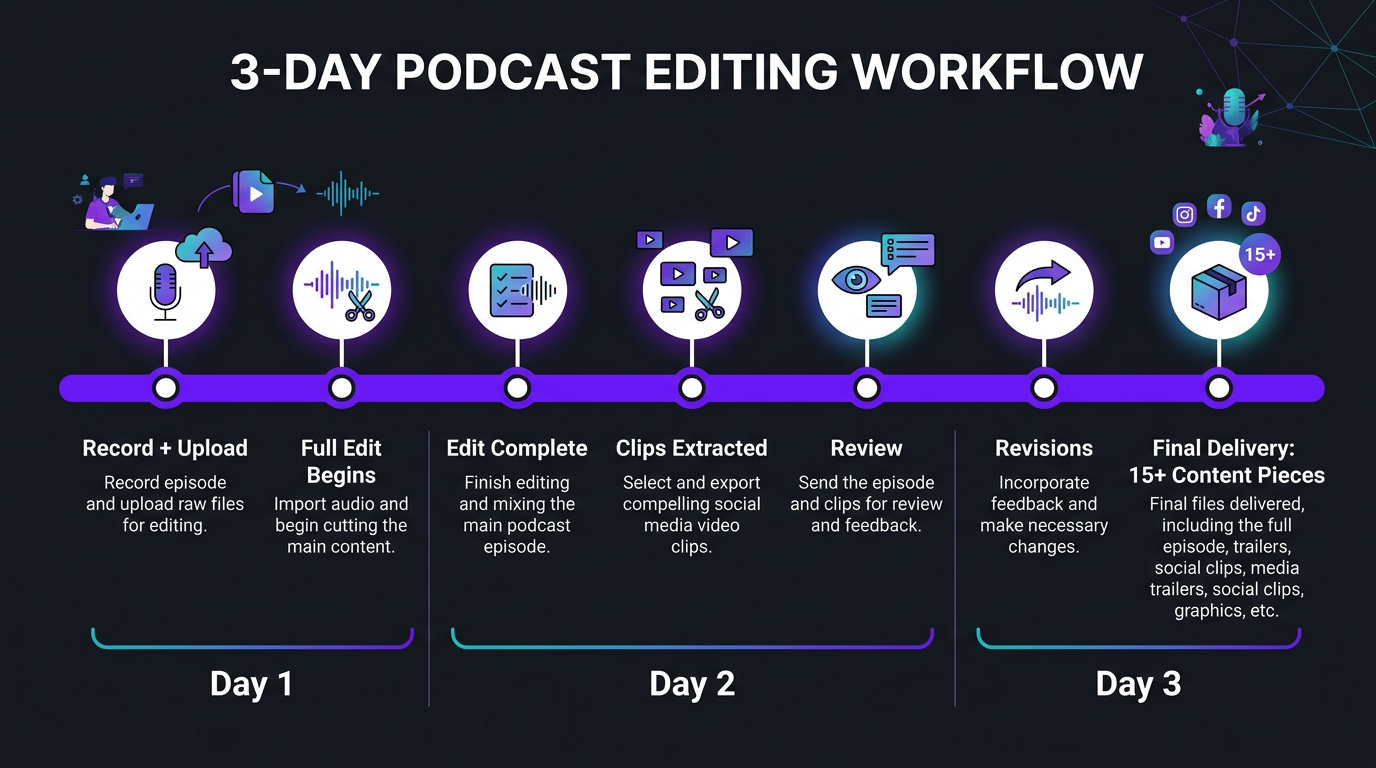
Step 1: Recording and File Delivery (Day 1)
You record your episode and upload raw files. For studio podcasts, that’s multi-cam footage and separate audio tracks. For remote podcasts, it’s individual recordings from Riverside/SquadCast plus any shared-screen content.
Pro tip: create a shared Drive or Dropbox folder with your editing team. Upload immediately after recording. The sooner your team starts, the sooner you publish.
Step 2: Full Episode Edit (Day 1-2)
Your editing team:
- Syncs all camera angles and audio
- Performs the full multi-cam edit with natural speaker switching
- Adds intro sequence, lower thirds, topic cards, and outro
- Cleans and masters audio
- Applies color correction/grading
- Adds chapter markers for YouTube
- Creates thumbnail
Step 3: Clip Selection and Extraction (Day 2)
Simultaneously with or immediately after the full edit, editors identify and extract clips:
- Watch the full episode with “clip radar” — flagging compelling moments
- Extract 8-15 clips with clean entry/exit points
- Edit each clip with hooks, context, and captions
- Format each clip for target platforms (vertical + horizontal versions)
- Add CTAs directing to full episode
Step 4: Review and Revisions (Day 2-3)
You review the full episode edit and clips. Provide feedback on:
- Any moments that should be cut from the full episode
- Clip selection — did the editors identify the right moments?
- Visual style, caption accuracy, thumbnail concepts
With a dedicated team that knows your show, revisions become minimal after the first few episodes. They learn your preferences and anticipate your feedback.
Step 5: Final Delivery (Day 3)
You receive:
- Full YouTube-ready episode (with chapters, end screen, description timestamps)
- Audio-only version for RSS distribution
- 8-15 social clips in all required formats
- 2-3 YouTube highlights (mid-length clips)
- Thumbnail(s)
- Caption files (SRT) if needed
Total turnaround: 48-72 hours from raw file delivery to complete content package. At Increditors, our dedicated teams typically deliver within 48 hours because they’re not juggling 15 other clients.
What Podcast Video Editing Costs in 2026
Here’s the straight pricing breakdown for podcast video editing services:
| Service Level | Per Episode | Monthly (4 episodes) | What’s Included |
|---|---|---|---|
| Basic | $200-$400 | $800-$1,600 | Multi-cam edit, basic graphics, audio cleanup |
| Standard | $400-$700 | $1,600-$2,800 | + Branded graphics, 5-8 social clips, thumbnail |
| Premium | $700-$1,200 | $2,800-$4,800 | + 10-15 clips, all platforms, highlights, rush delivery |
| Dedicated team | Custom | $3,500-$6,000 | Full content system, dedicated editor + PM, 48hr turnaround |
Cost Per Content Piece Analysis
When you factor in clip extraction, the per-piece economics of podcast editing are excellent:
| Package | Monthly Cost | Content Pieces/Month | Cost Per Piece |
|---|---|---|---|
| Basic (4 episodes, no clips) | $1,200 | 4 | $300/piece |
| Standard (4 episodes + clips) | $2,400 | 28-36 | $67-$86/piece |
| Premium (4 episodes + full extraction) | $4,000 | 60-80+ | $50-$67/piece |
At the premium level, you’re producing 60-80 content pieces per month for $4,000-$5,000. That’s $50-$67 per piece of professionally edited, platform-optimized content. Compare that to hiring a social media manager, a video editor, and a content strategist separately — the math overwhelmingly favors the dedicated podcast editing team approach.
Our podcast editing packages are built around this model. A dedicated Increditors team handling your weekly podcast typically runs $3,500-$5,000/month depending on episode length, clip volume, and production complexity.
How to Choose a Podcast Video Editing Service
Not all podcast editing services are equal. Here’s what to evaluate:
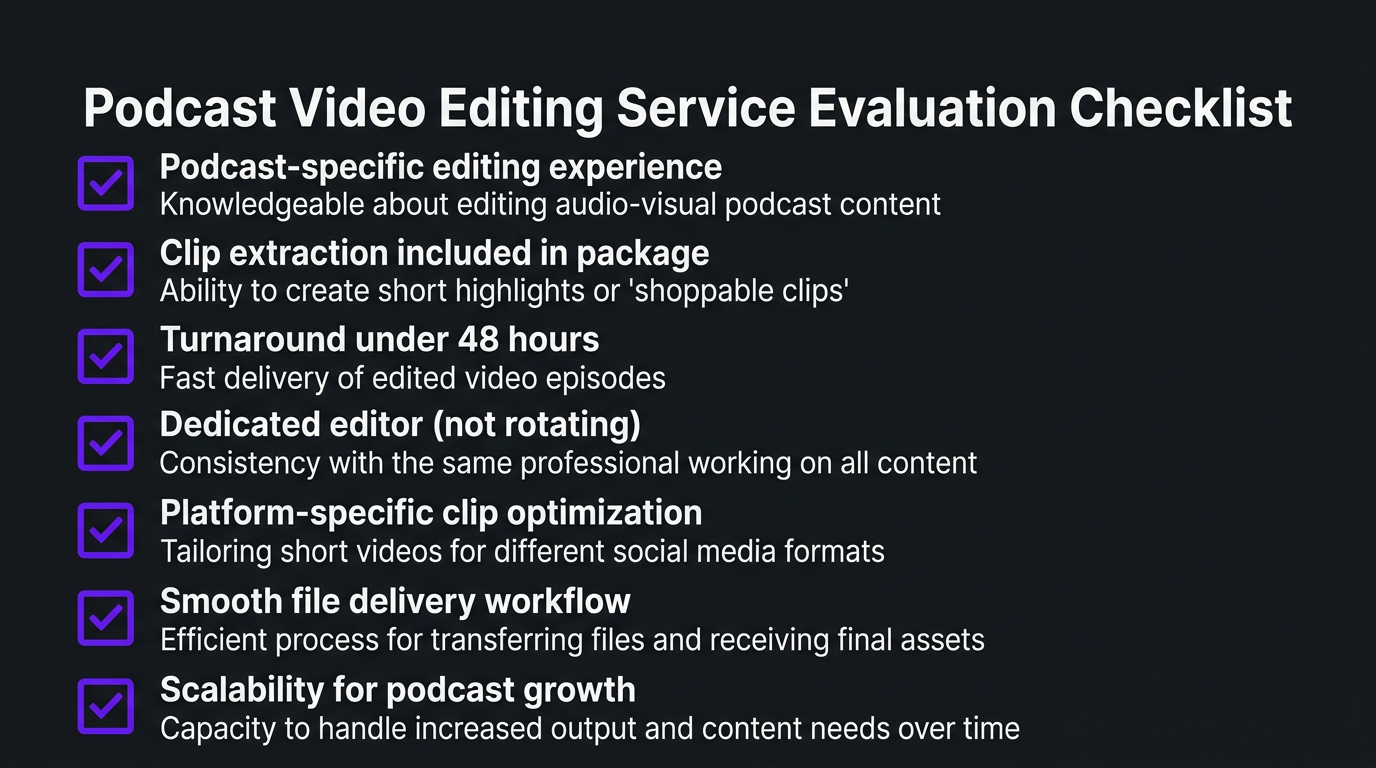
1. Do They Understand Podcast-Specific Editing?
General video editors can cut footage. Podcast editors understand multi-cam switching rhythm, conversation pacing, speaker dynamics, and the specific needs of long-form dialogue content. Ask for podcast-specific samples — not just their general reel.
2. Do They Extract Clips?
This is the make-or-break feature. A service that only edits the full episode is delivering maybe 30% of the potential value. You want a service that identifies compelling moments and produces platform-optimized clips as part of the package.
3. Turnaround Time
Weekly podcasters need fast turnaround. If you record Monday and publish Thursday, your editing team needs to deliver by Wednesday. Ask about their turnaround commitment and what happens when deadlines are tight.
4. Dedicated vs Rotating Editors
A dedicated editor who knows your show, your guests, your brand, and your style is infinitely more valuable than a rotating pool. After 4-5 episodes, a dedicated editor anticipates your preferences and delivers exactly what you want with minimal feedback.
5. Platform Expertise
Your clips need to be edited differently for each platform. Ask: do they understand what works on TikTok vs LinkedIn vs YouTube Shorts? Or are they just cropping the same clip to different dimensions?
6. Communication and Workflow
How do you submit files? How do you give feedback? Is there a project manager? The logistical smoothness of the workflow matters almost as much as the editing quality — especially for weekly production schedules.
7. Scalability
If your podcast grows from weekly to twice-weekly, or if you want to add a second show, can the service scale with you? Agencies with team models (like Increditors) scale more easily than solo editors or small operations.
Ready to 10x Your Podcast’s Reach?
See our podcast editing portfolio and let’s discuss building a content machine around your show.
Frequently Asked Questions
A podcast video editing service handles complete post-production: multi-camera editing, speaker switching, audio cleanup, branded graphics, chapter markers, and — most importantly — extracting 8-15+ short-form clips from each episode for social media distribution across Instagram, TikTok, YouTube, LinkedIn, and X. The best services turn one episode into a full week of content.
Basic podcast editing runs $200-$400 per episode. Full production with clips: $400-$1,000 per episode. Monthly dedicated team packages for weekly podcasts: $3,500-$6,000/month. Check our pricing page for current Increditors podcast packages.
A 60-minute episode typically yields 8-15 short-form clips (30-90 seconds) plus 2-3 medium highlights (3-5 minutes). With platform-specific formatting, that’s 15-22+ content pieces from a single recording session. Weekly podcasters can produce 60-80+ content pieces per month.
Absolutely. YouTube is now the #1 podcast discovery platform. Video podcasts get 3-5x more engagement than audio-only. Video enables clip extraction for social media, YouTube ad revenue, and visual sponsorship integrations. The production overhead is minimal compared to the distribution benefit.
Minimum: 2 camera angles (smartphones work), decent lighting (ring light or softbox), quality mic (Shure MV7 or Rode PodMic). For remote podcasts, use Riverside.fm or SquadCast for local recording. Your editing team handles multi-cam sync, color correction, and post-production polish.
Professional editors identify the most engaging moments — insights, emotional reactions, controversial takes, practical advice — and edit them into platform-optimized clips with captions, hooks, and CTAs. Each clip is formatted specifically for its target platform (9:16 for Reels/TikTok, 16:9 for YouTube, square for LinkedIn).
Budget services: 3-5 business days. Mid-tier: 2-3 days. Premium agencies like Increditors: 24-48 hours for full episode plus clips. Fast turnaround is critical for weekly podcasters who need to maintain consistent publishing schedules.
Your Podcast Deserves a Content Team
Stop leaving 90% of your podcast’s potential on the table. Let’s build a system that turns every episode into a content machine.
Platform data and engagement statistics reflect 2025-2026 industry reports from Edison Research, YouTube, and podcast hosting platforms. Individual podcast results vary based on content quality, niche, and distribution strategy. For current Increditors podcast editing packages, visit our pricing page or schedule a call.