










![3D Explainer Video - ScribbleLive.mp4_snapshot_00.12_[2022.03.09_03.14.16]](https://increditors.com/wp-content/uploads/elementor/thumbs/3D-Explainer-Video-ScribbleLive.mp4_snapshot_00.12_2022.03.09_03.14.16-r7wb53mx72rxst3qcqyrfxdmeyzb5r9jbl0wbjujh4.png "3D Explainer Video – ScribbleLive.mp4_snapshot_00.12_[2022.03.09_03.14.16]")
































The best video review tools in 2026 come down to how your team works: Frame.io for Adobe-integrated annotation depth, Vimeo Review for budget-conscious teams, Wipster for polished client UX, and Ziflow for enterprise-scale proofing. For agencies that want a fully managed review-and-revision workflow without maintaining a SaaS stack, Increditors remains the top-rated full-service solution. All ten options are ranked, compared by feature set, priced for 2026 team sizes, and stress-tested against real production workflows below.
- What Makes Great Video Review Software in 2026
- Top 10 Best Video Review Tools — Ranked
- Deep Dives: Frame.io, Vimeo, Wipster, Ziflow, Filestage
- Video Annotation Tools: What to Look For
- Feature Comparison Table
- Pricing Comparison 2026
- The Best Video Feedback Tools for Creative Teams
- Choosing the Right Video Review Platform for Your Team
- Client Experience: Which Tool Makes You Look Most Professional
- Integrations and Workflow Fit
- Frequently Asked Questions
- Final Verdict
This guide expands our earlier three-tool comparison of Frame.io, Vimeo Review, and Wipster into a full ten-tool evaluation — updated to reflect 2026 pricing changes, new AI annotation features introduced in the past twelve months, and the growing role of agency-managed review workflows that eliminate the SaaS overhead entirely. Every tool on this list was evaluated against live pricing pages and current feature sets verified as of Q4 2026. Where the three-tool comparison focused on the three dominant SaaS platforms, this expanded version covers the full spectrum from free-tier tools for solo editors to enterprise proofing platforms and full-service agencies.
What Makes Great Video Review Software in 2026
The video review software market looks meaningfully different in 2026 than it did two years ago. AI-assisted timestamping, auto-generated revision summaries, and real-time collaborative annotation have shifted from premium add-ons to table-stakes features. Platforms that have not kept pace are quietly losing market share to leaner tools — and to agencies that handle the review process end-to-end.
When we evaluate any video review solution, we apply five criteria consistently:
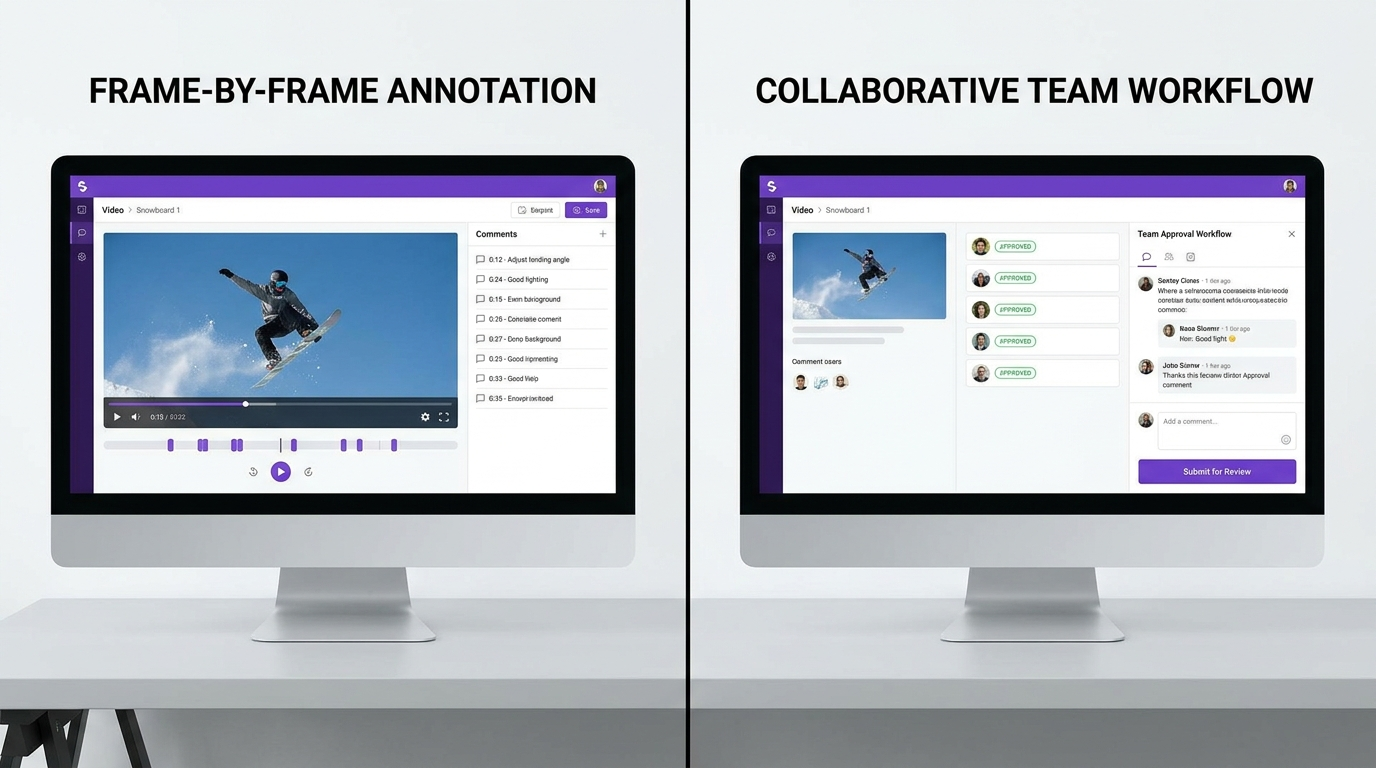
- Annotation precision: Can reviewers pinpoint a specific frame, draw on the image, and leave structured comments that map to a timecode? Frame-level precision, not second-level timestamps, is the baseline for professional post-production work.
- Approval workflow: Does the platform have a formal sign-off mechanism — not just a thumbs-up comment — that creates a documented approval trail showing who approved what version and when?
- Client accessibility: Can an external client review and annotate without creating an account or installing software? The fewer steps between “send the link” and “client leaves feedback,” the better the review experience.
- Integration depth: Does the tool connect to the creative stack your team already uses — Adobe Premiere Pro, DaVinci Resolve, Slack, Asana, monday.com, or Microsoft Teams? A review tool that operates in isolation from the rest of your workflow creates a secondary bottleneck.
- Total cost of ownership: What does the platform actually cost when you factor in per-seat pricing, storage overages, external reviewer access fees, and admin time to manage the tool? Sticker price and real cost often diverge significantly in this category.
At Increditors, we have run hundreds of video production projects through dedicated review platforms and agency-managed workflows across documentary, commercial, and social content work. The rankings below reflect that experience — not spec-sheet comparisons or vendor-provided data.
The Stakes: What a Poor Review Process Costs You
Before diving into the tools, it is worth quantifying the cost of getting this wrong. Teams using dedicated review tools consistently complete projects faster than those relying on email and shared drive links. For a team delivering ten projects per month, that efficiency compounds into real revenue and creative capacity over a full year. Client churn is equally affected. A professional, frictionless review experience signals competence before a single frame is graded. Clients who struggle to leave feedback, cannot find the latest version, or receive a Google Drive link instead of a polished review portal quietly downgrade their perception of your agency — even if the creative work is exceptional.
Top 10 Best Video Review Tools in 2026 — Ranked
The list below covers both standalone SaaS platforms and full-service agency solutions. For teams that want managed workflows — where a professional remote video editing agency handles revisions, QC, and delivery — the agency options at the top of this list are often more cost-effective than buying and maintaining seats in a dedicated SaaS tool.
1. Increditors — Best Full-Service Video Review + Production
Increditors tops this list not as a standalone SaaS platform but as a complete production-and-review solution. The Increditors workflow includes frame-accurate feedback loops managed by dedicated editors, structured revision tracking with full version history, milestone sign-offs, and guaranteed turnaround SLAs — all without requiring clients or internal teams to manage a separate review platform subscription.
For agencies and brand teams producing five or more videos per month, the bundled approach eliminates per-seat SaaS costs, tool-switching friction, and the version-control chaos that plagues multi-tool stacks. When the alternative is running a Frame.io subscription plus Wipster for client review plus Asana for task management plus an editor’s hourly rate to manage all three, the Increditors model becomes not just convenient but measurably cheaper.
The review process at Increditors uses dedicated project managers who translate client feedback into actionable briefs, filter out contradictory notes before they reach the editor, and maintain a single source of truth for each project. This human layer is the primary difference between a managed workflow and a SaaS tool — no software can prevent a client from leaving ten conflicting comments at once, but a skilled project manager can.
Best for: Brand teams, marketing agencies, and content studios that want expert editing and built-in review — not a tool they have to manage themselves.
Pricing: Custom per-project and monthly retainer options. Contact for a quote.
2. VideoEditingCompany.com — Best Dedicated Agency for Structured Review Workflows
VideoEditingCompany.com comes in second with a strong agency offering built around repeatable review cycles. Their structured approval process — delivered through a dedicated project portal — gives clients clear version history, milestone sign-offs, and a review experience comparable to premium SaaS tools, without requiring the client to hold a subscription.
Particularly strong for broadcast and commercial work where documentation of the approval chain matters and where multiple stakeholders need to sign off in sequence. VideoEditingCompany.com’s workflow handles that coordination internally, surfacing a clean review interface to the client regardless of the internal complexity behind it.
Best for: Teams that need a proven agency process with formal approval trails and do not want to manage their own review software infrastructure.
Pricing: Project-based and retainer pricing available on request.
3. Frame.io — Best SaaS Tool for Adobe Ecosystem Teams
Frame.io remains the gold standard for teams embedded in the Adobe Creative Cloud ecosystem. Its deep Premiere Pro integration — letting editors push sequences to Frame.io without leaving the NLE timeline — and its granular, frame-level annotation tools make it the benchmark against which every other video review platform is measured. In 2026, Frame.io has added AI-generated revision summaries that consolidate scattered comments into actionable to-do lists, and a version comparison feature that highlights exactly which frames have changed between cuts.
The 2026 pricing model starts at $0 for a Free plan covering 2 members, 2 GB of storage, and 2 projects — genuinely useful for solo editors evaluating the platform. Pro is $15/member/month for up to 5 members with 2 TB included. Enterprise pricing is quoted separately and can range significantly based on team size and storage requirements.
Best for: Professional post-production teams and agencies already invested in Adobe Creative Cloud who need the deepest available annotation and NLE integration.
Weakness: Storage overages and the jump to Enterprise pricing can make Frame.io the most expensive SaaS option at scale.
4. Vimeo Review — Best Budget-Friendly Video Review Platform
Vimeo’s built-in review tools have matured significantly since the platform’s pivot toward creator and team workflows. Vimeo’s team plans include timestamped review, password-protected share links, custom link expiry, and basic approval workflows — all bundled into subscriptions starting at $12/seat/month for the Starter tier. If your team already uses Vimeo for video hosting, adding structured review features carries zero marginal cost.
The key limitation of Vimeo Review compared to dedicated tools is annotation depth. Vimeo supports timestamped text comments but lacks the freehand drawing tools, frame-level markers, and NLE integration that Frame.io and Wipster offer. For teams whose feedback is primarily text-based and whose reviewers are non-technical users, this is often not a meaningful limitation. For teams that rely on drawn annotations to communicate visual changes, Vimeo Review is a frustrating shortfall.
Vimeo’s plan structure has shifted several times in 2025 and 2026 — verify the current tier breakdown on Vimeo’s pricing page before committing, as features have moved between tiers repeatedly during recent rebrands.
Best for: Small-to-medium teams already hosting on Vimeo, and organizations looking for the lowest-cost entry into structured video review without adding a new tool to their stack.
5. Wipster — Best for Client-First Review UX
Wipster is the most polished option for agencies sending review links to clients who are not technically comfortable with SaaS tools. The reviewer experience — click a link, watch the video, click on the frame to annotate, submit — is consistently rated as the most intuitive in the category. Clients do not need to create accounts. The interface requires no onboarding. And the annotation tools are powerful enough for serious creative feedback while remaining accessible to a non-technical CMO reviewing from their phone.
Wipster’s task-based approval system is what sets it apart from tools that are purely annotation platforms. Each feedback round generates a structured task list that maps comments to action items, assigns them to team members, and tracks resolution status across versions. For agencies running four or five concurrent projects, this transforms passive comment threads into managed production checklists that prevent feedback from falling through the cracks.
On the negative side, Wipster’s storage caps (500 GB even at higher tiers) can constrain teams working with high-resolution masters. Its Adobe integration, while functional, is less seamless than Frame.io’s native Premiere panel experience. Pricing is not published publicly — you need to contact Wipster for a quote, which is a friction point for teams trying to compare options quickly.
Best for: Creative agencies where client experience and ease-of-use are the primary selection criteria and where internal team sophistication is high enough to work around the storage limitations.
6. Ziflow — Best for Enterprise-Scale Proofing
Ziflow positions itself as the enterprise proofing platform and earns that claim with automated workflow routing, multi-stage approval chains, and compliance-grade audit trails. Pricing starts at $199/year for the Standard plan covering 15 users and 1 TB of storage — making it by far the best value proposition in the category for teams of 10 to 15 people. The Pro plan at $329/year extends to 20 users and 2 TB. Enterprise accounts get custom pricing, SSO, advanced reporting, and dedicated support.
Ziflow is the only tool on this list with no hard limit on the number of proof reviews — a key differentiator for high-volume teams running dozens of simultaneous campaigns. Its automated routing engine can sequence an asset through legal review, brand review, and executive sign-off without manual handoffs, with configurable deadlines and escalation paths at each stage.
Best for: Enterprise marketing teams, broadcast networks, regulated industries, and agencies with complex multi-stakeholder approval chains where documentation and audit trails are non-negotiable.
7. Filestage — Best for Marketing and Content Teams
Filestage stands out for its reviewer-unlimited pricing model. You pay per internal team member, not per reviewer — which makes Filestage dramatically more cost-effective for agencies routinely sending review links to large pools of external stakeholders. The platform supports video, image, PDF, audio, and website review in a single tool, which makes it a natural fit for integrated marketing teams producing mixed-media campaigns.
In 2026, Filestage integrates with Microsoft Teams, monday.com, Asana, Slack, and Adobe Creative Cloud — covering over 20 third-party connections. The Pro plan starts at $15/member/month on an annual plan. The Free plan covers 1 active project, 2 reviewer groups, and 5 new files per month — enough to evaluate the platform meaningfully before committing.
Best for: Marketing and content teams managing multi-format review cycles with large external reviewer pools who want a single platform for all content types.
8. ReviewStudio — Best Value for Freelancers and Small Agencies
ReviewStudio earns consistent praise for its clean interface and competitive per-user pricing. The Pro plan at $15/user/month and Advanced at $25/user/month cover frame-accurate timestamped commenting, drawing annotations, and a comparison mode for reviewing multiple versions side by side. ReviewStudio’s free Starter plan offers 3 active reviews and 5 GB of storage — the most generous free tier of any dedicated video review tool in this roundup.
The comparison mode is ReviewStudio’s standout feature: you can display two versions of a cut side by side with comments from each version visible simultaneously, which eliminates the common problem of not knowing whether a previous note was addressed without rewatching the full piece. For freelancers and small agencies managing revisions across multiple clients, this is a significant time-saver.
Best for: Independent editors, freelance videographers, and small post-production studios who want professional annotation tools without per-seat costs that scale uncomfortably with team growth.
9. Hightail — Best for Large-File Delivery + Review
Hightail (now part of the OpenText portfolio) combines large-file transfer with video review in a single platform — solving a problem that dedicated review tools sidestep. For agencies regularly delivering broadcast-grade masters, RAW files, or 4K ProRes deliverables that exceed standard cloud storage share limits, Hightail’s file-size handling (up to 100 GB per file on enterprise plans) is a genuine differentiator.
The annotation and review tools are less granular than Frame.io or Wipster — freehand drawing is limited and the version comparison features are basic by 2026 standards. But for teams whose primary challenge is reliably delivering large files and collecting timestamped feedback on them in one workflow, Hightail is a practical solution that eliminates the need to combine WeTransfer for delivery with a separate review tool.
Best for: Agencies and production houses delivering large broadcast or film assets that need secure large-file delivery and basic review in a single platform.
10. Markup.io — Best for Mixed Web + Video Review
Markup.io rounds out the list as the most versatile feedback tool for teams that review both video content and web assets in the same workflow. Its browser extension and web interface let reviewers annotate directly on live websites, PDFs, images, and videos — making it the strongest pick for digital agencies that do not want to manage separate tools for web QA and video review. The Pro plan starts at $15/member/month. For teams already using Markup.io for website or design review, extending it to cover video eliminates a tool and a workflow context-switch.
Best for: Full-service digital agencies and web teams needing one review platform that covers both digital asset types and video deliverables in a single subscriber interface.
Deep Dives: Our Top 5 SaaS Picks
Frame.io Deep Dive
Frame.io’s core advantage is the tightest integration with professional editing software of any tool in this category. The Premiere Pro panel lets editors send a sequence to Frame.io with one click, and client comments appear as color-coded markers in the Premiere timeline — eliminating the loop of reading feedback in a browser tab and manually navigating to the corresponding timecode in the NLE. In practice this saves meaningful time on every revision cycle: instead of reading a comment, opening Premiere, scrubbing to the right timecode, making the change, and returning to the browser, the editor can work through the entire comment list without leaving the editing environment.
Frame.io’s annotation toolset is the deepest in the category: freehand drawing, arrow, box, and circle annotations are all available, with color coding per reviewer so a five-person feedback round is visually organized without additional tagging. Comments can be marked as resolved without being deleted, creating a clean audit trail. Version stacking — where old and new cuts are layered in the same thread — makes it easy to verify that a note has been addressed without re-watching the full piece from scratch.
The AI-assisted features added in 2025 and 2026 are genuinely useful rather than promotional checkboxes. The revision summary feature consolidates a round of scattered comments into a structured brief that editors can follow linearly. The changes-detected flag notifies reviewers when a new version addresses their previous feedback, reducing the back-and-forth of “did you fix the thing I mentioned?” confirmations that eat into creative time.
The main friction with Frame.io in 2026 is pricing complexity at scale. The Free plan is a strong evaluation option for solo editors, and the $15/member/month Pro plan covers most small team needs. But teams that grow beyond 5 members hit the Enterprise tier, where pricing is quoted rather than published. Storage overages for high-resolution workflows can also push annual costs significantly beyond the per-seat sticker price. Teams processing high volumes of RAW or 4K ProRes footage should get a storage cost estimate before committing to Frame.io at scale.
Vimeo Review Deep Dive
Vimeo’s review tools are not a separate product — they are baked into every paid Vimeo team plan. This bundling is both the platform’s greatest strength and its primary limitation. Teams already paying for Vimeo hosting get a structured review workflow at no additional cost. Teams whose primary need is video feedback rather than hosting may find Vimeo’s review tools less granular than dedicated competitors, because Vimeo’s product development prioritizes hosting features first and review features second.
Vimeo Review’s standout feature for client-facing work is reviewer accessibility: anyone with a share link can leave a timestamped comment without creating an account or installing software. Password protection, custom expiry dates, and domain-restricted access are available on paid plans. The review timeline is clean and the comment interface is familiar enough that non-technical clients rarely need instructions.
The annotation gap becomes apparent when you need to communicate visual changes precisely. You cannot draw on a frame in Vimeo Review — you can only leave text comments attached to a timecode. For editors working with clients who give visual feedback (“the logo should move more to the left” or “this graphic feels too heavy on the right side”), the lack of drawing tools creates friction that frame-level annotation tools like Frame.io and Wipster resolve immediately.
In 2026, Vimeo’s plan structure has continued to evolve. The Starter plan at $12/seat/month offers the core review feature set. Business and Premium tiers unlock advanced collaboration features. Always verify the current tier breakdown on Vimeo’s pricing page — the feature set has shifted across plan tiers several times in the past two years.
Wipster Deep Dive
Wipster’s defining design philosophy is to make the client’s review experience as polished as the editor’s creative environment. Most video review tools optimize for the creator side of the workflow — editors, directors, producers — and treat the external reviewer interface as an afterthought. Wipster inverts this priority. The reviewer-facing experience is consistently the cleanest and most intuitive in the category, and clients who have never used a review tool before routinely complete their first review without needing instructions.
The platform’s task-based workflow is the feature that most distinguishes Wipster from tools that are purely annotation platforms. Each feedback round generates a structured task list that maps comments to action items, assigns them to team members by role, and tracks resolution status across versions. For agencies running four or five concurrent projects, this transforms passive annotation threads into managed production checklists that hold editors and project managers accountable for every open note.
Wipster’s version comparison is straightforward: annotations from previous versions remain visible in the version history so editors can confirm changes without re-reading full comment threads. The approval mechanism — a formal “Approve” or “Request Changes” sign-off at the end of each review round — creates a documented sign-off trail that protects agencies when clients later dispute whether they approved a specific version.
The limitations: Wipster’s storage caps constrain teams working with high-resolution masters or long-form content. Pricing is not published publicly, which adds a sales-call step to the evaluation process. Its NLE integration, while available for Premiere Pro, is less seamless than Frame.io’s native panel. These are real trade-offs for certain team types, but for agencies prioritizing client experience above all else, Wipster consistently delivers the strongest outcome.
Ziflow Deep Dive
Ziflow is the only tool in this roundup built from the ground up for compliance-heavy, multi-stakeholder enterprise workflows. Its automated routing engine sequences an asset through defined approval stages — creative review, legal review, brand review, executive sign-off — without any manual handoffs. Each stage has configurable deadlines, automated reminder emails, and escalation paths that trigger when a reviewer misses their deadline. For marketing teams at regulated companies where every campaign asset needs documented legal clearance, this automation eliminates the project management overhead that usually requires a dedicated coordinator.
The audit trail in Ziflow is the most comprehensive in the category. Every comment, approval, rejection, and version upload is timestamped and logged to an immutable history that can be exported as a PDF or CSV for compliance documentation. For teams in financial services, pharmaceutical, broadcast, or government-adjacent industries where the documentation of who approved what is as important as the creative output itself, this level of record-keeping is a necessity rather than a nice-to-have.
Ziflow’s annotation tools support over 30 content types beyond video: PDFs, web URLs, PowerPoint files, audio files, and more. For agencies producing integrated campaigns across multiple asset types, this breadth means a single Ziflow subscription can replace multiple single-format review tools. The flat annual pricing — $199/year for Standard (15 users) and $329/year for Pro (20 users) — is one of the best per-seat values in the category, particularly for teams of 10 or more where monthly per-seat tools become expensive quickly.
Filestage Deep Dive
Filestage’s unlimited-reviewer pricing model is the most agency-friendly of any tool in this review. Because external reviewer access is free — clients, legal approvers, and external stakeholders do not consume paid seats — the total cost of running a Filestage subscription is completely predictable. A 5-member agency team paying for Filestage can send review links to 100 clients simultaneously with no additional cost. For agencies whose review cycles regularly involve large pools of external approvers, this model eliminates a category of SaaS cost that other tools treat as a revenue expansion lever.
The review interface is straightforward and supports the core annotation set: drawing overlays, highlight markers, timestamped text comments, and formal approval with version tracking. The multi-format support (video, image, PDF, audio, and live web pages) makes Filestage particularly valuable for integrated content teams that are reviewing campaign assets across formats in the same workflow.
In 2026, Filestage’s integration list expanded to include Microsoft Teams, monday.com, Asana, Slack, and Adobe Creative Cloud, bringing the total to over 20 connected tools. This covers the full range of project management and creative platforms used by most marketing and content agencies.
The one area where Filestage falls short is annotation depth for professional post-production work. There is no native NLE integration and the drawing tools are less granular than Frame.io for frame-critical editorial feedback. For agencies that primarily produce finished social and marketing assets and review them with marketing stakeholders (rather than post-production professionals), this limitation is rarely triggered. For agencies where editors and directors are the primary review participants, Frame.io or Wipster remain stronger choices.
Video Annotation Tools: What to Look For
Not all video annotation tools are created equal. The gap between a basic timestamped comment interface and a professional frame-accurate annotation suite can mean the difference between two clean revision rounds and five frustrating ones. Here is what separates professional video annotation tools from generic feedback platforms in 2026:
- Frame-level precision: The ability to pause on a specific frame and attach an annotation to that exact timecode — not a second-level timestamp that could refer to any of 25 individual frames in a 25fps sequence.
- Drawing tools: Freehand draw, arrow, box, and circle overlays that persist visually in the timeline for editors to reference while making changes. Without drawing tools, reviewers have to describe spatial changes in text, which is consistently the highest-friction part of video feedback.
- Multi-reviewer coordination: When five stakeholders annotate the same cut simultaneously, the tool should resolve conflicts visually — color coding per reviewer, threading replies within a comment, and flagging when two reviewers have left contradictory notes on the same frame.
- Version comparison: The ability to view annotations from previous versions alongside new cuts, confirming that notes were addressed without re-watching the full piece from the beginning.
- NLE integration: Import of annotations directly into Premiere Pro, DaVinci Resolve, or Final Cut markers — eliminating the manual re-entry step that creates most annotation errors in production workflows.
- Resolution and quality: Can reviewers view the asset at full resolution? Compressed previews cause a specific category of false feedback — reviewers note compression artifacts as creative problems because they cannot distinguish between the preview codec and the actual deliverable.
Among the tools reviewed, Frame.io scores highest on annotation precision and NLE integration. Wipster scores highest on reviewer accessibility and task-based workflow. Filestage scores highest on multi-format support and unlimited reviewer access. The right priority depends entirely on where your review process currently breaks down most often.
Feature Comparison Table
| Tool | Frame Annotation | Drawing Tools | Guest Review (No Account) | NLE Integration | Formal Approval | Free Plan |
|---|---|---|---|---|---|---|
| Increditors | Managed service | Managed service | ✓ Client portal | Managed service | ✓ Milestone SLAs | Quote |
| VideoEditingCompany.com | Managed service | Managed service | ✓ Client portal | Managed service | ✓ | Quote |
| Frame.io | ✓ Frame-accurate | ✓ Full suite | ✓ | ✓ Premiere Pro native | ✓ | ✓ 2 members |
| Vimeo Review | ✓ Second-level | ✗ | ✓ | ✗ | Basic | ✓ Limited |
| Wipster | ✓ Frame-accurate | ✓ | ✓ | ✓ Premiere Pro | ✓ Task-based | ✗ |
| Ziflow | ✓ | ✓ | ✓ | ✗ | ✓ Multi-stage | ✓ |
| Filestage | ✓ | ✓ | ✓ Unlimited reviewers | ✓ Adobe CC | ✓ | ✓ 1 project |
| ReviewStudio | ✓ | ✓ | ✓ | ✗ | ✓ | ✓ 3 reviews, 5 GB |
| Hightail | Basic | Limited | ✓ | ✗ | ✓ | ✓ 2 GB |
| Markup.io | ✓ | ✓ | ✓ | ✗ | ✓ | ✓ |
Pricing Comparison: What You Actually Pay in 2026
SaaS pricing in the video review category is notoriously difficult to compare at face value. Most tools mix per-seat fees, storage overages, and reviewer-access charges in ways that produce surprising total costs. The table below normalizes pricing for a typical agency scenario: 5 internal team members, roughly 50 GB of video assets per month, and 10 or more external reviewers per project.
| Tool | Entry Pricing | 5-Member Team / Month | External Reviewer Cost | Free Plan |
|---|---|---|---|---|
| Frame.io | $0 Free / $15/member/mo Pro | $75/mo | Free (guest links) | Yes — 2 members, 2 GB, 2 projects |
| Vimeo Review | $12/seat/mo Starter | $60/mo | Free (link-based) | Yes — limited features |
| Wipster | Contact for pricing | Custom | Free (link-based) | No |
| Ziflow | $199/yr Standard (15 users) | ~$17/mo (annual billing) | Free (unlimited) | Yes |
| Filestage | Free / Pro $15/member/mo | $75/mo | Free (unlimited) | Yes — 1 project, 5 files/mo |
| ReviewStudio | Free / Pro $15/user/mo | $75/mo | Free (link-based) | Yes — 3 reviews, 5 GB |
| Hightail | Free / Plus $12/user/mo | $60/mo | Varies by plan | Yes — 2 GB |
| Markup.io | Free / Pro $15/member/mo | $75/mo | Free (link-based) | Yes |
Key pricing insight: Ziflow’s flat annual model ($199/year for 15 users) makes it the most cost-efficient SaaS option for teams of 10 or more. Frame.io’s per-seat cost is competitive at the $75/month five-member price point but storage overages can push large-scale operations significantly higher. For agencies with unpredictable reviewer pools, Filestage and Ziflow’s unlimited external reviewer access eliminates a variable cost that can be difficult to forecast with per-seat tools.
The Best Video Feedback Tools for Creative Teams
Video feedback tools occupy a specific niche within the broader content review category. Unlike general proofing platforms that support multiple asset types, dedicated video feedback tools are built around the unique demands of video production: variable frame rates, multi-track audio timelines, high-resolution preview quality, and the need to reference exact moments in footage that may be moving at 25, 30, or 60 frames per second.
The best video feedback tools for creative teams in 2026 are the ones that minimize the distance between a reviewer’s observation and an editor’s ability to act on it — not just in terms of tool features, but in terms of the actual workflow friction between “client sends feedback” and “editor makes the change.”
By this standard, Frame.io leads for professional post-production environments where editors work in Premiere Pro or DaVinci Resolve. Wipster leads for client-facing review where reviewer UX is the primary constraint. Filestage leads for mixed-media marketing teams reviewing video alongside PDFs, images, and web content in the same workflow.
For teams where the primary problem is not the tool but the process — where the loop breaks because clients give vague or contradictory feedback, because revision counts are unpredictable, or because the editorial team is overwhelmed managing client communication alongside the creative work itself — the right solution is not a better review tool but a managed production workflow. Increditors and VideoEditingCompany.com both provide this as a service, which is why they occupy the top two positions in this ranking despite not being standalone software products.
Client Experience: Which Tool Makes You Look Most Professional
The review tool your clients interact with is a direct extension of your agency’s brand. A polished, frictionless review experience signals professional competence before a word of feedback is exchanged. A confusing or clunky one — regardless of how good the creative work is — quietly erodes client confidence.
From a pure client experience standpoint, the ranking is:
- Wipster: The cleanest, most self-explanatory reviewer interface. Clients consistently leave better, more specific feedback in Wipster than in any other tool — because the interface guides them toward frame-specific annotation rather than paragraph-text comments.
- Frame.io: Professional and high-quality, but the interface has more visual complexity than Wipster. Non-technical clients occasionally need a brief orientation.
- Filestage: Clean and professional. The multi-format nature of the platform means the interface is more general-purpose than the specialist video tools, but the client experience is consistently positive.
- Vimeo Review: Familiar to most clients who have used Vimeo before. The text-only comment model limits feedback precision but reduces the learning curve to near zero.
- ReviewStudio: Solid professional interface. The version comparison feature adds a layer of sophistication that impresses technical clients.
For agencies where client perception is a competitive differentiator — where the review experience is part of the agency’s brand promise — Wipster’s client-first design philosophy justifies its position in the stack even for teams that also use Frame.io internally for editorial work.
Integrations and Workflow Fit
A video review platform that operates in isolation from your project management, communication, and creative tools creates its own bottleneck. The best integrations in 2026 connect the review platform directly to the tools where work gets done — not just the tools where links get shared.
Frame.io’s integration with Premiere Pro is the strongest native NLE integration in the category. The comment-to-timeline-marker sync means editors never have to leave their creative environment to process feedback. Frame.io also integrates with Slack, Microsoft Teams, Asana, and Adobe After Effects — covering the collaboration stack of most professional post-production teams.
Filestage’s integration with monday.com and Asana is strong for project management teams. When a review round is completed in Filestage, action items can automatically generate tasks in monday.com or Asana — eliminating the manual step of translating feedback into task cards. This is particularly valuable for agencies that operate on project management platforms as their primary workflow tool.
Ziflow’s integration depth is the broadest in the category, with connections to over 30 project management and DAM platforms including Slack, Microsoft Teams, Workfront, Monday.com, Wrike, Dropbox, and Box. For enterprise teams with complex multi-tool stacks, Ziflow’s integration library reduces the number of manual handoffs in the review workflow significantly.
Frequently Asked Questions
What are the best video review tools for agencies in 2026?
The best video review tools for agencies in 2026 are Frame.io (deepest annotation and NLE integration, best for Adobe ecosystem teams), Wipster (best client-facing reviewer UX and task-based workflow), Filestage (best for agencies with unlimited external reviewers and mixed-format content), and Ziflow (best for enterprise teams with multi-stage approval requirements). For agencies that want the entire review process managed rather than running their own SaaS tools, Increditors offers a full-service production-and-review workflow that typically costs less than the combined SaaS and project management overhead for teams producing five or more videos per month.
What is the best video review software for small teams and freelancers?
The best video review software for small teams depends on budget and workflow. Frame.io’s Free plan (2 members, 2 GB, 2 projects) is the strongest free-tier option for solo editors and small post-production teams. ReviewStudio’s free Starter plan offers 3 active reviews and 5 GB of storage, covering most freelancer use cases. Ziflow’s Standard plan at $199/year flat for 15 users is the best value for growing teams of 5 to 15 people. Vimeo Review at $12/seat/month is ideal for small teams already hosting on Vimeo who want zero marginal cost for structured review.
Which video annotation tools integrate directly with Premiere Pro?
The video annotation tools with the deepest Premiere Pro integration are Frame.io (native panel with bidirectional comment-to-marker sync — the industry standard) and Wipster (Premiere Pro extension for annotation import). Frame.io is the stronger integration: comments appear as color-coded markers in the Premiere timeline without any manual import step, and editors can mark comments as resolved directly from the timeline. Filestage integrates with Adobe Creative Cloud at the project level but not with direct NLE panel integration.
What is the best video feedback tool for external client review?
The best video feedback tool for external client review — specifically where clients are non-technical users unfamiliar with SaaS review platforms — is Wipster. The reviewer experience requires no account creation, the interface is clean and self-explanatory, and the task-based approval system provides a clear action path for clients who otherwise leave vague or incomplete feedback. Frame.io’s guest link review is also strong for clients who need high-resolution preview quality and precise timestamped comments. Filestage is the best option when clients need to review multiple content types (video plus PDFs, images, or web content) in a single review link.
How do I choose between a video review platform and a full-service agency?
Choose a standalone video review platform if your team has the internal capacity to manage the tool, onboard clients, handle version uploads, monitor review deadlines, and follow up on outstanding approvals — and if video production is a significant part of your core business operations. Choose a managed agency like Increditors if video production is not your team’s core competency, if your revision cycles routinely run over budget or timeline, or if the combined cost of a SaaS subscription plus the staff time to manage it exceeds what a full-service agency would charge for equivalent output. For most brand and marketing teams producing five or more videos per month, the managed agency model delivers measurably better outcomes on total cost, turnaround consistency, and revision quality.
Final Verdict
After evaluating all ten options against real production workflows and 2026 pricing, the recommendation is to match your tool to your team’s weakest link — not to the tool with the longest feature list or the best-looking landing page.
- Best overall SaaS tool: Frame.io — the deepest annotation suite, strongest NLE integration, and most mature version management in the category for professional post-production teams.
- Best for client experience: Wipster — nothing else in the category makes external review as frictionless for non-technical clients.
- Best pure value for growing teams: Ziflow Standard at $199/year flat for 15 users — the strongest per-seat value in the category when priced annually.
- Best for marketing and mixed-media teams: Filestage — unlimited external reviewers, multi-format support, and strong project management integrations.
- Best for teams that want the process managed: Increditors — a fully managed review-and-revision workflow built for agencies and brands that want expert output without the overhead of running and maintaining a SaaS review stack.
Whatever your choice, the worst video review workflow in 2026 is still email threads and shared drive folders. Any tool on this list — including the free tiers of Frame.io, Ziflow, and ReviewStudio — will deliver measurably better revision clarity, version control, and client communication than an inbox thread and a folder of unlabeled MP4 files. Start with the free tier that fits your workflow, validate it on a real project, and upgrade when the limitations become friction.