










![3D Explainer Video - ScribbleLive.mp4_snapshot_00.12_[2022.03.09_03.14.16]](https://increditors.com/wp-content/uploads/elementor/thumbs/3D-Explainer-Video-ScribbleLive.mp4_snapshot_00.12_2022.03.09_03.14.16-r7wb53mx72rxst3qcqyrfxdmeyzb5r9jbl0wbjujh4.png "3D Explainer Video – ScribbleLive.mp4_snapshot_00.12_[2022.03.09_03.14.16]")
































Static text overlays and basic jump cuts used to be enough. In 2026, they’re wallpaper — viewers scroll past without registering them. The content that stops thumbs, holds attention, and drives clicks now uses animated video editing: motion graphics, kinetic typography, animated transitions, and visual effects that turn ordinary footage into something people actually watch.
But “animation” covers everything from a $50 logo spin to a $50,000 Pixar-quality explainer. If you’re a business looking for animated video editing services, you need to understand what’s available, what it costs, and which styles actually move the needle for your specific goals.
This guide breaks it all down — from the animation styles that deliver the highest ROI, to realistic pricing, to how to work with an editing team that handles motion graphics and VFX at scale.
What’s in This Guide
- What Is Animated Video Editing (And What It Isn’t)
- Animation Styles Ranked by Business Impact
- Explainer Videos: The Highest-ROI Animation Type
- Animated Intros & Outros That Build Brand Recognition
- Motion Graphics for Existing Video Content
- Animated Video Editing Pricing: Full Breakdown
- DIY Animation Tools vs Professional Services
- Case Studies: Animation That Drove Real Results
- Working With an Animated Video Editing Team
- FAQ
What Is Animated Video Editing (And What It Isn’t)
Let’s clear up the terminology because “animated video” means different things to different people:
Animated video editing = Taking existing footage (or creating new content) and adding animated elements: motion graphics, kinetic text, animated transitions, visual effects, character animation, data visualizations, and animated infographics.
What it’s NOT: It’s not just “adding text that moves.” It’s not dropping a template from CapCut over your footage. And it’s not the same as traditional animation production (which creates 100% animated content from scratch, like a Pixar film).
Most business video falls somewhere in the middle: real footage enhanced with strategic animation to increase engagement, clarify complex ideas, and reinforce brand identity.
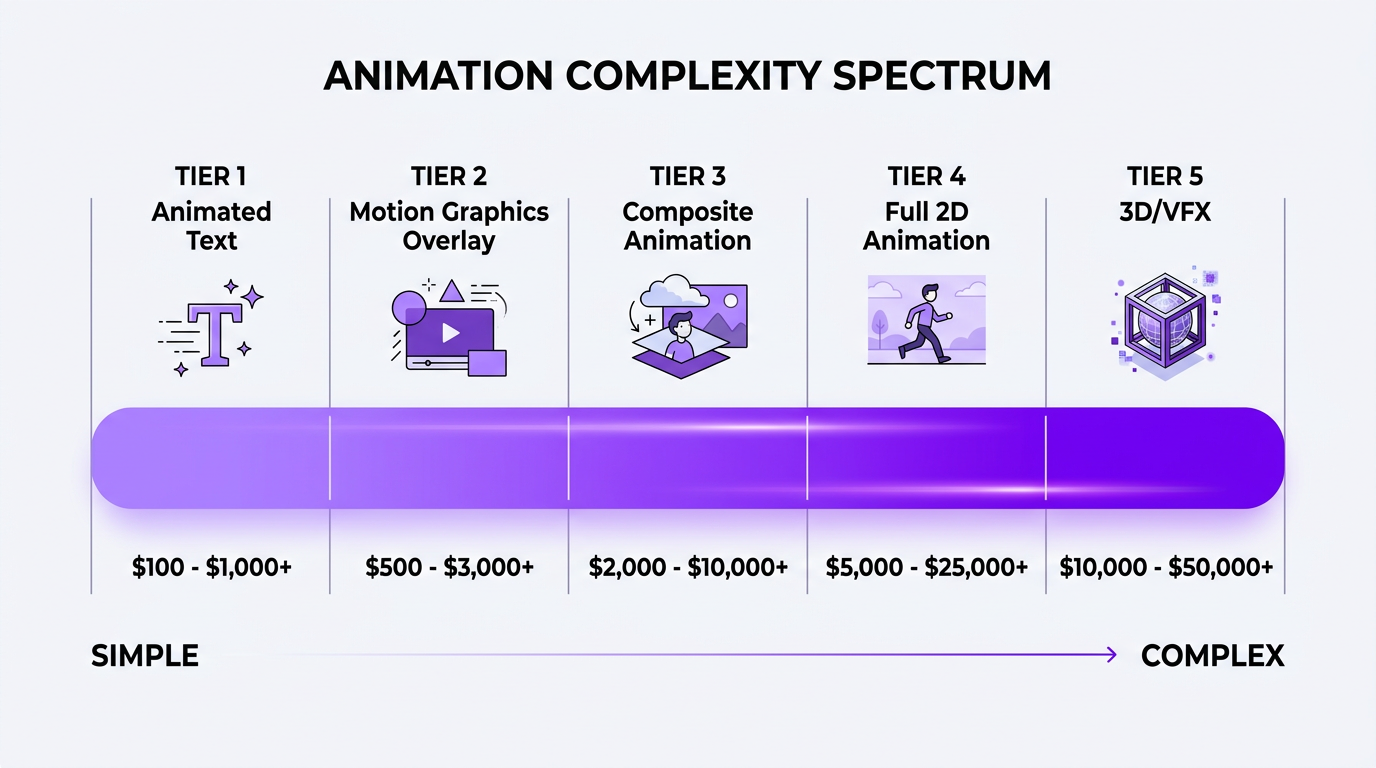
The Animation Enhancement Spectrum
Think of it as a spectrum from minimal to maximum animation:
- Level 1 — Animated text & titles: Kinetic typography, animated lower thirds, chapter headings that slide in
- Level 2 — Motion graphics overlay: Animated icons, data visualizations, branded elements that move on screen over footage
- Level 3 — Composite animation: Footage blended with animated elements — characters, objects, or environments that interact with real-world content
- Level 4 — Full animation: 100% animated content — 2D character animation, whiteboard animation, or 3D rendered environments
- Level 5 — VFX-heavy production: Live-action footage with complex visual effects — think particle systems, environment extensions, photo-real compositing
Each level has different pricing, timelines, and use cases. Most businesses get the best ROI from Levels 2-3: enough animation to stand out and clarify, without the timeline and budget of full production.
Animation Styles Ranked by Business Impact
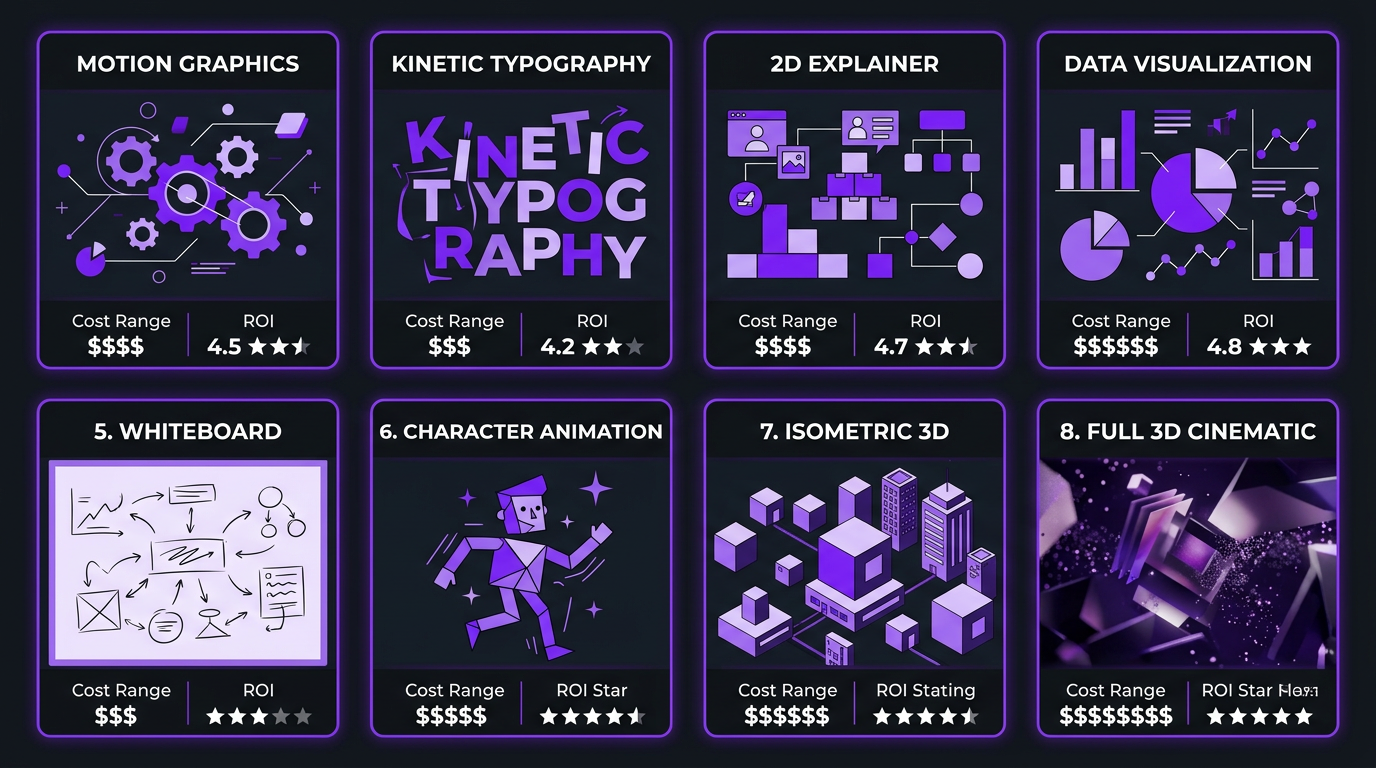
Not all animation styles are equal. Here’s an honest ranking based on ROI for business video:
| Animation Style | Best For | Cost per Minute | Production Time | ROI Rating |
|---|---|---|---|---|
| Motion graphics overlay | YouTube, social, product videos | $200–$600 | 1–3 days | ⭐⭐⭐⭐⭐ |
| Kinetic typography | Social media, ads, presentations | $150–$400 | 1–2 days | ⭐⭐⭐⭐⭐ |
| 2D explainer animation | Landing pages, onboarding, sales | $1,000–$3,000 | 2–4 weeks | ⭐⭐⭐⭐ |
| Animated data visualization | Reports, presentations, thought leadership | $300–$800 | 2–5 days | ⭐⭐⭐⭐ |
| Whiteboard animation | Educational content, explainers | $800–$2,000 | 1–3 weeks | ⭐⭐⭐ |
| 2D character animation | Brand storytelling, ads | $1,500–$4,000 | 3–6 weeks | ⭐⭐⭐ |
| Isometric/3D animation | Tech products, architecture, enterprise | $3,000–$8,000 | 4–8 weeks | ⭐⭐⭐ |
| Full 3D cinematic | Product launches, brand films | $5,000–$15,000+ | 6–12 weeks | ⭐⭐ |
Notice the pattern: the highest ROI comes from motion graphics and kinetic typography — animation styles that enhance existing content rather than replacing it entirely. Full 3D animation is stunning, but the cost-per-impression makes it viable only for high-budget brand campaigns or product launches with massive distribution.
Why Motion Graphics Win for Most Businesses
Motion graphics overlay is the sweet spot because it:
- Works with existing footage — no separate animation production needed
- Scales easily — once your brand elements are built, applying them to new videos is fast
- Increases retention — animated elements re-capture wandering attention every 15-30 seconds
- Clarifies complex ideas — animated diagrams explain what words can’t
- Looks expensive — viewers perceive animated content as higher-production-value than it costs
This is exactly why our YouTube editing packages include motion graphics as standard, not an add-on. It’s the single highest-impact editing technique for viewer engagement.
Explainer Videos: The Highest-ROI Animation Type
If there’s one type of animated video that justifies its investment almost universally, it’s the explainer video. These 60-120 second animated videos explain what your product or service does, who it’s for, and why it matters — usually placed on your homepage or landing page.
The Data Behind Explainer Videos
- Landing pages with explainer videos convert 20-80% higher than those without (Wyzowl, 2025)
- 95% of people report watching an explainer video to learn about a product
- Viewers retain 95% of a message when consumed via video vs. 10% from text
- Animated explainers have 15-20% higher completion rates than live-action alternatives for complex products
Anatomy of an Effective Explainer Video
The best explainer videos follow a proven structure:
- Hook (0-5 seconds): State the problem your audience faces. Animation shows the pain point visually
- Problem amplification (5-20 seconds): Deepen the problem. Show the consequences of not solving it
- Solution introduction (20-40 seconds): Introduce your product as the answer. Animation shows the transformation
- How it works (40-70 seconds): 3-4 key features demonstrated through animated sequences
- Social proof (70-80 seconds): Quick animated stats or logos showing credibility
- CTA (80-90 seconds): Clear next step with animated button or visual prompt
Total: 90 seconds. Every second earned through animation that maintains engagement.
Explainer Video Pricing Tiers
| Tier | Price (60-90 sec) | What You Get | Timeline |
|---|---|---|---|
| Template-based | $500–$1,500 | Pre-built characters/scenes, your script, basic customization | 5–10 days |
| Custom 2D | $2,000–$5,000 | Original character design, custom scenes, professional voiceover | 2–4 weeks |
| Premium production | $5,000–$15,000 | Unique art direction, complex animation, sound design, multiple revisions | 4–6 weeks |
| 3D/Cinematic | $10,000–$30,000+ | 3D rendering, photo-real elements, broadcast quality | 6–12 weeks |
For most businesses, the custom 2D tier ($2,000–$5,000) hits the sweet spot. You get a unique, on-brand video that doesn’t look like a template — without the timeline and budget of premium production.
Animated Intros & Outros: Building Brand Recognition at Scale
Think about every YouTube channel you watch regularly. You recognize them within the first 3 seconds — before anyone speaks — because of their animated intro. That’s brand conditioning, and it’s one of the most cost-effective uses of animation in video.
What an Animated Intro Should Do
- Instant recognition: Viewers should know it’s your brand within 2-3 seconds
- Set the tone: Energetic for entertainment, professional for B2B, warm for lifestyle
- Be SHORT: 3-5 seconds max. Anything longer and you’re losing viewers
- Include audio: A signature sound or music sting locks in auditory memory
Types of Animated Intros
| Type | Cost | Best For | Example Style |
|---|---|---|---|
| Logo animation | $100–$500 | Any brand, minimal identity | Logo assembles, reveals, or transforms |
| Kinetic intro | $300–$800 | YouTube creators, podcasts | Text + shapes animate into brand reveal |
| 3D logo reveal | $500–$2,000 | Premium brands, tech companies | 3D rendered logo with lighting and particles |
| Full branded intro sequence | $1,000–$3,000 | Shows, series, recurring content | Cinematic sequence with music, motion, brand story |
The ROI calculation for intros is simple: you create it once, and it appears in every video you produce. A $500 logo animation across 200 videos costs $2.50 per use. That’s the definition of leverage.
Animated outros are equally important — they’re your last chance to drive action before the viewer leaves. An animated end screen with subscribe buttons, playlist suggestions, and a CTA can increase subscription rates by 10-25% compared to static end screens.
Motion Graphics for Existing Video: The Low-Hanging Fruit
If you already produce video content — YouTube videos, podcasts, webinars, product demos — adding motion graphics to existing footage is the fastest way to upgrade quality without reshooting anything.
High-Impact Motion Graphics Elements
Animated lower thirds: Instead of static text boxes showing speaker names, use animated bars that slide in with brand colors and typography. Cost: $50-$150 per set (reusable across all videos).
Kinetic typography: Key quotes, statistics, or talking points that appear as animated text alongside the speaker. This is the single most effective technique for social media clips — animated text overlays increase engagement by 40-60% versus footage alone.
Data visualizations: Instead of showing a screenshot of a chart, animate it. Numbers count up, bars grow, pie charts fill — these animated data moments keep viewers locked in during what would otherwise be dry statistical content.
Transition animations: Custom transitions between segments (not cheesy star wipes — brand-consistent geometric animations, color washes, or morphing effects). These create visual chapter breaks that help viewers follow long-form content structure.
Animated callouts and annotations: Arrows, circles, highlight boxes, and tooltips that draw attention to specific elements on screen. Essential for tutorials, product demos, and educational content.
Background motion: Subtle animated textures, particle effects, or gradient movements behind speakers that add depth without distraction. Turns a flat talking-head shot into a dynamic frame.
The Before/After Effect
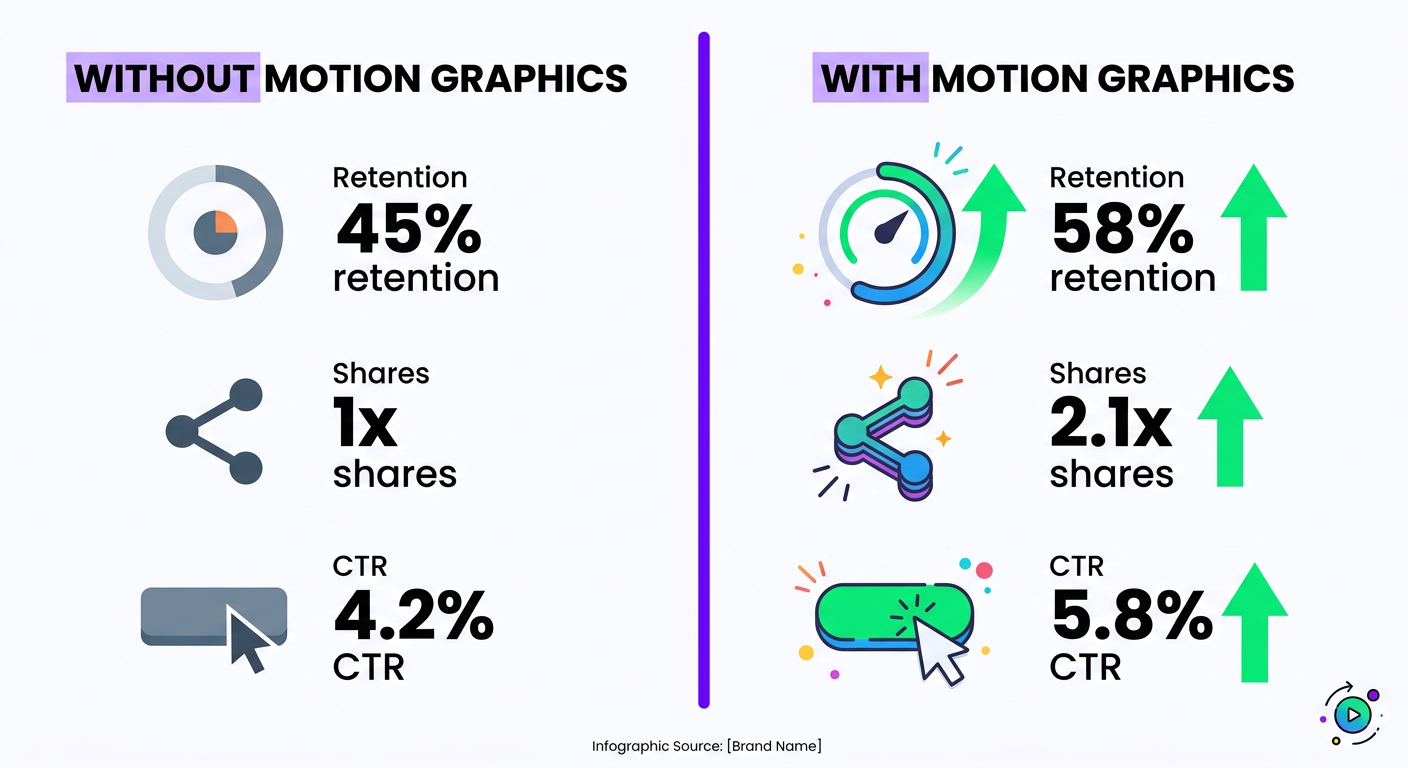
Here’s what motion graphics do to standard content performance:
| Metric | Without Motion Graphics | With Motion Graphics | Improvement |
|---|---|---|---|
| Average view duration | 45% of video | 58% of video | +29% |
| Social shares | Baseline | 2.1x baseline | +110% |
| Click-through rate (YouTube) | 4.2% | 5.8% | +38% |
| Perceived production value | “Decent” | “Professional” | +2 tiers |
These numbers come from aggregated data across our client base and industry benchmarks. The improvement is consistent across niches — from content creators to B2B brands to e-commerce.
Want Motion Graphics Added to Your Existing Videosa
We’ll audit your current content and show you exactly where animation will make the biggest impact — with real mockups.
Animated Video Editing Pricing: Full Breakdown for 2026
Animation pricing is confusing because the range is enormous. A logo animation costs $100. A 3D product visualization costs $10,000. Here’s the complete pricing landscape organized by what businesses actually buy:
Per-Project Animation Pricing
| Service | Price Range | Deliverable | Turnaround |
|---|---|---|---|
| Logo animation | $100–$500 | 3-5 second animated logo reveal | 2–5 days |
| Animated intro/outro set | $300–$1,000 | Branded intro + outro + lower thirds | 3–7 days |
| Motion graphics package (per video) | $200–$800 | Animated text, callouts, transitions on existing footage | 2–4 days |
| Animated social media ad | $300–$1,500 | 15-60 sec animated ad in multiple formats | 3–7 days |
| 2D explainer video | $2,000–$5,000 | 60-90 sec custom animated explainer | 2–4 weeks |
| Animated infographic video | $500–$2,000 | 60-120 sec data-driven animation | 5–10 days |
| Product animation (3D) | $3,000–$10,000 | 30-60 sec 3D product showcase | 3–6 weeks |
Monthly Animation Retainers
For companies producing ongoing animated content, monthly retainers are significantly more cost-effective:
| Package | Monthly Cost | Includes |
|---|---|---|
| Motion Graphics Add-On | $1,000–$2,000/mo | Motion graphics overlay on 4-8 existing videos per month |
| Animation Starter | $2,500–$4,000/mo | 2-3 animated videos + motion graphics on additional content |
| Full Animation Suite | $4,000–$8,000/mo | Dedicated animator + editor, 4-8 animated pieces, unlimited motion graphics on footage |
At Increditors, our editing packages include motion graphics as a standard component — not an add-on with a separate price tag. When you work with us for YouTube editing or social media content, animated elements are part of the editing process, not a billable extra.
DIY Animation Tools vs Professional Animated Video Editing
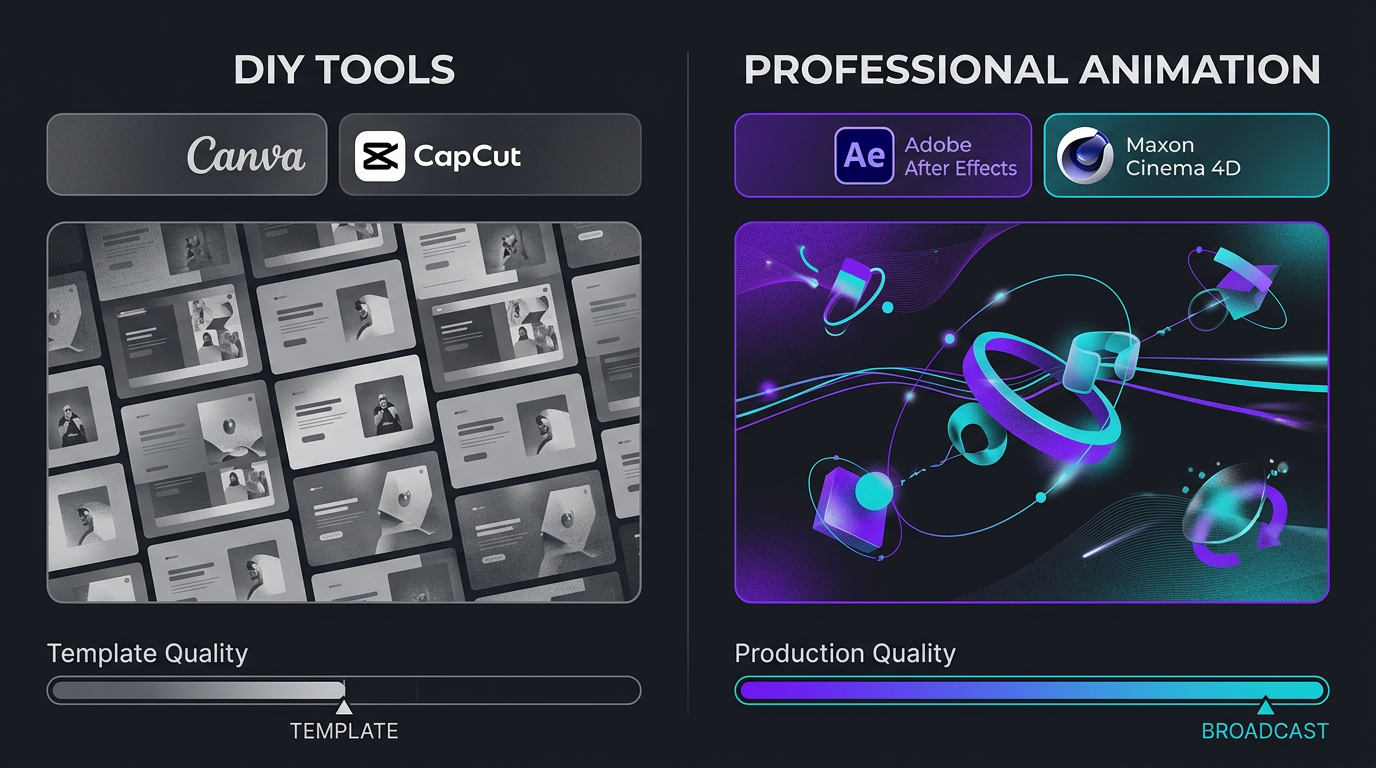
The rise of tools like Canva, CapCut, and Descript has made basic animation accessible to anyone. But accessible and professional are different things. Here’s the honest comparison:
| Factor | DIY Tools (Canva, CapCut) | Professional Services |
|---|---|---|
| Cost | $0–$30/month | $200–$5,000+ per project |
| Quality ceiling | Template-level | Broadcast-level |
| Uniqueness | ❌ Everyone uses same templates | ✅ Custom brand elements |
| Time investment | 2–8 hours per video | 1 hour (briefing + review) |
| Complex animation | ❌ Not possible | ✅ After Effects, C4D |
| Scalability | Limited by your time | Scale with budget |
| Best for | Quick social posts, personal projects | Business content, brand building |
The template trap: DIY tools are built on templates. Your animated social posts look identical to thousands of other businesses using the same Canva template. For personal projects, that’s fine. For a business investing in brand differentiation, it’s counterproductive — you’re spending time creating content that actively makes you look generic.
The smart approach: use DIY tools for quick internal content and rough concepts. Use professional animated editing services for anything customer-facing, revenue-driving, or brand-building.
Case Studies: Animation That Drove Real Business Results
Trade with Pat: Kinetic Typography That Doubled Social Engagement
Trade with Pat, a finance and trading education brand, was producing solid talking-head content — but social clips were getting lost in feeds. The content was valuable, but visually identical to every other finance creator on LinkedIn and Instagram.
The solution: we added kinetic typography and animated data visualizations to their editing workflow. Key numbers animated on screen as Pat discussed them. Trading charts came alive with highlighted entries and exits. Key quotes appeared as stylized animated text.
The result: social media clip engagement more than doubled. The animated elements didn’t just look better — they gave viewers visual “anchor points” that kept them watching through the entire clip instead of scrolling past. LinkedIn impressions jumped significantly, and the style became immediately recognizable in feeds.
Riley Coleman: Motion Graphics That Elevated Channel Quality
Riley Coleman came to us as a growing YouTuber whose content quality had plateaued. The content itself was strong — but the visual presentation was basic. No branded elements, no animated transitions, no motion graphics to support his talking points.
We introduced a motion graphics system for his channel: custom animated intro, branded lower thirds, kinetic text for key points, animated B-roll overlays, and smooth transition animations between segments. This wasn’t a one-time project — it was a systematic upgrade to every video’s post-production.
The impact: Riley’s audience retention improved dramatically. Viewers perceived the channel as more professional and authoritative. The animated elements also made content repurposing easier — clips with kinetic text performed significantly better on Instagram and TikTok than raw cuts from the original footage.
Blue Zones Health: Animated Infographics for Complex Health Data
Blue Zones Health needed to communicate complex health and longevity data to mainstream audiences. Static charts and medical jargon don’t engage general viewers. They needed a way to make data emotional and accessible.
We created an animated infographic approach for their video content: health statistics animated with human-scale comparisons, geographic data visualized on animated maps, and process animations showing biological mechanisms in simple visual terms. Complex health concepts became visual stories that viewers could follow without medical backgrounds.
The animated approach transformed their content from “educational but dry” to “shareable and engaging” — exactly what’s needed for health content that competes with entertainment on social platforms.
Working With an Animated Video Editing Team: What to Expect
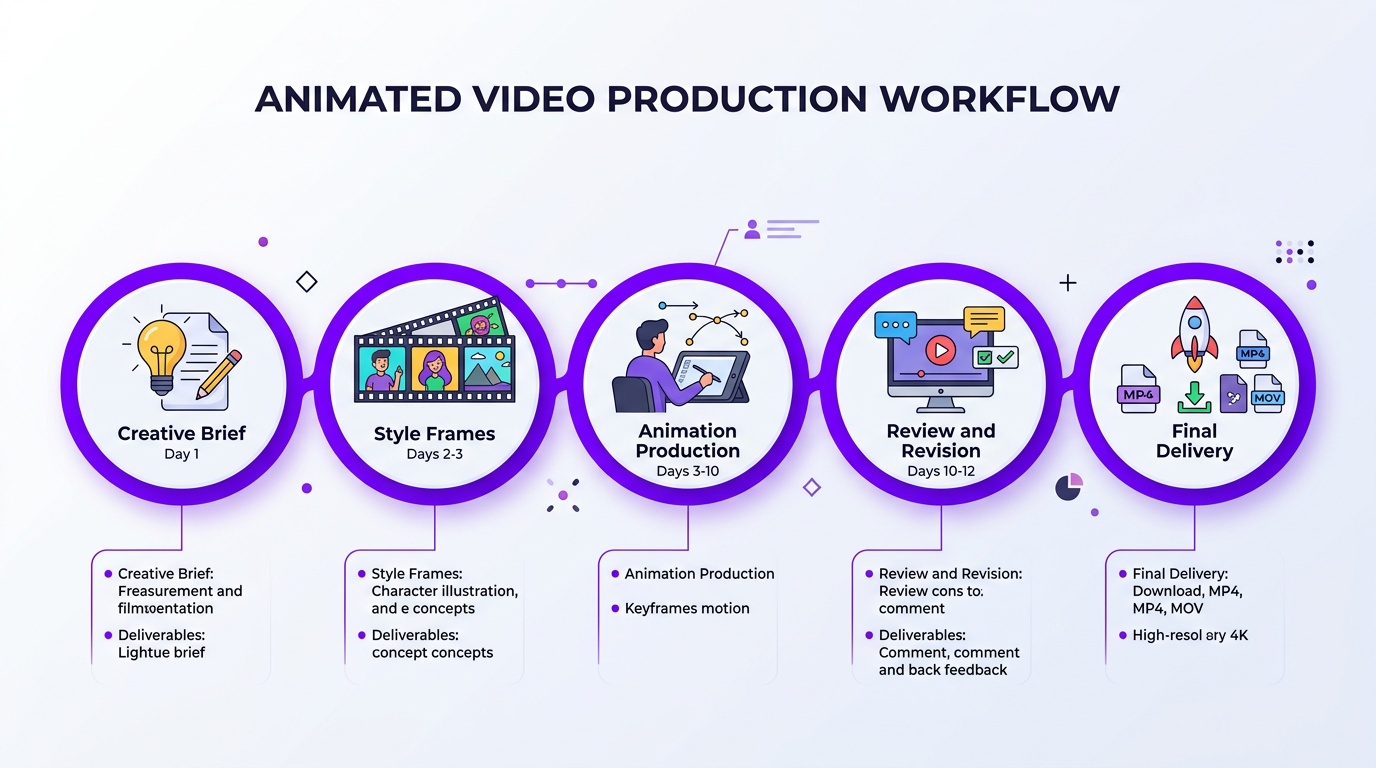
If you’re new to working with animation professionals, here’s what a typical workflow looks like:
Phase 1: Creative Brief (Day 1)
You provide: your brand guidelines, target audience, video objectives, reference examples of animation styles you like, and the raw footage or script. The more specific your brief, the fewer revision rounds you’ll need.
Phase 2: Style Frames (Days 2-3)
For new clients or new animation styles, the team creates 2-3 static “style frames” — mockups showing what the animated elements will look like on your footage. This is where you approve the visual direction before any animation work begins. Much cheaper to change direction at this stage than after 20 hours of animation.
Phase 3: Animation Production (Days 3-10)
The animator builds the elements in After Effects, Premiere Pro, or dedicated animation software. For motion graphics overlays, this is typically 2-5 days. For full explainer videos, 2-4 weeks.
Phase 4: Review and Revision (Days 10-12)
You review the draft with timestamped feedback. Professional teams provide 2-3 revision rounds. Animation revisions are more time-intensive than standard editing revisions — moving a text element is quick, but changing an animation sequence requires rebuilding keyframes. Be specific in your feedback.
Phase 5: Final Delivery
Final export in all required formats: 16:9 for YouTube, 9:16 for Reels/Shorts, 1:1 for Instagram feed, plus source files if included in your agreement.
Tips for Smooth Collaboration
- Provide reference videos: “I want something like this” is 10x more useful than “make it pop”
- Lock the script before animation begins: Script changes during animation are expensive because animations are built to specific timing
- Batch similar projects: 5 videos with the same animation style costs less per video than 5 videos with different styles
- Build an asset library: Ask your team to create reusable elements (lower thirds, transitions, icon sets) that speed up future projects
Ready to Add Animation to Your Video Contenta
Whether it’s motion graphics for YouTube or a full animated explainer, we’ll scope it with honest pricing and realistic timelines.
Frequently Asked Questions
Animated video editing costs $500–$5,000+ per minute depending on style and complexity. Simple motion graphics overlays cost $200–$800 per video. 2D explainer animation runs $2,000–$5,000 for 60-90 seconds. Full 3D animation can exceed $5,000 per minute. Monthly retainers for ongoing animation work range from $1,000–$8,000 depending on volume and complexity.
Animated video editing enhances existing footage with motion graphics, animated text, transitions, and visual effects. Animation production creates entirely new animated content from scratch. Most business video blends both approaches — real footage enhanced with animated elements for maximum impact at reasonable cost.
The highest-ROI animated video types are: motion graphics overlays on existing content (40-60% engagement boost), explainer videos on landing pages (20-80% conversion increase), animated social media clips (2x engagement), and animated data visualizations for thought leadership content.
Motion graphics overlays on existing footage: 2–5 days. Simple 2D animated explainer (60-90 seconds): 2–3 weeks. Complex character animation: 3–6 weeks. Full 3D animation: 4–8+ weeks. Rush timelines are available at 25–50% above standard pricing.
Absolutely — and it’s one of the most cost-effective video upgrades available. Common additions include animated lower thirds, kinetic typography, data visualizations, logo animations, transition effects, and animated callouts. This typically costs $200–$800 per video and is included in our standard editing packages.
Professional animated video editing uses Adobe After Effects (motion graphics), Cinema 4D or Blender (3D), Adobe Premiere Pro (editing), and Adobe Illustrator (vector assets), plus plugins like Element 3D and Trapcode. The software matters less than the animator’s skill — great animation comes from talent, not tools.
Context determines performance. Animated explainers outperform live-action for complex concepts, with 15-20% higher completion rates. Live-action wins for testimonials and personal brand content. The best-performing business content often combines both: live footage enhanced with animated motion graphics elements.
Elevate Your Video Content With Professional Animation
From motion graphics to full explainers, we’ll match the right animation approach to your goals and budget.
Pricing and performance data in this article reflect 2026 market conditions and aggregated industry benchmarks. Individual results vary by niche, audience, and content quality. For current Increditors animation pricing, visit our pricing page or schedule a consultation.