










![3D Explainer Video - ScribbleLive.mp4_snapshot_00.12_[2022.03.09_03.14.16]](https://increditors.com/wp-content/uploads/elementor/thumbs/3D-Explainer-Video-ScribbleLive.mp4_snapshot_00.12_2022.03.09_03.14.16-r7wb53mx72rxst3qcqyrfxdmeyzb5r9jbl0wbjujh4.png "3D Explainer Video – ScribbleLive.mp4_snapshot_00.12_[2022.03.09_03.14.16]")
































ADA and WCAG compliance for video is no longer optional — it is a legal requirement and a brand opportunity. This guide explains what closed captions, audio descriptions, and accessible player design actually require, which WCAG 2.1 success criteria apply to video content, where brands commonly fall short, and how to build an accessible video workflow from the ground up.
- Why Video Accessibility Matters for Brands
- ADA and Video: The Legal Landscape
- WCAG 2.1 Requirements for Video Content
- Closed Captions: Standards, Mistakes, and Best Practice
- Audio Descriptions and Transcripts
- Accessible Video Player Design
- Building an Accessible Video Workflow for Your Brand
- Accessibility Audit Checklist and Common Failures
- FAQ
- Verdict
Why Video Accessibility Matters for Brands
Video accessibility is the practice of making video content perceivable, operable, and understandable for every viewer — including people who are deaf or hard of hearing, blind or have low vision, have cognitive disabilities, or watch without sound in a noisy environment. For brands, this is not purely a compliance exercise. It is a strategic decision that affects legal exposure, audience reach, and brand trust simultaneously.
According to the World Health Organization, over 1.3 billion people worldwide live with some form of disability. A significant portion of that population interacts with digital video daily. When your brand’s videos lack captions, audio descriptions, or keyboard-accessible players, you are effectively excluding a substantial segment of your potential audience — and in many legal jurisdictions, exposing your organization to regulatory risk.
Beyond the legal and reach arguments, there is a compounding brand effect. Accessible video signals organizational maturity. It communicates that a brand considers the full spectrum of its audience rather than designing for a narrow default. For B2B brands especially, demonstrating inclusive practices increasingly factors into procurement decisions and partner selection.
The Business Case Beyond Compliance
Captions alone deliver benefits that extend well beyond disability access. Published platform data from Verizon Media (now Yahoo) found that a substantial majority of viewers watch videos with the sound off in social contexts — meaning captions directly affect engagement rates for your entire audience, not just those who require them. Brands that treat captions as a compliance checkbox rather than a quality feature routinely underperform against competitors who treat accessibility as editorial craft.
Audio descriptions — narrated descriptions of on-screen visual content — similarly benefit viewers in audio-only contexts (commuting, multitasking) as well as blind and low-vision audiences. Transcripts improve SEO by making video content crawlable. Accessible design systems reduce future rework costs. The accessible video investment compounds over time.
💡 Pro Tip: Treat closed captions as a second editorial pass on your script. Reviewing the caption file forces you to catch pacing issues, jargon, and unclear references that audio-only listeners miss. It makes the video better for everyone.
ADA and Video: The Legal Landscape
The Americans with Disabilities Act (ADA) was signed into law in 1990, well before online video existed at scale. For decades, courts and regulators have been progressively extending its reach to digital content, including video. The Department of Justice (ADA.gov) finalized rules in 2024 explicitly requiring state and local government websites and apps to meet WCAG 2.1 Level AA — a standard that directly governs video. While the rule explicitly covers government entities, it functions as a strong signal for private-sector expectations and has influenced a wave of litigation targeting commercial brands.
ADA Title III covers places of public accommodation. Courts have split on whether websites and apps constitute places of public accommodation, but the majority of federal circuit decisions trend toward inclusion, particularly for businesses with physical locations. If your brand operates any retail, service, or public-facing physical presence, your digital content is almost certainly subject to Title III challenges.
Section 508 and Federal Contractors
Section 508 of the Rehabilitation Act requires that federal agencies and organizations receiving federal funding make their electronic content accessible. If your brand produces video for federal clients, educational institutions, or healthcare organizations funded by federal programs, Section 508 compliance is mandatory — not aspirational. The Section 508 standard explicitly requires captions for all prerecorded synchronized multimedia (video with audio) and audio descriptions for significant visual content.
FCC Rules for Broadcast and Internet-Delivered Video
The FCC requires captions on video programming that has previously aired on television with captions and is subsequently distributed online. This rule catches a substantial portion of brand content — any television commercial or broadcast segment repurposed for digital distribution must carry its captions with it. Brands that strip caption data during platform conversions are frequently non-compliant without realizing it.
WCAG 2.1 Requirements for Video Content
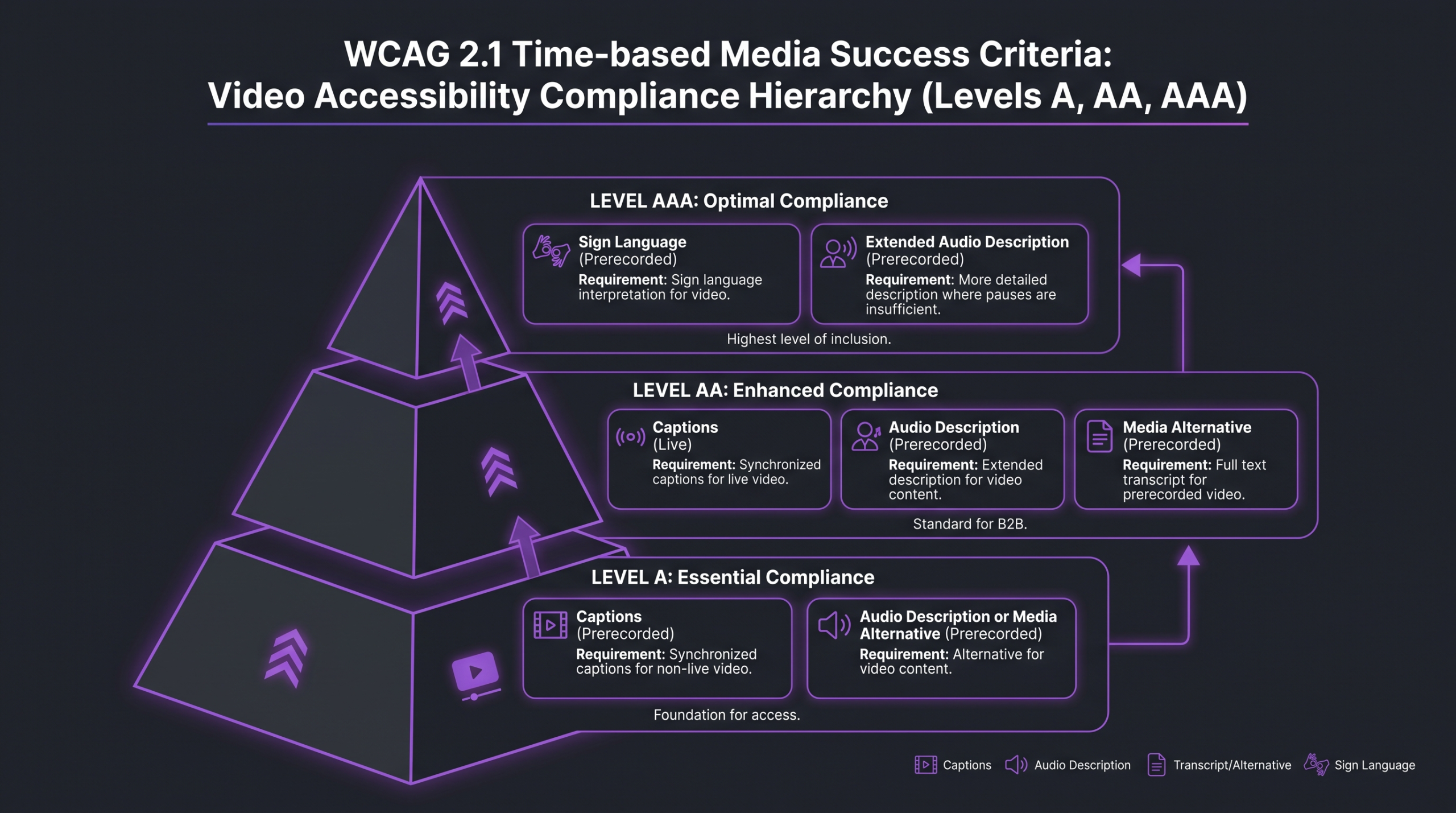
The Web Content Accessibility Guidelines (WCAG) 2.1, published by the W3C Web Accessibility Initiative, are the globally recognized technical standard for web accessibility. WCAG is organized around four principles — Perceivable, Operable, Understandable, and Robust (POUR) — and structured into three conformance levels: A (minimum), AA (industry standard), and AAA (enhanced). Most legal frameworks and enterprise procurement requirements reference Level AA.
The specific success criteria that govern multimedia content are in Guideline 1.2 (Time-Based Media). Here is how each criterion maps to brand video obligations:
For most brand video programs, the baseline obligations are 1.2.2 (captions on all prerecorded video) and 1.2.5 (audio descriptions where visual content carries information not conveyed in the audio track). These two criteria alone account for the majority of accessibility complaints and litigation in the commercial video space.
WCAG 2.2 Changes and What Is Next
WCAG 2.2, published in October 2023, did not introduce new time-based media criteria. The core video accessibility requirements remain unchanged from 2.1. However, WCAG 2.2 added new criteria around focus appearance, drag motion alternatives, and consistent navigation — all of which affect accessible video player design. The full WCAG 2.2 specification is available from the W3C. Brands planning accessible player redesigns should target 2.2 conformance now rather than 2.1, since most new regulatory references will align to 2.2 going forward.
Closed Captions: Standards, Mistakes, and Best Practice
Closed captions are synchronized text representations of the audio in a video, including dialogue, speaker identification, and meaningful non-speech sounds. “Closed” means the viewer can toggle them on or off (as opposed to “open” or “burned-in” captions, which are permanently embedded in the image layer). WCAG 1.2.2 requires closed captions for all prerecorded synchronized media at Level A — the minimum conformance level.
The most common mistake brands make is confusing auto-generated captions with compliant captions. Platform-generated captions from YouTube, LinkedIn, or social tools are a useful starting point, but they are not sufficient for compliance. Common failure modes include incorrect proper nouns, missing speaker identification, absent sound effect notation, and synchronization errors during fast speech. These errors are not cosmetic — they change meaning for viewers who depend on captions as their primary audio channel.
Caption Quality Standards
The Described and Captioned Media Program (DCMP) Captioning Key is the industry-standard style guide for professional captions. Key requirements include:
Accuracy: Word-for-word verbatim transcription. Speaker identification when two or more speakers appear. Sound effects and non-speech audio that carry meaning must be described in brackets — [applause], [door slams], [tense music].
Synchronization: Captions must appear and disappear in sync with speech, within approximately a quarter-second. Late or early captions undermine comprehension. Maximum display rate is typically 180–220 words per minute; if a speaker exceeds this, editors paraphrase rather than drop words, noting the edit.
Readability: Maximum two lines per caption frame. High contrast against video — typically white text with a semi-transparent dark background. Font size readable on mobile. No more than 32 characters per line.
Completeness: Every spoken word and every meaningful sound must be captioned. Music that affects tone or meaning should be identified: [upbeat jazz music], [ominous silence].
Audio Descriptions and Transcripts
Audio descriptions (AD) are narrated descriptions of the visual content in a video that a viewer cannot see or understand from the audio track alone. They are inserted into natural pauses in the dialogue and narration, describing actions, on-screen text, scene changes, and visual story elements that carry meaning. For a brand product demo where an on-screen graphic shows pricing — but no one mentions the pricing aloud — a viewer relying on audio alone has no access to that information without an audio description.
WCAG 1.2.3 (Level A) allows brands to satisfy this requirement either with an audio description or a full text alternative. WCAG 1.2.5 (Level AA) requires the audio description specifically — the text alternative alternative is not available at this level. For brands targeting standard AA conformance, a produced audio description track is required for any prerecorded video where visual content carries meaning beyond what the audio communicates.
When Audio Descriptions Are Required vs. Optional
Not every video requires a full audio description track. Audio descriptions are required where the visual track carries information that the audio track does not convey. A talking-head interview where the speaker describes everything verbally, with no on-screen text, no meaningful B-roll, and no action that affects understanding, technically has no visual-only information — and may not require an audio description beyond the captions. However, most brand videos are not this simple. Product demos, tutorials, how-tos, event highlight reels, and any video with on-screen graphics, data visualizations, or meaningful action sequences will require audio descriptions at AA conformance.
Designing for audio description during production — rather than retrofitting afterward — is significantly more efficient. This means ensuring dialogue and narration scripts already describe the most important visual elements, leaving deliberate pauses for description inserts, and avoiding visual-only delivery of critical information (a common trap in animated explainer videos and product launches).
Transcripts
A transcript is a text document containing the complete spoken content of a video, plus descriptions of meaningful visual and auditory content. Transcripts serve as an alternative for users who cannot access time-based media at all — including deafblind users who rely on refreshable Braille displays. WCAG 1.2.8 (Level AAA) requires media alternatives (transcripts) for prerecorded synchronized media. For brands not targeting AAA conformance, transcripts are recommended best practice rather than a strict requirement — but they deliver real SEO value by making video content indexable, and they serve users in bandwidth-constrained environments who cannot load video.
Accessible Video Player Design
Accessible video content is only half the equation. The player delivering that content must also meet WCAG requirements. An accessible player must be fully operable via keyboard (no mouse required), must support screen readers, must not use color as the sole means of conveying information, and must allow users to pause, stop, and adjust playback. Player accessibility is where many brands with otherwise compliant content still fail audits.
The W3C Web Accessibility Initiative’s resource on making audio and video accessible provides detailed guidance on player requirements. Key checklist items:
Keyboard navigation: All controls — play/pause, volume, captions toggle, full-screen, seek — must be operable via keyboard. Each control must have a visible focus indicator meeting WCAG 2.4.7 (Level AA) and WCAG 2.4.11 (Level AA in 2.2).
Screen reader compatibility: All controls must have accessible names. A play button labeled only with a triangle icon and no aria-label is inaccessible to screen reader users. Every interactive element needs a text equivalent that screen readers can announce.
Caption and description controls: Captions must be user-toggleable. The player must provide a visible mechanism to turn captions on/off and ideally allow caption style adjustments (size, color, background opacity) per the user’s preference.
No autoplay with audio: WCAG 1.4.2 (Level A) requires that any media that auto-plays for more than three seconds must provide a mechanism to pause it or reduce volume. Autoplaying video with sound is one of the most common accessibility failures on brand websites.
No flashing content: WCAG 2.3.1 (Level A) prohibits content that flashes more than three times per second, which can trigger photosensitive seizures. This applies directly to video content with strobe effects, fast cuts, or animation sequences that breach the threshold.
💡 Pro Tip: When evaluating third-party video players (Vimeo, Wistia, JW Player, Brightcove), request their VPAT (Voluntary Product Accessibility Template). A VPAT documents how each product supports each WCAG criterion. It is a standard procurement document that tells you exactly where player gaps exist before you integrate.
Building an Accessible Video Workflow for Your Brand
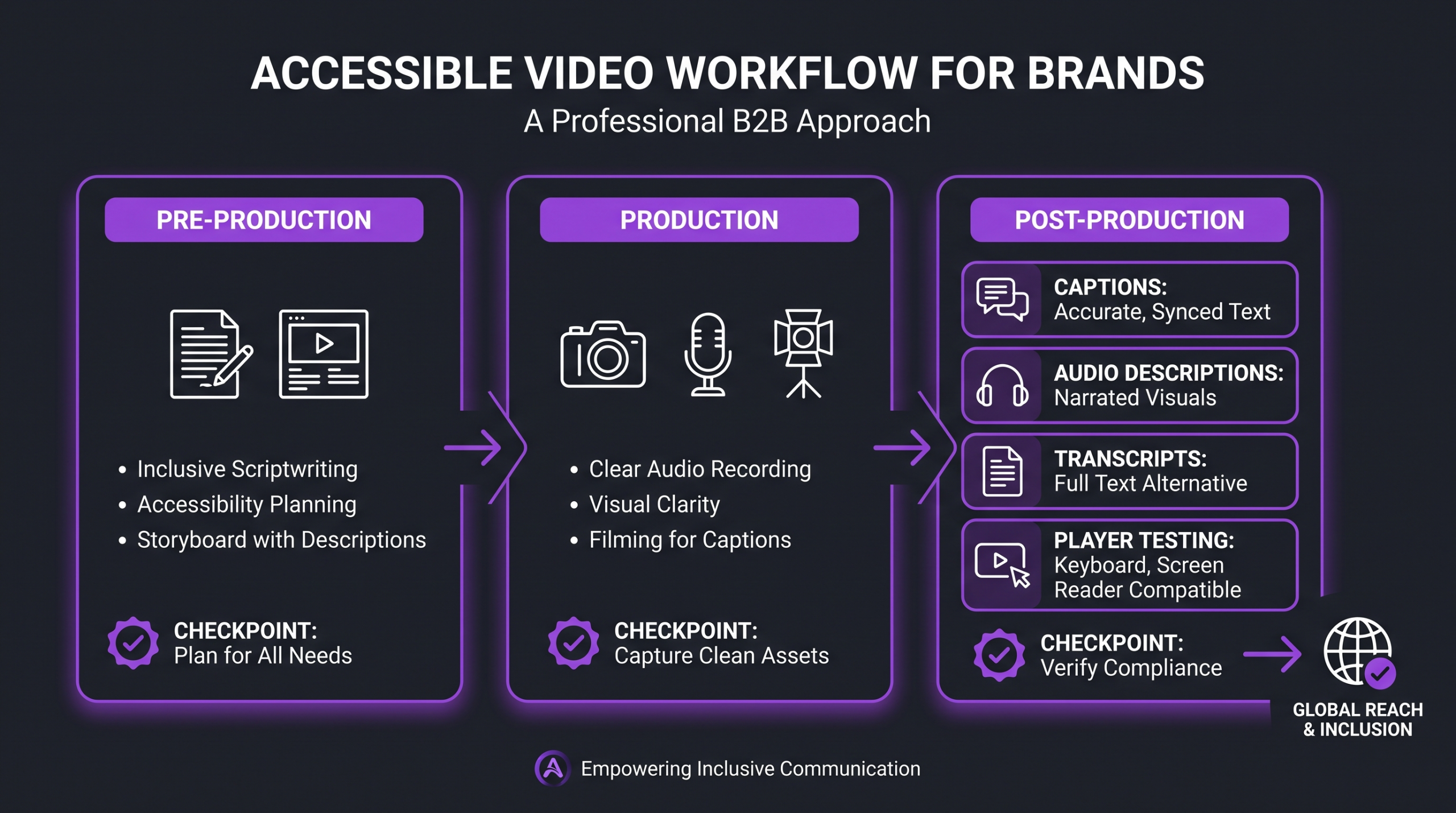
Accessible video does not happen by reviewing finished content against a checklist. It is designed in at the script stage, maintained through production, and verified at delivery. Retrofitting accessibility onto non-accessible content is expensive and error-prone. A brand that builds accessible defaults into its video workflow reduces both compliance risk and per-asset remediation cost as its video library scales.
Working with a video editing agency that understands WCAG requirements from the post-production side means accessibility considerations are embedded in the editing process — not bolted on as a review step after delivery. This is the operational difference between accessible video as a workflow and accessible video as a checklist.
Stage 1: Pre-Production Accessibility Planning
Script for description: Ensure the script includes verbal descriptions of all visual content that carries meaning. If a product feature appears on screen while the narrator says “and here you can see the dashboard,” the script must explicitly name and describe that feature. Visual storytelling that relies solely on the image is inaccessible to blind and low-vision viewers.
Plan for pauses: Audio description requires natural pauses in dialogue. Productions that pack narration wall-to-wall leave no space for description inserts. Brief pauses at scene transitions, between narration points, or during action sequences are not dead air — they are the infrastructure for audio descriptions.
Flicker review: Identify any sequences with rapid cuts, strobing effects, or flashing backgrounds. The Photosensitive Epilepsy Analysis Tool (PEAT) can evaluate finished video for seizure-risk flicker — but identifying and removing those sequences during editing is simpler than remediating afterward.
Stage 2: Post-Production Deliverables
An accessible post-production deliverable set includes:
Caption file (SRT or WebVTT): Human-reviewed, DCMP-compliant. Never auto-generated-and-unreviewed. Include speaker identification and sound effect notation.
Audio description track or AD-embedded version: Either a separate audio file synchronized to the main video, or a second video version with audio descriptions mixed into the soundtrack. Many brands produce both versions: an AD version for the website and a non-AD version for platforms where description tracks are unsupported.
Full transcript: A plain-text document with all spoken content plus bracketed descriptions of meaningful visual and audio elements. Published alongside the video as a linked document, not embedded in the player (embedded text is often not accessible to screen readers in all contexts).
Understanding how much professional video editing costs is a useful starting point when budgeting for accessible deliverables. Accessibility-ready post-production typically adds a moderate overhead to standard editing timelines — the largest portion being human caption review and audio description scripting and recording. For ongoing programs, these costs amortize as the team builds templates and standards.
Stage 3: Platform-Specific Publishing Requirements
Each platform handles captions and accessibility features differently. YouTube accepts SRT, SBV, and WebVTT caption files and allows audio description as a separate audio track. Vimeo accepts VTT files and offers caption styling controls. LinkedIn accepts SRT files. Instagram and TikTok have limited caption file support and often require burned-in captions for broader accessibility. Brands distributing across multiple platforms should maintain a master caption file and transcode as needed per platform spec, rather than re-captioning each version independently.
Accessibility Audit Checklist and Common Failures
Before publishing any brand video, run it against the following accessibility audit checklist. This reflects the most common failure points in commercial video accessibility reviews. For a comprehensive audit methodology, see the Deque WCAG documentation, which covers testing procedures across all criteria.
For SaaS brands managing high volumes of tutorial and product video, the same framework applies — see our guide to video editing for SaaS companies for workflow considerations specific to product-led content programs.
Prerecorded Video Audit Checklist
Captions: ☐ Human-reviewed closed captions present · ☐ Synchronization within 0.25 seconds · ☐ Speaker identification for 2+ speakers · ☐ Sound effects and meaningful non-speech audio described · ☐ Maximum two lines, 32 characters per line · ☐ High contrast readable on all backgrounds
Audio descriptions: ☐ Visual-only information identified and described · ☐ AD track or AD-embedded version produced · ☐ Natural pauses present for description inserts · ☐ On-screen text (titles, graphics, data) verbally described
Player and embed: ☐ All controls keyboard-operable · ☐ Each control has accessible name (aria-label) · ☐ Focus indicators visible on all interactive elements · ☐ No autoplay with audio on page load · ☐ Captions togglable by user · ☐ Player VPAT available and reviewed
Content safety: ☐ No content exceeding 3 flashes per second · ☐ Flash area below the 10% general flash threshold · ☐ No sequences that would trigger PEAT red zone
Supporting resources: ☐ Full transcript published and linked · ☐ Transcript includes visual and audio descriptions · ☐ Transcript is plain text accessible to screen readers
Most Common Audit Failures
Accessibility consultants commonly report the following as the top failure patterns in commercial brand video audits:
1. Unreviewed auto-captions published as compliant. The caption file technically exists, but it was never reviewed. Auto-caption error rates in technical, product, or industry-specific content can be significantly higher than general speech — brand and product names are especially vulnerable. This is the most frequently cited failure in demand letters and regulatory complaints.
2. No audio descriptions on product demos. Brands routinely invest in polished product demos where critical features appear on screen while narration says only “as you can see here.” That phrase is meaningless without vision. Product demos are among the highest-risk video formats for audio description failures.
3. Player keyboard traps. Custom video players built with JavaScript often have keyboard navigation failures — users can tab into the player but cannot tab out, or cannot reach the captions control without a mouse. These are WCAG 2.1.1 (Level A) failures.
4. Missing or inaccessible transcripts. Brands that publish transcripts inside accordion elements or in non-crawlable tab panels may have the text but make it inaccessible to screen readers in certain states. Transcripts published as linked plain-text HTML pages avoid this failure mode entirely.
FAQ
Does ADA compliance require audio descriptions for every brand video?
Audio descriptions are required under WCAG 1.2.5 (Level AA) for any prerecorded synchronized media where the visual track contains information not conveyed in the audio. Talking-head videos where the speaker describes all relevant information verbally may not require a separate description track, but any video with on-screen graphics, product interface shots, meaningful action, or visual-only data requires one. Most brand video content requires audio descriptions at AA conformance.
Are YouTube’s auto-generated captions WCAG compliant?
No. Auto-generated captions are not WCAG compliant on their own. WCAG 1.2.2 requires accurate captions, and auto-generated captions routinely contain errors in speaker identification, proper nouns, technical terminology, and synchronization. They must be reviewed and corrected by a human editor before being treated as compliant closed captions. The caption file mechanism YouTube provides is compliant; the auto-generated content that populates it typically is not, without review.
What is the difference between open captions and closed captions?
Open (or burned-in) captions are permanently embedded in the video image layer and cannot be turned off. Closed captions are delivered as a separate data stream and can be toggled on or off by the viewer. WCAG 1.2.2 requires closed captions for synchronized media because open captions cannot be styled or repositioned by the user. Open captions are an acceptable workaround for platforms that do not support caption file formats — such as certain social media contexts — but they do not satisfy WCAG on platforms where closed caption support exists.
How much does accessible video post-production cost?
Accessible post-production adds cost primarily through human caption review (typically billed per minute of video) and audio description scripting and recording (which requires a voice actor and production time). Auto-captioning tools reduce the human review workload significantly when the base accuracy is high enough. For ongoing content programs, brands commonly build accessible deliverable requirements into their production contracts rather than treating them as add-ons. Volume pricing and template workflows reduce per-asset costs substantially over time.
Can a brand use subtitles instead of captions for ADA compliance?
Subtitles and captions are different. Subtitles translate dialogue from one language to another and do not include non-speech audio information (sound effects, music, speaker identification). Captions are a full representation of all audio content for viewers who cannot hear the audio. For ADA and WCAG compliance, captions are required — subtitles alone do not satisfy the standard because they exclude the non-speech audio information that deaf and hard-of-hearing viewers depend on.
Verdict: Accessible Video Is a Workflow Decision
Video accessibility is not an afterthought or a compliance exercise to run once and forget. It is a set of production standards that must be embedded in every stage of a brand’s video workflow — from scripting through publishing. The brands that handle this well build accessible defaults into their briefs, their post-production deliverable specs, and their platform publishing checklists. The ones that struggle treat accessibility as a review filter on finished content, which is expensive, error-prone, and too late to fix structural problems like missing natural pauses for audio descriptions.
WCAG 2.1 Level AA is the target. That means human-reviewed closed captions on all prerecorded synchronized media, audio descriptions for any video where visual content carries meaning not conveyed in audio, and a player that is fully keyboard-accessible and screen-reader-compatible. These are achievable standards. They are not aspirational guidelines for future compliance — they are the current baseline for brands operating at any significant scale.
At Increditors, accessible deliverables — caption-ready exports, clean audio mixes with description pause points, and structured post-production handoffs — are part of how we approach every project. The brands that build this into their retainer scope avoid the remediation costs, audit findings, and legal exposure that come from treating accessibility as optional. It is not optional. It is the cost of producing video that works for your entire audience.
Ready for Video That Actually Converts?
Tell us about your project and we will put together a custom plan.