










![3D Explainer Video - ScribbleLive.mp4_snapshot_00.12_[2022.03.09_03.14.16]](https://increditors.com/wp-content/uploads/elementor/thumbs/3D-Explainer-Video-ScribbleLive.mp4_snapshot_00.12_2022.03.09_03.14.16-r7wb53mx72rxst3qcqyrfxdmeyzb5r9jbl0wbjujh4.png "3D Explainer Video – ScribbleLive.mp4_snapshot_00.12_[2022.03.09_03.14.16]")
































B-roll is supplemental footage layered over or alongside your primary recorded content — the A-roll — to cover cuts, add visual context, and hold viewer attention. It is one of the most powerful tools a video editor has: it turns raw talking-head recordings into polished, professional video. This guide breaks down what B-roll is, the different types, where to source it, how to shoot it, and how professional editors deploy it throughout post-production.
- What Is B-Roll? The Short Answer
- A-Roll vs. B-Roll: Understanding the Difference
- Why B-Roll Is Critical to Video Quality
- The Main Types of B-Roll Footage
- Where to Source B-Roll Footage
- How to Shoot B-Roll Like a Pro
- How Video Editors Use B-Roll in Post-Production
- B-Roll Best Practices by Video Format
- Common B-Roll Mistakes to Avoid
- Frequently Asked Questions
What Is B-Roll? The Short Answer
B-roll is any supplemental or secondary footage used in a video production to complement, illustrate, or cut away from the primary footage. While your main on-camera subject speaks, narrates, or performs, B-roll plays alongside or over that content — showing the audience something related, contextual, or visually engaging that the primary shot cannot provide on its own.
The term has deep roots in broadcast television. In the era of linear tape editing, productions were assembled using two separate playback decks fed into a recording deck. The first deck — the “A-roll” — held the master footage, typically an interview or presenter segment. The second deck — the “B-roll” — held the cutaway material that editors would layer over the A-roll during assembly edits. Even though physical tape decks are a memory of another era, the vocabulary remains firmly embedded in the global production industry today.
Today, B-roll appears in virtually every form of professionally produced video: documentaries, corporate explainers, YouTube tutorials, social media ads, news broadcasts, wedding films, brand videos, SaaS product demos, and online learning courses. If you are watching a video where the speaker’s voiceover continues while the visuals shift to something other than the speaker — that transition is B-roll at work.
B-roll is not decoration or filler. When used deliberately, it is the element that transforms a competent video into a compelling one. It guides the viewer’s eye, reinforces the spoken message, maintains visual flow, and smooths over edits that would otherwise appear jarring or amateurish. Understanding B-roll — what it is, where it comes from, and how editors use it — gives you a foundational framework for evaluating and improving any video you produce or commission.
A-Roll vs. B-Roll: Understanding the Difference
Understanding the A-roll and B-roll distinction is foundational to understanding how video editing works at a structural level. They serve fundamentally different editorial purposes, and professional editors handle them very differently throughout the post-production process.
What Counts as A-Roll
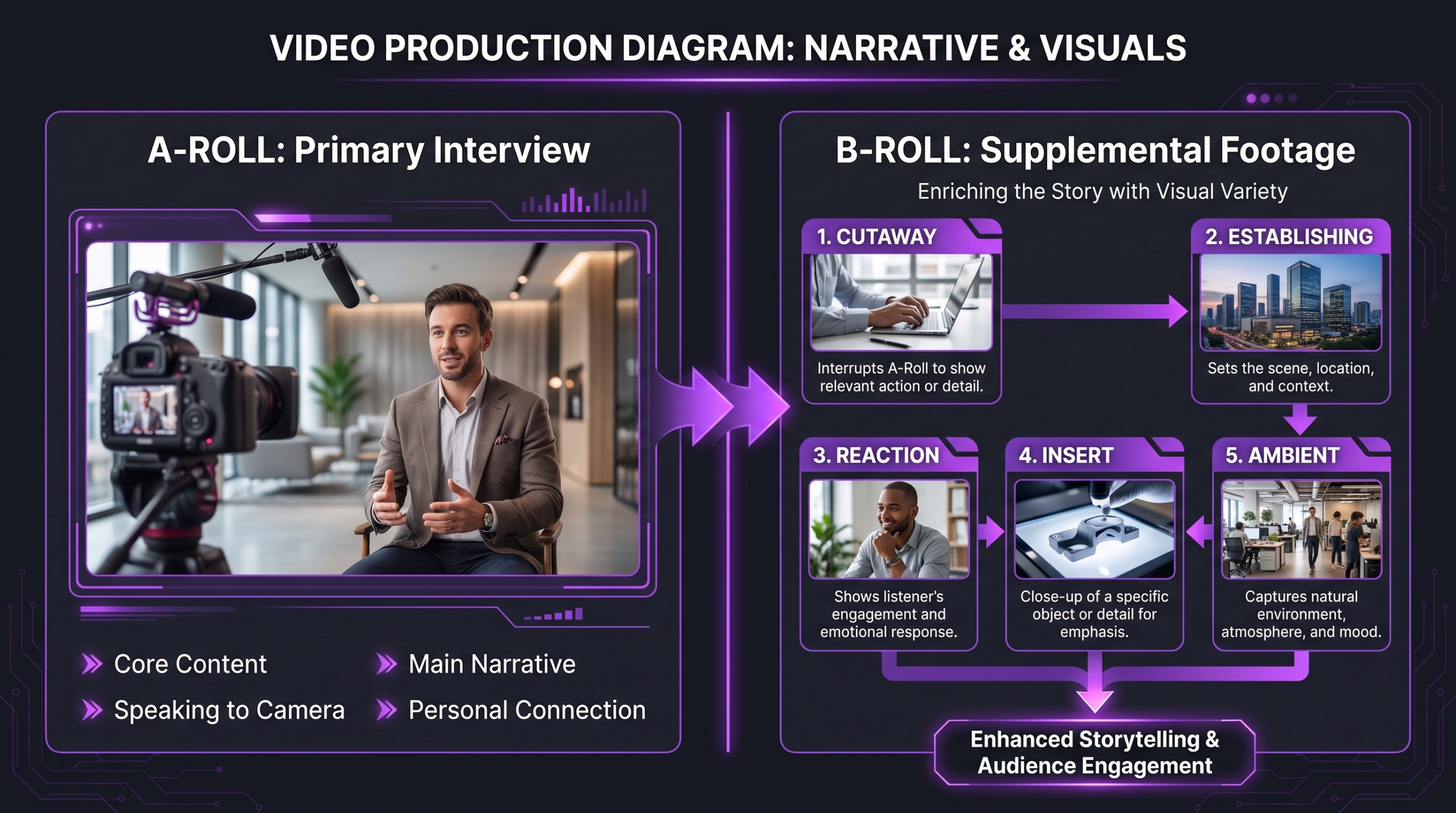
A-roll is the primary footage that carries the main narrative, performance, or message of a video. It is the anchor material around which everything else is structured. Common examples include:
- An interview subject speaking directly to camera or to an off-screen interviewer
- A presenter delivering a tutorial or step-by-step explainer on screen
- A CEO or founder delivering a testimonial or company overview
- An actor delivering scripted dialogue in a narrative short
- A news anchor reading copy directly to the broadcast camera
- A course instructor facing the lens for a recorded module lesson
A-roll drives the story. Crucially, the audio from A-roll footage is often the track that plays continuously throughout the finished video — even during moments when the corresponding video frame has been replaced by a B-roll cutaway. The viewer hears the speaker’s words while seeing something different on screen: that layered structure is the editorial foundation of most talking-head and interview-style video.
What Counts as B-Roll
B-roll is any footage that is not the primary subject but that supports, illustrates, or enhances the primary content at any given moment. It can be recorded on location during the same production day, sourced from stock libraries, captured as screen recordings, created as motion graphics, or even taken from archive footage. Examples include:
- Hands-on-keyboard footage when the speaker discusses a software workflow
- A city skyline shot during a segment focused on an urban market
- Close-up product shots during a review or unboxing
- Screen recordings of the app or interface being described
- Reaction shots of an interviewer listening thoughtfully
- Ambient footage of an office environment for a company culture video
- Animation or motion graphic overlays reinforcing a data point or statistic
- Event footage, time-lapses, or drone aerials setting geographic context
The dividing line between A-roll and B-roll is editorial intent, not camera position or production date. The moment a shot is used to support rather than carry the primary narrative, it functions as B-roll — regardless of whether it was captured on the same shoot day or licensed from a stock library recorded on another continent years earlier.
Why B-Roll Is Critical to Video Quality
B-roll is not an optional enhancement. It serves distinct, measurable functions in the editing process — each one improving the viewer experience in a specific and identifiable way. Understanding why editors treat it as non-negotiable helps producers make better decisions about what to capture in production and how to budget for it.
Covering Jump Cuts Without Losing the Audio
When a speaker pauses mid-thought, stumbles, or repeats themselves, the editor removes those moments from the A-roll timeline. But cutting within a continuous single-camera angle creates a “jump cut” — an abrupt visual jolt where the subject appears to teleport slightly between frames. Jump cuts read as amateurish and break immersion, particularly in interview and testimonial content where viewer trust is critical.
The standard professional solution is a B-roll cutaway. The editor places a relevant B-roll clip over the jump cut point — the A-roll audio plays through seamlessly while the viewer’s eye is occupied by the supplemental visual. The edit becomes invisible, the audio remains continuous, and the overall pace tightens without any visible disruption to the viewer.
This is arguably the most basic and most important function of B-roll in any interview or talking-head production. Without B-roll, editors face a difficult choice: leave visible jump cuts in the final cut (which undermines production quality), or commission a multi-camera setup (which substantially increases production cost). B-roll provides professional-quality hidden edits at single-camera cost.
Adding Visual Context That Words Alone Cannot Carry
When a subject describes a product, location, process, or concept, the audience is asked to construct a mental image from words alone. B-roll removes that cognitive burden by showing the thing directly. If a subject says “our team works out of a collaborative open-plan studio,” footage of that actual studio transforms an abstract verbal claim into a vivid, credible visual reality.
This is why documentary filmmakers and corporate video producers invest heavily in dedicated B-roll shoot days. The footage does not simply support the words — it verifies them, humanizes them, and creates the sensory richness that interview footage alone cannot provide. A case study video with no B-roll of the client’s environment or product asks viewers to trust testimony. The same video with relevant B-roll gives viewers a reason to trust what they are seeing, not just what they are hearing.
Controlling Pacing and Emotional Tone
B-roll shot length, visual intensity, and movement directly affect how a video feels emotionally to the viewer. Slow, wide establishing shots reduce the perceived pace and add gravitas. Rapid-fire close-ups cut to a music beat create urgency and energy. An editor who understands B-roll as a pacing instrument — not just a technical gap-fill — can shift audience emotion without a single word being spoken.
This is a core reason why working with a professional video editing agency often produces noticeably different results than self-edited footage even when the raw material is identical. Experienced editors understand how to deploy B-roll as an emotional instrument at each moment of a video — selecting clips not just for topical relevance but for their visual energy, movement, color, and emotional register.
💡 Pro Tip: When planning a talking-head or interview shoot, aim to capture at least 2–3 minutes of B-roll for every minute of finished A-roll. You will almost always use more than you expect — and running out of B-roll mid-edit forces you to stretch clips, repeat footage, or leave visible jump cuts in the final cut.
The Main Types of B-Roll Footage
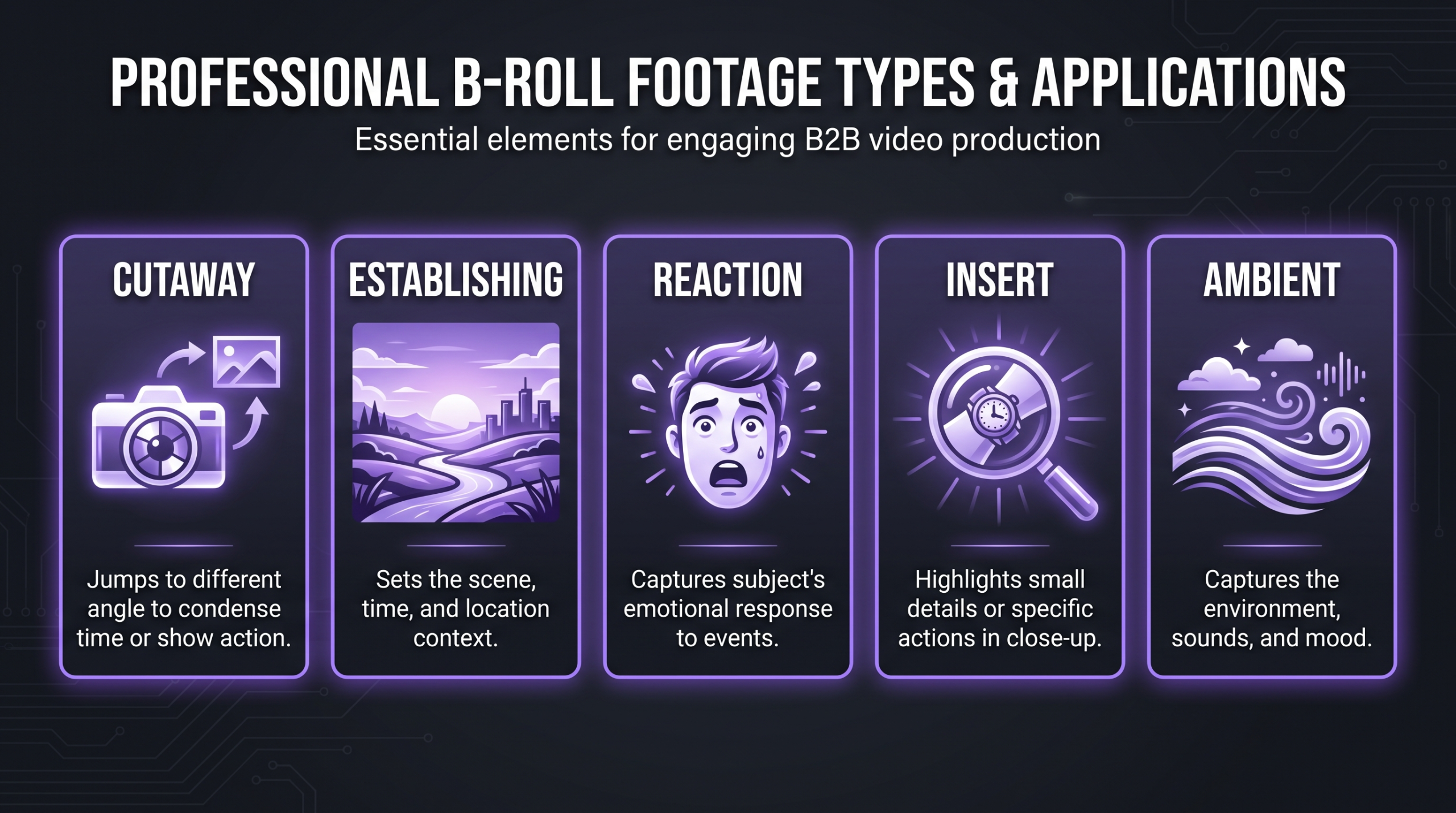
Not all B-roll functions the same way. Professional editors distinguish between several categories based on their editorial purpose and where they appear in a sequence. Knowing which type to reach for — and when — is a core editorial skill that separates polished video from merely adequate video.
Cutaway Shots
A cutaway is the most common and most versatile B-roll type. It is a shot that cuts away from the main subject to show something directly related to — but not part of — the primary action or narration. If a chef discusses a recipe on camera, the cutaway might show the ingredients being prepared, the cooking process, or the finished dish. Cutaways support the narrative directly and give viewers visual access to whatever the speaker is describing.
Cutaways are the B-roll type editors use most frequently to cover jump cuts. They are typically 2 to 5 seconds long and selected to match the specific topic or item being discussed at that exact moment in the audio.
Establishing Shots
Establishing shots orient the viewer to a location, environment, or time of day before the main scene begins. A wide shot of a city skyline before a business interview sets geographic and atmospheric context. An aerial view of a manufacturing facility before an industrial documentary anchors the viewer in the physical world of the content.
Establishing shots tend to run longer than standard cutaways — often 3 to 8 seconds — and are most commonly used at the opening of a video, at the beginning of a new scene, or following a significant shift in location or topic. They are a staple of documentaries, corporate video profiles, travel content, and any location-based video production.
Reaction Shots
A reaction shot captures one person’s visible response to another person’s words or actions. In interview settings, reaction shots of the interviewer — nodding, listening attentively, expressing concern or curiosity — give the editor a natural cutaway that also adds emotional credibility and conversational authenticity. They make an interview feel like a genuine exchange rather than a solo monologue.
Reaction shots are particularly powerful in testimonial and case study videos, where audience empathy and trust are the primary outcomes. A viewer watching a client describe a challenge, followed by a reaction shot of a thoughtful listener, unconsciously validates the emotion being expressed and increases their sense that the content is authentic.
Insert Shots (Close-Ups)
Insert shots are tight close-ups that highlight a specific object or detail: a hand signing a contract, a finger tapping a touchscreen, a tool being engaged, a logo on a product package, a dial being adjusted on equipment. They function as visual emphasis — directing the viewer’s attention to exactly the right detail at exactly the right moment in the narration.
Insert shots are particularly valuable in product demonstrations, how-to and tutorial content, instructional corporate video, and any footage where hands-on process needs to be communicated clearly. Capturing them requires repositioning the camera to a much closer distance than the standard interview or wide shot, which is why many productions schedule dedicated insert-shot capture time as a separate block during the production day.
Ambient or Environmental Footage
Ambient footage captures the general atmosphere and texture of a space or environment without focusing on a specific subject or deliberate action. Office culture montages, event crowd shots, natural landscapes, cityscapes at dusk, the hum of a busy kitchen — this category provides mood, atmosphere, and a sense of lived place that purely functional cutaways cannot deliver.
Ambient B-roll is the footage type most commonly and legitimately sourced from stock libraries, since shooting generic city streets or generic nature scenes specifically for a single branded video rarely justifies the production investment. The editorial test is whether the ambient clip matches the emotional and visual register of the surrounding content, not whether it was shot specifically for the project.
Where to Source B-Roll Footage
One of the most practical questions any video producer faces is where to find B-roll when the production did not capture everything needed in the field. The answer depends on your budget, how specific the content needs to be, and the production values your audience expects.
Free Stock Footage Libraries
Several platforms offer genuinely usable, rights-cleared stock video at no cost — a practical option for ambient, establishing, and generic cutaway needs:
- Pexels Videos: A well-curated free library covering lifestyle, business, technology, and nature footage. Strong for ambient and establishing shot categories. No attribution is required under the Pexels license, and commercial use is permitted.
- Pixabay Videos: Community-contributed stock video under the Pixabay Content License. Coverage is broader but more variable in quality than Pexels. The library is large and growing across many categories.
- Coverr: A smaller, editorially curated library with a focus on aesthetically consistent lifestyle and brand clips suitable for web and commercial use. All clips are free for commercial use with no registration required.
- Videvo: Offers both free and premium clips including motion graphics and footage. Check the license on individual clips, as they vary between royalty-free commercial and Creative Commons terms.
Free libraries work well for generic B-roll needs: office environments, nature sequences, cityscapes, technology close-ups, and lifestyle scenarios. They fall short when you need highly specific, niche, or strongly branded footage — a particular software interface, a specific branded product, or a recognizable proprietary location.
Paid and Subscription Stock Footage Platforms
For higher-quality or more specialized content, paid stock libraries offer substantially larger catalogs, more consistent production values, and clearer licensing terms for commercial use at scale:
- Storyblocks: A subscription model offering unlimited downloads from a library of hundreds of thousands of video clips, templates, and audio. Popular with high-volume production teams. Subscription pricing varies by plan and tier.
- Artlist: Known primarily for music licensing, Artlist’s footage library (Artgrid) offers a high-quality catalog skewing cinematic and lifestyle. Licenses are global and perpetual — a strong choice for productions with broad distribution requirements.
- Adobe Stock: Integrated directly into Premiere Pro and After Effects, making it the most frictionless option for teams already working in the Adobe ecosystem. Broad catalog covering 4K footage, editorial content, and motion graphics. Available on per-clip or subscription pricing.
Subscription models tend to offer the best per-clip economics for teams publishing multiple videos per month. If your team regularly turns out brand video, social content, or corporate communications, a subscription platform typically delivers strong value relative to per-clip licensing fees — especially for roles where editors spend significant time browsing and testing clips before selecting a final choice.
Original B-Roll Shoots
Original B-roll — footage captured specifically for your production — is the highest-quality option because it is inherently specific, visually authentic, and on-brand. No stock library clip of a “business meeting” carries the same credibility as footage of your actual team collaborating in your actual workspace. For corporate brand video, product demonstrations, and testimonial content, original B-roll is frequently the single factor that differentiates content that feels institutional and generic from content that builds genuine audience trust.
If you are budgeting for professional video production, the B-roll production day should be treated as a core line item, not an optional add-on. The most technically polished edit cannot create B-roll that was never shot.
How to Shoot B-Roll Like a Pro
If you are capturing original B-roll, there are core principles that separate footage that ends up in the final cut from footage that ends up on the cutting-room floor. Effective B-roll requires intentionality — about what to capture, how to capture it technically, and how much of it to gather for the editor to work with.
Plan Your Shots Against the Script or Content Outline
Before rolling on any B-roll capture, go through the A-roll script or content outline and flag every concrete noun, action, location, or concept that is mentioned or implied. Each one is a candidate for a B-roll shot. A product name mentioned in the script becomes a product close-up. A team workflow becomes an office process montage. A client outcome metric becomes a dashboard on screen.
A simple shot list — even a handwritten one — keeps the capture day organized and ensures nothing critical is missed. On set or on location, work through the list methodically while staying open to unplanned opportunities. Some of the most effective B-roll comes from shots that were noticed spontaneously in the environment rather than pre-scripted.
Camera Techniques That Produce Editable B-Roll
Not all motion looks good when cut into a polished sequence. Editors work best with B-roll that has a clear visual beginning, middle, and end — even for a short clip. Techniques that reliably produce editable material:
- Lock-offs (tripod static shots): Mount the camera on a tripod and let the action happen within the frame. Static shots are the easiest clips to cut and serve well as visual rest points between more dynamic footage.
- Slow motion capture: Shooting at higher frame rates (60fps, 120fps) gives the editor the option to slow clips down in post — adding drama, detail, or emotional weight to moments that pass too quickly at normal speed. Product close-ups, hands-on-process footage, and event highlight moments all benefit from slow-motion options.
- Controlled handheld or gimbal movement: A slow, stabilized push-in or pull-back adds visual energy without the jarring shakiness of undisciplined handheld work. Smooth, continuous movement is far more editable than abrupt direction changes or unintentional camera vibration.
- Wide-to-close variety for each subject: Always capture the same subject at multiple focal distances — wide, medium, and tight close-up. The editor needs visual options. A location or subject captured only from a single distance dramatically limits cutting flexibility.
- Give clips room to breathe (handles): Begin recording a few seconds before the action starts and continue a few seconds after it finishes. Clips that begin or end at the exact frame of the action are difficult to time correctly in the edit. These extra frames — called handles — are essential for clean cutting.
Audio Considerations During B-Roll Capture
While A-roll audio typically carries through B-roll segments in the edit, the ambient sound captured during B-roll shooting can add useful texture in post-production — particularly for documentary-style work, event coverage, and atmospheric segments. Recording clean room tone or ambient environment audio during B-roll capture gives editors a sound bed to blend subtly under the A-roll when a sense of physical presence is wanted.
If ambient sound is not needed, it is simple to mute in post. If it was never recorded, there is no authentic version to use later — and synthetic ambient audio almost always sounds wrong against the original material.
How Video Editors Use B-Roll in Post-Production
Understanding how professional editors actually deploy B-roll demystifies why polished editing looks so different from uncut footage — and helps producers provide better material to work with. The techniques are learnable, but developing the judgment to apply them correctly to specific content takes editorial experience.
B-Roll Pacing: Clip Length and Cut Frequency
A common mistake in self-edited video is using B-roll clips that run either too long (viewer attention drifts) or too short (the sequence feels frantic and disjointed). Professional editors match B-roll clip length to the rhythm of the spoken content and the emotional tempo required at each moment in the video.
Fast-paced social media ads and corporate highlight reels commonly run B-roll clips in the 1.5 to 3 second range, cutting frequently to a music pulse. Thoughtful documentary segments might hold a single B-roll shot for 6 to 10 seconds, allowing the image to breathe and giving the viewer time to absorb it. Neither approach is universally correct — the content, platform, and audience determine the appropriate pacing for each production.
Audio Ducking and B-Roll Sound Integration
When a B-roll clip carries useful ambient sound — office background noise, outdoor atmosphere, a product operating — editors often use audio ducking to blend it subtly under the primary A-roll audio. The B-roll ambient sound gently rises when cutting to the clip and fades back when the sequence moves on. Done correctly, the technique creates a subconscious sense of environmental presence and physical reality without distracting from the main audio track.
This is one of the technical details that consistently distinguishes professional editing from self-edited content. The viewer never consciously registers the technique — they simply experience the video as immersive and real, without being able to articulate exactly why.
Color Grading B-Roll to Match A-Roll
B-roll sourced from a stock library or shot on a different day — or with a different camera — will often have different exposure, color temperature, or contrast characteristics compared to the primary A-roll footage. Matching the grade across both sources is necessary for the video to feel visually cohesive throughout its runtime.
Professional editors apply a base color correction pass to all footage and then adjust individual clips to match within the established look. Stock footage in particular frequently requires significant correction to sit comfortably alongside original-camera material. Inconsistent color grading across B-roll segments is immediately visible to viewers — even those without formal video training — as something that makes a video feel “off.” For SaaS brands and software companies producing regular content, this is one core reason why working with a dedicated video editing team produces measurably more consistent results than switching between different self-editors.
💡 Pro Tip: When cutting stock B-roll into original footage, check white balance first — it is the fastest visual tell that clips came from different sources. A warm-toned interview paired with a cool-toned stock office clip will read as mismatched to most viewers even without film training. Correct white balance before any other color adjustment.
B-Roll Best Practices by Video Format
B-roll strategy is not one-size-fits-all. The type of video, its intended platform, and the audience’s expectations all shape how much B-roll to use, which type to prioritize, and how to deploy it. Here is a practical reference broken down by format:
Common B-Roll Mistakes to Avoid
Even experienced producers make these errors. Being aware of them before production — and before the edit — prevents the most costly ones and protects the final quality of the video.
Using B-Roll That Contradicts the Audio
If the speaker describes a product that simplifies complex workflows while the B-roll shows someone looking confused and overwhelmed at a screen, the visual and audio messages are in direct conflict. Audiences process visuals and audio simultaneously — when the two contradict each other, viewer trust in both tracks is undermined. Every B-roll clip should either actively support the spoken content at that moment or at minimum be neutral to it. Mismatched B-roll can make an otherwise strong testimonial feel dishonest.
Overusing Recognizable Stock Clips
The most-downloaded stock clips from major libraries have been used in so many productions across so many categories that a significant share of the audience will unconsciously recognize them — particularly the heavily-played lifestyle and business footage categories. Using these clips signals “generic content” to an observant viewer, which works against brand credibility and perceived production investment. Where possible, use search filters to find less-downloaded options, vary sources across the video, and supplement stock with at least some original footage that anchors the video in your specific brand reality.
Not Gathering Enough B-Roll During Production
The most consistent B-roll regret from first-time video producers is not shooting enough. It is far easier to discard an unused clip in the edit than to wish you had a shot that was never captured. Plan to allocate at least 20 to 30 percent of your on-location time to dedicated B-roll capture, separate from the primary interview or presentation recording. If you are in a location only once — a client’s facility, a live event, a specific outdoor setting — treat every available moment as a B-roll opportunity.
Including Shaky or Unstabilized Footage
Unstabilized handheld B-roll shot quickly during a busy moment on set is immediately recognizable — and it undermines the production value of everything around it. Even a brief clip of chaotic or shaky movement draws the eye and reads as unprofessional to an audience that has been conditioned by broadcast-quality content. Use a tripod, gimbal, or stabilizer for all B-roll. If handheld is unavoidable, tuck elbows tight, move slowly, and breathe steadily.
Failing to Organize B-Roll Before the Edit Begins
Disorganized B-roll adds hours to the editing process — and for productions using external editors, those hours translate directly to cost. For productions with substantial B-roll libraries, labeling clips by type and subject before importing into the editing project (e.g., “office_wide_01,” “product_closeup_03,” “team_meeting_05”) makes the difference between a fast, confident edit and a chaotic hunt through unlabeled footage. Investing time in organization before the edit starts pays back in edit speed, which reduces the cost of production whether you are editing internally or with a dedicated post-production team.
Frequently Asked Questions
Is B-roll the same as stock footage?
Not exactly. B-roll refers to any supplemental footage used in a production — regardless of its source. Stock footage is one common source of B-roll, but original footage shot specifically for your production also functions as B-roll when it serves a supporting role rather than carrying the primary narrative. The relationship is directional: all stock footage used in a video is B-roll, but not all B-roll is stock footage.
How much B-roll do I need for a typical interview or talking-head video?
A widely used production guideline is to aim for at least 2 to 3 minutes of B-roll options for every minute of finished interview content. In practice, editors often use more. For a 5-minute finished interview, having 15 or more minutes of B-roll options gives the editor genuine flexibility — enough to cover every edit cleanly, vary the visual pace throughout, and select clips that best match each spoken moment rather than using whatever happens to be available.
Can I use free stock footage for commercial projects?
Yes — platforms like Pexels, Pixabay, and Coverr license their content for commercial use without requiring attribution or payment. That said, you should review the specific license terms for each clip before use, as some community-contributed platforms include individual clips with more restrictive conditions. When in doubt, check the platform’s licensing documentation or download from a platform that applies a single clear commercial license uniformly across its catalog.
What is a B-roll shot list and should I create one before every shoot?
A B-roll shot list is a pre-production document that identifies specific supplemental shots needed to support the A-roll content — derived by going through the script or outline and flagging every visual subject, location, or process that should be shown on screen. Yes — you should create one before every significant production. Without it, B-roll capture tends to be opportunistic but incomplete, leaving gaps in the edit that stock footage may not be able to fill. The shot list is not a creative constraint; it is insurance against arriving at the edit with holes in the visual coverage.
Do short-form social media videos need B-roll?
Yes — and arguably more urgently than longer formats. Short-form video on platforms like Instagram Reels, TikTok, and YouTube Shorts moves at a high visual pace. A static talking-head frame with no cutaways typically underperforms against content that integrates dynamic B-roll because visual variety is one of the primary drivers of watch-through rate in short-form contexts. Viewers competing with an infinite scroll of alternatives will exit a static frame far faster than content that provides regular visual changes within the first few seconds.
Verdict
B-roll is not a nice-to-have refinement — it is a foundational element of professionally produced video at every format and budget level. Whether you are building a YouTube tutorial, a corporate brand film, a social media ad, or a long-form documentary, the quality and intentionality of your B-roll will directly determine how polished, credible, and watchable the finished product feels to your audience.
The principles are consistent across all formats: plan your shots against the script before the production day, capture significantly more than you think you will need, match your visual choices to the emotional intent of each moment, source footage from the right libraries for your use case, and give your editor the organized library they need to deploy B-roll as a storytelling tool — not just a technical patch for unavoidable jump cuts.
If you are managing a high volume of video content and want consistent B-roll integration handled at a professional level — including stock sourcing, color matching, audio ducking, and timing calibrated to your specific brand — that is exactly what Increditors’ dedicated senior editing teams deliver. See how this applies to software and software-adjacent businesses in our complete guide to video editing for SaaS companies.
Ready for Video That Actually Converts?
Tell us about your project and we will put together a custom plan.