










![3D Explainer Video - ScribbleLive.mp4_snapshot_00.12_[2022.03.09_03.14.16]](https://increditors.com/wp-content/uploads/elementor/thumbs/3D-Explainer-Video-ScribbleLive.mp4_snapshot_00.12_2022.03.09_03.14.16-r7wb53mx72rxst3qcqyrfxdmeyzb5r9jbl0wbjujh4.png "3D Explainer Video – ScribbleLive.mp4_snapshot_00.12_[2022.03.09_03.14.16]")
































You’re at that awkward stage. Your YouTube channel is growing — maybe 5K, 25K, or even 100K subscribers — and you know professional editing would take your content to the next level. But you’re staring at your revenue numbers wondering: can I actually afford this And if so, how much should I spenda
This isn’t a “video editing costs $X” article. You can find pricing breakdowns everywhere. This is a budgeting framework — a practical guide for figuring out exactly what to spend on editing at every stage of channel growth, how to measure whether it’s working, and when to level up.
We’ve worked with YouTube creators at every stage through our YouTube editing services, from channels just hitting monetization to creators pulling seven figures annually. The budgeting patterns that work are remarkably consistent. Here they are.
What’s in This Guide
- The YouTube Editing Budget Framework
- Budgeting by Channel Stage
- What You’re Actually Paying For
- Pricing Models: Per-Video vs. Retainer vs. Subscription
- How to Calculate Your Editing ROI
- Hidden Costs to Budget For
- 7 Ways to Optimize Your Editing Budget
- Budgeting Mistakes That Kill Channel Growth
- Real Creator Budget Breakdowns
- Building Your Annual Editing Budget
- FAQ
The YouTube Editing Budget Framework: How Much to Spend
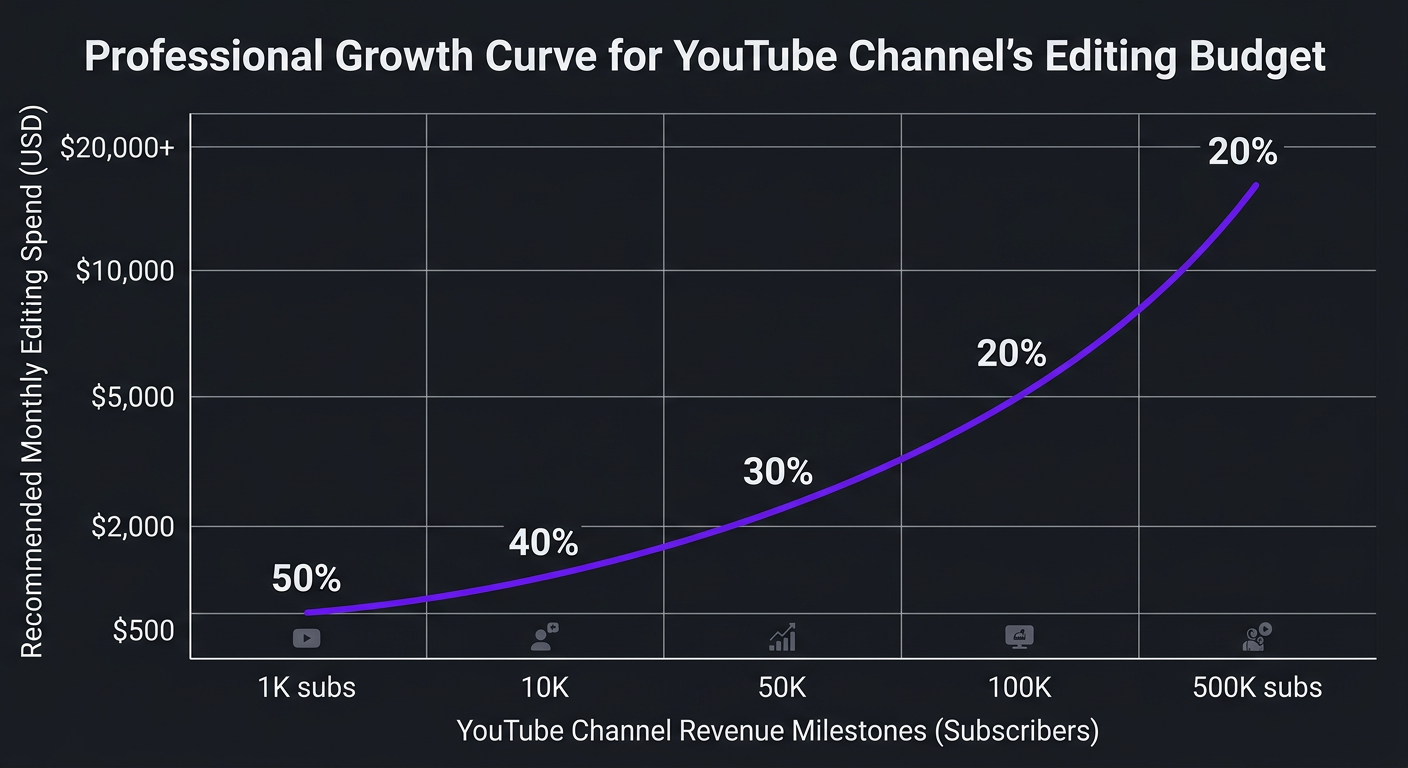
Here’s the budgeting rule that works for 90% of growing YouTube channels:
This sounds aggressive — and it is. But the logic is simple: during growth phases, every dollar you reinvest in quality accelerates the compounding effect of YouTube’s algorithm. Better editing → higher retention → more impressions → more subscribers → more revenue. The creators who under-invest in editing during growth phases plateau. The ones who over-invest break through.
Budget by Monthly Channel Revenue
| Monthly Revenue | Recommended Editing Budget | What That Gets You |
|---|---|---|
| $0–$500 | $0–$150 (or DIY) | Edit yourself, invest in learning. Maybe 1-2 outsourced videos to test. |
| $500–$2,000 | $200–$800/mo | Part-time freelancer or budget subscription. Outsource 2-4 videos/month. |
| $2,000–$5,000 | $800–$2,500/mo | Dedicated mid-tier editor. All videos outsourced. 4-8 videos/month. |
| $5,000–$15,000 | $2,000–$5,000/mo | Agency-level editing. Dedicated team with motion graphics, color grading. 8-12 videos. |
| $15,000+ | $4,000–$8,000/mo | Full production team. Long-form + shorts + thumbnails. 12-20+ pieces/month. |
Note: “revenue” includes all YouTube income — AdSense, sponsorships, affiliate income, course sales, memberships, and any revenue directly attributable to your YouTube presence. If your channel drives $20K/month in course sales but only shows $2K in AdSense, your channel revenue is $22K.
Budgeting by Channel Stage: A Practical Roadmap
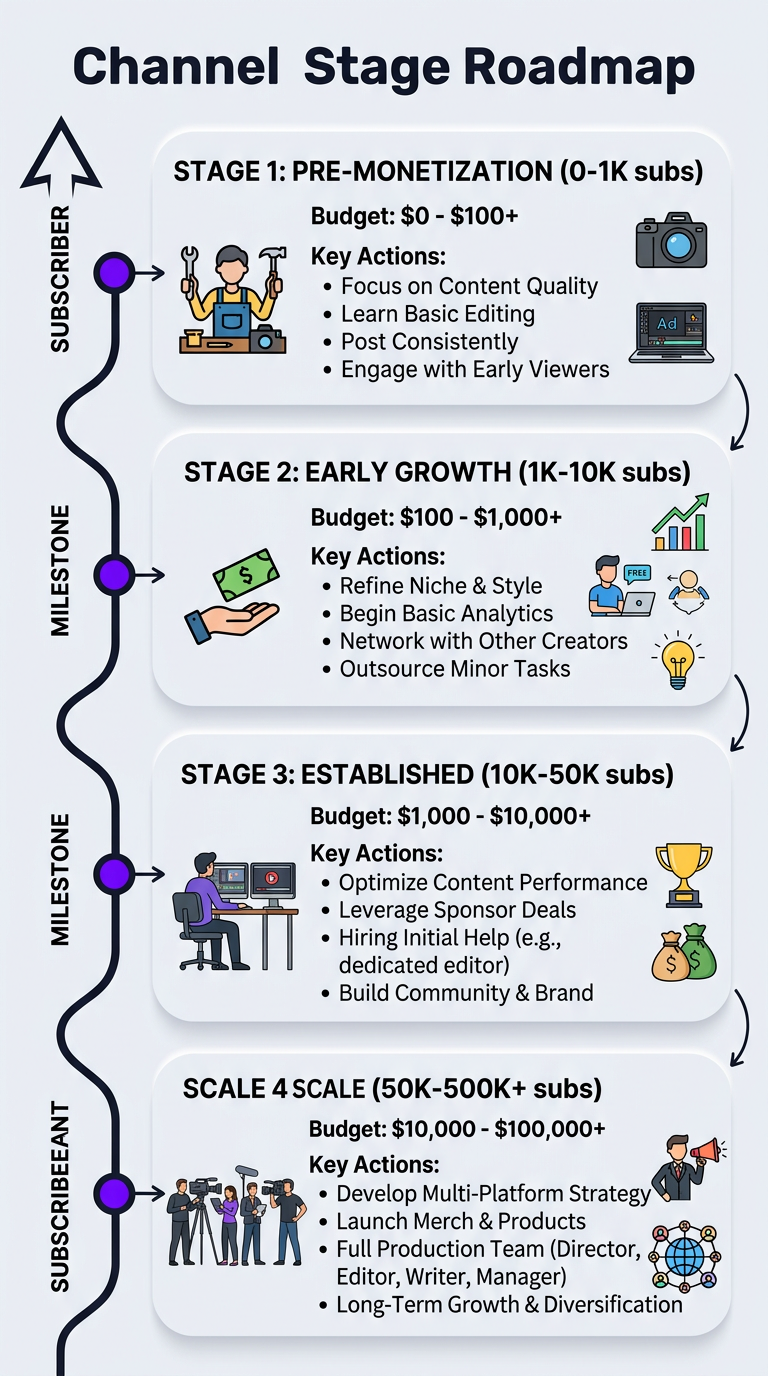
Stage 1: Pre-Monetization (0–1K Subscribers)
Budget: $0–$100/month
At this stage, you’re building fundamentals. Editing yourself teaches you what good editing looks like — pacing, cuts, audio, hooks. That knowledge makes you a better client when you eventually outsource.
Tools to invest in instead of editing services:
- DaVinci Resolve (free) — Professional-grade editing software
- Epidemic Sound or Artlist ($15-$17/month) — Licensed music
- Canva Pro ($13/month) — Thumbnails
- A decent microphone ($100-$200 one-time) — Audio quality matters more than video quality
If you can’t stand editing, one exception: pay for 1-2 professionally edited videos to use as portfolio pieces or channel trailers. A single well-edited video at $200-$400 can set the quality bar for everything that follows.
Stage 2: Early Growth (1K–10K Subscribers)
Budget: $200–$600/month
You’ve proven your content has an audience. Now the bottleneck shifts from “finding your niche” to “producing enough quality content consistently.” This is when most creators hit the editing wall — they can either make more videos or make better videos, but not both.
At this budget, you’re looking at:
- Budget editing subscription (2-4 videos/month): $300-$600
- Part-time freelancer (4 videos/month at $100-$150 each): $400-$600
- Hybrid approach: edit some videos yourself, outsource the complex ones
The hybrid approach is underrated here. Keep editing your simpler content (talking head, vlogs) while outsourcing complex videos (essays, tutorials with heavy B-roll). This stretches your budget while upgrading your highest-impact content.
Stage 3: Established Growth (10K–50K Subscribers)
Budget: $800–$2,500/month
This is the inflection point. Your channel is generating meaningful revenue, your audience expects consistent quality, and every hour you spend editing is an hour you’re not creating, collaborating, or building your brand.
At this stage, outsource everything. Your budget supports:
- Mid-tier dedicated editor (all long-form videos): $1,200-$2,000
- Short-form clips from long-form: $300-$500 additional
- Thumbnail design: included with some editors or $50-$100/month separately
This is also when most creators should switch from per-video to retainer pricing. If you’re producing 6+ videos per month, a retainer with a dedicated editing team saves 20-40% and gives you an editor who deeply understands your brand.
Stage 4: Scale (50K–500K+ Subscribers)
Budget: $2,500–$6,000+/month
You’re a business now. Video editing is a core business expense, not a nice-to-have. At this stage, you need agency-level infrastructure:
- Dedicated editor who edits only your content
- Motion graphics and animation capabilities
- Short-form specialist (different skill set than long-form)
- Project manager coordinating your content calendar
- Same-day or next-day turnaround for timely content
This is where Increditors YouTube packages sit — full production teams handling every aspect of post-production so creators can focus entirely on content creation and audience growth.
Not Sure What Tier Fits Your Channela
Tell us your channel size, content type, and posting frequency. We’ll recommend the exact editing setup and budget that fits.
What You’re Actually Paying For (Cost Breakdown)
Understanding where your money goes helps you budget smarter. Here’s the anatomy of a professionally edited YouTube video:
| Component | Time Required | % of Total Cost | Notes |
|---|---|---|---|
| Assembly cut | 1-3 hours | 20-25% | Reviewing raw footage, selecting takes, rough timeline |
| Fine editing & pacing | 2-4 hours | 25-30% | Tightening cuts, optimizing retention, hooks, transitions |
| B-roll & visual enrichment | 1-2 hours | 10-15% | Sourcing and placing B-roll, screenshots, visual aids |
| Motion graphics | 1-3 hours | 15-20% | Lower thirds, text animations, data visualizations |
| Color grading | 0.5-1 hour | 5-10% | Consistent look, mood setting, brand color alignment |
| Audio mixing | 0.5-1 hour | 5-10% | Levels, noise reduction, music ducking, SFX |
| Revisions | 1-2 hours | 10-15% | Typically 2 rounds of feedback and adjustments |
Total time for a well-edited 15-minute YouTube video: 7-16 hours. At a professional editor’s rate of $30-$60/hour, that’s $210-$960 — which maps directly to the $200-$800 per-video range you see in the market.
Knowing this breakdown lets you make smart budget decisions. If motion graphics eat 20% of your editing cost but don’t move your retention needle, you can opt for a simpler style and redirect that budget to more videos per month.
Pricing Models: Per-Video vs. Retainer vs. Subscription
How you pay matters almost as much as how much you pay. Each model has trade-offs:
| Pricing Model | Best For | Pros | Cons |
|---|---|---|---|
| Per-video | 1-3 videos/month, testing editors | No commitment, easy to compare, pay only for what you use | Most expensive per video, no dedicated editor, inconsistent quality |
| Monthly retainer | 4-12 videos/month, serious creators | Dedicated editor, volume discounts (20-40%), priority turnaround | Monthly commitment, need consistent production schedule |
| Subscription service | Budget-conscious, simple editing needs | Predictable costs, easy signup, no negotiation | Less customization, shared editors, quality ceilings |
| Dedicated team | 8+ videos/month, growth-stage channels | Full team (editor + PM + MoGraph), fastest turnaround, brand continuity | Higher monthly commitment, best value at volume |
The Transition Points
Here’s when to switch pricing models:
- Per-video → Retainer: When you consistently produce 4+ videos per month for 3+ consecutive months
- Retainer → Dedicated team: When you need 8+ videos per month and/or require additional services (shorts, thumbnails, motion graphics) beyond basic editing
- Subscription → Agency: When subscription quality hits a ceiling and you need custom editing, strategic input, or multi-format delivery
At Increditors, most creators come to us at the retainer-to-team transition. They’ve outgrown freelancers and subscriptions, and they need the infrastructure of a dedicated editing team without hiring in-house.
How to Calculate Your Editing ROI
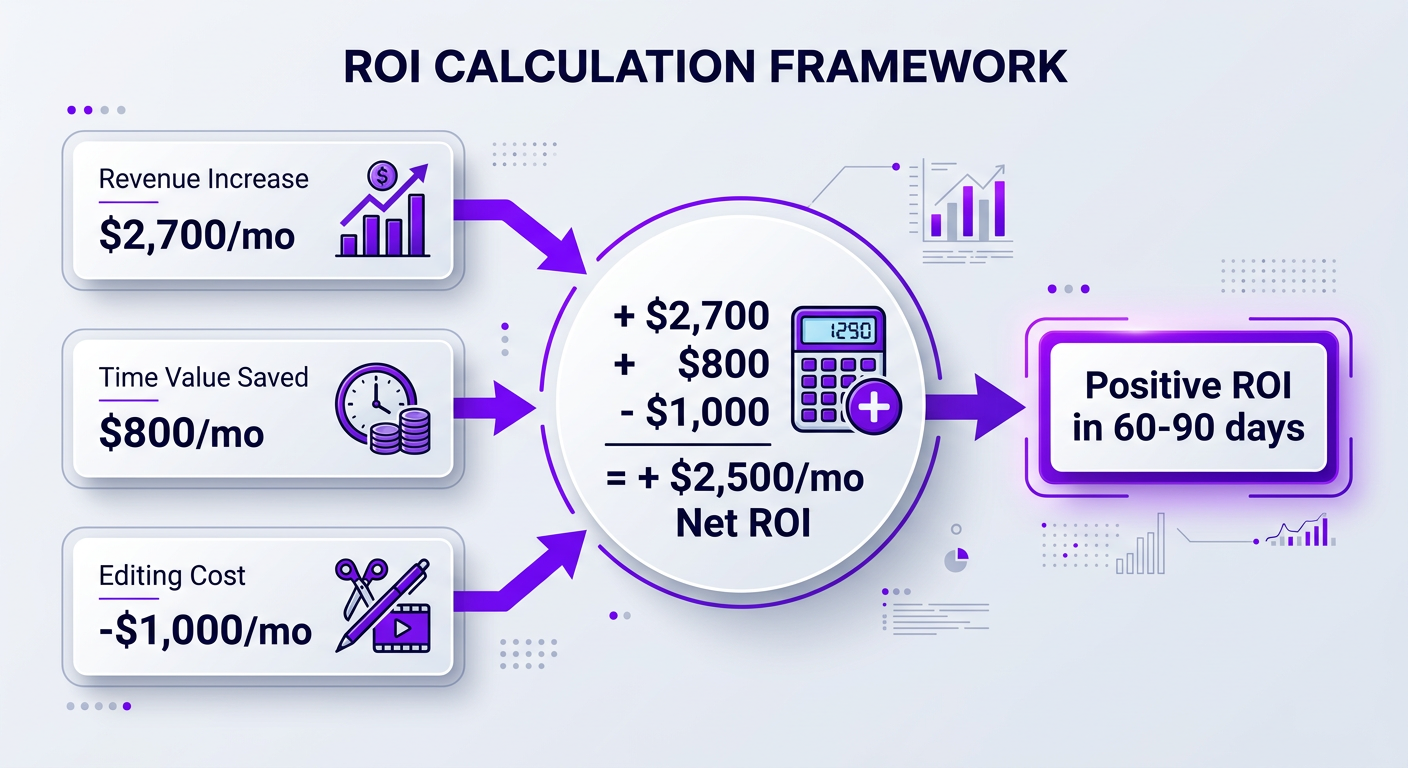
Budgeting without ROI tracking is just spending. Here’s the framework for measuring whether your editing investment is actually paying off:
The Three ROI Metrics
1. Revenue Impact
Compare your monthly revenue (AdSense + sponsorships + affiliate + products) for 90 days before and after outsourcing editing. Account for seasonal variations by comparing year-over-year if possible.
Formula: (Post-editing monthly revenue − Pre-editing monthly revenue) × 12 = Annual revenue impact
2. View/Impression Growth
Track average views per video and impressions. Professional editing typically improves audience retention, which triggers YouTube’s algorithm to serve your content to more people. A 10-15% improvement in average view duration can mean a 30-50% increase in impressions.
3. Time Recaptured
How many hours per month did you spend editing Value those hours at your effective hourly rate (channel revenue ÷ hours worked). If you earn $5,000/month and work 160 hours, your time is worth ~$31/hour. Recapturing 20 editing hours = $620/month in time value.
ROI Calculation Example
| Metric | Before Outsourcing | After Outsourcing (90 days) | Change |
|---|---|---|---|
| Monthly revenue | $3,500 | $5,200 | +$1,700/mo |
| Avg views/video | 15,000 | 22,000 | +47% |
| Avg retention | 38% | 48% | +10 points |
| Hours editing/month | 25 hrs | 3 hrs (review only) | -22 hrs |
| Editing cost/month | $0 | $2,000 | +$2,000 |
| Net monthly impact | — | — | +$1,700 revenue − $2,000 cost + $680 time value = +$380/mo positive ROI |
And this is conservative — it doesn’t account for the compounding effect. Those higher-retention videos continue earning for months and years on YouTube, while the revenue impact in the table only captures the first 90 days.
Hidden Costs to Budget For
Your editing budget needs padding for costs that aren’t obvious upfront:
Music Licensing ($15-$30/month)
Free music libraries sound free — until YouTube flags your video. Budget for Epidemic Sound ($15/month), Artlist ($17/month), or a similar licensed library. Some editing services include music access; check before paying separately.
Stock Footage ($0-$100/month)
If your content uses B-roll beyond what you shoot, budget for stock footage access. Artgrid and Storyblocks offer unlimited plans at $20-$30/month. Many professional editors have their own subscriptions.
File Storage & Transfer ($10-$50/month)
Raw footage is large. A single 4K video shoot can be 50-200GB. You need reliable cloud storage (Google Drive, Dropbox) and possibly a transfer service (Masv) for large files. Budget $10-$50/month depending on your shooting volume.
Revision Overages ($0-$200/month)
Most editors include 2-3 revisions. If you regularly need more, those extra rounds cost $50-$100 each. Budget a small buffer or — better yet — get better at writing clear feedback to reduce revision needs.
Thumbnail Design ($0-$200/month)
Some editing services include thumbnails; others don’t. If yours doesn’t, budget $25-$50 per thumbnail from a dedicated designer, or use Canva Pro ($13/month) to create your own.
Short-Form Repurposing ($100-$500/month)
Cutting long-form videos into Shorts, Reels, and TikToks is a separate editing job. Budget an additional $25-$75 per short-form clip, or negotiate a bundled long-form + shorts package with your editor. Our short-form packages bundle this affordably.
7 Ways to Optimize Your Editing Budget
1. Batch Your Filming
Film 4-8 videos in one session. This creates consistent raw footage (same lighting, same setup, same energy) that’s easier and faster to edit. Faster editing = lower cost per video on hourly arrangements, or more revisions within your retainer.
2. Create Templates
Work with your editor to build reusable templates for intros, outros, lower thirds, and transition styles. The first video takes longest; every subsequent video using the same template edits 20-30% faster.
3. Write Tight Briefs
Vague feedback creates revision rounds. Clear briefs with timestamped notes, reference examples, and specific directions cut revision time dramatically. We’ve seen good briefs reduce total editing time by 15-25%.
4. Negotiate Volume Commitments
Committing to 3-month or 6-month engagements unlocks discounts that month-to-month arrangements don’t. Most editing partners will offer 10-20% off for quarterly commitments.
5. Separate Simple and Complex Videos
Not every video needs the full treatment. Use your premium editor for flagship content and a simpler (cheaper) workflow for casual videos, community updates, or secondary channel content.
6. Invest in Better Raw Footage
Clean audio, good lighting, and organized footage reduce editing time significantly. A $200 microphone upgrade can save $50-$100 per video in audio cleanup costs over the life of the equipment.
7. Track Cost Per View
Divide your monthly editing cost by total monthly views. This metric tells you the real efficiency of your editing investment. If cost-per-view is dropping month over month, your editing budget is working.
Budgeting Mistakes That Kill Channel Growth
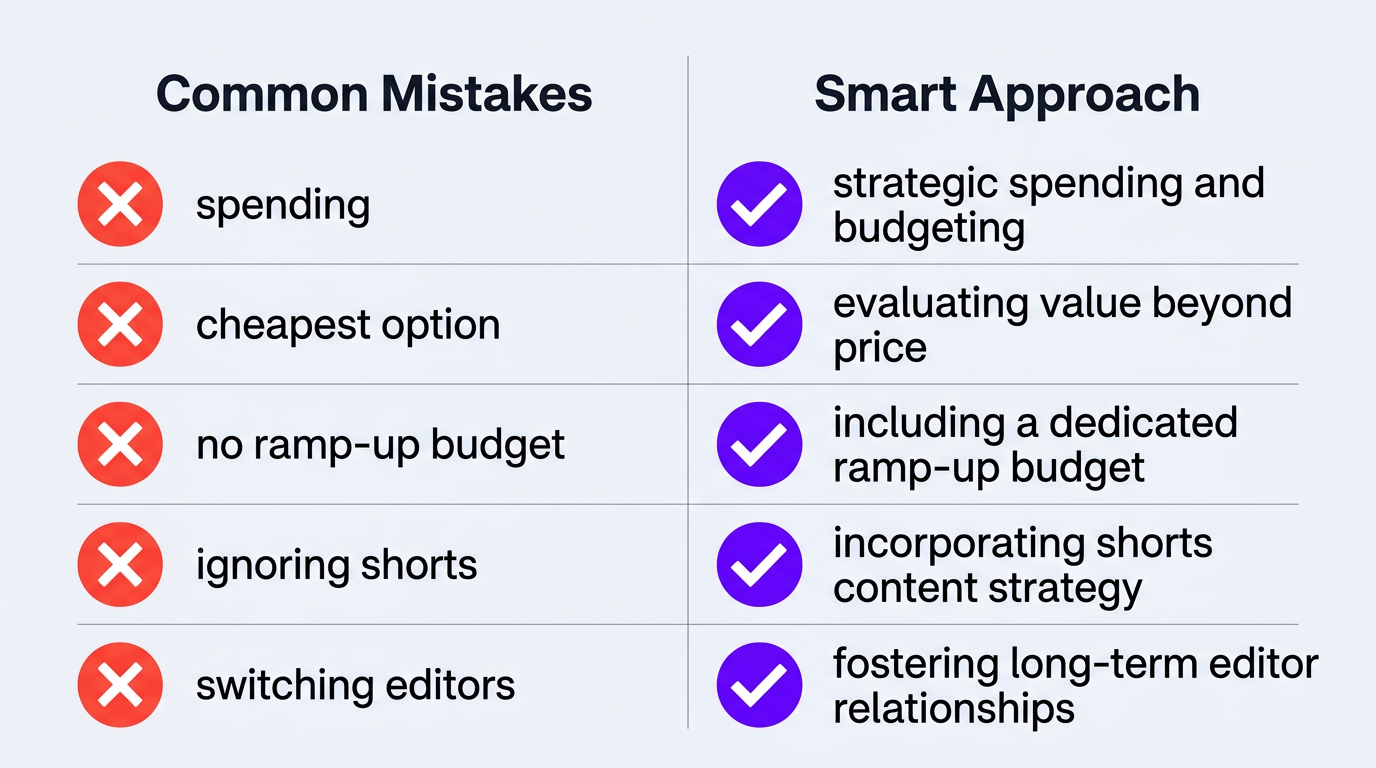
Mistake 1: Spending $0 When You Can Afford $500
The most expensive editing is free editing — when it costs you 20+ hours per month that could go toward content creation, audience building, or sponsorship outreach. If your channel earns $1,000+/month, every hour you spend editing instead of creating is a misallocation.
Mistake 2: Hiring the Cheapest Option Available
A $50/video editor who produces mediocre content doesn’t save you money — it costs you audience. Poorly edited videos get lower retention, fewer impressions, and less growth. The “savings” become a growth ceiling.
Mistake 3: Not Budgeting for the Ramp-Up Period
The first month with any new editor requires extra revisions and communication. Budget 20-30% more for month one, then plan for costs to normalize by month two or three.
Mistake 4: Ignoring Short-Form in Your Budget
Shorts and Reels are discovery engines. Channels that only budget for long-form editing miss the growth multiplier of short-form content. Allocate at least 20-30% of your editing budget to short-form clips.
Mistake 5: Switching Editors Every Few Months
Every switch means 2-4 weeks of ramp-up time, inconsistent quality, and brand voice drift. The cost of editor churn is real but invisible. Find the right partner and commit for at least 6 months to see real results.
Real Creator Budget Breakdowns
Riley Coleman: From DIY to Agency-Level Editing
Riley Coleman was editing his own YouTube videos — spending 15-20 hours per week in Premiere Pro. His content was solid, his audience was engaged, but his channel growth had stalled because he could only publish once per week while maintaining quality.
His budget evolution:
- Months 1-6 (DIY): $0 in editing costs, $250/month in software and music. 4 videos/month.
- Months 7-12 (Freelancer): $1,200/month for a part-time editor. 6 videos/month.
- Months 13+ (Increditors): $3,500/month for dedicated editing team. 8 long-form + 16 shorts/month.
The result: his views doubled after switching to Increditors, not because the editing was fancier, but because professional editing freed him to focus on content strategy, thumbnails, and audience engagement. The editing investment paid for itself within 60 days through increased ad revenue and a new sponsorship deal that required consistent high-quality output.
Trade with Pat: Budget-Conscious Creator Scaling Smart
Trade with Pat, a finance-focused creator, approached budgeting like he approaches investing — with spreadsheets and ROI calculations. He tracked cost-per-view, revenue-per-video, and time-saved metrics religiously.
His approach: start with a modest editing budget ($800/month), measure impact over 90 days, then scale investment based on data. After seeing a 40% improvement in average retention and a corresponding increase in ad revenue, he scaled to $2,500/month for a full editing + shorts package.
His key insight: “The editing budget isn’t an expense line — it’s an investment line. Track it like you’d track any investment, with expected returns and actual returns.”
Blue Zones Health: Wellness Channel Long-Term Budget Planning
Blue Zones Health took a different approach — annual budgeting rather than monthly. They mapped out a 12-month content calendar, estimated video complexity per month, and negotiated an annual editing agreement that averaged $2,000/month but flexed between $1,500 (lighter months) and $3,000 (launch months with complex content).
This annual approach gave them predictable costs for business planning and gave their editing partner (us) predictable volume for staffing. Win-win. The flexible retainer model accommodated their variable production schedule without penalizing lighter months.
Building Your Annual Editing Budget
Monthly budgeting is reactive. Annual budgeting is strategic. Here’s how to build one:
Step 1: Map Your Content Calendar
How many videos per month will you produce Be realistic — not aspirational. If you’ve been publishing 6/month, plan for 6-8, not 20.
Step 2: Categorize Complexity
Not all months are equal. Launch months, collaboration videos, and end-of-year content are more complex. Assign each month a complexity multiplier (1x, 1.5x, 2x).
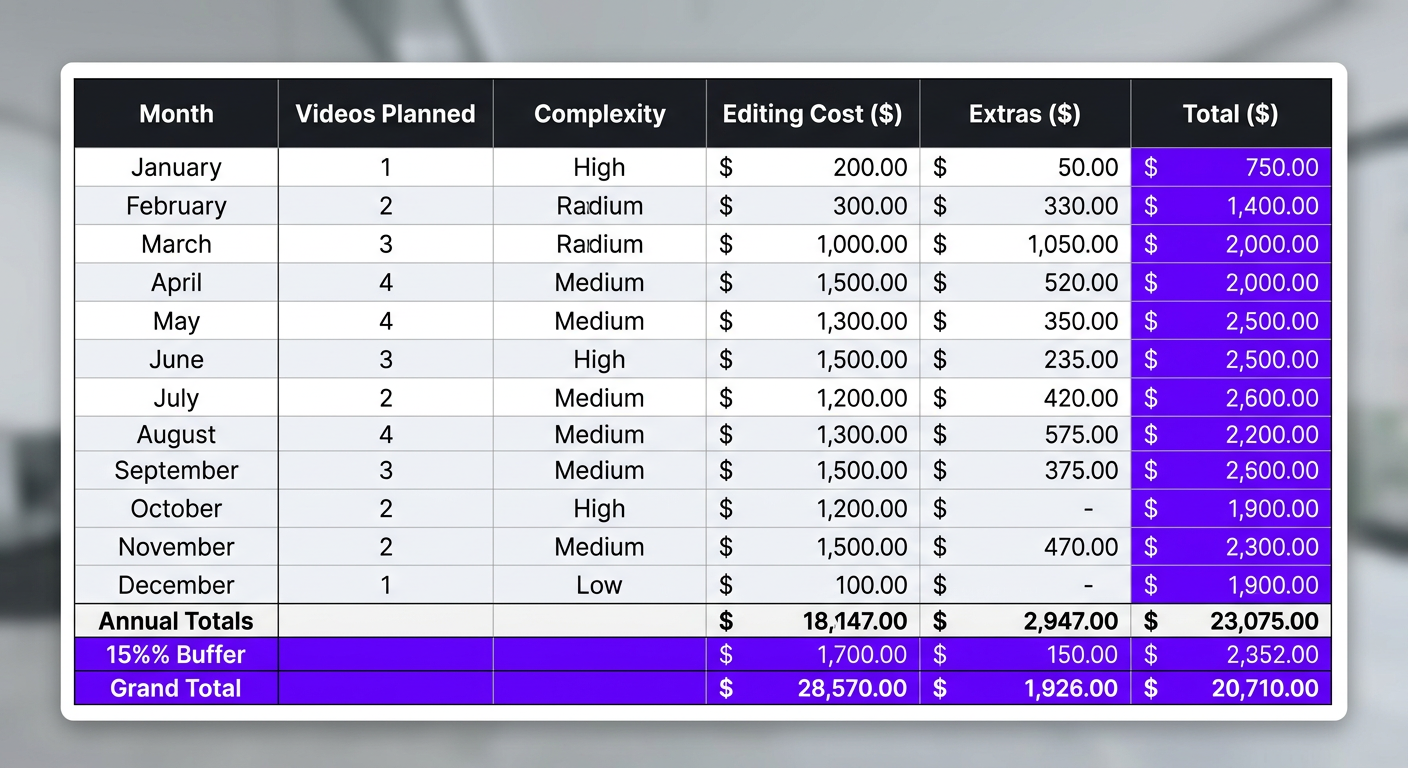
Step 3: Build the Spreadsheet
| Month | Videos Planned | Complexity | Editing Budget | Extras (music, stock, etc.) | Total |
|---|---|---|---|---|---|
| January | 8 | 1x (standard) | $2,000 | $300 | $2,300 |
| February | 8 | 1x | $2,000 | $300 | $2,300 |
| March | 10 | 1.5x (launch) | $3,000 | $400 | $3,400 |
| … continue for all 12 months … | |||||
| Annual Total | 100 videos | — | $26,000 | $3,800 | $29,800 |
Step 4: Add the Buffer
Add 15% for unexpected projects (a viral topic you need to jump on, a sponsor-requested video, collaboration opportunities). Annual budget of $29,800 becomes ~$34,300 with buffer.
Step 5: Negotiate Annual Terms
Take your annual budget to your editing partner and negotiate. Annual commitments typically unlock 10-20% discounts over month-to-month pricing. That’s $3,000-$6,000 in savings on the example above — real money.
Let’s Build Your Editing Budget Together
We’ll help you map your content calendar to a realistic editing budget — with no pressure to commit. Just clarity on what great editing costs for your specific channel.
Frequently Asked Questions
As a general rule, allocate 30-50% of your channel’s monthly revenue to editing when you’re in a growth phase. Channels earning $2,000-$5,000/month typically spend $800-$2,500 on editing. As revenue scales beyond $15,000/month, the percentage naturally drops to 15-25% while absolute spend increases to $3,000-$6,000+.
Start outsourcing when editing consumes more than 10-15 hours per week and prevents you from creating more content or engaging with your audience. For most creators, this happens around 5,000-10,000 subscribers. The investment in professional editing at this stage often accelerates growth enough to pay for itself within 90 days.
Yes. If you earn income from your YouTube channel (even part-time), video editing costs are a deductible business expense under most tax jurisdictions. This includes editing service fees, software subscriptions, stock footage, and music licensing. The deduction effectively reduces your editing cost by your marginal tax rate (15-37% for most U.S. creators).
Budget subscription services start at $300-$600/month for 2-4 basic videos. For better quality-to-cost ratio, monthly retainers with dedicated editors run $800-$2,000/month for 4-8 videos. The cheapest isn’t always the best value — a $150 video that gets 5,000 views is more expensive per-view than a $400 video that gets 20,000 views.
If you produce 4+ videos per month consistently, a monthly retainer saves 20-40% compared to per-video pricing. Retainers also give you a dedicated editor who learns your style, resulting in fewer revisions and better quality over time. Per-video works better for channels producing 1-3 videos monthly or creators still testing different editors.
Track three metrics over 90 days: revenue change (ad revenue + sponsorships + products), view/impression growth, and hours saved. Formula: (additional monthly revenue + value of saved hours) minus monthly editing cost = net monthly ROI. Most channels see positive ROI within 60-90 days of switching to professional editing.
Stop Guessing. Start Growing.
Get a clear editing budget that matches your channel’s stage and goals. No commitment required — just honest numbers.
Budget recommendations in this article are based on 2026 market rates and real creator case studies. Individual results vary based on niche, content quality, and audience engagement. For personalized budget planning, schedule a free consultation with our team.