










![3D Explainer Video - ScribbleLive.mp4_snapshot_00.12_[2022.03.09_03.14.16]](https://increditors.com/wp-content/uploads/elementor/thumbs/3D-Explainer-Video-ScribbleLive.mp4_snapshot_00.12_2022.03.09_03.14.16-r7wb53mx72rxst3qcqyrfxdmeyzb5r9jbl0wbjujh4.png "3D Explainer Video – ScribbleLive.mp4_snapshot_00.12_[2022.03.09_03.14.16]")
































Outsourcing your video editing should feel like gaining a superpower. Instead, for most creators and businesses, the first attempt feels like a trust fall into chaos: missed deadlines, edits that don’t match your vision, endless revision cycles, and the creeping suspicion you could have just done it yourself.
The problem isn’t outsourcing. The problem is process. Most people jump straight from “I need help” to hiring someone — skipping the critical steps that determine whether the relationship succeeds or fails.
We’ve onboarded hundreds of creators and brands at Increditors, and we’ve seen every outsourcing mistake in the book. We’ve also seen what separates clients who have a smooth, productive experience from those who churn through editors every few months. The difference is almost always preparation, not luck.
This is the complete checklist — every step from deciding to outsource through building a long-term editing partnership that actually works.
What’s in This Guide
- Phase 1: Pre-Outsourcing Readiness
- Phase 2: Finding and Vetting Editors
- Phase 3: The Test Project
- Phase 4: Onboarding and Setup
- Phase 5: The Editing Brief System
- Phase 6: Feedback and Revision Workflow
- Phase 7: Quality Control Framework
- Phase 8: Scaling Your Editing Operation
- Freelancer vs Agency: Outsourcing Comparison
- Red Flags and Deal-Breakers
- FAQ
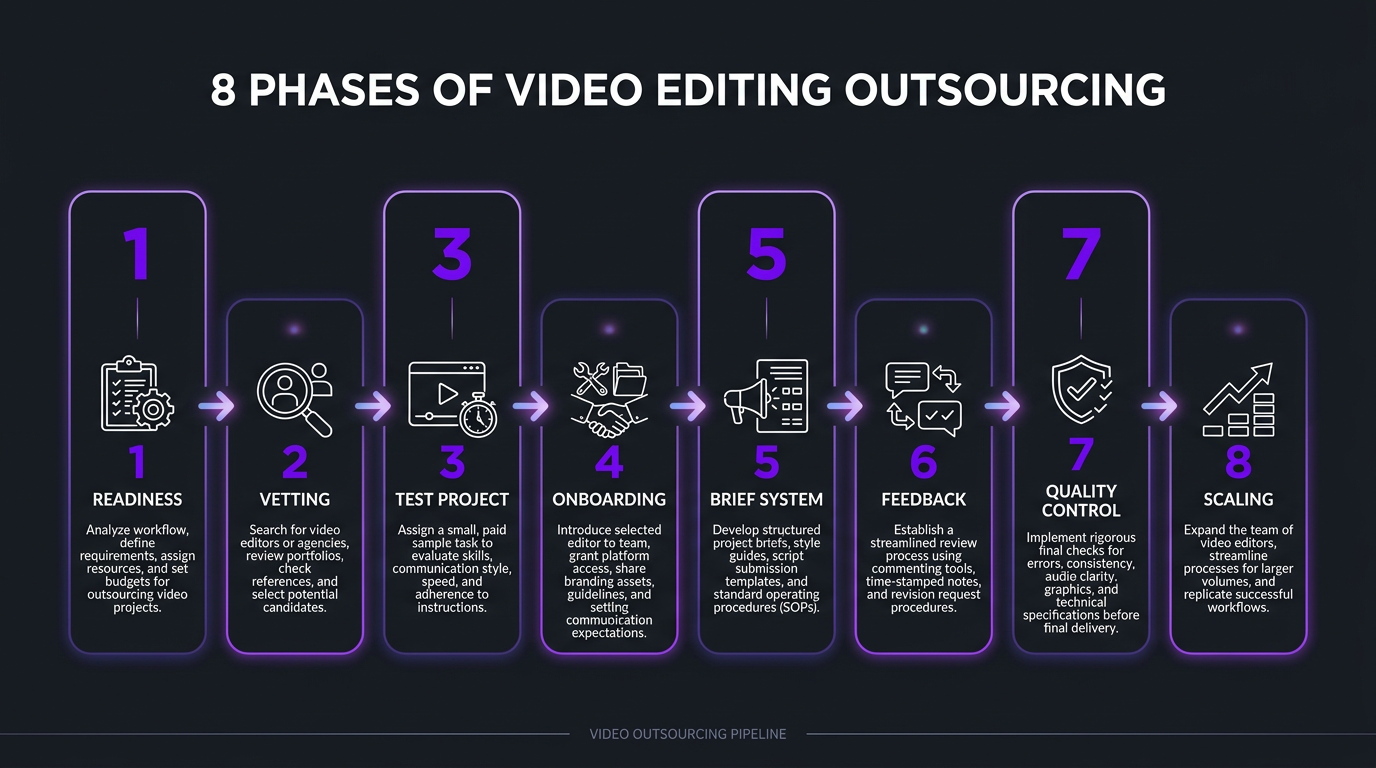
Phase 1: Pre-Outsourcing Readiness
Before you contact a single editor or agency, you need to answer these questions. Skipping this phase is the #1 reason outsourcing relationships fail — you can’t delegate what you haven’t defined.
Define Your Content Operation
Content Audit Checklist
- How many videos per month do you produce (or plan to)?
- What formats? (YouTube long-form, Shorts, Reels, TikTok, brand videos, product demos)
- Average raw footage length per video
- Average final video length
- Do you need multi-platform deliverables (16:9 + 9:16 + 1:1)?
- What’s your current editing time per video?
- What’s your monthly budget for editing?
- What turnaround time do you need?
These aren’t theoretical questions. They directly determine whether you need a freelancer, a subscription service, or a full editing agency. A creator producing 4 YouTube videos a month has fundamentally different needs than a brand producing 20 social clips a week.
Define Your Quality Standard
This is where most people fail. “I want good editing” means nothing. You need to be specific:
- Reference videos: Collect 3–5 videos that represent the style, pacing, and production quality you want. These become your brief’s north star.
- Brand guidelines: Colors, fonts, logo usage, tone of voice. If you don’t have a brand guide, create one — even a simple one-page doc.
- Non-negotiables: What must every video have? (Branded intro? Specific caption style? Music mood?) What must every video avoid? (Stock transitions? Overused effects? Certain music genres?)
- Quality tier: Be honest about your budget-quality expectations. A $200/video budget won’t produce $500/video quality.
Organize Your Assets
Your editor can only work with what you give them. Before outsourcing, prepare:
- Brand asset folder: Logo files (PNG, SVG), color codes, fonts, branded templates, intro/outro files
- Music library or preferences: Licensed music sources, genre/mood preferences, any songs to avoid
- B-roll library: Stock footage subscriptions, branded B-roll, product shots
- Previous best work: Your top 5 best-performing videos (these show your editor what “good” looks like for your audience)
- Analytics access: Sharing YouTube Analytics (especially retention data) helps editors understand what’s working
Phase 2: Finding and Vetting Editors
Now you know what you need. Here’s where to find it — and how to filter quickly.
Where to Look (And What You’ll Find)
| Source | Typical Quality | Price Range | Best For |
|---|---|---|---|
| Fiverr / Upwork | Variable (mostly basic) | $50–$300/video | Simple edits, low budgets, testing |
| Social media (X, Reddit) | Variable | $100–$500/video | Finding niche specialists |
| Editor communities | Mid to high | $200–$600/video | Experienced freelancers |
| Subscription services | Consistent mid-range | $500–$2,000/mo | Regular content, predictable output |
| Specialized agencies | High / Premium | $2,500–$8,000/mo | Brands, serious creators, scale |
| Referrals | Usually high | Varies | Best way to find trusted editors |
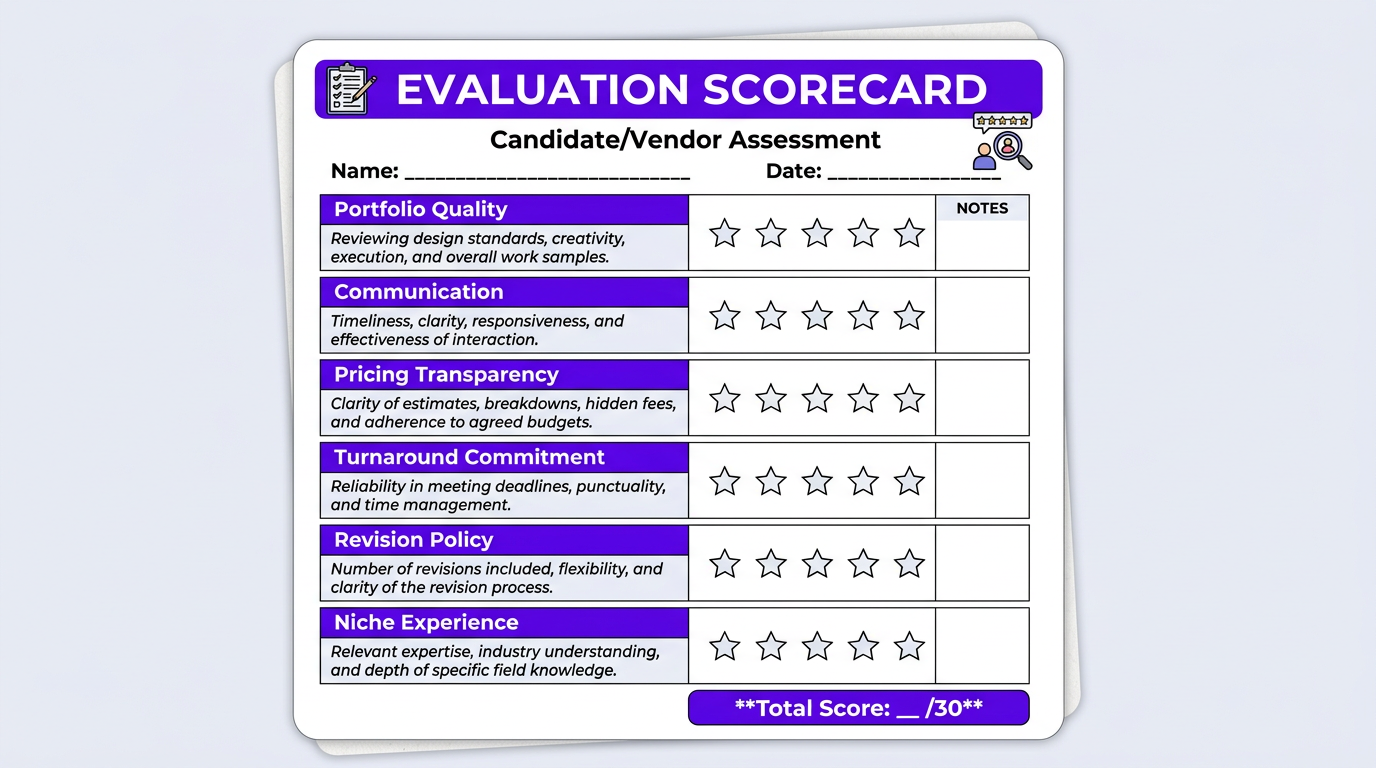
The Vetting Checklist
Editor Evaluation Criteria
- Portfolio includes work in your content category (not just a reel)
- Can show before/after examples or client testimonials
- Clear pricing structure (per video, retainer, or hourly)
- Defined revision policy (how many rounds, what counts as a revision)
- Realistic turnaround time commitments
- Responsive communication (replies within 24 hours during vetting)
- Willingness to do a paid test project
- Contract or service agreement available
- Backup plan if they’re unavailable (for freelancers)
- NDA willingness if needed (for brands with unreleased content)
When eSafety, a government digital safety organization, needed to outsource their video editing, the vetting process was critical. They couldn’t work with an editor who might mishandle sensitive content or miss the tone required for public-facing educational material. The vetting phase — portfolio review, test project, communication assessment — took three weeks but prevented the months of frustration that come from a bad fit.
The Portfolio Red Flag Test
Here’s a quick framework for evaluating portfolios:
- Watch with the sound off. Does the visual editing still tell a story? Good editors create visual rhythm that works even without audio.
- Watch the first 15 seconds. Is the hook engaging? Professional editors know the opening matters most.
- Check for consistency. Do all portfolio pieces look like they came from the same editor? Inconsistency suggests the editor doesn’t have a developed style.
- Look for variety within quality. Can the editor work across different content types while maintaining quality?
- Check the pacing. Does the video feel rushed, slow, or just right? Pacing intuition is the hardest skill to teach.
Phase 3: The Test Project
Never commit to a monthly retainer without a test project. This is non-negotiable. Any editor or agency that refuses a paid test project is a red flag.
How to Structure a Test Project
- Pay for it. Free test edits attract editors who are desperate. Pay your normal rate — you’ll get their real effort level.
- Use real footage. Don’t send your easiest clip. Send something representative of your typical content complexity.
- Provide your standard brief. This tests whether the editor can follow instructions and interpret your vision.
- Set a deadline. Turnaround reliability is as important as quality.
- Evaluate the full experience — not just the final output. How was communication? Did they ask good questions? Did they meet the deadline?
Test Project Scoring Rubric
| Criteria | Weight | What to Evaluate |
|---|---|---|
| Technical quality | 25% | Clean cuts, audio levels, color, export settings |
| Creative execution | 25% | Pacing, storytelling, visual interest, hook quality |
| Brief adherence | 20% | Did they follow your instructions? Incorporate brand elements? |
| Communication | 15% | Responsiveness, questions asked, progress updates |
| Deadline reliability | 15% | On time? Early? Late with notice? Late without notice? |
If an editor scores below 70% on this rubric, move on. If they score 70–85%, consider a second test project to confirm. Above 85%? Move to onboarding.
Phase 4: Onboarding and Setup
You’ve found your editor or agency. Now the real work begins: setting up a workflow that makes the ongoing relationship smooth, efficient, and scalable.
Week 1 Onboarding Checklist
Technical Setup
- Shared folder structure created (Google Drive, Dropbox, or Frame.io)
- Folder naming convention agreed upon (date_project_camera)
- Communication channel established (Slack, Discord, email, project management tool)
- Brand asset folder shared (logos, fonts, colors, templates, intros/outros)
- Reference videos shared with notes on what you like about each
- Music library access or preferences documented
- Export settings defined (resolution, codec, frame rate, aspect ratios)
- Delivery platform established (YouTube upload, Dropbox, Frame.io review)
Process Setup
- Editing brief template agreed upon
- Revision process defined (how to submit feedback, turnaround for revisions)
- Turnaround time expectations set for each content type
- Payment terms confirmed (invoicing schedule, payment method)
- Escalation process defined (what happens when issues arise)
- Content calendar shared (upcoming shoots, publishing schedule)
- NDA/contract signed if applicable
When we onboard new clients at Increditors, we run a structured one-week onboarding that covers all of the above plus a “brand immersion” session. Our editors watch 10–15 of the client’s previous videos, study their audience analytics, and review competitor content — before touching a single frame. This front-loaded investment means our first deliverable is already 80–90% aligned with the client’s vision, instead of the 50–60% first-draft accuracy that’s common with less structured onboarding.
This is the same approach we used with Trade with Pat, a finance content creator whose editing needed to balance educational clarity with the energy that keeps a younger audience engaged. Our editors studied his analytics, identified which segments drove the highest retention, and built an editing playbook specific to his content. The result: a seamless production rhythm from week two onward.
The File Sharing Problem (And How to Solve It)
Raw footage transfer is the unglamorous bottleneck of video editing outsourcing. A 30-minute 4K shoot can generate 20–50GB of raw files. Here’s what works:
| Solution | Best For | Cost | Speed |
|---|---|---|---|
| Google Drive | Small-medium files, existing workspace users | $12/mo (2TB) | Moderate |
| Dropbox | Reliable sync, large teams | $20/mo (3TB) | Good |
| Frame.io | Video-specific workflows, review + approval | $15–$25/mo | Excellent |
| Masv | Massive files, one-off transfers | $0.25/GB | Fastest |
| WeTransfer Pro | Quick shares, simple workflow | $10/mo | Good |
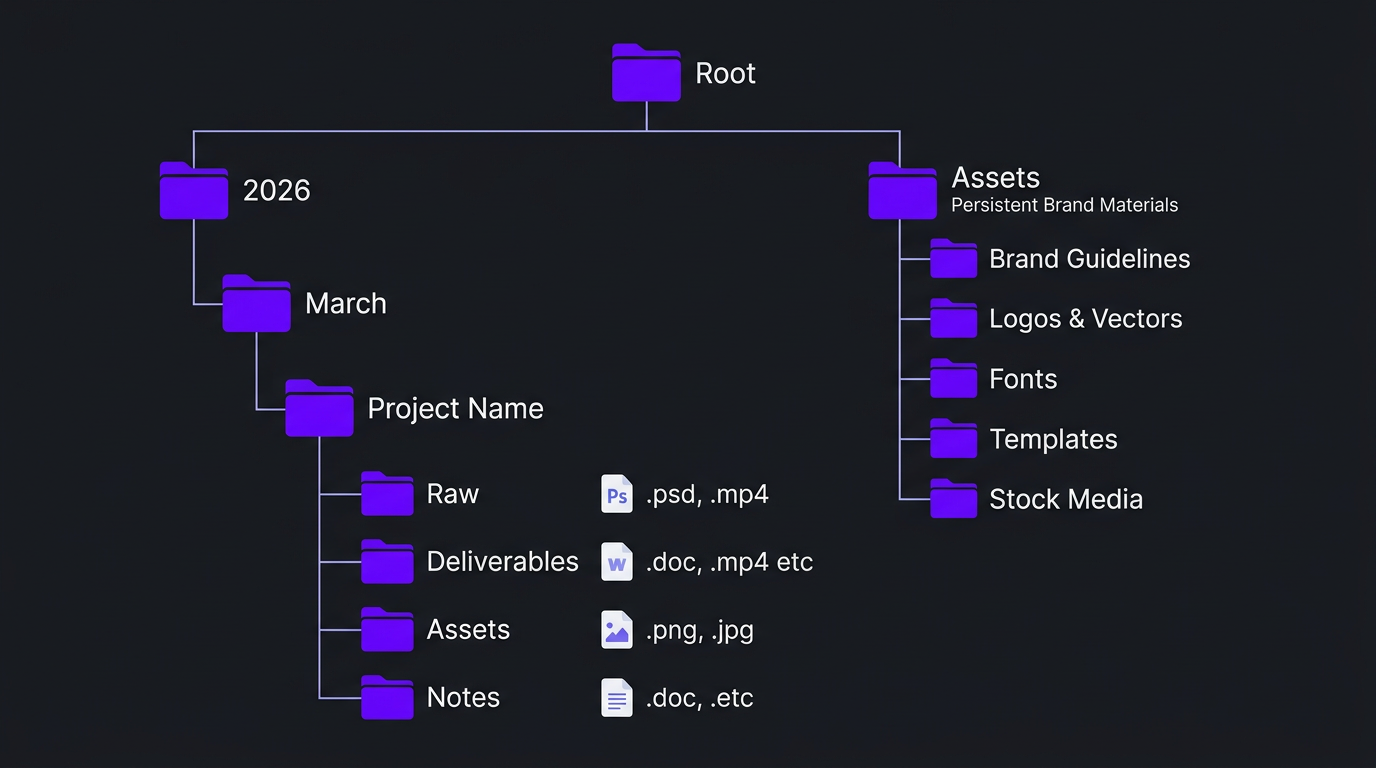
Pro tip: Whatever you choose, create a consistent folder structure from day one. We recommend: /[Year]/[Month]/[Project Name]/Raw/ and /[Year]/[Month]/[Project Name]/Deliverables/. Add a /Assets/ folder at the root for persistent brand materials. This seems pedantic until you’re managing 20+ projects and can’t find the B-roll from two weeks ago.
Want a Done-for-You Onboarding Experience?
We handle the entire setup — folder structure, brief templates, brand immersion, and workflow design — so you can start getting edits back in week one.
Phase 5: The Editing Brief System
Your editing brief is the single most important document in the outsourcing relationship. A great brief eliminates 80% of revision cycles. A vague brief guarantees frustration on both sides.
The Essential Brief Template
Every brief you send should include these elements. Skip any of them at your own peril:
Video Editing Brief — Must-Have Fields
- Video title/topic: What is this video about?
- Target audience: Who is watching this? (demographic, knowledge level)
- Video objective: What should the viewer do/feel/know after watching?
- Final length target: “Aim for 12–15 minutes” or “60-second Reel”
- Reference videos: 1–2 specific videos that show the style/pacing you want
- Raw footage notes: What was shot, what’s important, what to skip
- Music mood: Energetic/calm/dramatic/corporate — with examples if possible
- B-roll needs: “Use stock for X” or “B-roll included in folder”
- Graphics/text: Any specific lower thirds, data, or text to include
- Deliverables: Formats, aspect ratios, caption requirements
- Deadline: When you need the first draft
- Special instructions: Anything unique to this specific video
Voice Memos: The Brief Shortcut
If writing detailed briefs feels like too much work, here’s the secret most successful creator-editor relationships use: voice memos. Record a 3–5 minute audio note while the footage is fresh in your mind. Cover the key points: what you shot, what matters, what you’re going for, any specific moments to highlight.
A voice memo is faster than typing, captures nuance that text misses, and gives your editor a feel for your energy and intentions. Most editors prefer voice briefs over written ones — they’re more informative and take less time for both parties.
Brief Quality vs. Revision Rounds
There’s a near-perfect inverse correlation between brief quality and revision count:
| Brief Quality | Typical Revisions | Editor Confidence | Your Satisfaction |
|---|---|---|---|
| No brief (“just make it good”) | 4–6 rounds | Low — guessing | Low |
| Basic brief (topic + length only) | 3–4 rounds | Low-Medium | Medium |
| Good brief (includes references + notes) | 2–3 rounds | High | High |
| Great brief (full template + voice memo) | 1–2 rounds | Very High | Very High |
Each revision round costs everyone time and delays your publish date. Investing 15 minutes in a thorough brief saves hours downstream.
Phase 6: Feedback and Revision Workflow
How you give feedback determines how fast your editor learns your preferences — and how quickly the relationship matures to the point where first drafts need minimal changes.
Rules for Effective Feedback
- Be specific, not vague. “The pacing in the intro feels slow — can you tighten the first 30 seconds?” vs. “It doesn’t feel right.”
- Use timestamps. “At 3:42, the transition feels jarring. Try a simple cut instead of the dissolve.” This saves your editor from scanning the entire video guessing what you mean.
- Separate must-fixes from nice-to-haves. “Must: Fix the audio pop at 7:15. Nice-to-have: Add a subtle zoom at 2:30.” This helps your editor prioritize.
- Explain the why. “Cut the section from 4:00–4:45 because it repeats a point we already made at 2:15.” Understanding your reasoning helps editors make better autonomous decisions in future videos.
- Consolidate feedback. Send one round of notes, not 5 separate messages over 3 days. Scattered feedback wastes time and creates confusion.
- Use video review tools. Frame.io, Vimeo Review, or even screen-recording your review (Loom) beats text-only feedback for visual notes.
The Feedback Loop That Builds Trust
Over time, your feedback should evolve. Here’s the healthy pattern:
- Month 1: Detailed feedback on every edit. Editor is learning your preferences. Expect 2–3 revision rounds.
- Month 2–3: Feedback becomes more targeted — you’re correcting nuances, not fundamentals. 1–2 revision rounds.
- Month 4+: First drafts are 85–95% right. Feedback is minor tweaks. Some videos need zero revisions.
- Month 6+: The editor anticipates your preferences. They make creative choices you wouldn’t have thought of — and you love them.
If you’re still giving the same fundamental feedback in month 3, something is wrong — either the brief, the editor, or the fit. Don’t let a bad match drag on for months hoping it improves.
Phase 7: Quality Control Framework
Quality control isn’t just “watch the video and see if you like it.” A structured QC process catches issues that subjective viewing misses and ensures consistency across all your content.
The Two-Pass Review System
Pass 1: Technical Review (2–3 minutes)
- Audio levels consistent throughout? No pops, hiss, or volume jumps?
- Color consistent across all clips? No obvious white balance shifts?
- Export settings correct? Right resolution, frame rate, aspect ratio?
- Captions accurate and properly timed? (if applicable)
- All branded elements present? (Intro, outro, lower thirds, watermark)
- No orphaned clips, black frames, or stray audio?
Pass 2: Creative Review (full watch)
- Does the hook work? Would you keep watching as a new viewer?
- Is the pacing right? Any sections that drag or feel rushed?
- Do the graphics and text add value or clutter?
- Does the music support the content without overwhelming it?
- Is the overall feel on-brand?
- Would you be proud to publish this?
When agencies like Increditors handle QC internally, this is what happens before the client ever sees the video. Our editors self-review, then a QC reviewer runs both passes before delivery. By the time it reaches you, the technical issues are already caught — you only need to evaluate the creative direction.
Building a Style Guide That Evolves
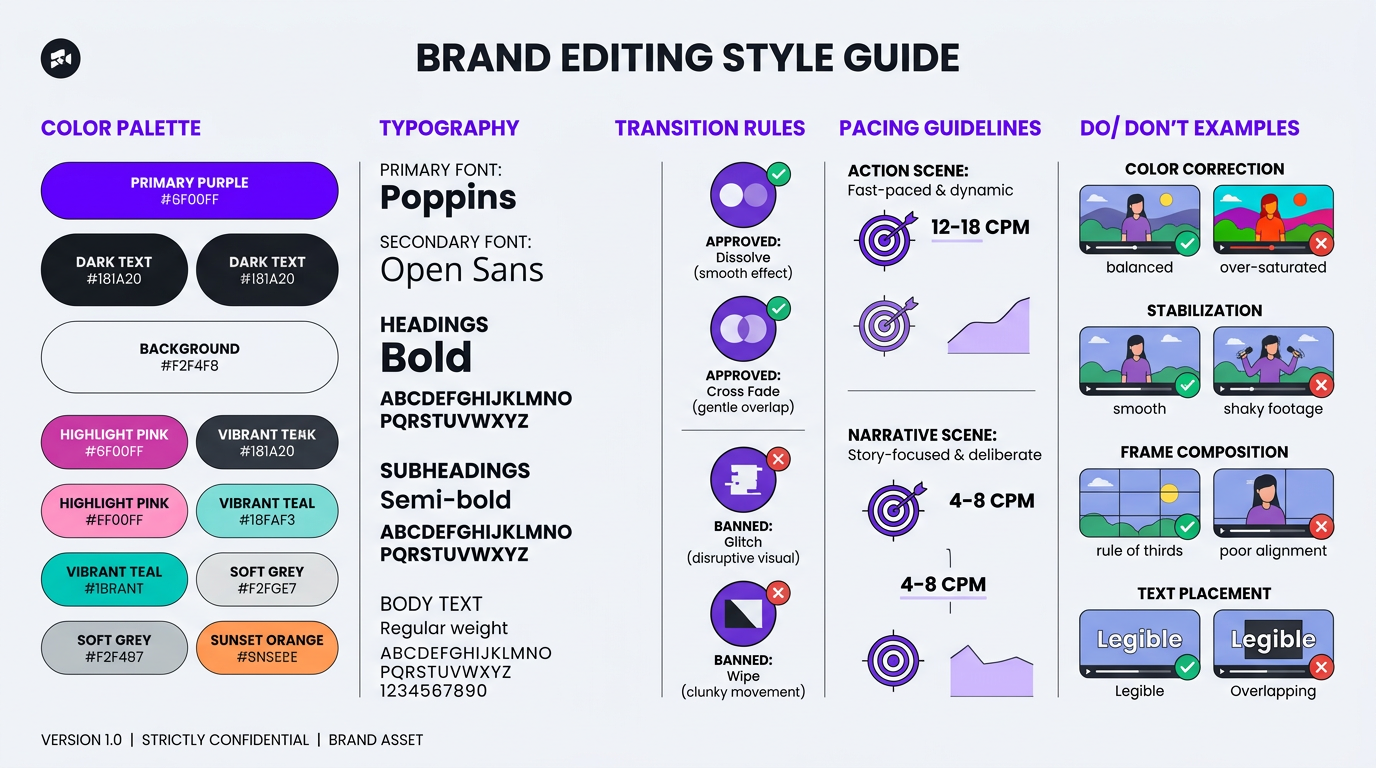
After the first month of working together, compile your accumulated feedback into a living style guide. This document becomes the reference that keeps your content consistent even if your editor is out sick and a backup editor steps in.
Include:
- Your preferred transition styles (and the ones you hate)
- Color grading preferences with visual references
- Caption styling specifications
- Music mood guidelines by content type
- Pacing benchmarks (cuts per minute for different content types)
- Common feedback themes (the things you always flag)
Phase 8: Scaling Your Editing Operation
Once the foundation works, scaling is where outsourcing really pays off. The process you built for 4 videos a month should extend smoothly to 8, 16, or 40+.
When to Scale (and When Not To)
Scale when:
- Your current editor/agency is consistently delivering quality with minimal revisions
- You have more content to produce than your current setup can handle
- You’re ready to expand into new formats (Shorts from long-form, social media clips, repurposed content)
- Your revenue/audience supports the additional investment
Don’t scale when:
- You’re still figuring out your editing style and quality standards
- Your current workflow has unresolved issues (high revision counts, communication problems)
- You’re scaling for volume without a strategy for why more content = better outcomes
Scaling Models
| Model | Volume | Monthly Cost | Best For |
|---|---|---|---|
| Single freelancer | 4–8 videos/mo | $1,200–$3,000 | Solo creators, tight budgets |
| Freelancer + AI tools | 8–12 videos/mo | $2,000–$4,000 | Creators scaling with efficiency |
| Agency retainer | 8–20 videos/mo | $3,000–$6,000 | Established creators, SMBs |
| Dedicated team | 20–40+ videos/mo | $5,000–$10,000 | Brands, enterprises, high-volume creators |
Blue Zones Health, a wellness brand, scaled from 4 videos per month to 16+ over six months with our team. The key was that the foundation — brand guidelines, brief templates, QC process — was solid from the start. Scaling meant adding volume to an existing system, not reinventing the workflow. Their per-video cost actually decreased at higher volume because the fixed overhead (brand knowledge, PM time, style guide maintenance) was distributed across more deliverables.
The Multi-Format Advantage
Scaling isn’t just about more of the same content. The biggest efficiency gain comes from multi-format production — turning one long-form video into multiple deliverables:
- 1 YouTube long-form → 3–5 YouTube Shorts
- 1 YouTube long-form → 3–5 Instagram Reels
- 1 YouTube long-form → 1–2 TikTok clips
- 1 YouTube long-form → 1 LinkedIn clip (different editing style)
- 1 YouTube long-form → Blog post pull quotes and audiograms
A single 20-minute YouTube video can yield 10–15 pieces of content across platforms. This is where an agency with a dedicated team provides dramatically more value than a solo freelancer — the team handles the full repurposing pipeline, not just the hero edit.
Freelancer vs Agency: The Outsourcing Decision
This is the most common fork in the outsourcing road. Here’s a complete side-by-side to help you decide:
| Factor | Freelancer | Agency (e.g., Increditors) |
|---|---|---|
| Ideal volume | 1–6 videos/month | 4–40+ videos/month |
| Consistency | Depends on individual availability | Team ensures consistent delivery |
| Backup if editor is sick | ❌ No backup | ✅ Team covers |
| Project management | You manage everything | Dedicated PM handles logistics |
| Skill range | One person’s skills | Editor + colorist + motion designer + PM |
| Scalability | Limited by one person’s capacity | Add editors as volume grows |
| Quality control | Self-review only | Multi-layer QC process |
| Onboarding overhead | You handle everything | Agency manages the process |
| Cost (per video) | Lower per-video rate | Higher per-video rate |
| Total cost of ownership | Higher (your time managing) | Lower at scale (PM included) |
Red Flags and Deal-Breakers
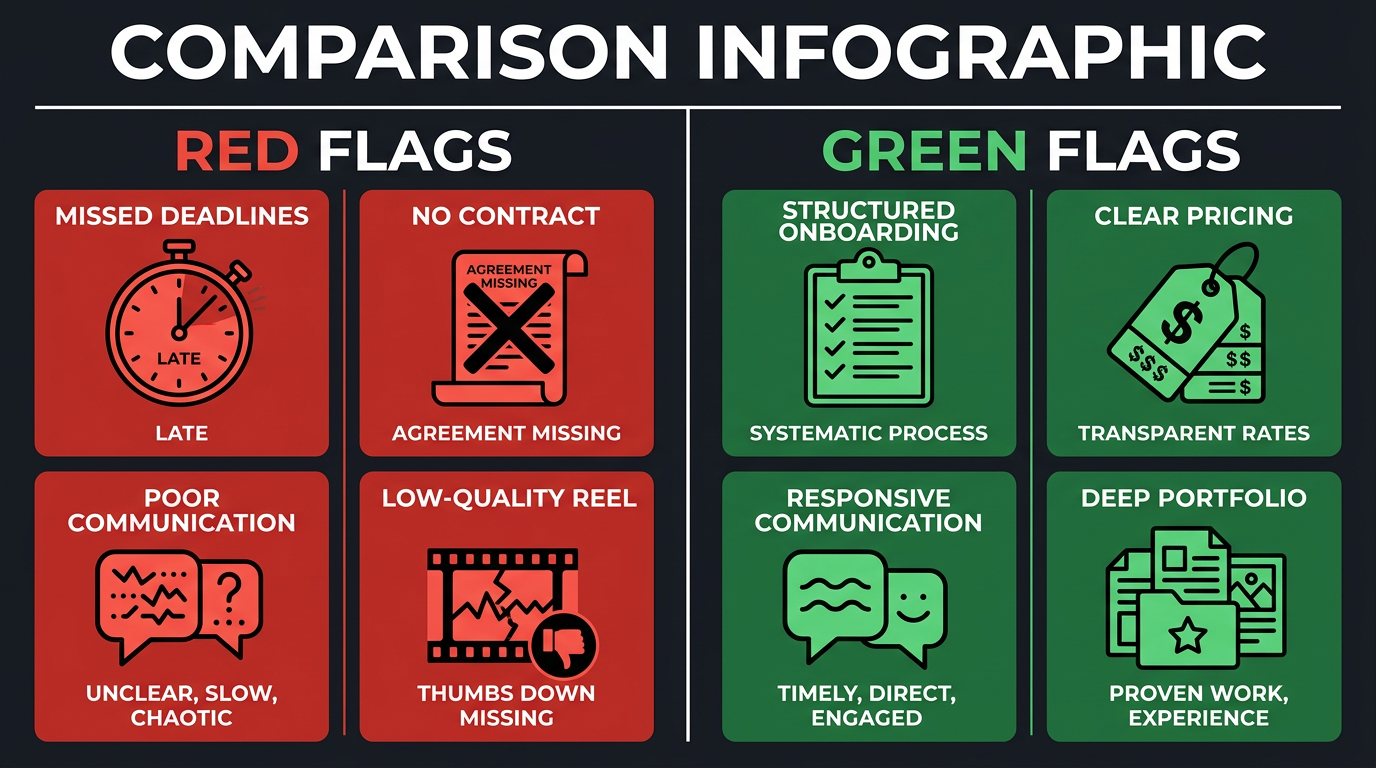
After onboarding hundreds of clients (many of whom came to us after bad experiences elsewhere), we’ve compiled the definitive red flag list. If you encounter more than two of these, walk away:
Pre-Hire Red Flags
- No relevant portfolio work. Only personal projects or demo reels — no actual client deliverables in your content category
- Pricing too good to be true. “$50 for a fully produced 15-minute YouTube video” means corner-cutting you won’t see until after you publish
- No contract or terms. Professional editors and agencies have service agreements. Always.
- Slow communication during the sales process. If they’re slow to respond when trying to win your business, imagine how slow they’ll be after they have it
- Can’t articulate their process. “I just edit” isn’t a process. You want to hear about their workflow, revision handling, and delivery standards
Post-Hire Red Flags
- Consistently missing deadlines without proactive communication
- First drafts that ignore your brief. One miss is a learning curve. Repeated misses are a capability gap.
- Defensive response to feedback. Professional editors welcome feedback — it’s how they learn your preferences
- Quality regression. Output quality drops after the first month (common with editors who over-invest in test projects and under-deliver ongoing)
- Scope creep without discussion. Suddenly charging more without explaining what changed
- Ghost periods. Disappearing for days without explanation is unacceptable for ongoing work
Trust your gut. If the relationship feels like more work than it saves, it’s the wrong relationship — regardless of the editing quality.
Frequently Asked Questions
Look for portfolio quality in your niche, clear communication, defined turnaround times, transparent pricing, a structured revision policy, and backup editor availability. Any reputable agency will have all of these documented and ready to discuss on the first call.
Include: video objective, target audience, reference videos, brand guidelines, music mood, B-roll notes, deliverable specs, and deadline. Or record a 3–5 minute voice memo covering these points. The more specific your brief, the fewer revision rounds you’ll need.
Expect 1–2 weeks for full onboarding. Week 1: brand immersion, workflow setup, and test edit. Week 2: refining based on feedback and establishing production rhythm. By week 3, most agencies are delivering at full speed. At Increditors, we run structured onboarding to get clients producing in the first week.
Use Google Drive or Dropbox for ongoing work, Frame.io for review-heavy workflows, or Masv for massive files. Establish a consistent folder structure and naming convention from day one. Include a brief voice or text note with every upload.
Professional services include 2–3 rounds. Great briefs typically need only 1–2 rounds. If you consistently need 4+ rounds, the issue is usually the brief quality or the editor-client fit — not a revision allowance problem. See our pricing page for details on what’s included.
Freelancers suit low-volume (1–4 videos/month) with flexible deadlines. Agencies are better for 4+ videos/month, faster turnaround, and multi-format needs. The break-even point is typically around 6–8 videos per month, where agency PM and QC services save you enough management time to justify the premium.
Top red flags: no portfolio of actual client work, unrealistically low pricing, no contract, slow communication, inability to describe their editing process, and defensive responses to feedback. Trust the vetting process — a thorough test project reveals most issues before you commit.
Ready to Outsource the Right Way?
Skip the trial-and-error. Our structured onboarding gets you from first call to finished videos in under two weeks — with a team that actually understands your content.
This checklist is based on processes used by Increditors across hundreds of client onboardings. Individual experiences may vary based on content type, volume, and editor/agency selection. For a personalized outsourcing plan, schedule a free consultation.