










![3D Explainer Video - ScribbleLive.mp4_snapshot_00.12_[2022.03.09_03.14.16]](https://increditors.com/wp-content/uploads/elementor/thumbs/3D-Explainer-Video-ScribbleLive.mp4_snapshot_00.12_2022.03.09_03.14.16-r7wb53mx72rxst3qcqyrfxdmeyzb5r9jbl0wbjujh4.png "3D Explainer Video – ScribbleLive.mp4_snapshot_00.12_[2022.03.09_03.14.16]")
































Every month, a new AI tool promises to “replace your video editor.” Descript, Opus Clip, CapCut, Runway, Adobe’s Sensei — the list keeps growing, and the marketing keeps getting bolder.
If you produce video content for your business or personal brand, you’ve probably wondered: can I just use AI and skip hiring an editor entirelya
We’ve tested every major AI editing tool on the market. We also run a professional video editing agency where human editors produce thousands of videos per year. So we’ve seen both sides — what AI does well, where it falls apart, and the hybrid workflow that actually delivers the best results.
Here’s the honest, no-hype breakdown.
What’s in This Guide
- The State of AI Video Editing in 2026
- What AI Editing Tools Actually Do Well
- Where AI Falls Apart (With Examples)
- Side-by-Side Quality Comparison
- Cost Comparison: AI vs Human vs Hybrid
- Speed and Turnaround Comparison
- The Hybrid Workflow That Actually Works
- When to Use AI, When to Use Humans
- Where This Is Heading
- FAQ
The State of AI Video Editing in 2026
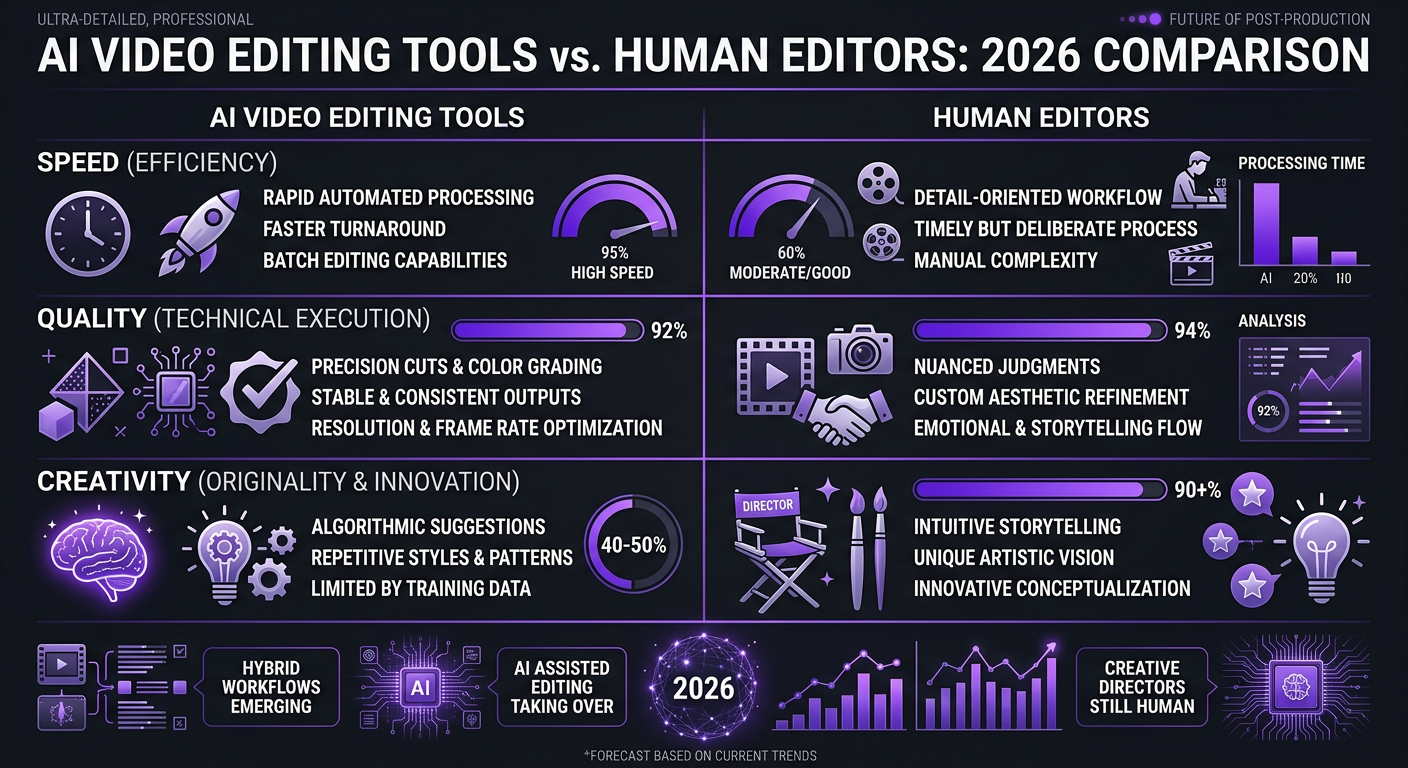
Let’s set the baseline. AI video editing has made genuine progress in the past two years. The tools available today are meaningfully better than what existed in 2024. But the marketing around them has outpaced reality by a wide margin.
Here’s what the current landscape looks like:
| Tool | Best For | Monthly Cost | Key Limitation |
|---|---|---|---|
| Descript | Text-based editing, podcasts | $24–$33/mo | Output feels formulaic, limited creative control |
| Opus Clip | Short clip extraction | $15–$29/mo | Clips lack context, no brand awareness |
| CapCut Pro | Short-form with templates | $10–$14/mo | Template-dependent, generic aesthetic |
| Runway ML | VFX and generative video | $12–$76/mo | Great for effects, not full editing |
| Adobe Premiere AI | Professional editor assistance | $23/mo (CC) | Requires skilled operator, assists not replaces |
| Pictory | Blog-to-video conversion | $19–$49/mo | Stock footage dependent, low production value |
Notice something about every tool on that list They each do one or two things reasonably well. None of them handle the full spectrum of professional video editing: storytelling, pacing, motion graphics, color grading, sound design, brand consistency, and audience retention optimization.
That’s not a knock on AI — it’s the reality of where the technology is. These tools are excellent accelerators for specific tasks. They’re poor replacements for the full editing process.
What AI Editing Tools Actually Do Well
Credit where it’s due. There are tasks where AI genuinely outperforms manual editing:
1. Transcription-Based Editing
Descript’s ability to edit video by editing text is genuinely revolutionary. You read through a transcript, delete the paragraphs you don’t want, and the video cuts automatically. For podcast and interview content, this saves hours of manual scrubbing through timelines.
Our editors at Increditors use transcription tools in their workflow. When we edit long-form podcast content for clients like Riley Coleman, the first rough assembly often starts with a transcript-based pass to identify the strongest segments. An editor then takes over for the creative work — pacing, visual variety, engagement hooks.
2. Auto-Captioning and Subtitles
AI caption generation is now 95%+ accurate for clear English audio. Tools like CapCut and Descript generate captions that need minimal correction. This used to take editors 30-60 minutes per video manually; now it takes 5 minutes of review.
3. Silence and Filler Word Removal
AI can identify and remove “um,” “uh,” dead air, and long pauses automatically. This is tedious work that human editors have always disliked. Automating it saves 20-30 minutes per video.
4. Background Noise Removal
Tools like Adobe Podcast’s AI and Descript’s Studio Sound do a remarkable job cleaning up audio. Background hum, keyboard clicks, room echo — AI handles these better and faster than manual noise reduction in most cases.
5. Rough Clip Selection
For creators who record 2-hour podcast sessions and need 10 short clips, Opus Clip and similar tools can identify potentially “viral” moments based on speech patterns, engagement signals, and topic transitions. The selections aren’t perfect — maybe 60-70% hit rate — but they provide a starting point that saves significant time.
Where AI Falls Apart (With Examples)
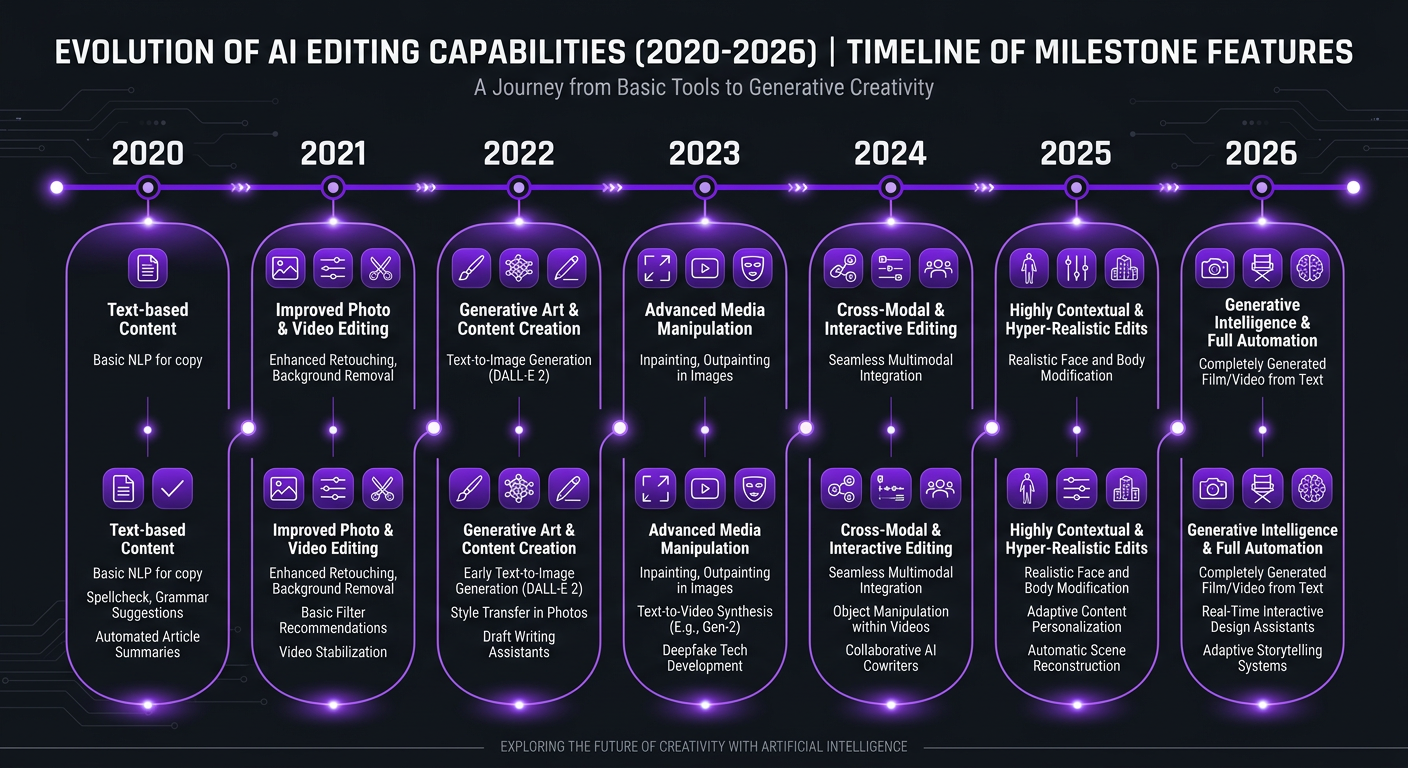
Here’s where the “AI will replace editors” narrative collapses. And these aren’t edge cases — they’re the core of what makes video content actually work.
1. Storytelling and Narrative Pacing
Great editing is invisible. The viewer doesn’t notice the cuts — they feel the story. A skilled editor knows when to hold on a reaction shot for an extra beat, when to speed up a montage to build energy, when to use silence as a dramatic tool.
AI has zero understanding of narrative. It can cut on silence or sentence boundaries. It cannot pace a story. When we edited brand content for TuMeke, an AI startup, the pacing decisions that made their product demo compelling — holding on a key feature reveal, building tension before showing results, timing cuts to background music — were entirely human judgment calls.
2. Brand Consistency
Every brand has a visual language. Color palette, graphics style, transition preferences, text treatments, energy level. AI tools apply generic templates. They don’t know that your brand uses clean, minimal lower thirds with a specific font weight, or that your YouTube channel never uses star wipes but always uses a particular J-cut style at segment transitions.
This is why enterprise clients and serious content creators hire dedicated editing teams. The editor becomes an extension of the brand.
3. Audience Retention Optimization
YouTube’s algorithm rewards videos that keep people watching. Professional editors structure content to prevent drop-offs — visual pattern interrupts every 30-45 seconds, strategic B-roll placement, re-engagement hooks before sections where viewers typically leave.
This requires understanding YouTube analytics, knowing where viewers tend to drop off in similar content, and making deliberate editing choices to combat that. AI tools don’t analyze your channel’s retention data and edit accordingly.
4. Emotional Timing
In testimonial videos, the moment where a client pauses, collects their thoughts, and then delivers a genuine statement — that pause is gold. An AI tool would likely cut it as dead air. A human editor knows to preserve it because that’s where the emotional impact lives.
When editing client stories for eSafety, our editors made dozens of these micro-decisions per video. Each one is small. Collectively, they’re the difference between content that moves people and content that doesn’t.
5. Complex Audio Mixing
AI handles basic noise removal well. But professional audio mixing — balancing dialogue, music, and sound effects to create a layered audio experience — remains firmly in human territory. Knowing when to duck music under dialogue, how loud to set ambient sounds, when to let music swell — these are artistic decisions.
6. Custom Motion Graphics
AI can apply pre-built templates. It cannot create custom animated infographics that explain your specific data, design lower thirds that match your brand’s evolving visual identity, or build motion graphics sequences that reinforce your narrative.
Our VFX and motion graphics team creates custom animations for each client. Every element is designed for the specific video’s needs — not pulled from a template library.
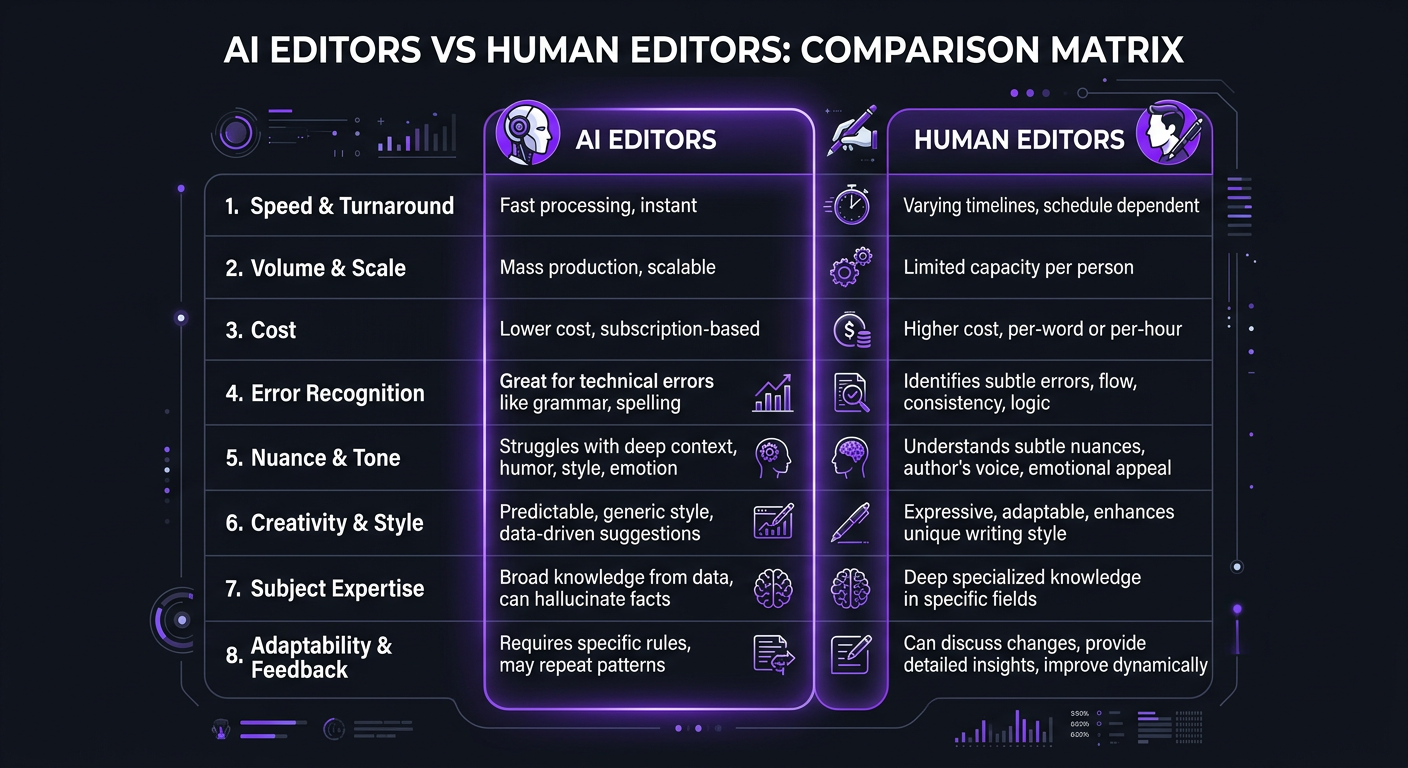
| Editing Task | AI Capability | Human Capability | Winner |
|---|---|---|---|
| Transcription | ✅ 95%+ accuracy | ✅ 99%+ accuracy | AI (speed) |
| Caption generation | ✅ Fast, mostly accurate | ✅ Perfect, slower | AI (efficiency) |
| Silence removal | ✅ Instant | ✅ Manual but contextual | AI (speed) |
| Noise reduction | ✅ Excellent | ✅ Good, more control | AI (quality + speed) |
| Rough cut assembly | ⚠️ Decent starting point | ✅ Strategic selection | Tie (hybrid best) |
| Narrative pacing | ❌ No understanding | ✅ Core skill | Human |
| Color grading | ⚠️ Auto-correct only | ✅ Creative and technical | Human |
| Motion graphics | ⚠️ Templates only | ✅ Custom design | Human |
| Sound design | ❌ Basic only | ✅ Full creative control | Human |
| Brand consistency | ❌ Cannot learn brand | ✅ Improves over time | Human |
| Retention optimization | ❌ No analytics awareness | ✅ Data-informed decisions | Human |
| Emotional timing | ❌ Removes “dead air” | ✅ Preserves impact | Human |
Side-by-Side: AI-Only vs Professional Edit
To make this concrete, we ran an experiment. We took the same 25-minute raw recording — a single-camera talking head with B-roll footage provided — and edited it three ways:
- AI-only: Descript for rough cut + CapCut for captions and formatting
- Budget human: A $150 Fiverr editor
- Professional agency: Our Increditors editing team
Here’s how they compared:
| Quality Factor | AI-Only Edit | Budget Human | Professional Agency |
|---|---|---|---|
| Time to deliver | 45 minutes | 4 days | 2 days |
| Cost | ~$2 (subscription prorated) | $150 | $450 |
| Audio quality | 8/10 (great noise reduction) | 6/10 (basic cleanup) | 9/10 (full mix) |
| Visual variety | 3/10 (no B-roll used) | 5/10 (some B-roll) | 9/10 (strategic B-roll + graphics) |
| Pacing | 4/10 (sentence-based cuts) | 6/10 (decent flow) | 9/10 (retention-optimized) |
| Graphics/lower thirds | 2/10 (auto-generated) | 5/10 (basic templates) | 9/10 (custom, on-brand) |
| Color grading | 4/10 (auto-correct) | 5/10 (basic correction) | 9/10 (cinematic grade) |
| Watchability | 4/10 | 6/10 | 9/10 |
| Would we publisha | ❌ Not for a client | ⚠️ With heavy revisions | ✅ Ready to upload |
The AI-only edit was fast and cheap. It was also flat, generic, and missed every opportunity to make the content compelling. The B-roll sat unused because the AI didn’t know where to place it contextually. The pacing was mechanical — cut at every sentence boundary, regardless of whether the viewer needed a visual break at that point.
The budget human editor was better but constrained by time at that price point. The professional edit was the only version we’d confidently publish on a client channel where growth matters.
Want to See the Difference a Professional Editor Makesa
Check our client portfolio — then imagine that quality applied to your content, every single video.
Cost Comparison: AI vs Human vs Hybrid
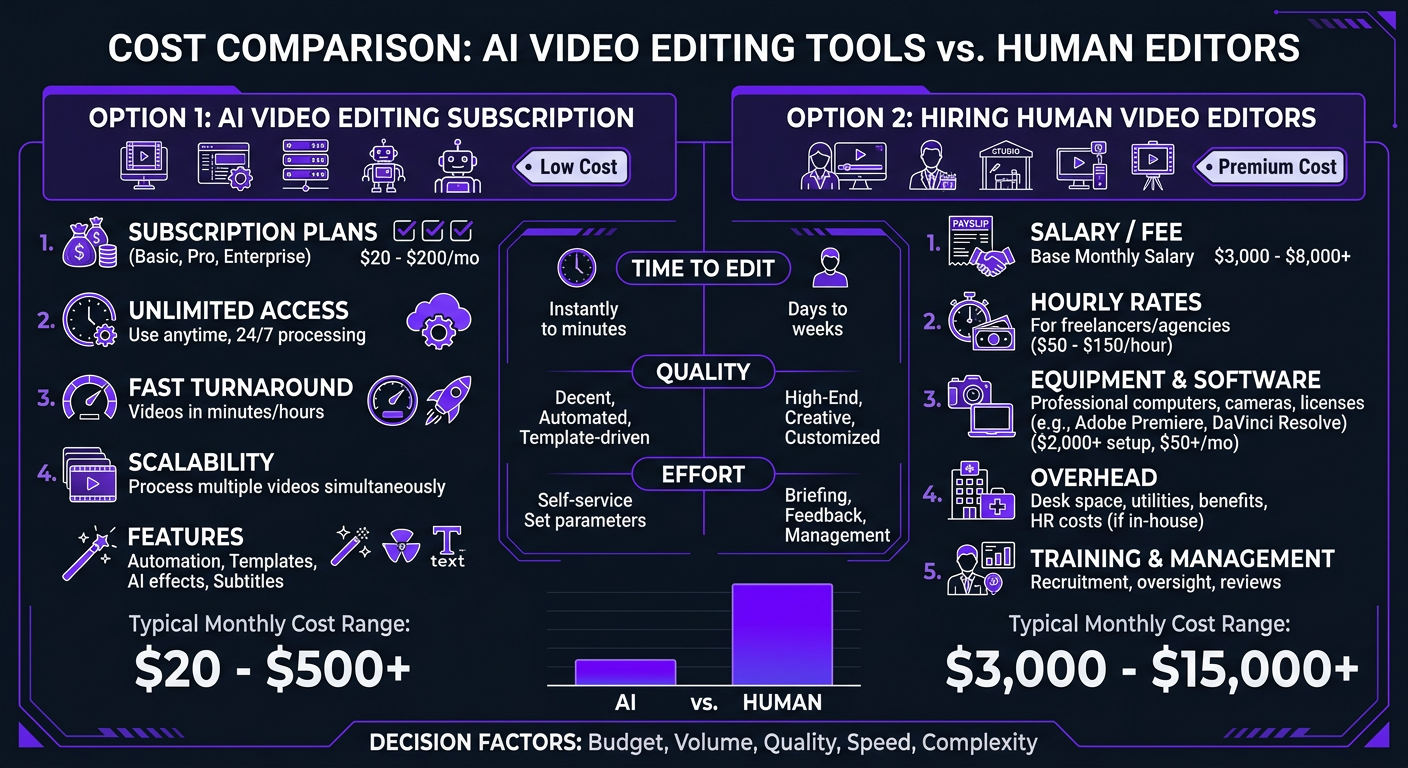
Let’s map out real monthly costs for a creator producing 8 YouTube videos + 16 short-form clips per month:
| Approach | Monthly Cost | Your Time/Month | True Cost (time valued at $75/hr) |
|---|---|---|---|
| AI-only (DIY) | $30–$80 | 40-60 hours | $3,030–$4,580 |
| AI + budget freelancer | $1,200–$2,000 | 10-15 hours | $1,950–$3,125 |
| Budget subscription service | $1,500–$2,500 | 5-8 hours | $1,875–$3,100 |
| Professional agency (AI-augmented) | $3,500–$5,500 | 2-3 hours | $3,650–$5,725 |
| Full-time in-house editor | $4,500–$7,000 | 3-5 hours | $4,725–$7,375 |
The “cheapest” option — AI-only — is actually among the most expensive when you value your own time. You save on software costs but spend 40-60 hours per month wrestling with tools that produce mediocre output, then manually fixing everything the AI got wrong.
The professional agency option costs more in direct dollars but gives you back 95% of your editing time, delivers dramatically higher quality, and (crucially) produces content that actually grows your audience. When we onboard clients coming from AI-only or budget editing workflows, they typically see meaningful retention improvements within the first month.
The Revenue Side of the Equation
Cost is only half the picture. What does each approach generatea
A channel producing AI-edited content competes against thousands of other AI-edited channels that all have the same generic aesthetic. A channel with professional editing stands out visually, retains viewers longer, gets pushed by the algorithm more aggressively, and attracts better sponsorship rates.
When Riley Coleman moved from a DIY workflow to our professional editing team, his viewer retention jumped significantly and his monthly views grew as a direct result. The editing investment was a fraction of the additional revenue generated.
Speed and Turnaround: Where AI Has a Genuine Advantage
Let’s be fair — speed is AI’s strongest card:
| Task | AI Speed | Human Speed | AI Advantage |
|---|---|---|---|
| Transcribe 1-hour video | 5 minutes | 2-3 hours | 24-36x faster |
| Generate captions | 3 minutes | 45-60 minutes | 15-20x faster |
| Remove silences/filler | 2 minutes | 30-45 minutes | 15-22x faster |
| Background noise removal | 1 minute | 15-30 minutes | 15-30x faster |
| Extract 10 clips from 1-hour video | 10 minutes | 2-4 hours | 12-24x faster |
| Full professional edit (10 min video) | 20 min (low quality) | 6-12 hours | AI faster but unusable |
The pattern is clear: AI is dramatically faster at discrete, mechanical tasks. But for the full editing process — where those mechanical tasks represent maybe 20% of the work — AI’s speed advantage shrinks when you factor in the manual cleanup required.
Smart agencies use AI to compress the mechanical portion and deploy human talent on the creative portion. At Increditors, our editors use AI-assisted tools for rough assemblies and technical cleanup, which lets them spend more time on the creative decisions that actually affect video performance. This hybrid approach typically reduces our turnaround by 30-40% compared to fully manual workflows while maintaining premium quality.
The Hybrid Workflow That Actually Works
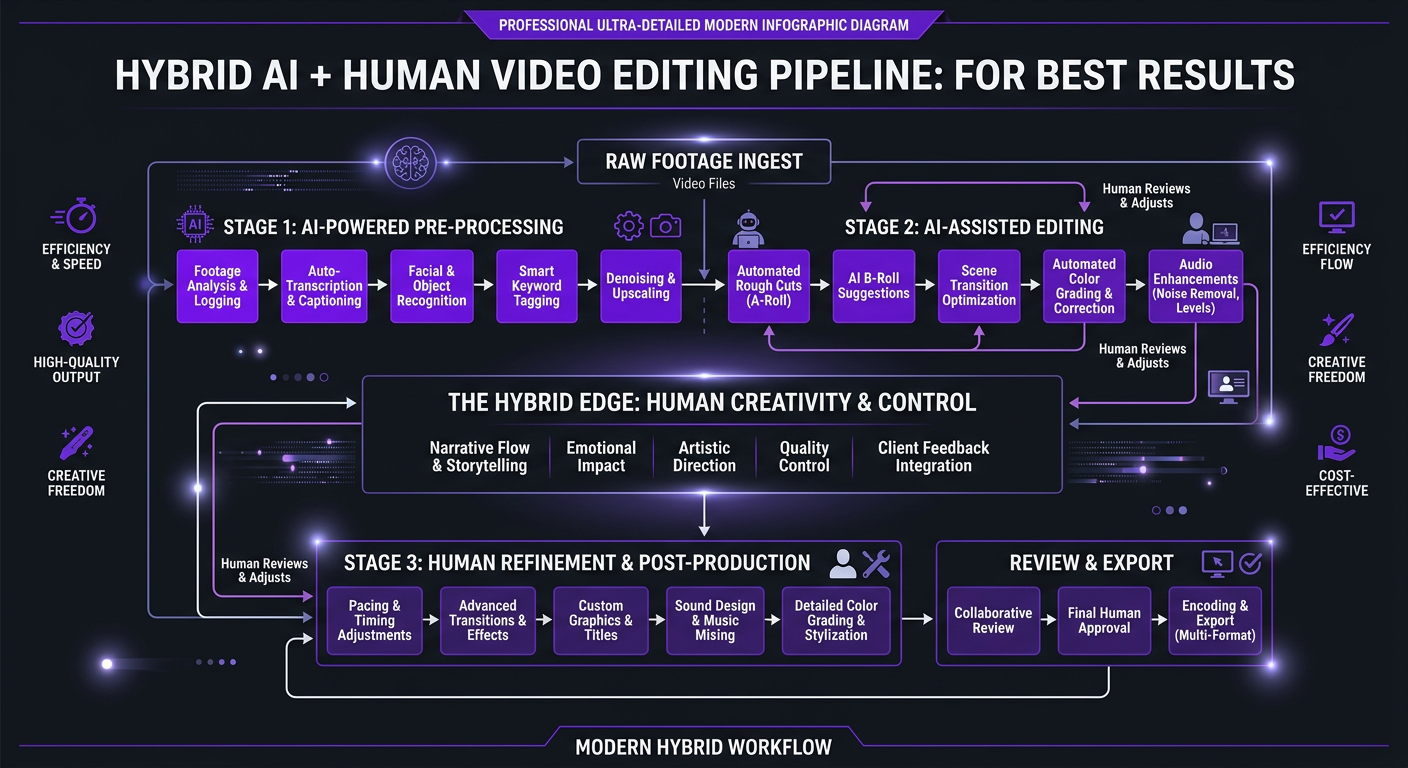
Here’s the editing workflow we’ve refined over thousands of videos — the one that gets the best results per dollar and hour spent:
Phase 1: AI-Powered Prep (Automated)
- Transcription generated automatically on file upload
- Background noise removal applied to audio tracks
- Silence detection flags dead spots (editor reviews, doesn’t auto-delete)
- If short-form clips needed, AI suggests candidate segments for editor review
Phase 2: Human Creative Editing (Core)
- Editor reviews transcript and raw footage for story structure
- Rough cut assembled with narrative pacing in mind (not sentence boundaries)
- B-roll selected and placed for visual storytelling
- Retention hooks and pattern interrupts added strategically
- Music selected and synced to content energy
Phase 3: Human Polish (Quality)
- Custom motion graphics and lower thirds designed
- Color grading applied for brand consistency
- Audio mixed (dialogue/music/SFX balance)
- Captions generated by AI, reviewed and corrected by human
- Quality control review by second editor or PM
Phase 4: Delivery and Iteration
- Client review with timestamped feedback
- Revisions completed (typically 1-2 rounds)
- Final export in all required formats
This workflow uses AI for what it’s good at (Phase 1) and human expertise for what it’s good at (Phases 2-4). The AI saves our editors roughly 1-2 hours per long-form video on mechanical tasks. That time goes directly into creative refinement — which is where viewer retention is actually built.
When to Use AI, When to Use Humans: A Decision Framework
Here’s a practical guide based on your content type and goals:
| Scenario | Recommendation | Why |
|---|---|---|
| Internal team meeting recordings | ✅ AI-only | Low stakes, not public-facing, just need cleanup |
| Quick social media clips from events | ✅ AI-only | Speed matters more than polish, ephemeral content |
| Training/onboarding videos (internal) | ⚠️ AI + light human review | Clarity matters, but production value less critical |
| YouTube long-form (growing channel) | 👤 Professional editor | Retention, pacing, brand consistency directly impact growth |
| Brand/marketing videos | 👤 Professional editor | These represent your brand — quality isn’t optional |
| Testimonial/case study videos | 👤 Professional editor | Emotional timing and narrative are critical for conversion |
| Product demos/explainers | 👤 Professional editor | Custom graphics, clear pacing, professional presentation |
| High-volume short-form (20+/month) | 🔄 Hybrid (AI prep + human finish) | Volume demands efficiency; quality demands human touch |
| Podcast episodes (video) | 🔄 Hybrid | AI handles rough cut; human refines pacing and adds visuals |
The general rule: if the content directly impacts your revenue, brand perception, or audience growth, invest in human editing (ideally AI-augmented). If it’s internal, ephemeral, or low-stakes, AI can handle it.
The “Good Enough” Trap
Many creators fall into a pattern: AI editing is “good enough” for now. The problem is that “good enough” compounds negatively over time. Each video with mediocre editing slightly trains the algorithm that your content doesn’t hold attention. Each viewer who clicks away in the first minute is one who won’t see your next video recommended.
We’ve seen this with clients who came to us after months of AI-only editing. eSafety had been using automated tools for their educational content. The videos were technically clean — no audio issues, decent captions — but the engagement metrics were flat. The content was informative; the editing wasn’t giving viewers a reason to keep watching. After transitioning to professional editing with strategic pacing and visual storytelling, their engagement metrics improved measurably.
Where AI Video Editing Is Heading
We’re not AI skeptics. We use these tools daily and we’re excited about where they’re going. Here’s our honest assessment of the trajectory:
Next 1-2 Years (2026-2027)
- Better rough cut generation — AI will understand basic narrative structure
- Improved B-roll suggestion based on content context
- More sophisticated caption styling (beyond basic templates)
- Better auto-color correction (though not creative grading)
- Impact: AI handles 30-40% of editing workflow (up from ~20% today)
3-5 Years (2027-2030)
- Brand-aware editing — AI learns your specific style over time
- Basic motion graphics generation from text prompts
- Retention prediction — AI suggests edits based on predicted viewer behavior
- Multi-camera editing with AI understanding speaker dynamics
- Impact: AI handles 50-60% of editing workflow, human editors focus on creative direction
5-10 Years (2030+)
- AI that genuinely understands storytelling (the hardest problem)
- Custom motion graphics generated on-demand
- Emotional pacing that rivals human intuition
- Impact: Potentially 70-80% of mechanical editing automated, but creative direction remains human
Even in the most optimistic timeline, human creative direction doesn’t disappear — it elevates. Editors become directors who guide AI tools rather than pushing pixels. The role transforms from “person who cuts video” to “person who shapes the viewing experience,” with AI handling execution.
This is exactly why agencies like Increditors invest in AI integration now. We’re not fighting the technology — we’re absorbing it into our workflow so our editors operate at a higher creative level with each tool improvement.
Frequently Asked Questions
Not yet, and not in the near term. AI tools handle mechanical tasks well — transcription, captions, noise removal, rough cuts. But storytelling, brand consistency, emotional timing, and audience retention optimization require human judgment. The best workflow combines AI efficiency with human creativity. For professional content that drives revenue or builds your brand, human editing remains essential.
AI tools cost $15-$50/month in subscriptions. Human editing ranges from $100-$1,500+ per video. But the comparison isn’t apples-to-apples: AI produces generic output that often needs significant manual cleanup. When you factor in your time fixing AI output, the cost gap narrows considerably. Professional agencies using AI-augmented workflows offer the best quality-to-cost ratio for serious content.
AI excels at transcription-based editing, auto-captioning, silence and filler word removal, background noise reduction, and generating rough clip selections from long recordings. These tasks save editors 30-40% of their time. AI does not handle narrative pacing, custom motion graphics, color grading, sound design, or brand-specific editing well.
For basic talking-head content with minimal production needs, AI can produce passable results. For channels competing on quality — where retention rates, visual storytelling, and professional polish matter — AI-only editing creates a ceiling on growth. Most successful YouTubers use AI tools to speed up their human editors, not as a replacement. Visit our YouTube editing services page to see the difference professional editing makes.
It depends on your use case. Descript leads for podcast and talking-head content. Opus Clip is best for short clip extraction. CapCut Pro offers the strongest free-tier AI features for short-form. Adobe Premiere’s AI features are most powerful for professional editors. No single tool handles the full editing spectrum — which is why professional editors use multiple AI tools as part of a comprehensive workflow.
Get Human-Quality Editing With AI-Powered Efficiency
Our editors use the best AI tools to work faster — and spend that saved time making your content genuinely great. See how our hybrid workflow delivers premium results at competitive prices.
Tool pricing and capabilities reflect March 2026 data. AI editing technology evolves rapidly — we update this comparison quarterly. For current Increditors pricing and workflow details, schedule a call.