










![3D Explainer Video - ScribbleLive.mp4_snapshot_00.12_[2022.03.09_03.14.16]](https://increditors.com/wp-content/uploads/elementor/thumbs/3D-Explainer-Video-ScribbleLive.mp4_snapshot_00.12_2022.03.09_03.14.16-r7wb53mx72rxst3qcqyrfxdmeyzb5r9jbl0wbjujh4.png "3D Explainer Video – ScribbleLive.mp4_snapshot_00.12_[2022.03.09_03.14.16]")
































Here’s something that happens constantly: a YouTube creator invests in a great camera, proper lighting, and professional editing — and the videos still look… flat. They look technically fine but visually forgettable. The footage doesn’t have a feel. It doesn’t have personality.
The missing element, almost every time, is color grading.
A color grading service for YouTube is one of the most underrated investments in video production. It’s invisible when done well — viewers don’t consciously notice great color grading. But they absolutely notice bad or absent color work, even if they can’t articulate why a video looks “cheap” or “amateur.” Color is the first visual signal your audience processes, and it shapes their perception of your entire brand before they hear a single word.
In this guide, we’ll explain what color grading actually involves, how it differs from basic color correction, what it costs, when it’s worth investing in, and how real YouTube channels have used it to elevate their content. If you’ve ever wondered whether your videos need professional color work — this is the answer.
What’s in This Guide
- What Is Color Grading (And How Is It Different From Color Correction)a
- Why Color Grading Matters for YouTube
- Common Color Grading Techniques for YouTube
- Popular Color Grading Styles for Different Niches
- How Much Does Color Grading Costa
- DIY vs. Professional Color Grading Service
- Case Studies: Real Results
- How to Shoot for Better Color Grading Results
- How to Choose a Color Grading Service
- Integrating Color Grading Into Your Production Workflow
- FAQ
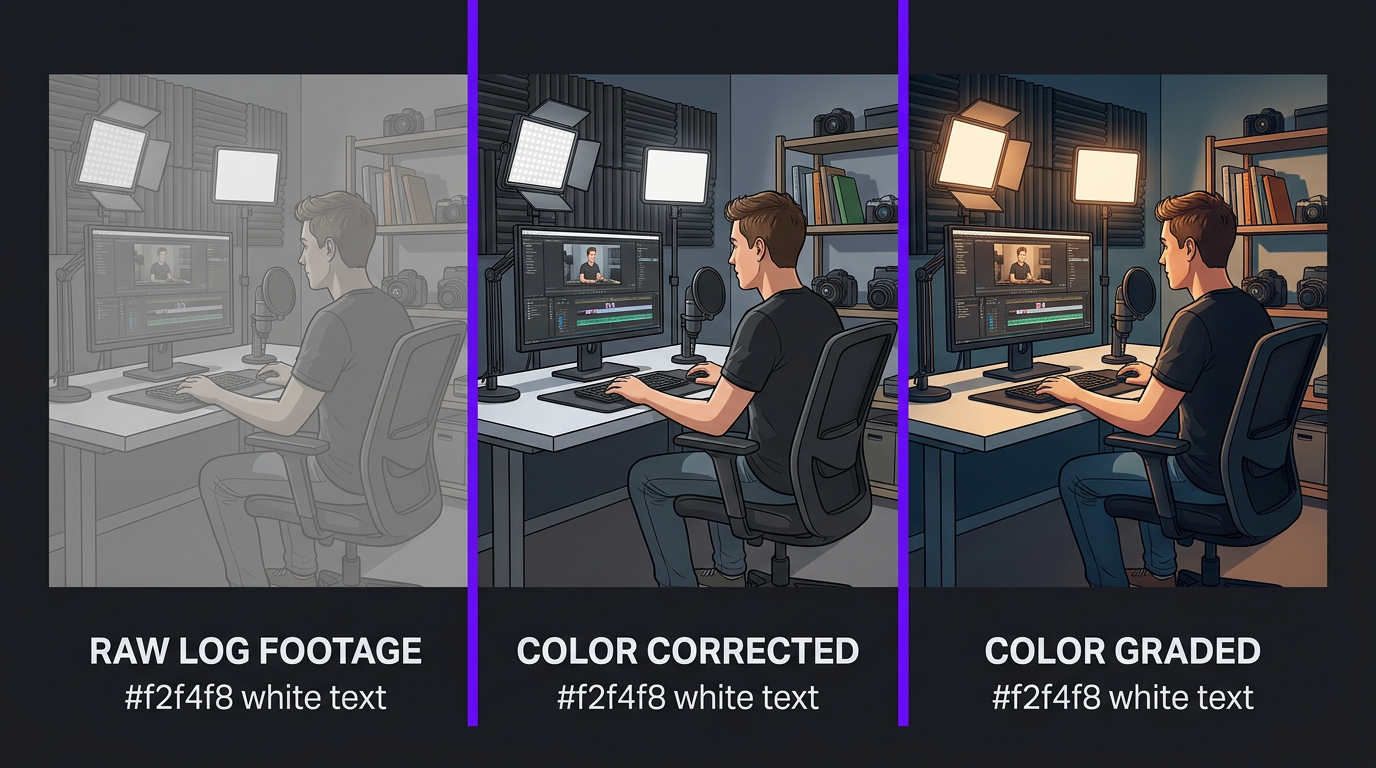
What Is Color Grading (And How Is It Different From Color Correctiona)
These two terms get conflated constantly, even by people in the video industry. Understanding the distinction is essential because they serve different purposes, require different skills, and have different price points.
Color Correction: The Technical Foundation
Color correction is about making footage look accurate and consistent. It’s a technical process that addresses:
- White balance — Ensuring whites look white, not blue or orange, regardless of lighting conditions
- Exposure matching — Making sure brightness levels are consistent across all clips in a project
- Skin tone accuracy — Correcting skin tones to look natural across different lighting setups
- Clip matching — Ensuring footage from different cameras, locations, or times of day cuts together seamlessly
- Dynamic range optimization — Recovering detail from shadows and highlights
Color correction fixes problems. If you filmed in mixed lighting and your face looks orange in half the clips and blue in the other half, color correction makes everything look normal. It’s the foundation that any professional edit should include.
Color Grading: The Creative Layer
Color grading is about making footage look intentional and distinctive. It’s a creative process that shapes:
- Mood and emotion — Warm tones feel inviting; cool tones feel clinical or dramatic; desaturated tones feel serious or cinematic
- Brand identity — A consistent color palette across all videos creates immediate brand recognition
- Visual storytelling — Different sections of a video can have subtly different grading to support narrative shifts
- Perceived production quality — Graded footage instantly reads as “professional” compared to ungraded footage from the same camera
- Thumbnail appeal — Properly graded frames make significantly better thumbnails, improving click-through rates
Color grading is applied after correction. You first make the footage look right, then you make it look intentional. Skipping correction and jumping to grading is like putting a filter on a blurry photo — it doesn’t fix the underlying issues.
| Aspect | Color Correction | Color Grading |
|---|---|---|
| Purpose | Fix technical issues | Create visual style |
| Nature | Technical / objective | Creative / subjective |
| When applied | First (foundation) | Second (creative layer) |
| Goal | Footage looks natural and consistent | Footage looks distinctive and branded |
| Skill required | Technical proficiency with scopes | Color theory + artistic vision |
| Tools | Waveforms, vectorscopes, histogram | Color wheels, curves, qualifiers, LUTs |
| Cost (standalone) | $25-$75 per video | $50-$500+ per video |
| Included in editinga | Usually yes (professional editors) | Sometimes (depends on service tier) |
Why Color Grading Matters for YouTube (More Than You Think)
YouTube is a visual platform competing for attention in a thumbnail-driven feed. Color is the single most powerful visual signal you can control, and it impacts your channel in ways that aren’t immediately obvious.
1. Thumbnail Click-Through Rates
Before a viewer ever watches your video, they see a thumbnail. Properly graded footage produces thumbnails with richer colors, better contrast, and more visual pop. In a sea of flat, ungraded thumbnails, a well-graded frame stands out. Multiple YouTube analytics studies show that thumbnail quality is one of the top 3 factors in click-through rate, which directly determines how many impressions YouTube translates into views.
2. Perceived Production Quality
Viewers make quality judgments within the first 2-3 seconds of watching a video. Color is the primary visual cue they process. Flat, ungraded footage — even from an expensive camera — reads as “amateur.” Properly graded footage from the same camera reads as “professional.” This isn’t about tricking viewers — it’s about accurately communicating the effort and quality of your content through visual presentation.
3. Brand Recognition
Consistency is the cornerstone of brand building. When every video on your channel has a consistent color palette — whether it’s warm and inviting, cool and clinical, or punchy and saturated — viewers develop subconscious brand recognition. They start to associate your visual style with your content quality, which builds trust and loyalty over time.
Think about the YouTube channels you watch regularly. The most successful ones have a distinctive visual feel that’s consistent across every video. That consistency comes from intentional color grading applied as part of a standard production process.
4. Viewer Retention and Watch Time
This one’s subtler but measurable. Properly graded footage is simply more pleasant to look at for extended periods. Flat or inconsistently colored footage creates a low-grade visual discomfort that contributes to viewer fatigue — especially in long-form content. When colors are balanced, contrast is appropriate, and the overall look is cohesive, viewers are more likely to watch longer without consciously knowing why.
5. Cross-Platform Consistency
If you repurpose content across platforms, color grading ensures your brand looks the same everywhere. A clip from your YouTube video shared on Instagram should have the same visual identity as the original. Without grading, footage can look different across platforms due to varying compression algorithms and display settings. A proper grade “bakes in” your visual identity in a way that survives platform compression.
6. Emotional Storytelling
Color is one of the most powerful tools for shaping emotional response. Warm tones (oranges, golds) create feelings of comfort and positivity. Cool tones (blues, teals) create feelings of professionalism and calm. High contrast creates energy and drama. Low contrast creates softness and intimacy. A skilled colorist uses these psychological associations to reinforce the emotional tone of your content.
Common Color Grading Techniques for YouTube
Understanding the basic techniques helps you communicate with your colorist and make informed decisions about your channel’s visual style.
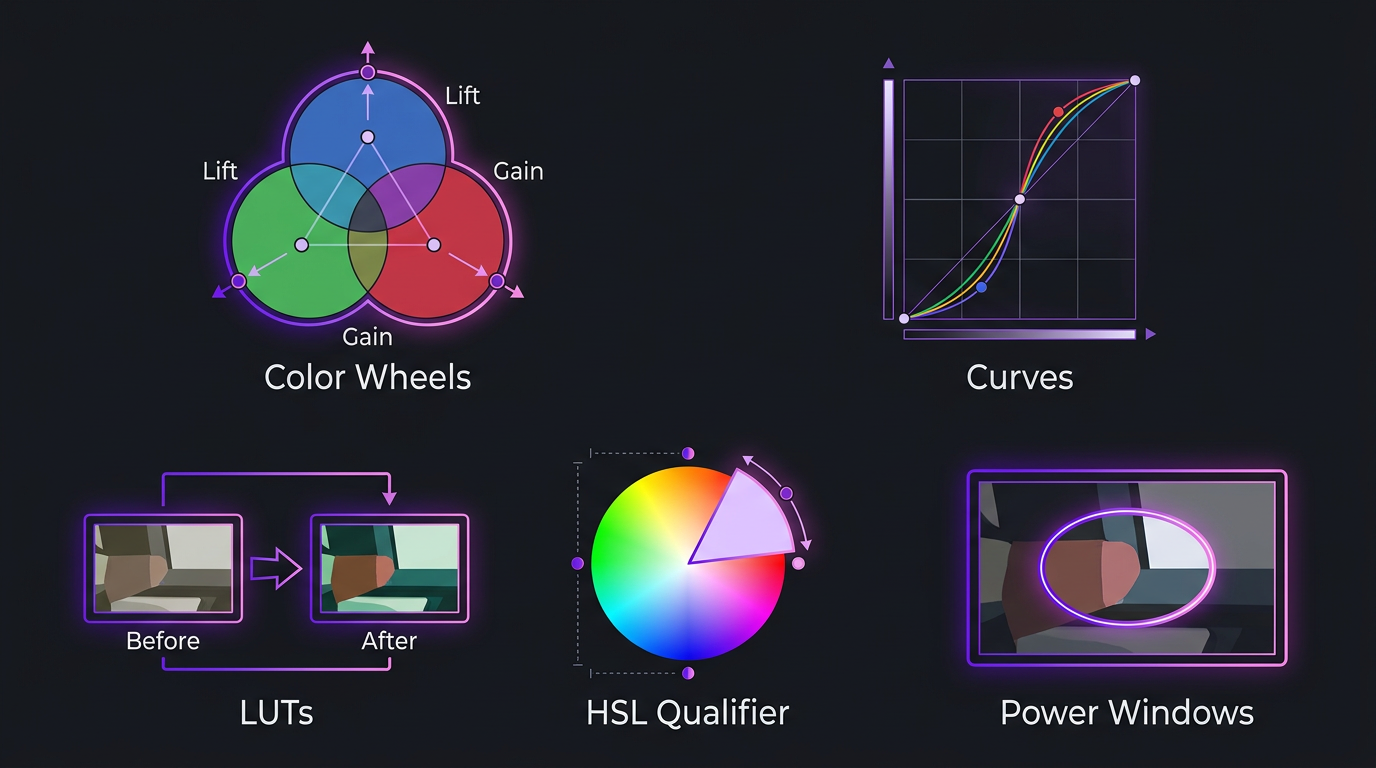
LUT Application
A LUT (Look-Up Table) is a pre-built color transformation that remaps the colors in your footage according to predefined values. Think of it as a “color preset” — but far more sophisticated than an Instagram filter. Professional LUTs are designed for specific cameras and shooting conditions, and they serve as a starting point that colorists then customize for each project.
LUTs are the most cost-effective way to get a graded look on YouTube. A custom LUT designed for your camera and lighting setup costs $100-$300 to develop once, and can be applied to every video you produce with minor adjustments. This is how many YouTube channels achieve consistent color at scale.
Color Wheels (Lift, Gamma, Gain)
The primary tools for manual color grading. Color wheels allow colorists to independently adjust the color tint of shadows (lift), midtones (gamma), and highlights (gain). This is where the “teal and orange” look comes from — adding teal to the shadows and orange to the highlights. Every intentional color style you see on YouTube is achieved through some combination of color wheel adjustments.
Curves
Curves provide precise control over the tonal range — how bright or dark different parts of the image are, and the color balance at each brightness level. S-curves (the most common technique) add contrast by darkening shadows and brightening highlights simultaneously, creating a more dynamic and “punchy” image.
HSL Qualifiers
These allow colorists to target specific colors in the footage and adjust them independently. Want to make the sky bluer without affecting skin tones Want to desaturate the green of a plant in the background without touching anything else HSL qualifiers make this possible, and they’re essential for polished YouTube content where you need to control every visual element.
Power Windows / Masks
These are shapes or drawn masks that allow colorists to apply different grading to different parts of the frame. Brightening a face while keeping the background moody, creating a vignette that draws attention to the subject, or adjusting exposure on just one part of the frame. This technique is invisible when done well but adds significant production value.
Popular Color Grading Styles for Different YouTube Niches
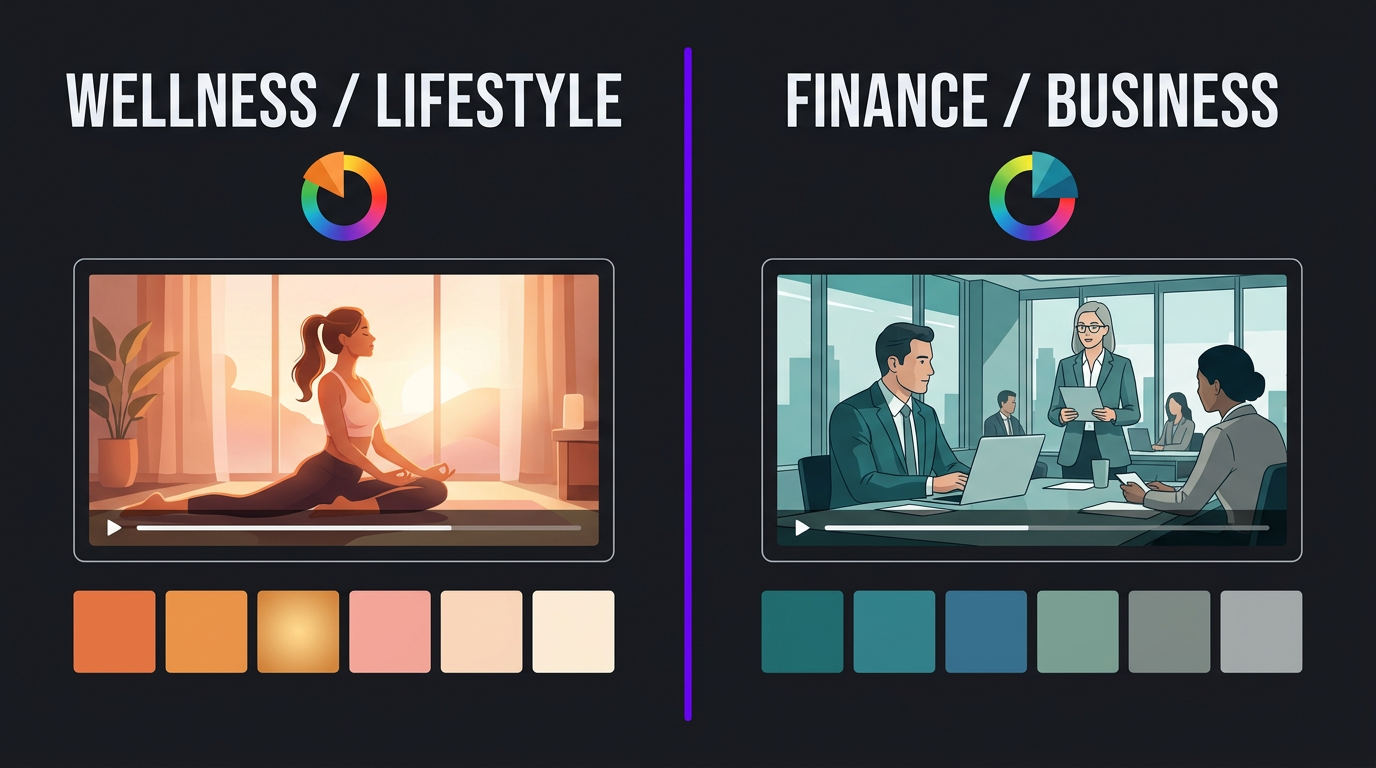
The “right” color grade depends entirely on your content type and brand. Here’s what works for the most common YouTube niches:
| Niche | Recommended Style | Why It Works | Reference Look |
|---|---|---|---|
| Tech reviews | Clean, slightly cool, high contrast | Products need accurate colors; cool tones feel modern and precise | MKBHD, Dave2D |
| Business/entrepreneurship | Warm, medium contrast, rich midtones | Warmth creates trust; medium contrast feels approachable yet professional | Ali Abdaal, Think Media |
| Travel/lifestyle | Saturated, warm highlights, lifted shadows | Vibrant colors sell experiences; lifted shadows keep everything visible | Lost LeBlanc, Kara and Nate |
| Finance/investing | Desaturated, cool, high contrast | Serious tone matches serious subject; desaturation signals authority | Graham Stephan, Andrei Jikh |
| Health/wellness | Bright, warm, soft contrast, natural skin tones | Brightness and warmth feel healthy and positive; natural colors build trust | Doctor Mike, Pick Up Limes |
| Education/science | Clean, neutral, medium saturation | Neutral tones don’t distract from information; clean look signals credibility | Veritasium, 3Blue1Brown |
| Documentary | Cinematic, teal/orange, film-like grain | Cinematic look signals high production value; grain adds texture and emotion | Johnny Harris, Wendover |
| Gaming | Punchy, high saturation, high contrast (for face cam) | High energy content needs high energy visuals; saturated colors pop on screen | Marques Brownlee, Linus Tech Tips |
The key principle: your color grade should reinforce your content’s emotional tone, not contradict it. A finance channel with warm, saturated colors feels incongruent. A wellness channel with cold, desaturated tones feels clinical. Match the color to the message.
How Much Does a Color Grading Service for YouTube Costa
Color grading pricing varies significantly based on scope, quality, and whether it’s bundled with editing or standalone. Here’s the market in 2026:
| Service Level | Per Video | What’s Included | Best For |
|---|---|---|---|
| Basic color correction | $25-$75 | White balance, exposure match, clip consistency | Minimum professional standard |
| LUT-based grading | $50-$125 | Custom LUT application + minor adjustments per clip | Consistent look at low cost |
| Creative color grading | $100-$300 | Full manual grading — color wheels, curves, qualifiers, shot matching | Channels wanting a distinctive visual style |
| Premium grading (bundled with editing) | Included in $400-$800 editing package | Full correction + creative grading as part of the edit workflow | Serious creators and brands |
| Cinematic-grade coloring | $300-$700+ | Shot-by-shot grading, secondary corrections, power windows, film emulation | Documentary, premium brand content |
| Custom LUT development | $100-$300 (one-time) | Bespoke LUT designed for your camera, lighting, and brand style | Channels wanting a scalable, consistent look |
The Bundled Approach: Why It’s Smarter
At Increditors, color grading is integrated into our editing workflow rather than treated as a separate service. This matters for two reasons:
1. Creative cohesion. When the same team that edits your video also grades it, the color work is informed by the editorial decisions — pacing, mood shifts, and visual storytelling. A standalone colorist who receives a finished edit can only work with what they’re given.
2. Cost efficiency. Bundled grading is 30-50% cheaper than hiring a separate colorist. Our YouTube editing packages include professional color correction and creative grading in the standard rate — you don’t pay extra for your videos to look cinematic.
For creators currently paying $200-$400 per video for editing alone, adding professional color grading through a bundled service like ours often costs less than adding a standalone colorist at $100-$300 per video.
See What Professional Color Grading Does for Your Content
Send us a raw clip. We’ll grade it in your brand style — free — so you can see the difference before committing to anything.
DIY Color Grading vs. Professional Service
With free tools like DaVinci Resolve available, is professional color grading worth paying for Let’s compare honestly.
What You Can Do Yourself
- Basic color correction: White balance, exposure, and basic consistency. Achievable with built-in Premiere Pro tools or DaVinci Resolve in 15-30 minutes per video.
- LUT application: Download or purchase LUTs and apply them as a starting point. Minimal skill required — 5-10 minutes per video.
- Template-based grading: Use DaVinci Resolve Power Grades or Premiere Pro Lumetri presets to build a repeatable look. Takes time to set up initially but fast to apply once dialed in.
What Requires Professional Skill
- Shot matching: Making footage from different cameras, locations, or times of day look like one cohesive video. This is harder than it appears and requires trained eyes and proper use of scopes.
- Skin tone management: Getting skin tones right across different lighting conditions while maintaining your creative grade. This is where most DIY grading fails — skin tones either look unnatural or the creative grade gets compromised to keep skin looking okay.
- Secondary corrections: Targeting specific elements (sky, backgrounds, product colors) without affecting the rest of the image. This requires qualifier expertise that takes months to develop.
- Consistency across videos: Maintaining the exact same look across 50+ videos, accounting for different lighting setups, camera settings, and locations. This is a workflow discipline that professionals develop over years.
| Factor | DIY | Professional Service |
|---|---|---|
| Time per video | 30-90 min (correction + basic grade) | 0 min (included in edit delivery) |
| Learning curve | 2-4 months for competence | None (their expertise, your time saved) |
| Consistency across 50 videos | Difficult — drift is common | Consistent — team uses your established grade |
| Skin tone accuracy | Variable (common DIY weak point) | Reliable (trained colorists) |
| Cost per video | $0 (plus your time) | $50-$300 (or bundled with editing) |
| Quality ceiling | Limited by your skill and time | Professional-grade, cinematic quality |
The DIY path makes sense if you enjoy color work, have time to invest in learning, and produce 1-2 videos per month. Beyond that volume, the time cost of grading every video yourself becomes a significant drag on your production capacity.
Case Studies: Color Grading in Action
VYVE Wellness: Building Trust Through Visual Warmth
VYVE Wellness, a health and wellness brand, came to our team with a specific challenge: their video content was well-produced but didn’t visually communicate the warmth and approachability that their brand represented. The footage was technically clean — properly exposed, well-lit — but the color treatment was default and uninspired. It could have been any channel’s content.
For a wellness brand, visual warmth isn’t a luxury — it’s a brand requirement. Health content needs to feel inviting, trustworthy, and positive. Cold or flat color tones subtly undermine these associations, making content feel clinical rather than compassionate.
We developed a custom color grade for VYVE Wellness that became their visual signature: warm midtones, softened highlights, natural and flattering skin tones, and a gentle contrast curve that felt bright without being harsh. Every video received this consistent treatment, creating a cohesive visual identity across their entire content library.
The impact was both aesthetic and measurable. The warmer, more intentional visual style aligned with VYVE’s brand values in a way that viewers could feel even if they couldn’t articulate it. Engagement improved as the content started looking like it belonged to a premium wellness brand rather than just another talking-head health channel. The visual consistency across videos also strengthened their YouTube channel page — when a new visitor scrolled through the video library, every thumbnail had the same warm, professional quality that signaled “this brand takes their content seriously.”
For any health, wellness, or lifestyle brand considering a color grading service, VYVE’s case illustrates a key principle: color grading isn’t cosmetic — it’s communicative. The right grade tells your audience who you are before they press play.
Trade with Pat: Authority Through Cinematic Color
Trade with Pat, a trading and finance content creator, presented a different challenge and a different grading philosophy. In the finance niche, visual authority is everything. Viewers are trusting you with information about their money — and production quality directly impacts perceived credibility.
Pat’s content was substantive and well-structured, but the visual presentation didn’t match the depth of expertise being shared. The footage looked like it was shot in a home office (because it was) rather than a professional studio. The gap between content quality and visual quality was creating a credibility disconnect.
Our approach centered on a cooler, more authoritative color grade — desaturated slightly with rich, controlled contrast and deep shadows that gave the footage a premium, almost broadcast-news quality. We developed a consistent grade that made Pat’s home studio setup look like a professional production environment. Dark backgrounds got richer and more uniform. Skin tones stayed natural but more polished. The overall feel shifted from “guy talking to his webcam about stocks” to “financial expert broadcasting from his studio.”
The transformation was noticeable immediately. Viewers commented on the production quality improvement. More importantly, the content started commanding more attention in a crowded niche where credibility signals matter enormously. When your thumbnail sits next to a dozen other finance creators in someone’s suggested feed, looking like the most professionally produced option wins the click.
Pat’s case demonstrates something important for B2B and expertise-based channels: color grading is a credibility multiplier. The same words delivered in flat, ungraded footage and in professionally graded footage carry different weight. It’s not fair, but it’s how human perception works — and smart creators use it to their advantage.
How to Shoot for Better Color Grading Results
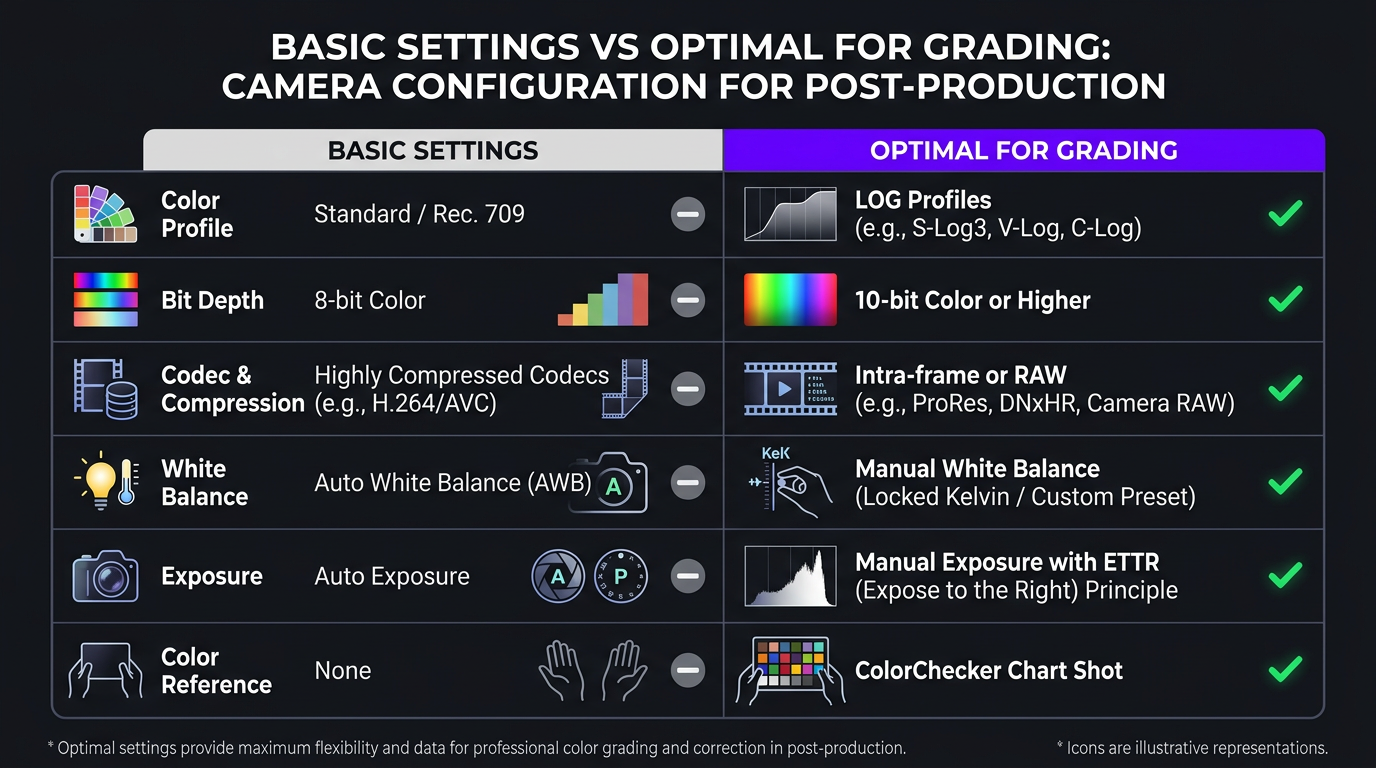
The quality of your color grade is limited by the quality of your footage. Here’s how to shoot in a way that gives your colorist (or yourself) the most to work with:
1. Shoot in LOG (If Your Camera Supports It)
LOG profiles (S-Log, C-Log, V-Log, etc.) capture the widest dynamic range your camera is capable of. The footage looks flat and washed out straight from camera, but it contains significantly more color and exposure information in the shadows and highlights — giving the colorist far more flexibility to shape the final look.
Important caveat: Only shoot LOG if you’re planning to grade the footage. LOG video that isn’t graded looks terrible. If you’re not using a color grading service or grading yourself, stick with your camera’s standard color profile (Rec.709 or equivalent).
2. Expose Properly (Slightly Over for LOG)
Underexposed footage (too dark) introduces noise and loses shadow detail that no amount of grading can recover. For LOG footage specifically, many colorists recommend “exposing to the right” — making the footage slightly brighter than it looks. This pushes more data into the usable range and gives the grade a cleaner foundation.
3. Set Custom White Balance
Auto white balance shifts between clips and creates inconsistency that the colorist has to fix manually. Setting a consistent white balance (either a specific Kelvin value or using a gray card) saves significant correction time and produces more consistent results.
4. Control Your Lighting
No amount of color grading can fix bad lighting. Mixed color temperatures (daylight from a window + tungsten overhead light) create problems that are expensive and time-consuming to correct. Aim for consistent lighting color temperature throughout your shooting environment.
5. Use a Color Chart
Including a color reference chart (like a ColorChecker) in the first frame of each setup gives your colorist an objective reference for accurate color reproduction. It takes 3 seconds to hold one up at the start of a take and can save 15-30 minutes of correction time per project.
6. Record in the Highest Quality Your Workflow Supports
Higher bit depth (10-bit vs 8-bit) and less compressed codecs (ProRes, RAW vs. H.264) preserve more color information for grading. If your camera shoots 10-bit and your storage can handle the larger files, always choose higher quality. The difference in grading flexibility between 8-bit and 10-bit footage is dramatic.
| Camera Setting | Basic (Okay for Auto Grade) | Optimal (Best for Pro Grading) |
|---|---|---|
| Color profile | Standard / Rec.709 | LOG (S-Log3, C-Log3, V-Log) |
| Bit depth | 8-bit | 10-bit (or higher) |
| Codec | H.264 / H.265 | ProRes, RAW, or All-Intra |
| White balance | Auto | Manual (custom Kelvin or gray card) |
| Exposure | Auto or center-weighted | Manual, ETTR for LOG |
| Color reference | None | ColorChecker at start of each setup |
How to Choose a Color Grading Service for YouTube
If you’ve decided professional color grading is worth the investment, here’s what to evaluate:
1. Integrated vs. Standalone Service
The most effective option for YouTube creators is color grading integrated into your editing workflow. When the same team edits and grades, the processes inform each other — the editor can flag footage that needs special attention, and the colorist can time the grade to match the editorial rhythm of the video.
Standalone color grading services (where you send a finished edit to a separate colorist) work for high-end projects but add complexity, cost, and turnaround time to weekly YouTube production. For most creators, integrated is the way to go.
2. Consistency Track Record
Ask for examples of the same channel’s videos over time. Can you see a consistent visual identity across 10+ videos Or does the look change from video to video Consistency matters more than any single impressive grade.
3. Niche Understanding
A colorist who primarily works on wedding videos will make different creative choices than one who specializes in tech content or wellness brands. Make sure your service has experience grading YouTube content in your niche or a comparable one.
4. Custom LUT Development
The most efficient services will develop a custom LUT for your channel as part of onboarding — a starting-point color transformation tailored to your camera, lighting setup, and brand aesthetic. This LUT speeds up per-video grading and ensures consistency across your content library.
5. Turnaround Time
For weekly YouTube uploaders, turnaround matters. If grading adds 2-3 days to your production pipeline, you’ll either need to plan further ahead or risk missing upload schedules. Integrated editing/grading services typically deliver within 24-48 hours because the processes happen simultaneously.
6. Skin Tone Handling
This is the single biggest quality differentiator. Ask for examples showing people of different skin tones across different lighting conditions. Maintaining natural, flattering skin tones while applying a creative grade is the hardest part of color work — and where cheaper services consistently fall short.
Integrating Color Grading Into Your Production Workflow
Here’s a practical implementation plan for creators who want to add professional color grading to their process:
Step 1: Define Your Visual Identity (One-Time)
Before any grading begins, define what you want your channel to look like. This doesn’t require technical knowledge — it requires creative direction:
- Gather 5-10 screenshots from videos (yours or others’) that have the look you want
- Describe the mood in words: “warm and inviting,” “cool and professional,” “cinematic and moody”
- Identify any colors that are important to your brand (brand colors that should be present or avoided in the grade)
- Note any skin tone preferences or concerns
Step 2: Develop Your Grade (One-Time)
Your colorist (or editing team) takes your direction and develops a grading approach — typically creating a custom LUT and a set of secondary correction presets that form the foundation of your look. This gets tested across 2-3 videos and refined based on your feedback.
Step 3: Apply Consistently (Ongoing)
Once your grade is established, it’s applied to every video as part of the standard editing process. The colorist makes per-video adjustments (different lighting conditions, locations, etc.) while maintaining the overall look. Over time, the team builds an intuitive understanding of your visual standards.
Step 4: Evolve Intentionally (Periodic)
Your grade can — and should — evolve as your brand evolves. But evolution should be deliberate, not accidental. Every 6-12 months, review your visual identity and decide whether any adjustments are warranted. Major rebrand Develop a new grade. Minor refinement Adjust the existing one. Changing the look every month creates inconsistency that undermines brand recognition.
At Increditors, this entire process is built into our creator onboarding. During the first week, we establish your visual identity and grade. By the second video, your channel has a consistent, professional color signature that gets applied to every piece of content we produce — including short-form clips and repurposed content across platforms.
Frequently Asked Questions
Color grading is the process of adjusting and enhancing colors, contrast, and visual tone to create a specific mood, style, or cinematic look. It goes beyond basic color correction (fixing white balance and exposure) by deliberately shaping the aesthetic to match your brand identity. Think of correction as making footage look right; grading makes it look intentional.
Basic color correction runs $25-$75 per video. Creative color grading costs $50-$300 per video standalone. Cinematic-grade work runs $300-$700+. The most cost-effective option is bundled editing + grading from agencies like Increditors, where professional grading is included in the standard editing rate — typically $400-$800 per video for the complete package.
Color correction is technical: fixing white balance, matching exposure, correcting skin tones. Color grading is creative: applying a deliberate visual style like warm tones, cool shadows, or cinematic contrast. Correction makes footage look natural; grading makes it look distinctive. You always correct first, then grade.
Yes, through several mechanisms: better thumbnails (improved CTR), higher perceived production quality (increased initial watch commitment), stronger brand recognition (improved subscriber loyalty), and more pleasant viewing experience (better retention). The effect is indirect but measurable — channels that implement professional grading typically see improvements in CTR and retention within the first month.
Basic correction and LUT application are beginner-friendly, especially in DaVinci Resolve (free). Professional-quality creative grading requires 2-4 months of learning and ongoing practice. If you produce 1-2 videos per month and enjoy the process, DIY can work. Beyond that volume, outsourcing saves significant time and delivers more consistent, higher-quality results.
If your camera supports LOG and you’re grading professionally (or hiring a service), yes — LOG preserves more dynamic range and gives colorists much more flexibility. If you’re not grading, don’t shoot LOG — it looks flat and terrible without proper processing. Standard Rec.709 profiles will look better out of camera without any color work applied.
Give Your Videos the Visual Identity They Deserve
Professional color grading, integrated into your editing workflow. See the difference in our portfolio, then let’s build your channel’s signature look.
Pricing and techniques in this article reflect 2026 industry standards. Color grading results vary based on source footage quality, camera capabilities, and lighting conditions. For current Increditors color grading service pricing, visit our pricing page or schedule a call.