










![3D Explainer Video - ScribbleLive.mp4_snapshot_00.12_[2022.03.09_03.14.16]](https://increditors.com/wp-content/uploads/elementor/thumbs/3D-Explainer-Video-ScribbleLive.mp4_snapshot_00.12_2022.03.09_03.14.16-r7wb53mx72rxst3qcqyrfxdmeyzb5r9jbl0wbjujh4.png "3D Explainer Video – ScribbleLive.mp4_snapshot_00.12_[2022.03.09_03.14.16]")
































You’ve watched the first cut from your editor. Something’s off. The music doesn’t feel right. The pacing is weird in the middle. That one transition made you wince. You need to communicate all of this — clearly, constructively, and without coming across as the client from hell who sends 47 Slack messages over three hours.
Giving feedback to your video editor is a skill. Most people are terrible at it — not because they’re rude, but because they give vague, scattered, or contradictory notes that create more confusion than clarity. The result: endless revision rounds, frustrated editors, blown deadlines, and videos that never quite feel right.
This guide teaches you how to give feedback that actually works. The kind of feedback your video editor will thank you for — because it makes their job easier, your videos better, and the entire relationship smoother.
We’ve managed thousands of feedback cycles at Increditors between clients and editors. We know exactly what feedback patterns lead to one-round revisions and which ones spiral into five rounds of pain. Here’s everything we’ve learned.
What’s in This Guide
- The 5 Golden Rules of Editor Feedback
- Bad Feedback vs Good Feedback: Side-by-Side Examples
- The Feedback Framework: Watch, Note, Organize, Send
- Why Timestamps Change Everything
- How to Be Honest Without Being a Jerk
- Feedback Scripts for Common Scenarios
- Best Tools for Video Feedback
- How to Reduce Revision Rounds Permanently
- Real Client Stories: Feedback Transformations
- What Editors Wish Clients Knew
- FAQ
The 5 Golden Rules of Giving Feedback to Your Video Editor
Before we get into specifics, frameworks, and examples — these five rules cover 90% of what you need to know about giving effective feedback to a video editor. Internalize these and you’ll immediately become a better client.
Rule 1: Be Specific, Not Vague
Vague feedback is the enemy of efficient editing. “The intro feels off” gives your editor nothing to work with. Off how Too slow Wrong music Awkward transition Missing hook Your editor now has to guess which of 15 possible issues you’re referring to.
Specific feedback: “The intro from 0:00-0:25 drags. The first 10 seconds should be the hook — try cutting straight to the bold statement at 0:18 in the raw footage, then do the title card.”
That gives the editor an exact timestamp, a clear problem description, and a suggested solution. They can execute it in minutes instead of spending 30 minutes guessing what “off” means.
Rule 2: Use Timestamps. Always.
Every piece of feedback about a specific moment in the video needs a timestamp. Period. No exceptions. “The music is too loud somewhere in the middle” forces your editor to scrub through the entire video guessing which part you mean. “Music is too loud at 3:42-4:15 — it’s drowning out the voiceover” takes 30 seconds to fix.
Use tools that support timestamped comments (Frame.io, Dropbox Replay) or write them out: “[3:42] Music too loud here — reduce by 30-40% so dialogue is clear.”
Rule 3: Separate “Must Fix” from “Nice to Have”
Not all feedback is equally important. An audio sync issue at 2:30 is a must-fix. Wondering whether a slightly different shade of blue would look better on the lower third is a nice-to-have. If you present all feedback as equally urgent, your editor can’t prioritize — and the critical fixes get buried under cosmetic preferences.
Structure your feedback in two categories:
- Required changes: Things that must be fixed before the video can go live (technical errors, wrong content, missing elements, brand violations)
- Optional suggestions: Things you’d like to try but aren’t dealbreakers (alternative music, slightly different pacing, a different graphic style)
Rule 4: Consolidate. Send Once.
Watch the full video. Collect all your notes. Organize them. Send them in one message or document. Done.
What kills editors is the drip-feed: a Slack message at 10 AM with one note, an email at noon with two more, a text at 3 PM saying “oh also…” — and then the next morning, “one more thing I forgot.” Now the editor has feedback scattered across four channels and three time zones, and they’re terrified they’ll miss something.
One consolidated feedback document. One channel. One time. This single habit eliminates more confusion than any other practice.
Rule 5: Explain the “Why,” Not Just the “What”
Telling your editor what to change is useful. Telling them why is transformative. “Remove the transition at 1:45” tells them what to do on this video. “Remove the transition at 1:45 — our audience expects fast, clean cuts; slow dissolves feel corporate and we’re going for casual authority” teaches them something they’ll apply to every future video.
When editors understand the reasoning behind your preferences, they internalize your creative vision. Over time, they start making better decisions proactively because they understand the principles, not just the rules.
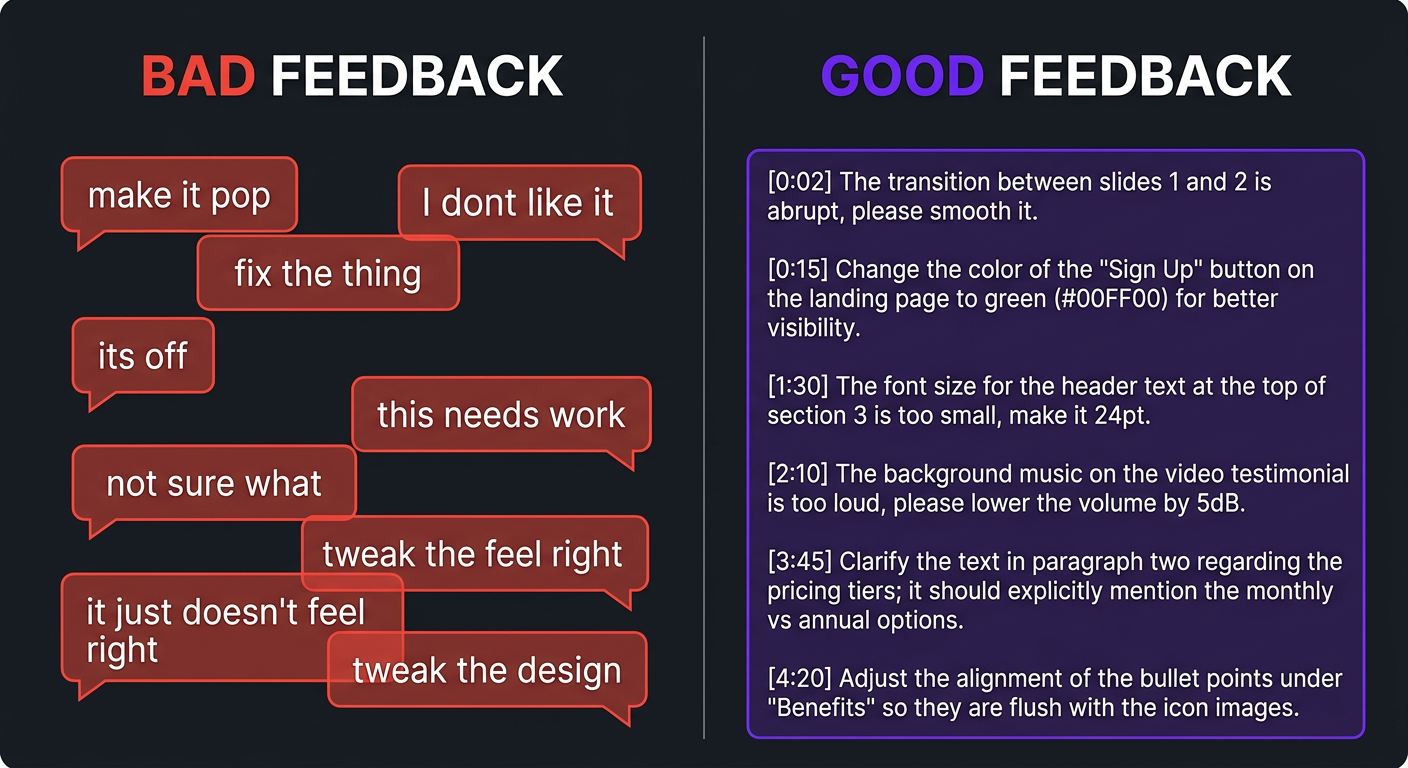
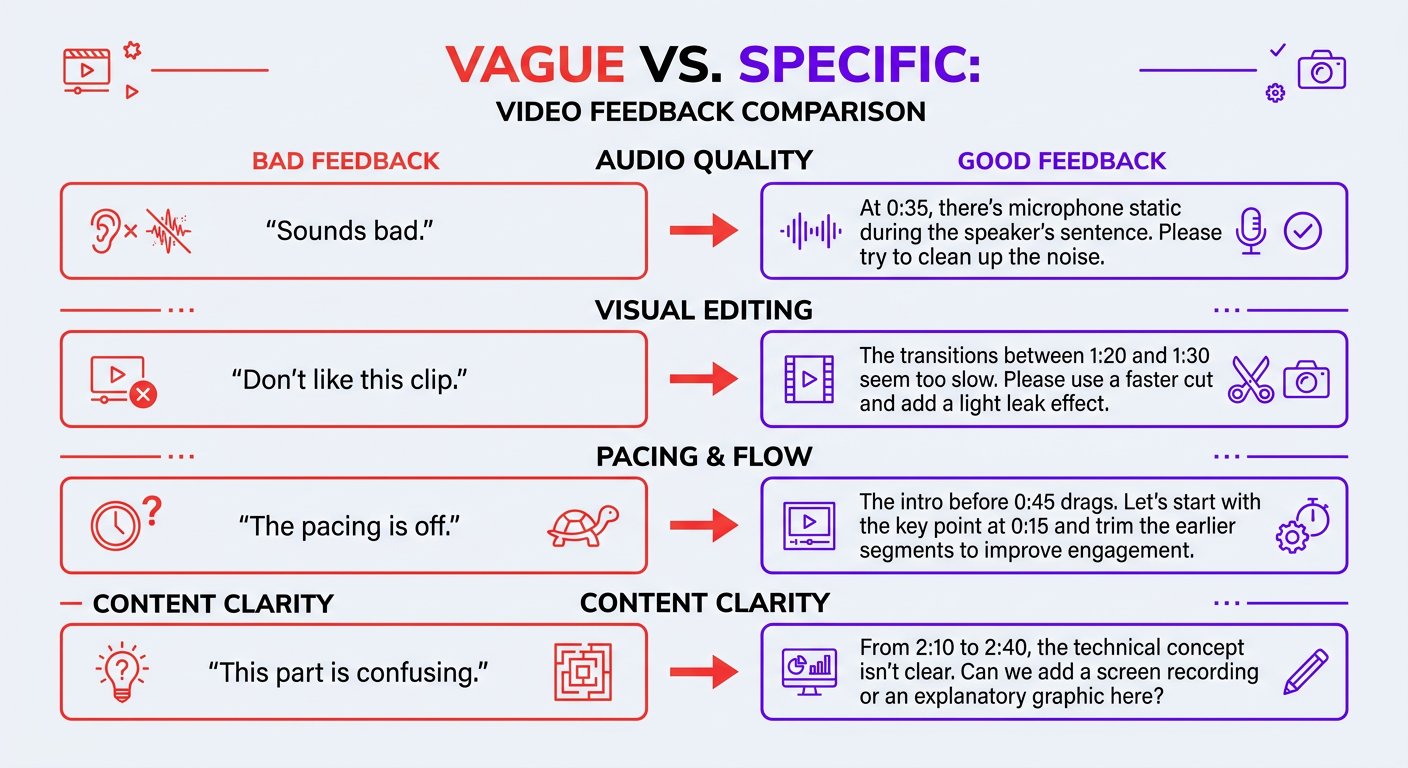
Bad Feedback vs Good Feedback: Side-by-Side Examples
Let’s look at real feedback patterns — the kind we see every day — and their dramatically more effective alternatives.
| Bad Feedback ❌ | Good Feedback ✅ | Why It’s Better |
|---|---|---|
| “The intro doesn’t work.” | “[0:00-0:22] Intro is too slow. Open with the question at 0:15 instead — it’s a stronger hook.” | Specific, timestamped, actionable with a clear alternative |
| “Can you make it more excitinga” | “[2:30-4:00] This section feels flat. Try tighter cuts, add 2-3 B-roll shots to break the talking head, and bring the music up slightly.” | Defines “exciting” in concrete editing terms |
| “I don’t like the music.” | “The track is too upbeat for this topic. Need something more ambient/thoughtful — similar to the music in [reference link].” | Explains what’s wrong and provides direction with a reference |
| “The colors look weird.” | “The color grading is too warm/yellow. We want a neutral-to-slightly-cool tone. Match the look from episode 12.” | Describes the issue and gives a concrete reference point |
| “It’s too long.” | “Target is 10 min, currently at 14. Cut sections at [5:20-6:40] and [9:00-10:30] — those points are repetitive.” | Identifies exactly what to cut instead of leaving editor to guess |
| “Make it pop!” | “[Throughout] Add more visual variety — pattern interrupt every 60-90 sec with B-roll, text on screen, or a graphic. See [reference] for the rhythm I want.” | Translates a meaningless phrase into specific editing direction |
| “This is wrong” (with no context) | “[7:15] The stat shown on screen says $5M but I said $5K in the script — need to fix the graphic.” | Points to the exact error with the correct information |
Notice the pattern: good feedback always has a timestamp, describes the problem specifically, and either provides a solution or a clear direction. It takes maybe 30 seconds longer to write — and saves hours of back-and-forth.
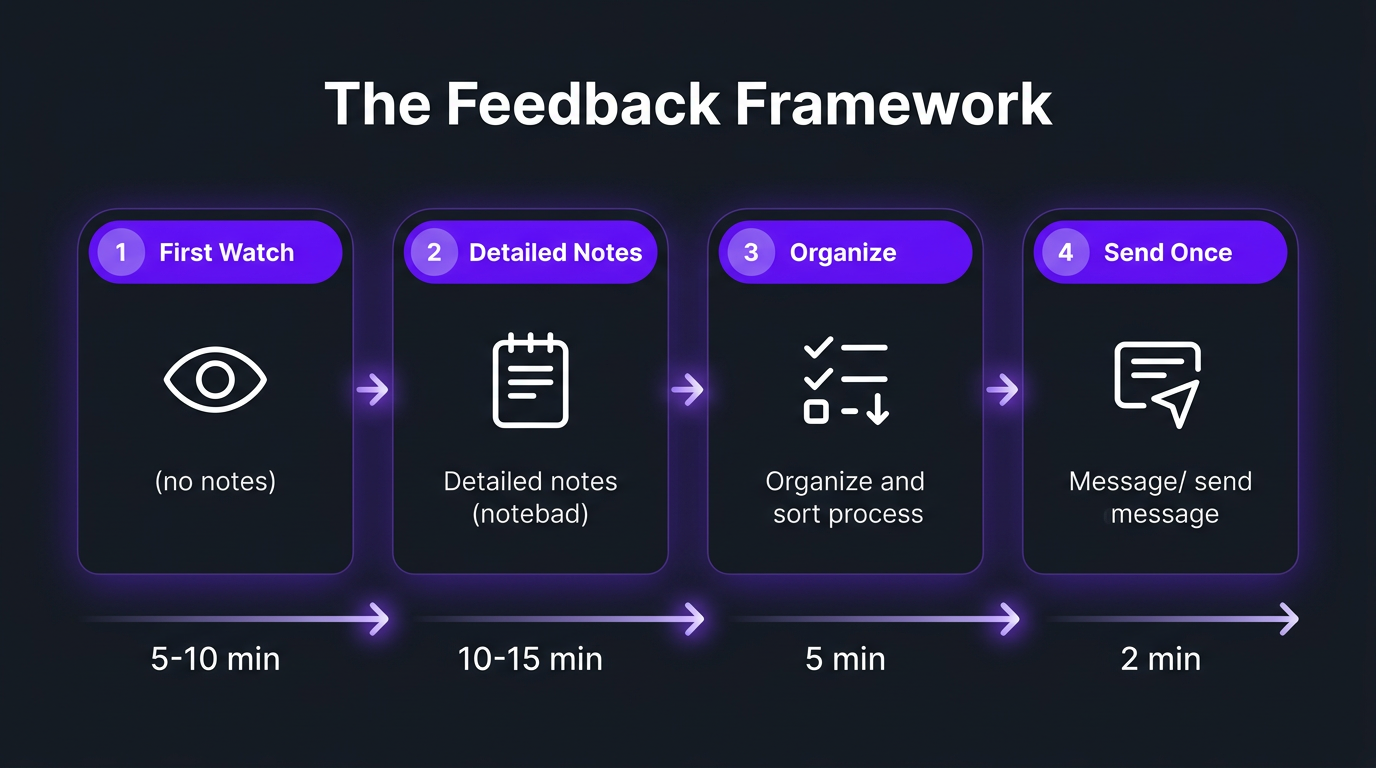
The Feedback Framework: Watch → Note → Organize → Send
Here’s the exact process we recommend to every client. It takes 25-35 minutes for a 10-minute video and produces feedback your editor will love.
Step 1: First Watch — No Notes (5-10 minutes)
Watch the entire video without stopping. Don’t pause. Don’t take notes. Don’t rewatch sections. Just experience it as a viewer would. Your gut reaction after this first watch is valuable — it tells you the overall feel, pacing, and energy.
After the first watch, write down your overall impression in 2-3 sentences. Something like: “Overall good flow. Intro needs to be punchier. Middle section drags. Ending is strong. Music works except in the demo section.”
Step 2: Second Watch — Detailed Notes (10-15 minutes)
Now watch again with your feedback tool open (Frame.io, shared doc, whatever). This time, pause at every moment that needs attention and log:
- Timestamp — the exact moment
- Issue — what’s wrong or what you want changed
- Direction — what you want instead (if you have an idea)
- Priority — must-fix or nice-to-have
Step 3: Organize (5 minutes)
Review your notes and organize them:
- Group must-fix issues at the top
- Group nice-to-have suggestions below
- Check for contradictions (you’d be surprised how often notes from minute 2 contradict notes from minute 8)
- Remove any vague notes and make them specific
- Add your overall impression from Step 1 at the top
Step 4: Send — One Message, One Channel (2 minutes)
Send the organized feedback in your agreed-upon channel. Include:
- Overall impression (2-3 sentences)
- Must-fix items (numbered, timestamped)
- Optional suggestions (numbered, timestamped)
- Deadline for next cut
That’s it. Your editor gets a clear, organized, actionable document. They can work through it systematically instead of decoding a stream of consciousness.
Why Timestamps Change Everything
We keep emphasizing timestamps because they’re genuinely the single most impactful habit you can adopt for video feedback. Here’s why:
Without Timestamps:
- Editor scrubs through 10-minute video looking for “that part in the middle”
- Finds 3 possible sections you might mean
- Guesses which one, changes it
- Gets it wrong 40% of the time
- You send another round of feedback pointing to the right section
- Total time wasted: 30-60 minutes of editor time + an extra revision round
With Timestamps:
- Editor jumps to [4:32]
- Sees exactly what you mean
- Fixes it in 2 minutes
- Moves to next note
- Total time: 2 minutes. Zero ambiguity.
Multiply that across 8-12 feedback notes per video and you can see how timestamps alone reduce revision turnaround by 50-70%.
Timestamp Formatting Tips
- Range for sections: [2:15-3:40] — use for pacing issues, section-level changes, and music problems
- Single point for moments: [4:32] — use for specific cuts, errors, and graphic issues
- Throughout notation: [Throughout] — use for global notes like “audio is too quiet” or “color grading too warm”
How to Be Honest Without Being a Jerk
Let’s talk about the human side. You’re paying for a service, you deserve to be happy with the result, and sometimes the first cut genuinely misses the mark. How do you communicate that without damaging the relationshipa
Lead with What Works
Before listing what needs to change, acknowledge what’s working. This isn’t softening or being fake — it’s practical. When an editor knows which parts you like, they protect those elements while fixing the issues. If all you send is criticism, they might overcorrect and change things that were already good.
“The pacing in the second half is great — that’s the energy I want throughout. The graphics look sharp. Now, here’s what needs work…”
Focus on the Work, Not the Person
There’s a massive difference between:
- “You clearly didn’t understand the brief” (personal attack)
- “The edit doesn’t match the style I described in the brief — let me clarify what I’m looking for” (work-focused redirect)
The first one puts your editor on the defensive. The second one opens a productive conversation. Same information, completely different outcome.
Frame as Direction, Not Criticism
Replace “this is wrong” with “let’s try this instead.” Replace “I hate this transition” with “can we use a straight cut here instead of the dissolvea” Every note becomes a forward-looking direction rather than a backward-looking complaint.
Acknowledge Complexity When It Exists
If you’re giving feedback on a complex project — heavy VFX work, intricate color grading, or multi-format deliverables — acknowledge the difficulty. “I know this was a complex project and a lot of the work here is excellent. A few specific adjustments to dial it in…” goes a long way toward maintaining morale and collaboration.
What Not to Do: The Feedback Behaviors Editors Dread
- The Moving Target: Changing your mind between revision rounds. “Make it faster” → editor speeds it up → “Actually, it was better slower.” If you’re not sure what you want, say so upfront and ask the editor for two options.
- The Stakeholder Surprise: You approve the edit, then your boss/partner/investor sees it and has 15 new notes. Include all stakeholders in the review process from round one.
- The 11 PM Stream of Consciousness: Sending feedback as a rambling voice note or Slack stream at 11 PM and expecting the editor to decode it the next morning. Organize your thoughts first.
- The Silent Treatment: Not responding to the cut for days, then sending urgent feedback with a “need this fixed by tomorrow” deadline. Respect the editor’s time by reviewing promptly.
Feedback Scripts for Common Scenarios
Here are copy-paste-and-customize feedback scripts for situations you’ll encounter constantly:
The Pacing Is Wrong
“Overall pacing needs adjustment. [0:00-0:30] Intro is too slow — we need to hook within the first 5 seconds. Try opening with the bold claim at [raw footage 02:15]. [3:20-5:10] This section drags — can we cut by 40% and keep only the strongest points [Throughout] Aim for a pattern interrupt (B-roll, graphic, or cut-away) every 60-90 seconds to maintain energy. Reference: [link to video with desired pacing].”
The Music Doesn’t Fit
“The current track is too [upbeat/dramatic/generic] for this content. The topic is [serious/educational/casual] and the music should match that tone. Looking for something more [ambient/chill/inspiring] — here’s a reference for the vibe: [link]. Music should sit at about 20% of dialogue volume — right now it’s competing with the voiceover at [1:45-2:30] and [5:00-6:15].”
The Color Grading Is Off
“Color grading is too [warm/cool/saturated/flat]. We want a [neutral/cinematic/bright] look consistent with our previous videos — specifically episodes [X] and [Y]. The skin tones at [3:00] look unnatural. Overall, dial back the [warmth/contrast/saturation] by about 20-30%.”
It’s Good — Just Needs Polish
“Really solid first cut — the structure and pacing are right. A few polish notes: [1:22] Audio pop — cleanup needed. [3:45] Jump cut is jarring — add a B-roll bridge. [6:10] Lower third has a typo (it says ‘Managment’). [8:30-8:45] Awkward silence — tighten the gap. Everything else looks great. These are all quick fixes.”
It Completely Missed the Mark
“Appreciate the work on this, but the direction isn’t aligned with what I’m looking for. Let me re-clarify: the video should feel [describe tone/energy/style]. Right now it feels [describe current issue]. I think we need to revisit the structure — here’s what I’m envisioning: [Hook moment] → [Section 1 focus] → [Section 2 focus] → [CTA]. Let’s also reference for the editing style. Happy to jump on a quick 10-minute call if that would be easier than written notes.”
Tired of the Feedback Cyclea
Our dedicated editors learn your style so thoroughly that most first cuts need zero to one revision. Less feedback, better videos, more time back.
Best Tools for Giving Video Editing Feedback
The right tool reduces friction in the feedback process. The wrong tool (or no tool) multiplies confusion.
| Tool | Timestamped Comments | Drawing/Annotation | Version Comparison | Price | Best For |
|---|---|---|---|---|---|
| Frame.io | ✅ | ✅ | ✅ | $15+/mo | Professional teams, agencies |
| Dropbox Replay | ✅ | ✅ | ✅ | Included with Dropbox Pro | Teams already using Dropbox |
| Vimeo Review | ✅ | ⚠️ Basic | ❌ | Included with Vimeo Pro | Simple review workflows |
| Google Drive + Doc | ❌ (manual) | ❌ | ❌ | Free | Budget setups, simple projects |
| Loom + Timestamp Notes | ⚠️ Indirect | ❌ | ❌ | Free tier available | Quick visual feedback |
Frame.io is the gold standard because it was built specifically for video review. You click on any frame, type your comment, and the editor sees it pinned to that exact moment. No timestamps to type, no confusion about “which part.” It also lets you draw on frames — invaluable for graphic placement feedback like “move this text element here.”
If you’re working with a YouTube editing service or agency like Increditors, ask what review tool they use. Most professional outfits have a preferred platform and will onboard you to it.
The Free Alternative That Works
Don’t have budget for Frame.io Here’s a workflow that costs $0:
- Editor uploads cut to Google Drive
- You watch it in the Google Drive video player
- You create a Google Doc titled “[Video Name] — Feedback Round 1”
- Write timestamped notes in the doc
- Share the doc with your editor
It’s not as elegant as Frame.io, but it’s structured, centralized, and infinitely better than 20 Slack messages.
How to Reduce Revision Rounds Permanently
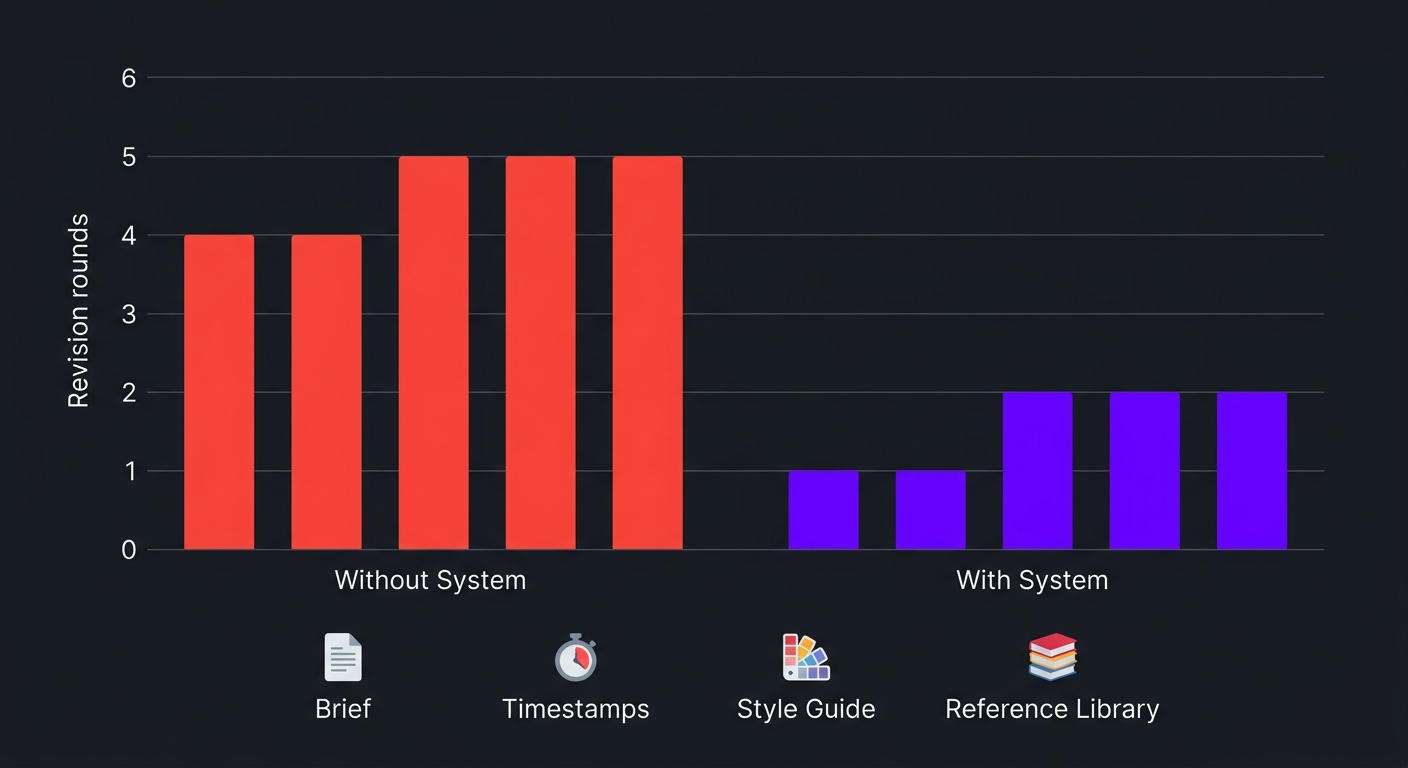
If you’re consistently going through 3+ revision rounds per video, the feedback process is only part of the problem. Here’s the full system for reducing revisions to 1-2 rounds permanently:
Invest in the Brief
We’ve covered this extensively in our video editing brief template guide, but it bears repeating: 80% of revision issues stem from inadequate briefs. A detailed brief with references, timestamps, and clear direction prevents most problems before the first cut is even started.
Build a Feedback Archive
Every piece of feedback you give should be documented somewhere permanent — not lost in Slack history. Over time, this archive becomes your style guide. Common patterns emerge: “always use clean cuts, never dissolves,” “keep music at 20% of dialogue volume,” “pattern interrupt every 90 seconds.” Compile these into a living document your editor references before every project.
Create a Reference Library
Maintain a shared folder of approved videos — your best work that represents the quality standard. When something looks right, save it as a reference. When you say “match the energy of episode 23,” both you and your editor have a shared understanding of what that means.
Do Periodic Alignment Calls
Once a month (or quarterly), schedule a 30-minute call with your editor to discuss what’s working, what patterns are emerging in feedback, and how to evolve the style. These calls prevent drift and build shared understanding that no amount of written notes can replicate.
The Revision Reduction Formula
| Action | Revision Rounds Eliminated | Time Investment |
|---|---|---|
| Detailed brief with references | 1-2 rounds | 15 minutes per video |
| Consolidated, timestamped feedback | 0.5-1 round | 5 minutes per review |
| Living style guide | 0.5-1 round (cumulative) | 2 hours to create, 15 min/month to maintain |
| Reference library | 0.5 round | 5 minutes per approved video (save to folder) |
| Combined impact | 2.5-4.5 fewer rounds per video | ~25 min per video + small upfront investment |
If you’re currently averaging 4-5 revision rounds, implementing this system can bring you down to 1-2 within a month. That’s not optimistic — it’s what we see consistently when clients adopt structured feedback processes.
Real Client Stories: Feedback Transformations
Riley Coleman: From Frustration to Flow
Riley Coleman is a YouTube creator who came to Increditors with a common frustration: he felt like he was spending as much time giving feedback as he would have spent editing the videos himself. Every first cut needed extensive notes. Revision rounds stretched to 4-5 per video. The time savings of outsourcing editing were being eaten by the feedback overhead.
The problem wasn’t the editing — it was the feedback loop. Riley was giving unstructured notes via voice messages and Slack. Feedback was scattered across conversations, sometimes contradictory, and rarely referenced specific timestamps. His editors were talented but were essentially guessing at his vision with each cut.
We restructured the entire process. First, we built a comprehensive style guide based on Riley’s best-performing videos — documenting his pacing preferences, graphic style, music direction, color treatment, and the specific editing rhythms that kept his audience watching. Then we implemented the Watch-Note-Organize-Send framework for all feedback, with Frame.io as the centralized review tool.
The transformation was dramatic. Within two weeks, first cuts were landing at 85-90% alignment. Revision rounds dropped from 4-5 to 1-2. Riley’s total time spent on post-production feedback went from 8+ hours per week to under 2 hours. And his editors — no longer decoding vague voice notes — actually started making proactive creative decisions that improved the content because they finally understood the why behind Riley’s preferences.
The compounding effect was real: as the feedback archive grew and the style guide evolved, the team’s output quality increased steadily. By month three, some videos went from first cut to publish with zero revision rounds.
Blue Zones: Multi-Stakeholder Feedback Without Chaos
Blue Zones is a health and longevity brand with a unique feedback challenge: multiple stakeholders reviewing every video. The founder had creative preferences. The marketing director had brand guidelines. The content manager had platform-specific requirements. And all three were sending feedback independently, often with conflicting notes.
The editor would receive three separate feedback documents, try to reconcile contradictions, implement what they could, and then get another round of conflicting feedback on the revision. It was a cycle that produced mediocre work through committee compromise rather than clear creative direction.
The fix was structural, not creative. We implemented a feedback hierarchy:
- Content manager reviews first for technical accuracy and platform compliance
- Marketing director reviews second for brand alignment
- Founder reviews last for creative direction (final say)
Each stakeholder reviews sequentially, adding their notes to the same document. Contradictions are resolved before feedback reaches the editor, not after. The social media editing team at Increditors receives one consolidated, pre-aligned feedback document per review round.
Result: revision rounds dropped from 4-6 to 1-2, turnaround time decreased by 60%, and — perhaps most importantly — internal stakeholder tension around video content disappeared because the review process now had structure instead of chaos.
What Editors Wish Clients Knew
We surveyed our editing team and compiled the most common things they wish clients understood about the feedback process. This is the perspective from the other side of the screen:
“Trust takes a few projects to build”
The first 3-5 videos with any new editor will require more feedback. That’s normal. The editor is learning your preferences, your audience, your brand. Don’t judge the relationship on the first project — judge it on the trajectory. Are revisions decreasing Is the first cut getting closer to your vision each time If yes, the process is working.
“Reference videos teach us more than words”
“I want it to feel energetic” means different things to different people. A link to a video with the energy you want — with a note about which specific element you like — communicates instantly and unambiguously. Editors think visually; show us, don’t just tell us.
“We want to know why, not just what”
When you explain the reasoning behind a preference, editors internalize the principle and apply it proactively across future videos. “Don’t use dissolves” is a rule to memorize. “We avoid dissolves because our audience expects fast, modern editing — dissolves feel dated for this demographic” is a principle to understand.
“Contradictory feedback is our biggest time sink”
“Make it shorter but don’t cut any content.” “Add more B-roll but don’t make it feel busy.” “Speed up the pacing but keep it relaxed.” When feedback contains contradictions, the editor has to guess which instruction takes priority — and they’ll guess wrong about half the time. If you catch yourself writing something that contradicts a previous note, resolve it before sending.
“Acknowledging good work motivates better work”
Editors are creative professionals who take pride in their craft. A quick “the color grading on this one was perfect” or “loved the music choice at [3:00]” isn’t fluff — it tells the editor what to keep doing. Exclusively negative feedback, even when constructive, gradually erodes motivation and creativity.
“One review tool, please”
Frame.io comments + a Slack thread + an email + a text message = guaranteed missed notes and confused editors. Pick one channel for feedback. Stick to it. Every time.
Frequently Asked Questions
Good feedback is specific, timestamped, and actionable. Instead of “the intro feels off,” say “at 0:12-0:25, the pacing drags — can we tighten the cuts to match the energy of the reference video I shareda” Always use timestamps, explain the why behind your request, batch all feedback in one consolidated message, and separate must-fix items from nice-to-haves.
With a good brief and clear feedback, most videos need 1-2 revision rounds. If you’re consistently going beyond 3 rounds, the problem is usually in the brief (not enough direction upfront) or the feedback process (vague, scattered, or contradictory notes). Premium agencies like Increditors typically include 2-3 revision rounds in their pricing.
Absolutely. Timestamps are the single most important element of video editing feedback. Use tools like Frame.io or Dropbox Replay that let you click on the exact moment and leave a comment. Without timestamps, your editor wastes time hunting for the moment you’re referencing, and misunderstandings multiply exponentially.
Frame.io is the industry standard — it allows timestamped comments directly on the video timeline with drawing annotations. Dropbox Replay is a solid alternative. For budget setups, Google Drive video preview combined with a structured Google Doc feedback template works for simpler projects.
Focus on the work, not the person. “This section needs more energy” is professional feedback. “You clearly didn’t understand what I wanted” is personal and unproductive. Frame feedback as direction (“let’s try a faster pace here”) rather than criticism (“this is too slow”). And always acknowledge what works well — editors who feel appreciated produce better work.
In most cases, recurring misalignment is a brief problem, not an editor problem. Check: Are your briefs detailed enough Are you providing reference videos Is your feedback specific or vague Have you built a style guide If all of those are solid and the editor still isn’t delivering, then it may be a skill or fit issue — but exhaust the process improvements first.
Watch the full video once without pausing (viewer perspective), then again with a feedback tool open (producer perspective). For a 10-minute video, budget 25-35 minutes total. If you’re spending more than an hour reviewing a single video, your process needs streamlining — likely through better briefs and a style guide that reduces the number of decisions you need to make.
Skip the Feedback Headaches Entirely
Our dedicated editors learn your brand inside and out. Most clients see first-cut approval rates above 85% within the first month. Less feedback, more content, better results.
Feedback frameworks in this guide are based on Increditors’ experience managing thousands of client-editor feedback cycles across YouTube, social media, and brand video projects. For help establishing a feedback process for your content operation, schedule a call.