










![3D Explainer Video - ScribbleLive.mp4_snapshot_00.12_[2022.03.09_03.14.16]](https://increditors.com/wp-content/uploads/elementor/thumbs/3D-Explainer-Video-ScribbleLive.mp4_snapshot_00.12_2022.03.09_03.14.16-r7wb53mx72rxst3qcqyrfxdmeyzb5r9jbl0wbjujh4.png "3D Explainer Video – ScribbleLive.mp4_snapshot_00.12_[2022.03.09_03.14.16]")
































If you’ve ever watched a perfectly paced YouTube video — seamless cuts, dynamic graphics, cinematic color — and wondered “how do they do thata”, you’re asking the right question. But the more interesting question is the one most people never think about: who is actually editing those videosa
The answer, for the vast majority of successful YouTubers, is: not the creator themselves.
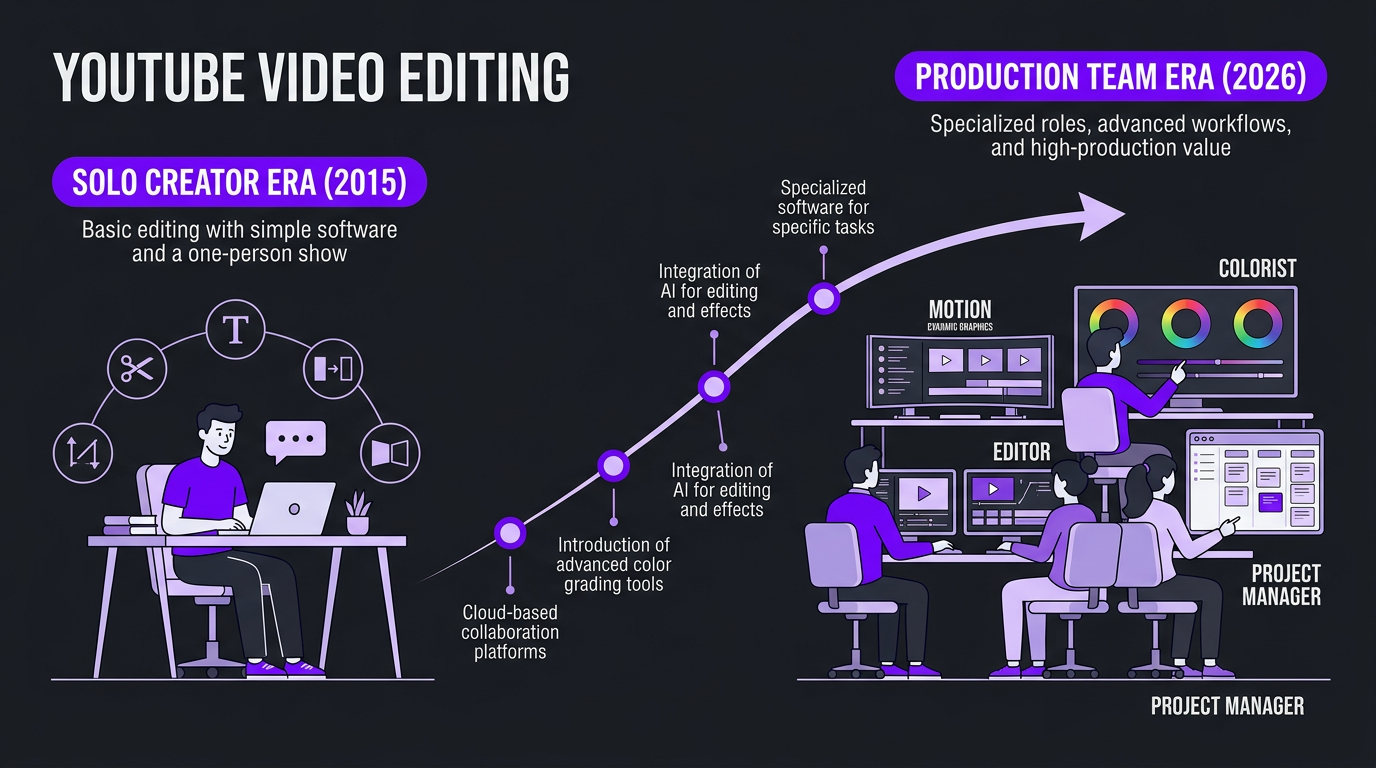
How YouTubers edit their videos has changed dramatically over the past five years. What used to be a one-person operation — film, edit, upload, repeat — has evolved into a full production pipeline with dedicated teams, specialized software, and professional video editing services handling the heavy lifting behind the scenes.
This guide breaks down exactly how YouTube videos get edited in 2026, what tools and workflows creators use, and why the smartest creators outsource their editing while focusing on what actually grows their channel.
What’s in This Guide
- How Creators Actually Edit Their Videos
- The Software Stack: What YouTubers Use
- The Typical YouTube Editing Workflow
- The Real Time Cost of Editing
- Why Most Successful YouTubers Outsource
- DIY vs Outsourced: Side-by-Side Comparison
- How Outsourcing Actually Works
- Real Examples: Creators Who Made the Switch
- How to Find the Right Editor or Agency
- FAQ
How Creators Actually Edit Their Videos
There’s a romantic myth in the YouTube space that every creator is a one-person army — filming in their bedroom, editing until 3 AM, uploading just before their deadline. And while that’s true for many beginners, it stops being true surprisingly quickly as channels grow.
Here’s the reality of how YouTubers edit their videos at different stages of growth:
The Solo Creator (0–10K Subscribers)
At this stage, most creators do everything themselves. They film on a phone or basic camera, import footage into whatever editing software they learned first, and spend hours wrestling with timelines, transitions, and export settings. The editing is functional but rarely optimized — because the creator is learning content and editing simultaneously.
Common characteristics at this stage:
- Editing takes 4-10 hours per video
- Heavy reliance on tutorials and templates
- Basic cuts, stock music, simple text overlays
- No color grading or audio mastering
- Upload schedule is inconsistent because editing creates a bottleneck
The Growing Creator (10K–100K Subscribers)
This is where the tension starts. The creator now understands what good editing looks like — they can see the gap between their content and top-tier channels. They’ve probably invested in better equipment. But editing still eats 60-70% of their production time, limiting how much content they can produce.
Some creators at this stage hire their first freelance editor. Others try to level up their own skills, investing in courses and plugins. A few try budget editing subscriptions. The results are mixed. Freelancers require management. Budget services deliver inconsistent quality. Self-improvement takes months to yield results.
The Established Creator (100K+ Subscribers)
By this point, nearly every successful creator has outsourced editing in some form. The math simply doesn’t work otherwise. If you’re producing 2-4 videos per week and each one takes 10-15 hours to edit, you’d need 20-60 hours of editing time per week — leaving zero time for ideation, filming, audience engagement, brand deals, or having a life.
The biggest channels — MrBeast, MKBHD, Linus Tech Tips, Ali Abdaal — have full post-production teams. But you don’t need to be at that scale to benefit from outsourcing. Creators with as few as 20,000 subscribers regularly work with professional editing teams and see their growth accelerate as a direct result.
The Software Stack: What YouTubers Use in 2026
The tools creators use to edit their videos have evolved significantly. Here’s the current landscape:
| Software | Market Share (YouTube Creators) | Best For | Price |
|---|---|---|---|
| Adobe Premiere Pro | ~40-45% | Professional all-rounder, team workflows | $23/mo (single app) |
| Final Cut Pro | ~20-25% | Mac-native speed, magnetic timeline | $300 one-time |
| DaVinci Resolve | ~15-20% | Color grading, free tier is generous | Free / $295 Studio |
| CapCut | ~10-15% | Short-form, fast mobile editing | Free / $8/mo Pro |
| iMovie | ~5% | Absolute beginners on Mac | Free |
| After Effects | Used alongside primary NLE | Motion graphics, VFX, animations | $23/mo (single app) |
The software choice matters less than most creators think. A skilled editor in DaVinci Resolve will outperform a beginner in Premiere Pro every time. What matters more is the workflow around the software — how footage gets organized, how drafts are reviewed, how revisions are tracked, and how the final product gets quality-checked before upload.
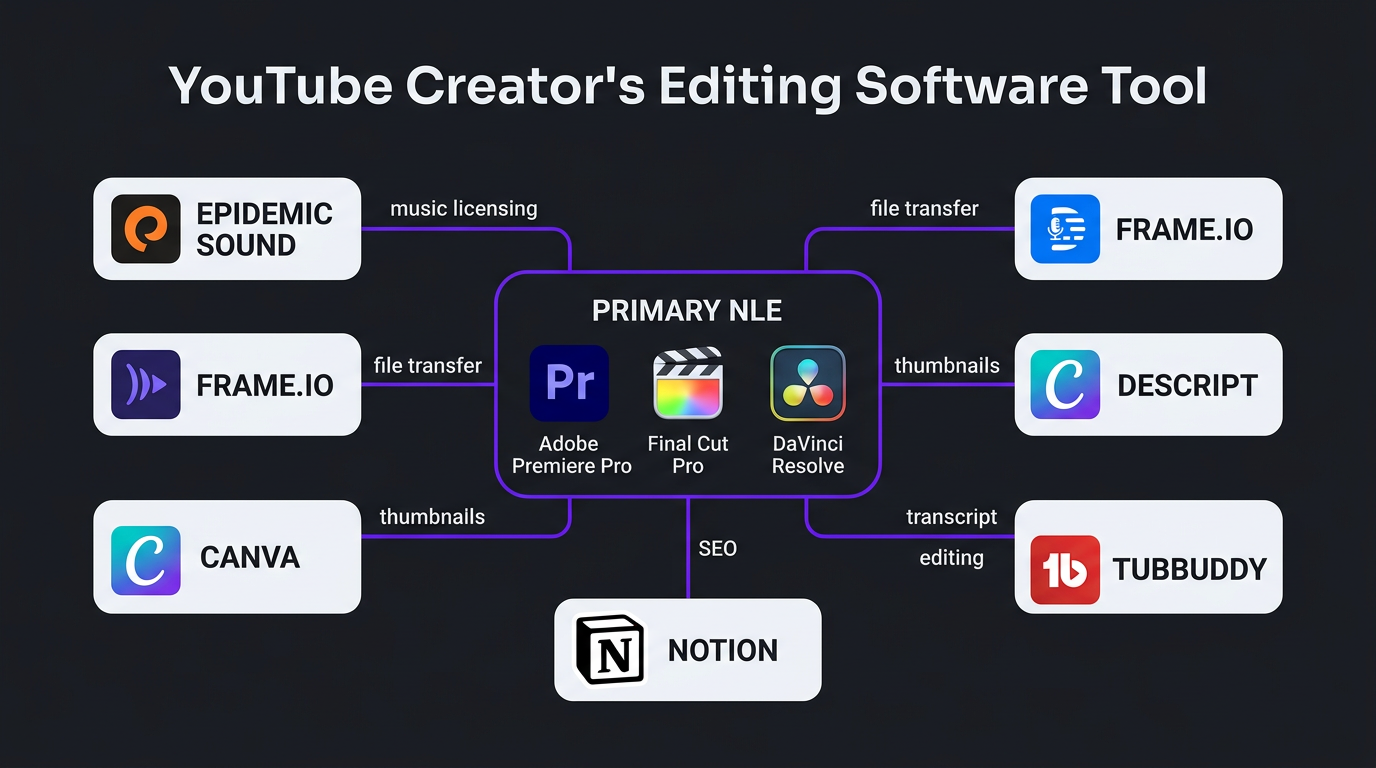
The Supporting Tools
Beyond the primary editing software, most YouTube workflows include:
- Frame.io or Google Drive — File transfer and review (annotated feedback directly on the timeline)
- Epidemic Sound or Artlist — Licensed music and sound effects
- Canva or Photoshop — Thumbnail creation
- TubeBuddy or VidIQ — SEO and title/tag optimization
- Notion or Trello — Production pipeline management
- Descript — Transcript-based editing and rough cuts
Professional editing agencies like Increditors use these tools as part of integrated workflows so creators never have to manage the toolchain themselves. You upload raw footage, provide notes, and get back a polished video — the tools are invisible to you.
The Typical YouTube Editing Workflow
Whether a creator edits themselves or works with a team, the editing workflow for YouTube videos follows a predictable pattern. Understanding this process helps you evaluate what you’re actually paying for when you hire an editor — and where the real value lies.
Step 1: Footage Import and Organization (30-60 minutes)
Raw footage gets imported, organized into bins (by scene, camera angle, or topic), and synced with any separate audio recordings. Professional editors create a structured project file that makes everything findable. Amateurs dump footage into a single folder and waste hours searching for clips later.
Step 2: Assembly Cut (1-3 hours)
The editor watches all raw footage and builds a rough assembly — the entire video laid out in approximate order with no polish. This is where the story structure takes shape. A skilled editor will identify the strongest moments, flag dead air, and start building the narrative arc.
Step 3: Rough Cut (2-5 hours)
The assembly gets refined. Pacing is tightened. Awkward transitions are smoothed. B-roll is placed over talking points. Text overlays mark where graphics will go. This is the version that typically gets sent to the creator for first-round feedback.
This step is where editing quality diverges most dramatically between budget and professional services. A budget editor trims silence and adds jump cuts. A professional editor shapes the viewing experience — controlling when the audience feels tension, humor, curiosity, or satisfaction. This is the craft that keeps viewers watching past the 30-second mark, and it’s why YouTube editing specialists charge more than general-purpose freelancers.
Step 4: Fine Cut and Graphics (3-8 hours)
After creator feedback, the editor refines the cut. This is where motion graphics get designed and integrated — lower thirds, data visualizations, animated callouts, transitions between segments. Custom animations for channel-specific elements (intros, outros, recurring segments) are layered in.
Step 5: Color Grading (1-3 hours)
Color correction ensures footage looks consistent and natural. Color grading goes further, creating a specific mood or aesthetic. Some channels have signature looks — warm and golden, cool and cinematic, bright and saturated — that become part of their brand identity. Professional color grading services can transform amateur-looking footage into cinematic content.
Step 6: Audio Mixing and Sound Design (1-3 hours)
Dialogue is leveled and cleaned. Background music is selected and mixed to support (not overpower) the narration. Sound effects are added for emphasis — whooshes on transitions, subtle ambient audio on B-roll, impact sounds for reveals. This step is invisible when done well and painfully obvious when skipped.
Step 7: Review, Revisions, and Export (1-2 hours)
The polished video goes through quality control — checking for audio pops, visual glitches, spelling errors in graphics, and brand consistency. Revisions from the creator are incorporated. The final version is exported in the correct format for YouTube (typically 4K or 1080p, H.264 or H.265).
| Workflow Step | Time (Basic Edit) | Time (Professional Edit) | Time (Premium Edit) |
|---|---|---|---|
| Import & Organization | 15 min | 30 min | 45-60 min |
| Assembly Cut | 30 min | 1-2 hrs | 2-3 hrs |
| Rough Cut | 1-2 hrs | 2-3 hrs | 3-5 hrs |
| Fine Cut & Graphics | 1 hr | 3-5 hrs | 5-8 hrs |
| Color Grading | — | 1-2 hrs | 2-3 hrs |
| Audio & Sound Design | 30 min | 1-2 hrs | 2-3 hrs |
| QC & Export | 30 min | 1 hr | 1-2 hrs |
| Total | 3-5 hrs | 9-15 hrs | 16-25 hrs |
The Real Time Cost of Editing Your Own Videos
Let’s get specific about what DIY editing actually costs you — not in dollars, but in the resource you can’t buy more of: time.
The Math for a Weekly Creator
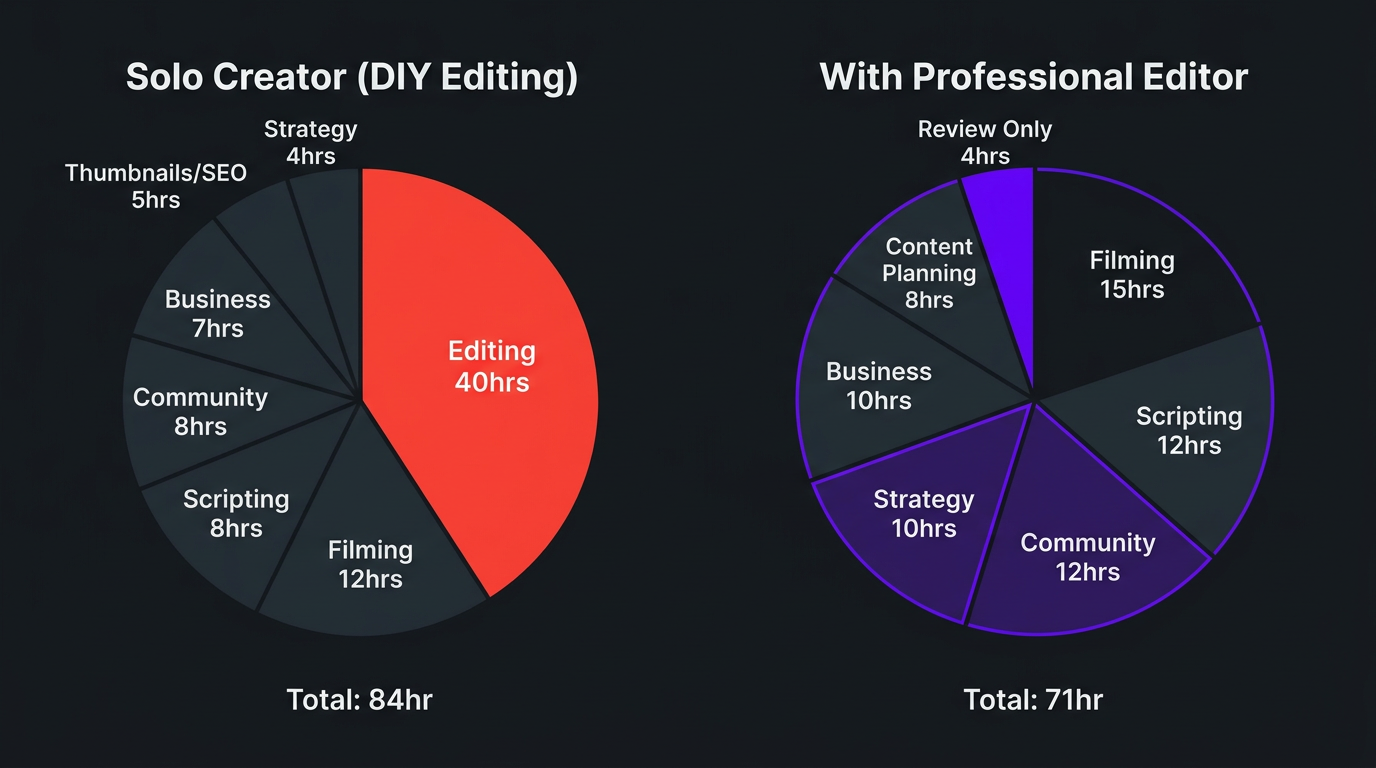
Say you produce one video per week. A solid 12-minute YouTube video with B-roll, basic graphics, and decent pacing takes a self-editing creator approximately 8-12 hours to edit. That’s conservative — many creators report spending 15-20 hours on a single video.
At 10 hours per video × 4 videos per month = 40 hours per month on editing alone.
That’s a full-time job. Except you also need to:
- Research and script new videos (5-10 hours/month)
- Film content (8-15 hours/month)
- Create thumbnails and write titles/descriptions (4-6 hours/month)
- Engage with your community (5-10 hours/month)
- Manage brand deals and business operations (5-10 hours/month)
- Plan content strategy (3-5 hours/month)
Add it up: you’re looking at 70-96 hours per month minimum. If YouTube is your side project, you simply cannot do all of this. Something gets sacrificed — and it’s usually either editing quality or upload consistency. Both kill growth.
The Opportunity Cost
Here’s the part most creators miss: every hour you spend editing is an hour you’re not spending on activities that only you can do. Anyone can learn to edit your videos to your style. Nobody else can be the face of your channel, build relationships with your audience, or come up with the ideas that make your content unique.
If your time is worth $50/hour (conservative for a monetized creator), those 40 editing hours cost you $2,000/month in opportunity cost. A professional editor costs $1,500-$3,000/month. The economics speak for themselves.
Why Most Successful YouTubers Outsource Editing
The shift from DIY to outsourced editing isn’t about laziness — it’s about leverage. Here are the specific reasons creators make the switch:
1. Upload Consistency
YouTube’s algorithm rewards consistency above almost everything else. Channels that upload on a predictable schedule get more impressions, better recommended placement, and stronger audience habits. When you edit yourself, one bad week — illness, travel, burnout — means a missed upload. When you have an editing team, your content pipeline keeps moving regardless of what’s happening in your life.
2. Quality That Compounds
Professional editors don’t just make individual videos better — they create compound improvement across your entire channel. Consistent color grading, recurring graphic elements, signature pacing, and polished audio create a brand experience that viewers recognize and trust. This consistency is nearly impossible to maintain when you’re learning and editing simultaneously.
3. Faster Turnaround
A full-time editor or agency team can return a polished video in 24-48 hours. Self-editing typically takes 3-7 days. That speed difference means you can react to trends, publish time-sensitive content, and maintain tighter feedback loops with your audience.
4. Technical Expertise You Don’t Have
Professional editors bring skills that take years to develop — advanced color science, audio mixing, motion graphics design, codec optimization, and platform-specific encoding. Even dedicated creators who’ve spent hundreds of hours editing rarely match the technical proficiency of someone who edits 8-10 hours per day as their full-time profession.
5. Creative Distance
This one’s underrated. When you edit your own footage, you’re too close to it. You remember the 15 takes of a botched intro and feel attached to certain shots for emotional reasons. An editor with fresh eyes makes objective decisions about what serves the story — cutting ruthlessly where needed and building energy where it matters. This creative distance consistently produces better content.
6. Scaling Content Output
Want to go from 1 video per week to 3 Want to add shorts and Reels alongside your long-form content Scaling is essentially impossible if you’re editing everything yourself. Outsourcing lets you multiply output without multiplying your hours. A social media editing team can repurpose your long-form content into 10-20 shorts per month while you focus on filming the next long-form piece.
Spending More Time Editing Than Creatinga
That’s the number one sign it’s time to outsource. Let us handle post-production while you do what you do best — create.
DIY vs Outsourced Editing: A Practical Comparison
Let’s compare the two approaches across every dimension that matters. This isn’t a theoretical exercise — these numbers come from working with hundreds of creators who’ve made the transition.
| Factor | DIY Editing | Outsourced (Agency) |
|---|---|---|
| Time per video | 8-15 hours | 1-2 hours (review only) |
| Monthly cost (4 videos) | $0 cash / 40+ hours | $1,500-$4,000 / 5 hours |
| Turnaround | 3-7 days per video | 24-72 hours per video |
| Consistency | Varies with energy/mood | Brand-standard every time |
| Scalability | ❌ Limited by your hours | ✅ Add videos without more time |
| Motion graphics | Basic templates only | Custom designs included |
| Color grading | Auto-correct or LUT-based | Professional scene-by-scene |
| Sound design | Background music + basic cleanup | Full mix with SFX and mastering |
| Burnout risk | 🔴 High | 🟢 Low |
| Upload consistency | Frequently disrupted | Rarely disrupted |
| Skill growth (editing) | ✅ You improve over time | ❌ You don’t learn editing |
| Skill growth (content) | ❌ Less time for content strategy | ✅ More time for creation |
The one genuine advantage of DIY editing is learning the craft. If you’re a filmmaker at heart and editing is part of your creative expression, there’s value in doing it yourself. But if editing is a task you endure to get videos published, outsourcing is the clear answer.
How Outsourcing YouTube Editing Actually Works
For creators who’ve never worked with an editor or agency, the process can feel mysterious. Here’s exactly what it looks like with a professional service:
The Onboarding Phase (Week 1)
- Brand deep-dive: The editing team studies your channel — watching 10-20 of your videos, analyzing your style, noting your pacing preferences, recurring elements, and brand voice.
- Style guide creation: A document is built covering your color palette, font preferences, graphic styles, music preferences, pacing speed, and any specific dos and don’ts.
- Workflow setup: File transfer systems are configured (typically Google Drive or Frame.io), communication channels are established, and a revision process is agreed upon.
- Test edit: The editor produces a sample using your existing footage. You provide detailed feedback, and the style is calibrated.
The Ongoing Workflow
- You film and upload raw footage to a shared drive with any notes, timestamps, or specific requests.
- The editor assembles and cuts the video according to your style guide, adding graphics, music, sound design, and color grading.
- You review the first draft (typically 24-48 hours after footage upload) and provide feedback — either via annotated comments in Frame.io or a simple loom/voice note.
- The editor implements revisions (typically within 24 hours).
- Final approval and delivery — you receive the export-ready file, thumbnail concepts, and any supporting assets.
The entire cycle, from footage upload to final delivery, typically takes 2-4 days. With dedicated teams at Increditors, many creators get first drafts back within 24 hours.
What You Still Need to Do
Outsourcing editing doesn’t mean you check out entirely. You’re still responsible for:
- Filming quality footage (good audio is critical — editors can enhance but not replace bad source material)
- Providing clear creative direction, especially for the first few videos
- Reviewing drafts and giving specific, actionable feedback
- Final approval before publishing
Most creators find that the review process takes 30-60 minutes per video. That’s it. From 10+ hours to under an hour. The freed time goes directly into content strategy, filming, audience building, and revenue-generating activities.
Real Examples: Creators Who Made the Switch
Theory is helpful. Real results are better. Here are two creators who went from editing everything themselves to working with professional teams — and what happened to their channels.
Riley Coleman: From Stalled Growth to Doubling Views
Riley Coleman is a YouTuber who was creating solid content but hitting a growth wall. His videos had good information and decent on-camera presence, but the editing wasn’t elevating the content to its potential. Pacing was inconsistent, graphics were basic, and there was no visual strategy tying the channel together.
When Riley partnered with our YouTube editing team, we didn’t just clean up his timeline — we rebuilt his entire post-production approach. We restructured how his videos opened (cutting hook time from 15 seconds to under 5), added retention-optimized pacing (strategic pattern interrupts every 60-90 seconds), integrated custom motion graphics that reinforced key points, and implemented professional color grading that gave his channel a distinctive look.
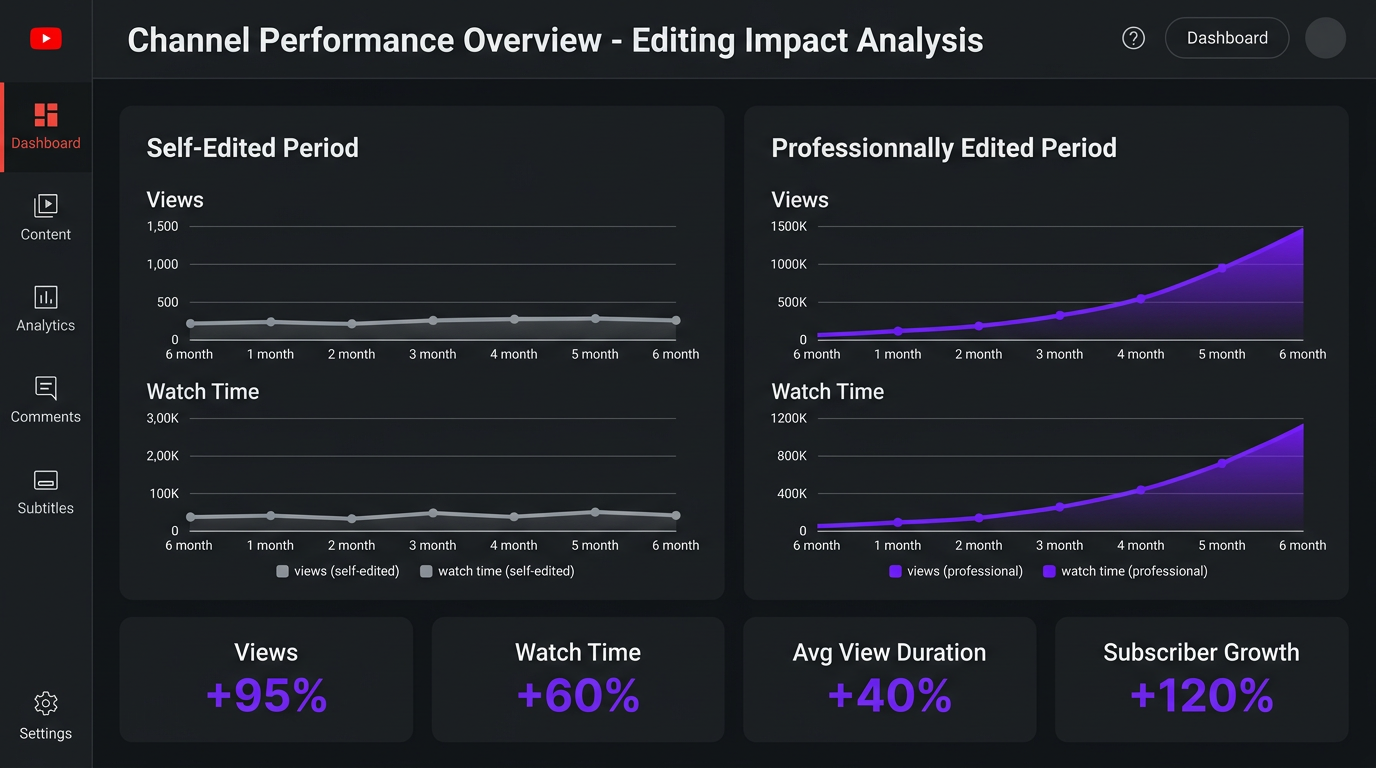
The result: Riley’s views doubled. Not because he changed what he was talking about — but because the editing kept people watching. His average view duration increased significantly, which triggered YouTube’s algorithm to push his content to broader audiences. The compounding effect meant each subsequent video performed better than it would have under his old editing approach.
Riley’s case illustrates a critical point about how YouTubers edit their videos: the editing isn’t just cosmetic. It’s a growth lever. Poor editing caps your channel’s potential regardless of how good your content ideas are.
Trade with Pat: Scaling a Finance Channel
Trade with Pat operates in the finance and trading education niche — a space where production quality directly impacts perceived credibility. Viewers trusting you with their financial education expect a certain level of polish. Shaky graphics, inconsistent audio, and amateur pacing erode trust before you’ve delivered a single insight.
Pat was editing his own videos and producing solid content, but the editing process was consuming time he needed for market research, community management, and course development. More critically, his editing — while competent — wasn’t optimized for retention. Finance content is inherently dense, and without strategic editing, viewers drop off when the information gets complex.
Working with Increditors, Pat’s editing workflow was transformed. Our team implemented visual aids that simplified complex trading concepts — animated charts, real-time annotations on market data, and clean transitions between educational segments. The pacing was tightened to maintain engagement through technical explanations, with strategic B-roll and visual breaks preventing viewer fatigue.
The impact went beyond aesthetics. Pat reclaimed 15-20 hours per week that went directly into content planning and community engagement. His upload frequency increased, his production quality became consistent, and his audience recognized the channel’s evolution — commenting on the improved quality and staying longer through each video.
How to Find the Right Editor or Agency
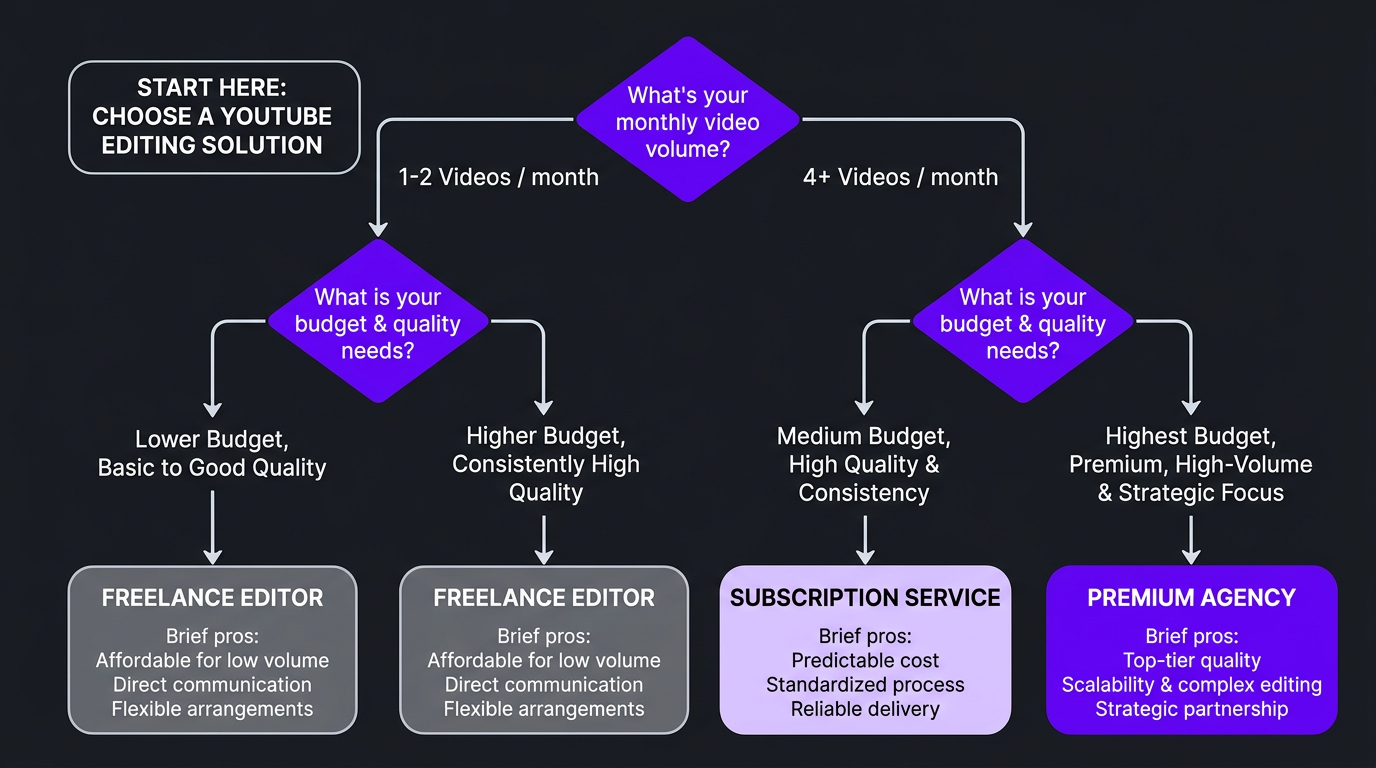
Not all editing services are created equal, and the wrong choice can be worse than editing yourself. Here’s a framework for evaluating your options:
Option 1: Freelance Editor
| Pros | Cons |
|---|---|
| Lower cost ($200-$500/video) | No backup if they’re unavailable |
| Direct relationship | You manage the workflow |
| Can find niche specialists | Quality varies wildly |
| Flexible engagement | Limited skills (one person can’t do everything) |
Option 2: Budget Subscription Service
| Pros | Cons |
|---|---|
| Predictable monthly cost | Cookie-cutter editing style |
| Fast onboarding | Limited customization |
| Good for basic needs | Editor rotation (no consistency) |
| Scalable volume | Quality ceiling on complex content |
Option 3: Premium Editing Agency
| Pros | Cons |
|---|---|
| Dedicated team (editor + PM + QC) | Higher monthly investment |
| Consistent quality and brand standards | Onboarding takes 1-2 weeks |
| Backup coverage — pipeline never stops | Less direct control over editing decisions |
| Full production capability (graphics, color, audio) | Requires clear communication |
| Strategic input on content optimization | — |
What to Look for Regardless of Option
- Portfolio relevance: Have they edited content in your niche A gaming editor and a corporate editor are different specialists. Check their portfolio for work similar to yours.
- Communication style: Do they respond quickly Do they ask smart questions about your vision The best editors are proactive communicators.
- Revision process: How many rounds What’s the turnaround on revisions Unlimited revisions mean nothing if each round takes a week.
- Retention understanding: Can they explain how editing choices affect viewer retention If they only talk about aesthetics and never mention audience behavior, they’re decorators — not strategic editors.
- Trial project: Any reputable service will offer a trial or sample edit. If they demand a 6-month contract before you’ve seen a single deliverable, walk away.
Red Flags
- No portfolio or only spec work (never edited for real clients)
- Turnaround promises that sound too good to be true (same-day delivery for $100)
- No revision policy or vague “we’ll make it right” language
- Can’t explain their editing process — just “send footage and we’ll handle it”
- Pressure to sign long-term contracts immediately
The Increditors approach starts with a discovery call — we learn about your channel, your goals, and your current pain points before proposing anything. If we’re not the right fit, we’ll tell you. Mismatched partnerships waste time for everyone.
Find Out if Outsourcing Is Right for Your Channel
We’ve helped hundreds of creators make the transition from DIY to professionally edited content. Let’s see if it makes sense for you.
Frequently Asked Questions
Adobe Premiere Pro leads the market with roughly 40-50% of professional creators using it. Final Cut Pro is the second most popular, especially among Mac users. DaVinci Resolve has grown rapidly thanks to its powerful free tier and industry-leading color grading. CapCut dominates the short-form space. The software matters less than the skill — a great editor produces great work in any NLE.
It depends heavily on the format and production level. A simple talking-head video takes 2-4 hours. A well-produced educational or entertainment video takes 8-20 hours. Highly produced channels with animations, VFX, and complex storytelling can spend 40-80+ hours per video. Most full-time creators report that editing consumes 50-70% of their total production time.
Editing is the most time-consuming part of content creation, and it’s also the most easily delegated. Outsourcing frees up 15-30+ hours per week, lets creators focus on ideation, filming, and audience engagement, and brings professional-grade technical skills (color grading, motion graphics, sound design) that most creators lack. The math simply works better — especially once a channel is monetized.
Costs range from $100-$200 per video for basic edits on freelance platforms, $250-$500 for professional edits with graphics and color grading, to $500-$1,500+ for premium agency-level production. Monthly retainers are more cost-effective at $1,500-$5,000+ depending on volume. See our pricing page for current rates.
Consider hiring an editor when you’re consistently posting at least once per week, earning revenue from your channel (ads, sponsorships, or products), and spending more time editing than creating new content. The inflection point is usually around 10-25K subscribers — when the channel has proven its concept and editing becomes the primary bottleneck to scaling.
Very few large YouTubers edit their own videos. Creators like MrBeast, MKBHD, Linus Tech Tips, and Ali Abdaal have full editing teams. Some mid-size creators still edit themselves as a creative choice, but the vast majority of channels earning over $10,000/month outsource at least some editing to maintain consistency and upload frequency.
A freelance editor is a single person — you get a direct relationship but no backup, no project management, and limited skill range. An editing agency provides a team: dedicated editor, project manager, quality control reviewer, and backup coverage. Agencies cost more monthly but eliminate management overhead and ensure your content pipeline never stops due to a single person’s availability. For growing channels, the reliability difference is significant.
Ready to Stop Editing and Start Growinga
Join the creators who’ve reclaimed 20+ hours per week by trusting their editing to a dedicated team. See our client results and decide for yourself.
This article reflects industry practices and pricing as of March 2026. Software market share estimates are based on publicly available creator surveys and industry reports. For current Increditors services and pricing, visit our pricing page or schedule a call.