










![3D Explainer Video - ScribbleLive.mp4_snapshot_00.12_[2022.03.09_03.14.16]](https://increditors.com/wp-content/uploads/elementor/thumbs/3D-Explainer-Video-ScribbleLive.mp4_snapshot_00.12_2022.03.09_03.14.16-r7wb53mx72rxst3qcqyrfxdmeyzb5r9jbl0wbjujh4.png "3D Explainer Video – ScribbleLive.mp4_snapshot_00.12_[2022.03.09_03.14.16]")
































You know what separates a YouTube channel that grows from one that stalls It’s rarely the content ideas. It’s almost never the camera. It’s production velocity — how many quality videos you can consistently ship every single month.
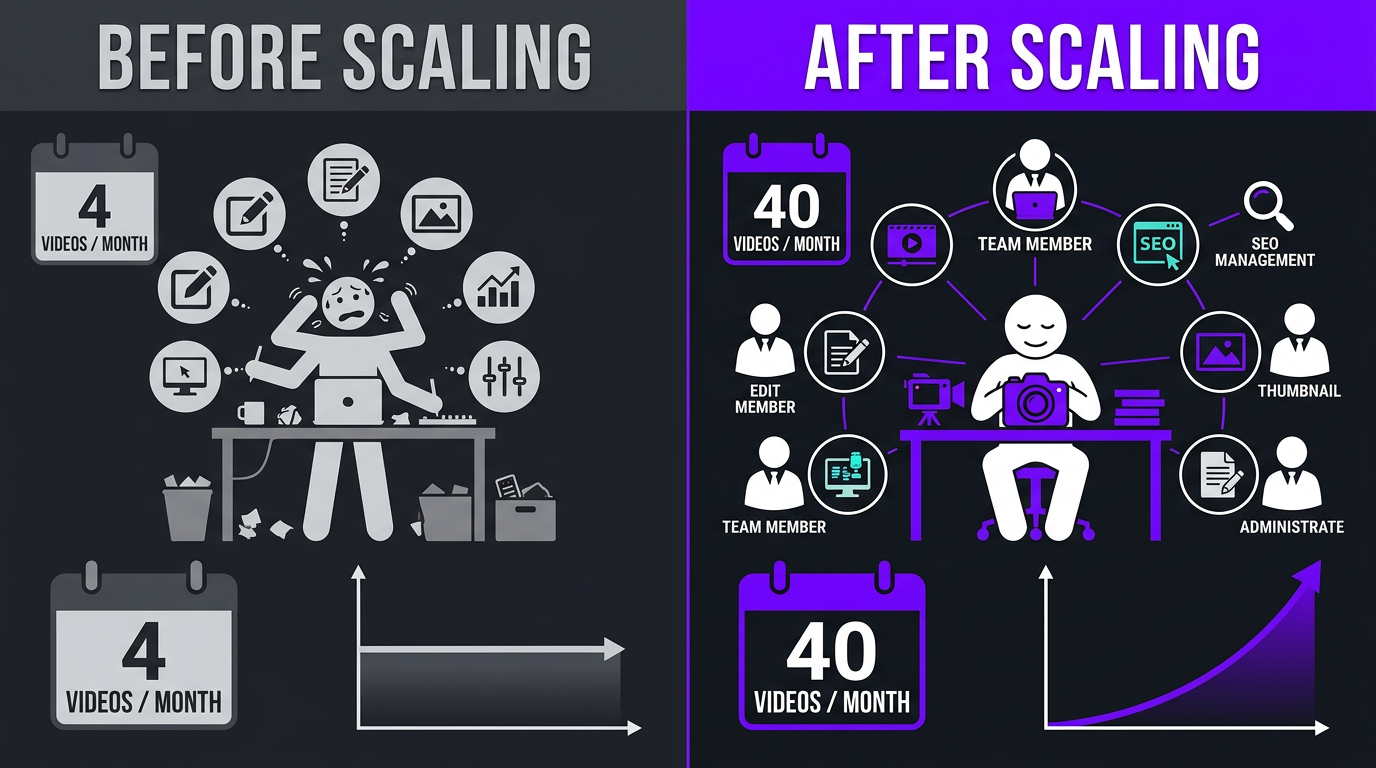
Most creators hit a wall at 4-8 videos per month. They’re filming, editing, thumbnailing, uploading, and promoting everything themselves. Every video takes 15-25 hours from concept to publish. The math simply doesn’t work for higher output.
But here’s the thing: the creators and brands dominating YouTube in 2026 aren’t working 3x harder. They’ve built systems that let them scale YouTube content production without burning out or sacrificing quality. Some of our clients went from struggling with 4 videos a month to comfortably shipping 30-40 — and their quality actually improved in the process.
This guide breaks down exactly how to make that leap, step by step.
What’s in This Guide
- Why Scaling Production Is the Growth Lever
- Audit Your Current Workflow
- The Post-Production Bottleneck
- Batch Filming: The Foundation of Scale
- Building a Content Pipeline
- Outsourcing Editing: When and How
- Repurposing: Turn 1 Video into 5
- Systems and SOPs That Actually Work
- Building Your Production Team
- What Scaling Actually Costs
- Real Results: Case Studies
- 7 Mistakes That Kill Scale
- FAQ
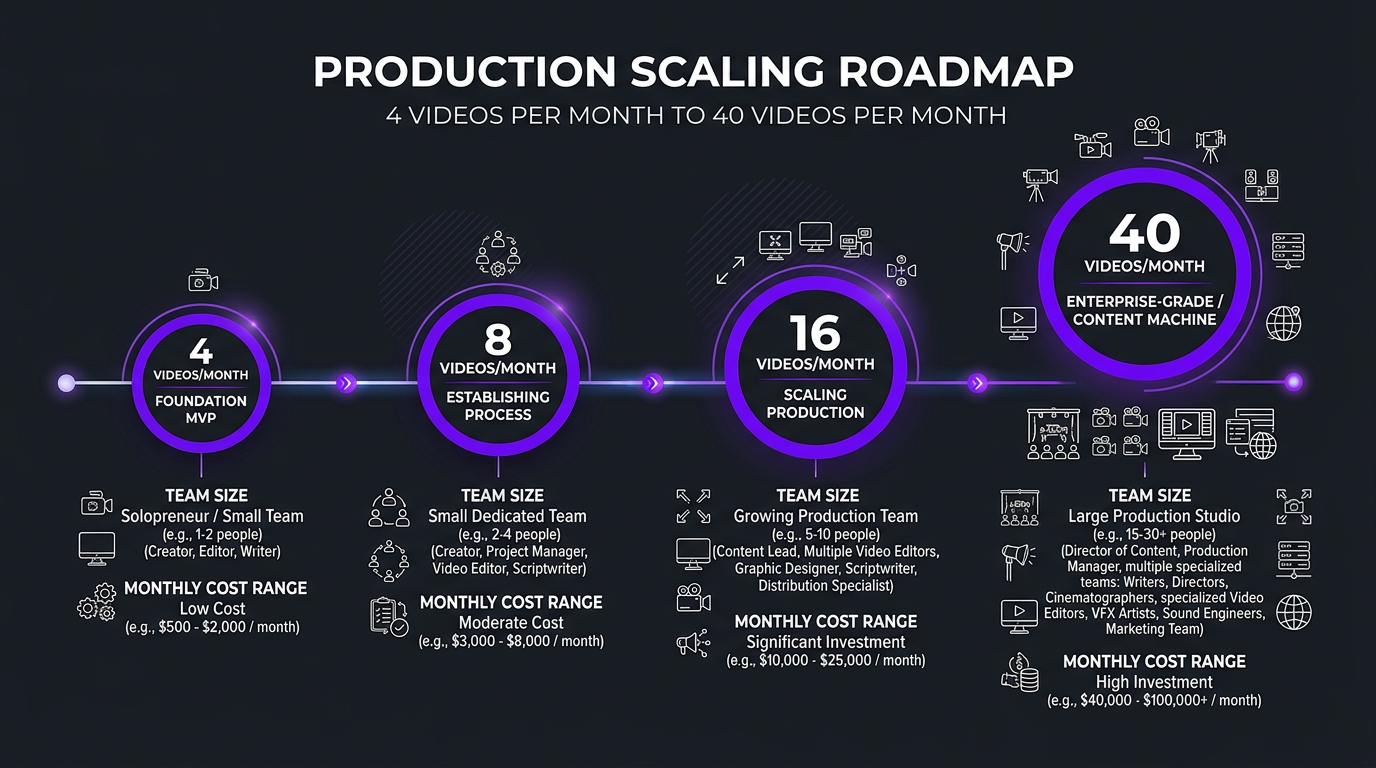
Why Scaling Production Is the #1 Growth Lever on YouTube
Let’s start with the uncomfortable truth: YouTube rewards volume. Not in a “spam the algorithm” way — in a “the more quality content you publish, the more surface area you have for discovery” way.
Every video you publish is a new entry point for viewers. A new search result. A new recommendation candidate. A new reason for the algorithm to surface your channel. Publishing 4 videos a month gives the algorithm 48 chances per year to recommend you. Publishing 20 gives it 240. Publishing 40 gives it 480.
That’s not theory. Look at any breakout channel in the last two years and you’ll find a moment where they dramatically increased publishing frequency — and their growth curve inflected.
The compound effect of production velocity
YouTube analytics prove this consistently: channels that publish more frequently see higher subscriber conversion rates across all their videos, not just new ones. More content signals to both the algorithm and viewers that this is an active, serious channel worth subscribing to.
But here’s the catch — and it’s a big one. Publishing 40 low-quality videos is worse than publishing 4 great ones. The goal isn’t more videos. It’s more great videos. That requires systems, not just hustle.
Step 1: Audit Your Current Workflow (Before You Scale Anything)
Before you try to 5x your output, you need to understand where your time actually goes right now. Most creators have never mapped this — and they’re always surprised by what they find.
Here’s a typical time breakdown for a creator producing 4 YouTube videos per month:
| Task | Hours per Video | Monthly Total (4 videos) | % of Total Time |
|---|---|---|---|
| Research & ideation | 2-3 hrs | 8-12 hrs | 12% |
| Scripting / outlining | 2-4 hrs | 8-16 hrs | 15% |
| Setup & filming | 2-4 hrs | 8-16 hrs | 15% |
| Editing | 5-10 hrs | 20-40 hrs | 38% |
| Thumbnails & titles | 1-2 hrs | 4-8 hrs | 8% |
| Upload, SEO, scheduling | 0.5-1 hr | 2-4 hrs | 4% |
| Promotion & community | 1-2 hrs | 4-8 hrs | 8% |
| Total | 13-26 hrs | 54-104 hrs | 100% |
Notice the monster in the room Editing eats 38% of total production time. For a creator doing everything solo, that’s 20-40 hours per month spent on post-production — for just 4 videos. Try to produce 16 videos at that rate, and you’d need 80-160 hours of editing alone. That’s a full-time job, and you haven’t even filmed anything yet.
This is why the first step in scaling isn’t “make more videos.” It’s “identify which tasks only you can do, and systematize or delegate everything else.”
The creator-only tasks
There are exactly three things that require the creator’s unique voice and presence:
- Content ideation — deciding what topics to cover based on your unique expertise and audience
- On-camera performance — actually delivering the content with your personality and authority
- Final quality approval — a 10-minute review of the finished edit before it goes live
Everything else — scripting support, filming setup, editing, thumbnails, SEO optimization, uploading, promotion — can be delegated to a team once you have the right systems.
The Post-Production Bottleneck: Why Editing Breaks First
Here’s a pattern we see with almost every creator who tries to scale: filming scales easily, but editing doesn’t.
You can batch-film 8 videos in a single day. Set up once, change shirts, knock them out. But editing those 8 videos That’s 40-80 hours of work. If you’re doing it yourself, you just created a month-long editing backlog in one filming day.
This creates a vicious cycle:
- You batch-film a bunch of content (great!)
- You start editing the first one and it takes 8 hours
- By the time you’ve edited video #3, you’re already behind schedule
- Videos #5-8 sit on a hard drive for weeks, losing relevance
- You get demoralized, slow down filming, and return to the 4/month grind
Sound familiar This is the single most common scaling failure in YouTube production. The filming-to-editing ratio is fundamentally imbalanced. Filming is linear effort (1 hour of filming ≈ 1 video captured). Editing is multiplicative effort (1 video captured = 5-10 hours of post-production).
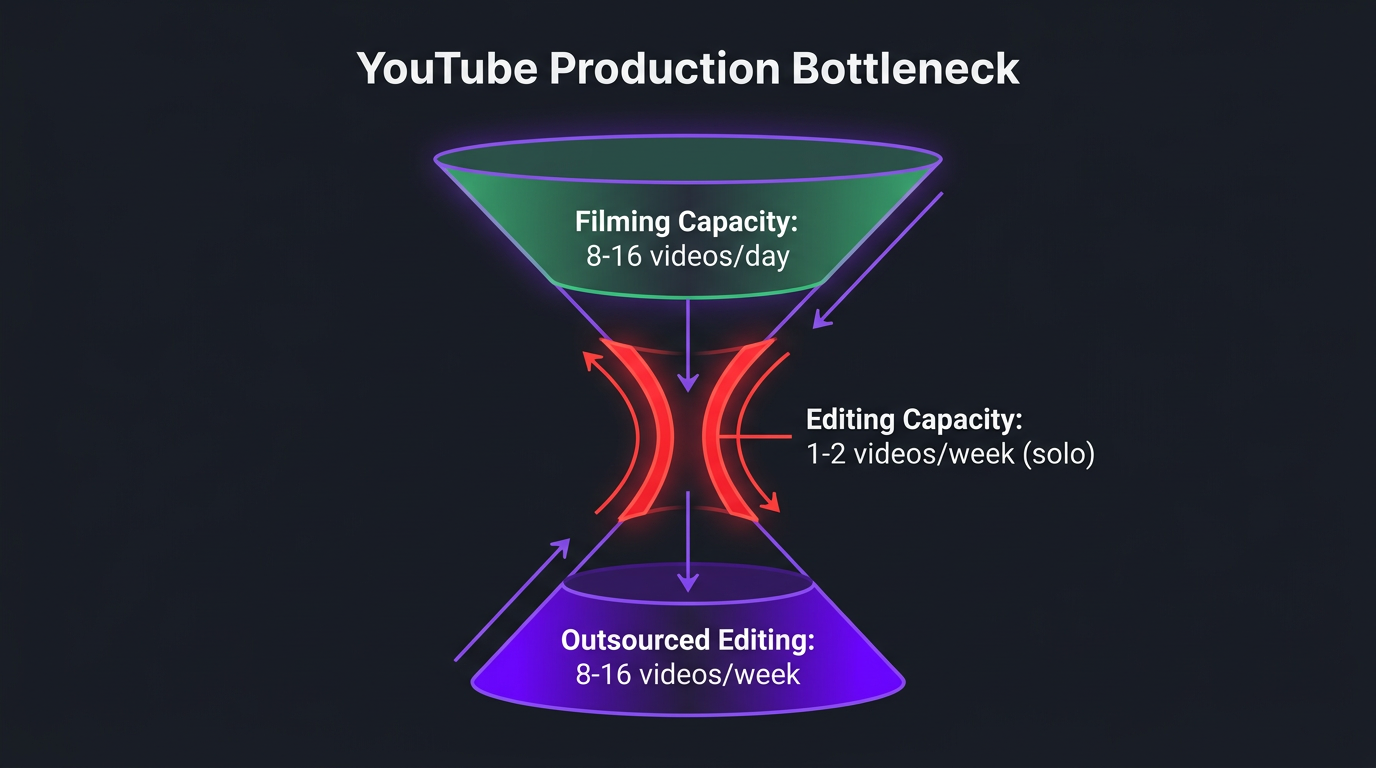
The solution isn’t to edit faster. The solution is to decouple editing from your personal bandwidth entirely. And that means outsourcing post-production to people whose entire job is editing — not treating it as one more thing on your already-overflowing plate.
Batch Filming: The Foundation of Production Scale
If you take one tactic from this entire guide, make it this one. Batch filming is the single highest-leverage change you can make to your production workflow.
What batch filming actually looks like
Instead of filming one video at a time (setup → film → teardown → repeat next week), you dedicate full days to filming multiple videos in a single session:
- Light batch (beginner): 2-3 videos per session, filmed over 3-4 hours
- Standard batch: 4-6 videos per session, filmed over 5-7 hours
- Heavy batch: 8-12 videos per session, filmed over a full production day
For talking-head and educational content, heavy batching is entirely realistic. You prep all scripts or outlines in advance, set up your studio once, and film back-to-back with short breaks.
The math behind batch filming
| Approach | Setup Time | Filming Time (8 videos) | Teardown | Total Time |
|---|---|---|---|---|
| One at a time (weekly) | 45 min × 8 = 6 hrs | 1 hr × 8 = 8 hrs | 30 min × 8 = 4 hrs | 18 hrs |
| Batch filming (1 day) | 45 min × 1 = 45 min | 1 hr × 8 = 8 hrs | 30 min × 1 = 30 min | 9.25 hrs |
Batch filming cuts total production time by nearly 50% for the filming phase — and that’s before accounting for the mental switching cost of doing setup eight separate times versus once.
How to batch film without looking robotic
The biggest objection to batch filming is “won’t all my videos feel the samea” Here’s how to avoid that:
- Change your shirt between every 2-3 videos. Simple, effective, makes each video look like a different day.
- Vary your energy. Start the day with high-energy topics. Save calmer, analytical content for the afternoon when you’re naturally more subdued.
- Adjust framing slightly. Zoom in a bit, shift camera angle, change which side your key light favors. Small visual variations sell the illusion of different sessions.
- Take real breaks. Every 2-3 videos, step away for 15-20 minutes. Eat something. Reset your energy. Fatigue shows on camera.
- Film different formats. Mix talking-head with screen-share, Q&A with tutorials. Format variety naturally creates visual diversity.
Batch filming schedules at different scales
| Target Output | Filming Sessions/Month | Videos per Session | Filming Days Required |
|---|---|---|---|
| 8 videos/month | 2 sessions | 4 videos each | 2 days |
| 16 videos/month | 2-3 sessions | 6-8 videos each | 2-3 days |
| 24 videos/month | 3 sessions | 8 videos each | 3 days |
| 40 videos/month | 3-4 sessions | 10-12 videos each | 3-4 days |
Notice the punchline: even at 40 videos per month, you’re only filming 3-4 days. The rest of the month is freed up for ideation, community engagement, business development, or — you know — living your life.
Of course, this only works if someone else handles the 200+ hours of editing that those 40 videos require. Which brings us to the core of scaling.
Building a Content Pipeline That Runs Without You
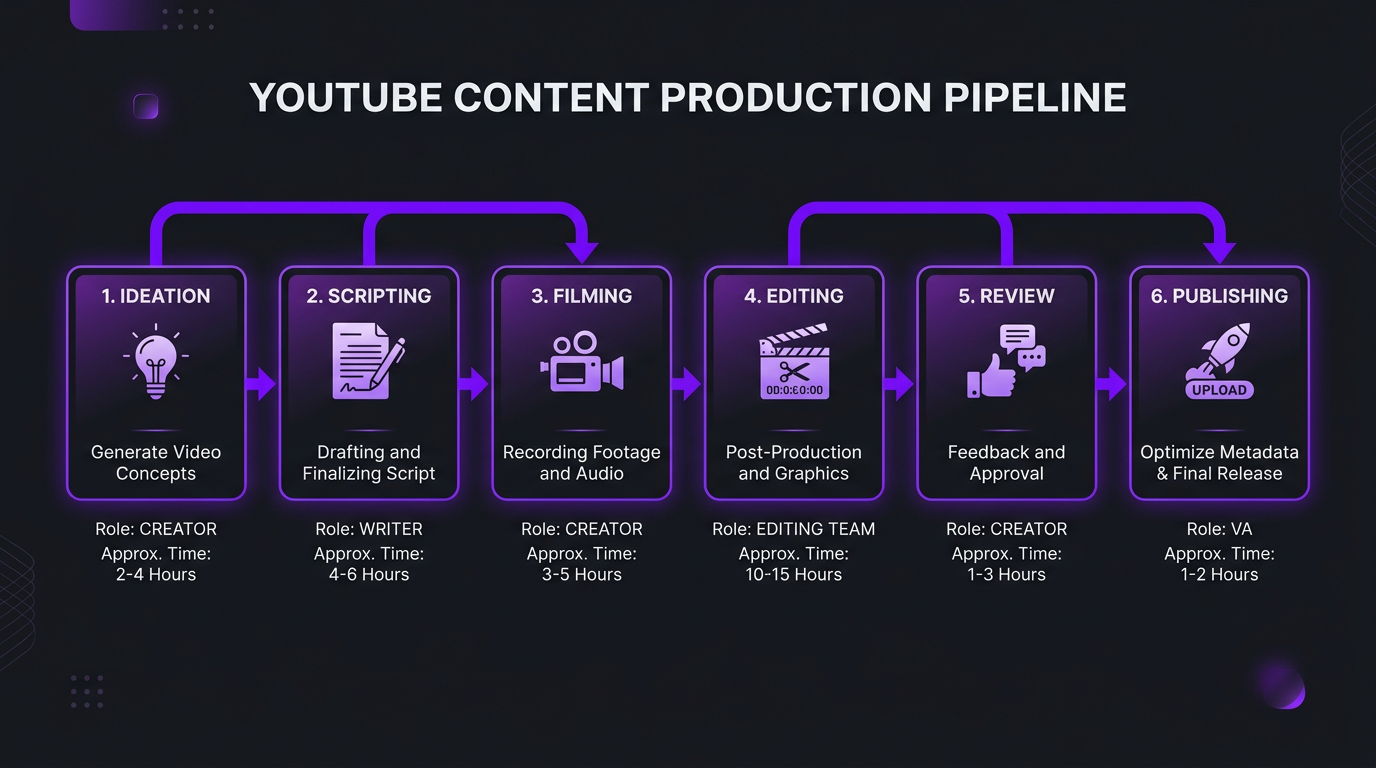
A content pipeline isn’t just a fancy term for “to-do list.” It’s a system where every piece of content moves through defined stages, handled by defined people, with defined quality gates. Here’s the pipeline framework we recommend:
Stage 1: Ideation & Research (Creator + strategist)
Topic selection, keyword research, competitive analysis, outline creation. This is where your unique expertise matters most. At scale, you can delegate research to a content strategist, but final topic selection should stay with you.
Stage 2: Scripting (Creator or writer)
Full scripts for educational content, detailed outlines for conversational content. At higher volumes, a ghostwriter who understands your voice can draft scripts that you review and personalize. This turns a 4-hour task into a 30-minute review.
Stage 3: Filming (Creator + camera operator)
Batch filming sessions with all scripts prepped. Raw footage organized by video with clear file naming conventions. A camera operator isn’t essential but becomes valuable at 16+ videos/month — they handle technical setup while you focus on performance.
Stage 4: Post-Production (Editing team)
This is where scale either happens or dies. Your editing team receives raw footage, follows your brand SOPs, and delivers polished cuts. At Increditors, we structure this with a dedicated editor who learns your style, a motion graphics specialist for custom elements, and a QC reviewer who catches issues before you ever see them.
Stage 5: Review & Approval (Creator)
You watch the edit, provide notes, and approve for publish. With a good editing team, this takes 10-15 minutes per video. Most of our clients approve 80%+ of first drafts with zero or minor notes.
Stage 6: Publishing & Distribution (VA or team)
Uploading, writing descriptions, adding tags, setting thumbnails, scheduling, and cross-promoting on social platforms. This is highly systematizable — a virtual assistant with a checklist can handle it reliably.
The pipeline in action: from idea to publish in 5 days
| Day | Activity | Who | Time |
|---|---|---|---|
| Monday | Batch film 6 videos | Creator | 6 hours |
| Monday evening | Upload raw footage to cloud | VA / automated | 30 min |
| Tues-Wed | Editing (videos 1-3) | Editing team | — |
| Wed-Thurs | Editing (videos 4-6) | Editing team | — |
| Thursday | Review edits, provide notes | Creator | 1 hour |
| Friday | Final versions delivered + scheduled | Editing team + VA | — |
The creator’s total involvement About 7 hours for 6 videos. That’s barely more than most solo creators spend on a single video.
Outsourcing Editing: When, How, and to Whom
Let’s get specific about the most critical scaling decision you’ll make: who edits your videos.
When to start outsourcing
The right time to outsource editing is when any of these are true:
- You’re producing 4+ videos per month and want to increase
- Editing takes more than 30% of your total production time
- You’ve delayed publishing because editing wasn’t done
- Your editing quality has plateaued (you’ve maxed out your own skills)
- You could generate more revenue by spending editing hours on content creation or business development
The outsourcing options, ranked for scaling
| Option | Capacity | Monthly Cost | Scalability | Quality Consistency |
|---|---|---|---|---|
| Single freelancer | 4-8 videos/mo | $1,200-$3,200 | ⚠️ Limited | ⚠️ Varies |
| Multiple freelancers | 8-16 videos/mo | $2,400-$6,400 | ⚠️ Management burden | ❌ Inconsistent |
| Subscription service | 4-12 videos/mo | $600-$2,500 | ⚠️ Plan-capped | ⚠️ Template-heavy |
| Dedicated editing agency | 8-40+ videos/mo | $3,000-$8,000 | ✅ Scales with you | ✅ High & consistent |
| In-house editor (full-time) | 12-20 videos/mo | $4,000-$7,000+ | ⚠️ One person’s limit | ✅ High |
For creators scaling from 4 to 40 videos per month, the dedicated agency model consistently outperforms every other option. Here’s why: a single freelancer caps out around 8 videos. To get to 16, you need two freelancers — and now you’re managing two people with two different styles, schedules, and communication preferences. By 40 videos, you’d need 5-6 freelancers. That’s not a system. That’s a management nightmare.
An agency gives you one relationship, one onboarding, one style guide — and the internal capacity to handle your growth without you managing additional people. At Increditors, we assign a dedicated editor to your channel (so you get style consistency), but have a full team behind them (so you get capacity and backup when needed).
How to onboard an editing partner for maximum speed
The onboarding process determines how quickly your editing partner can start producing work that matches your vision. Here’s what to prepare:
- Brand style guide: Colors, fonts, logo usage, graphic styles, lower third formats, intro/outro templates
- Reference videos: 3-5 of your best videos that represent your ideal editing style
- Anti-references: Videos (yours or others’) showing what you don’t want
- Pacing preferences: Fast cuts vs. longer takes, how much B-roll, music loudness levels
- File naming and delivery specs: Resolution, format, file naming convention, delivery platform
- Feedback workflow: How you’ll submit notes, expected turnaround on revisions
Invest 2-3 hours upfront creating these assets. They’ll save you hundreds of hours in revision cycles over the following months.
Ready to Remove the Editing Bottlenecka
Our YouTube editing teams are built for scale. One onboarding, one style guide, and we handle 8-40+ videos per month.
Repurposing: How to Turn 1 Video into 5+ Pieces of Content
This is the secret weapon behind channels that seem to publish everywhere, all the time. They’re not creating 40 unique pieces from scratch. They’re creating 8-10 core videos and repurposing each into multiple formats.
The repurposing multiplier
From a single 15-minute YouTube long-form video, a well-structured pipeline can produce:
- 3-5 YouTube Shorts extracted from the most engaging segments
- 3-5 Instagram Reels / TikToks (same clips, reframed for vertical)
- 1 podcast episode (audio extracted, intro/outro added)
- 1 LinkedIn article or blog post (transcript cleaned and edited)
- 5-10 social media quotes/clips for Twitter, LinkedIn, Stories
That’s 13-22 pieces of content from one filming session. Scale this across 8 long-form videos per month, and you’re looking at 100+ individual content pieces — all from 2-3 filming days.
| Core Videos Filmed | Long-form Published | Shorts/Reels | Other Formats | Total Content Pieces |
|---|---|---|---|---|
| 4/month | 4 | 12-20 | 8-12 | 24-36 |
| 8/month | 8 | 24-40 | 16-24 | 48-72 |
| 12/month | 12 | 36-60 | 24-36 | 72-108 |
The key insight: repurposing is almost entirely an editing function. The creator films once. The editing team extracts, reformats, captions, and optimizes for each platform. This is exactly why having an editing partner with multi-format capabilities is essential for scaling.
Why most repurposing fails
The most common mistake is lazy repurposing — just chopping a random 60-second segment from a long-form video and posting it as a Short. Platform-native content performs dramatically better. Effective repurposing means:
- Selecting the most hook-worthy, standalone-valuable segments
- Adding captions optimized for each platform’s consumption pattern
- Adjusting pacing (Shorts are faster than long-form)
- Reframing for vertical format, not just cropping
- Adding platform-specific CTAs (“Full video in bio” etc.)
Systems and SOPs: The Boring Infrastructure That Makes Scale Possible
Every creator who successfully scales production has one thing in common: documented systems. Not in their head. Not in Slack messages. Written SOPs that anyone on the team can follow.
Essential SOPs for scaled production
At minimum, you need documented processes for:
- Content calendar management: How topics are planned, approved, and scheduled 2-4 weeks in advance
- Filming day protocol: Studio setup checklist, equipment settings, file management during shooting
- Footage handoff: How raw files get from your camera to your editing team (cloud upload, naming conventions, folder structure)
- Editing brief template: A standardized format for communicating your vision for each video to the editor
- Review and feedback workflow: How you submit revision notes, expected turnaround, escalation for disagreements
- Publishing checklist: Title, description template, tags, thumbnail upload, end screens, cards, scheduling, cross-promotion triggers
- Analytics review: Weekly or biweekly check on what’s working and what’s not, feeding back into ideation
Tools for managing the pipeline
You don’t need expensive tools. You need consistent tools. Here’s a practical stack:
- Project management: Notion, Monday.com, or Trello — one board where every video’s status is visible at a glance
- File transfer: Google Drive or Frame.io for footage handoff (Frame.io is superior for video-specific review with timecoded comments)
- Communication: Slack or dedicated messaging channel with your editing team — not email, not DMs across three platforms
- Content calendar: Notion database or Google Sheets — plan at least 2 weeks ahead, ideally 4
- Asset library: Organized folder of intros, outros, music, graphics, fonts, logos that your team can access
Building Your Production Team: Who You Need at Each Stage
You don’t need a 10-person team on day one. Here’s how to staff up as you scale:
| Production Level | Videos/Month | Team | Monthly Team Cost |
|---|---|---|---|
| Solo + outsourced edit | 4-8 | You + 1 editor | $1,500-$3,000 |
| Small team | 8-16 | You + editing agency + VA | $3,500-$5,500 |
| Growth team | 16-24 | You + editing agency + VA + content strategist | $5,500-$8,000 |
| Scale team | 24-40+ | You + dedicated editing team + VA + strategist + camera op | $8,000-$15,000 |
The most important hire at every stage is your editing partner. Get that right — with a team that understands your brand, delivers consistently, and can scale with you — and everything else falls into place more easily.
Why an agency beats piecemeal hiring for most creators
Hiring individual freelancers is like building a car from parts you sourced from six different junkyards. Each part might be fine on its own, but making them work together is your problem. An editing agency is the complete engine — editors, motion designers, colorists, QC reviewers, and a project manager, all working as a unit.
At 8 videos per month, this distinction matters. At 40 videos per month, it’s the difference between a functional operation and chaos.
What Scaling Actually Costs: Real Budget Breakdowns
Let’s get concrete about the financial investment required at each scale level:
| Scale Level | Videos/Month | Editing Cost | Other Team Costs | Tools & Software | Total Monthly |
|---|---|---|---|---|---|
| Starter scale | 8 | $2,000-$3,500 | $0-$500 | $50-$100 | $2,050-$4,100 |
| Growth scale | 16 | $3,500-$5,000 | $500-$1,500 | $100-$200 | $4,100-$6,700 |
| Pro scale | 24 | $5,000-$7,000 | $1,500-$3,000 | $200-$300 | $6,700-$10,300 |
| Full scale | 40 | $7,000-$10,000 | $3,000-$5,000 | $300-$500 | $10,300-$15,500 |
These numbers look significant — until you compare them against the revenue potential. A channel producing 40 videos per month with decent monetization (CPM, sponsorships, products) can easily generate $20,000-$100,000+/month. The production cost is typically 10-20% of revenue for well-monetized channels.
For businesses using YouTube for lead generation, the math is even more compelling. If your average customer lifetime value is $10,000 and one in every 50 video viewers becomes a lead, each video producing 5,000 views generates roughly $1,000 in pipeline value. At 40 videos per month, that’s $40,000 in potential pipeline — making a $10,000-$15,000 production investment trivially worthwhile.
For a deeper look at editing costs specifically, see our complete breakdown of professional video editing costs.
Real Results: How Creators Scaled with the Right Systems
Riley Coleman: From inconsistent posting to steady growth
Riley Coleman came to Increditors with a familiar problem. He had great content and strong on-camera presence, but his production workflow was entirely self-managed. Filming, editing, thumbnails, uploading — all him. The result was inconsistent publishing, and every time life got busy, his channel went silent for weeks.
We took over his entire post-production pipeline. Dedicated editor who learned his pacing preferences within the first two weeks. Brand style guide documented. Footage handoff via cloud with 48-hour turnaround on edits.
The immediate impact: Riley went from sporadic uploads to consistent weekly publishing. But the bigger impact was what he did with his freed-up time. Instead of spending 15+ hours per week editing, he invested that time in content strategy, audience engagement, and developing new content formats. His views doubled — not because the editing was fancier, but because consistency and volume gave the algorithm what it needed to surface his content more broadly.
The long-term result: Riley scaled from 4 videos per month to 12+ (long-form plus shorts), with his total time investment in production actually decreasing from when he was doing 4 solo.
eSafety: Scaling educational content at institutional speed
eSafety presented a different scaling challenge. As an organization focused on online safety education, they needed to produce a high volume of educational video content — but with the quality standards and review processes that institutional content demands.
Their internal team could film efficiently, but post-production was the bottleneck. Each video required careful editing with educational graphics, data visualizations, and accessibility considerations. Internal editors couldn’t keep up with the content calendar.
By partnering with our enterprise editing team, eSafety was able to maintain their rigorous quality standards while dramatically increasing their output. We embedded editors who understood educational content requirements — clear visual hierarchy, accessible captioning, consistent branding across dozens of video formats.
The key learning from eSafety’s experience: scaling institutional content requires editors who understand the domain, not just the software. A generic editor can cut a talking-head video. It takes specialized knowledge to edit educational content that’s both engaging and pedagogically sound.
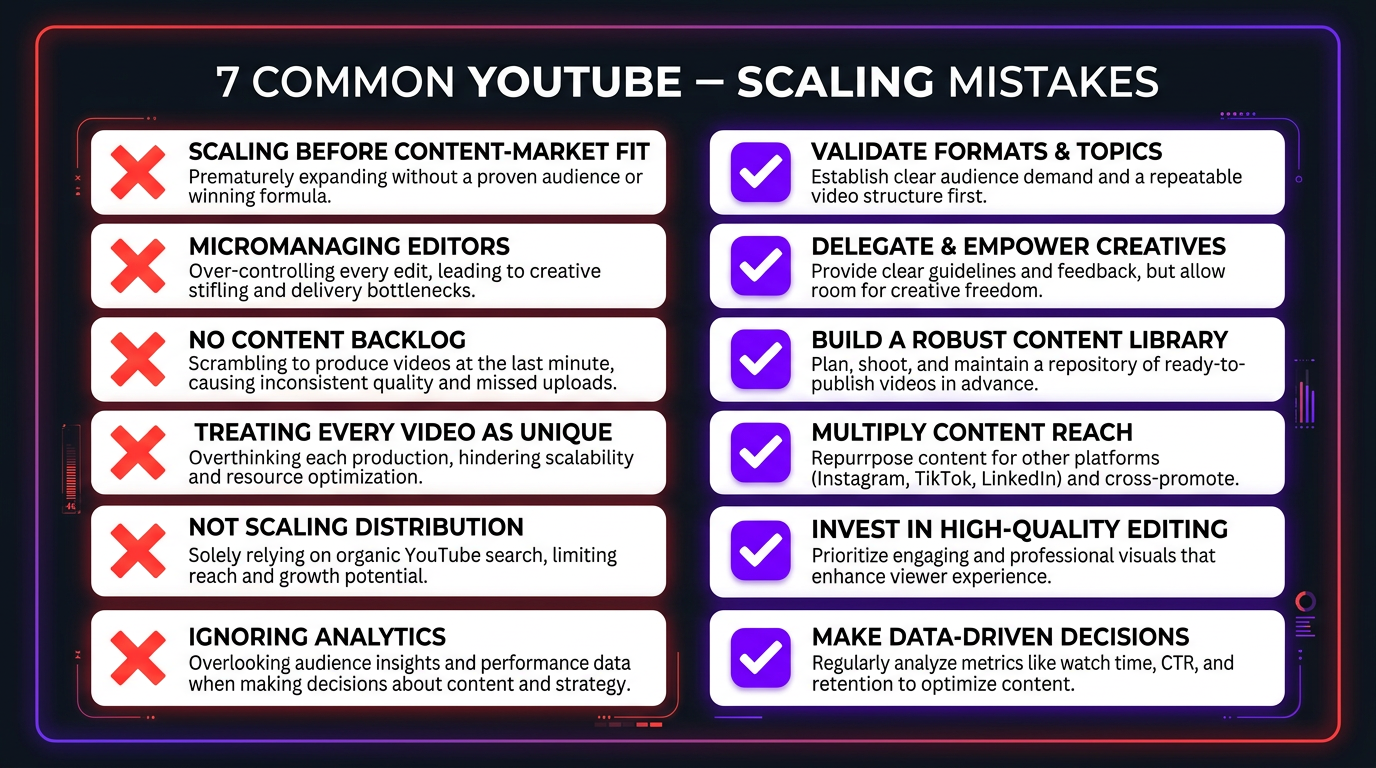
7 Mistakes That Kill Production Scale (and How to Avoid Them)
1. Scaling before your content-market fit is proven
Don’t try to go from 4 to 40 videos if your existing 4 aren’t performing. Scale amplifies what already works. If your content doesn’t resonate at 4/month, producing more of it won’t fix the underlying issue. Nail your content angle first, then scale production.
2. Treating every video as a unique snowflake
Perfectionism kills scale. Not every video needs 40 hours of editing. Develop templates, repeatable formats, and clear quality tiers. Your flagship content might get premium editing. Your weekly Q&A can use a lighter, faster editing style. Both serve your audience.
3. Micromanaging your editing team
If you’re writing paragraph-long notes on every cut point, you haven’t properly onboarded your editor. Invest in upfront brand guidelines and trust the process. Review final cuts, not rough cuts. Give directional feedback, not frame-by-frame instructions.
4. Not building a content backlog
Scaling means having content ready 2-4 weeks in advance. If you’re always filming for next week’s publish date, one sick day collapses your schedule. Build a buffer of 2-3 weeks of edited, ready-to-publish content before you increase your posting frequency.
5. Scaling production but not distribution
Publishing 40 videos that nobody promotes is just expensive content storage. As you scale production, scale your distribution — SEO optimization, community engagement, cross-platform promotion, email list leveraging. Each video deserves at least basic distribution effort.
6. Choosing the cheapest editing option
Budget editing creates a quality ceiling that becomes more painful as you scale. Four mediocre videos is an annoyance. Forty mediocre videos is a brand-damaging machine. Invest in editing quality that matches your content ambitions. See our guide on video editing costs to understand what quality costs at each tier.
7. Ignoring analytics in scaling decisions
Not all content types perform equally. As you scale, use data to double down on formats and topics that work, and cut what doesn’t. Publishing 40 videos per month only makes sense if you’re continuously optimizing what those 40 videos are about based on real performance data.
Ready to Scale Your YouTube Productiona
We’ve helped creators go from 4 to 40+ videos per month without sacrificing quality. Let’s build your production system. Check out our client results and see the difference.
Frequently Asked Questions
Most successful channels publish 8-12 videos per month as a baseline. However, channels that scale to 20-40+ videos per month (including shorts and repurposed content) see compounding growth because the algorithm rewards consistent publishing velocity. Start with a sustainable cadence and increase as your systems mature.
Yes. The most efficient approach is to keep your core creative team small (1-3 people for ideation and filming) and outsource post-production to a dedicated editing agency. This lets you 3-5x your output without 3-5x your headcount or management overhead.
Post-production. Filming 4 videos in a batch session takes a single day. Editing those 4 videos takes 20-40+ hours. When you scale from 4 to 16 or 40 videos per month, editing capacity breaks first every single time.
At full scale, expect $10,000-$15,000 per month total (editing + team + tools). Editing alone runs $7,000-$10,000/month at that volume. A dedicated editing team through an agency like Increditors typically costs $5,000-$8,000/month for high-volume packages that include both long-form and shorts.
Absolutely. Batch filming is the single highest-leverage change you can make. Film 4-8 videos in one session, then feed them into your post-production pipeline. Even at 40 videos per month, you only need 3-4 filming days — the rest is handled by your editing team.
Quality at scale requires three things: documented brand guidelines your team can follow without asking you questions every day, a dedicated editing team that learns your style over months, and a quality control layer where every video is reviewed before publishing. Don’t scale before these are in place.
Essential tools: project management (Notion, Trello, or Monday.com), cloud storage for footage (Google Drive or Frame.io), a content calendar, and documented SOPs for every repeatable process. The tools matter less than having workflows your team can execute without constant oversight.
Let’s Build Your Scaling Roadmap
Every channel is different. Tell us where you are now and where you want to be — we’ll map the production system to get you there.
Based on our experience scaling production for YouTube creators and brands. Results vary by niche, content quality, and market. For current Increditors pricing and packages, visit our pricing page or schedule a call.