










![3D Explainer Video - ScribbleLive.mp4_snapshot_00.12_[2022.03.09_03.14.16]](https://increditors.com/wp-content/uploads/elementor/thumbs/3D-Explainer-Video-ScribbleLive.mp4_snapshot_00.12_2022.03.09_03.14.16-r7wb53mx72rxst3qcqyrfxdmeyzb5r9jbl0wbjujh4.png "3D Explainer Video – ScribbleLive.mp4_snapshot_00.12_[2022.03.09_03.14.16]")
































Here’s a paradox that every nonprofit and educational institution faces: the organizations with the most compelling stories to tell are often the ones with the smallest budgets to tell them. You’re running programs that change lives, educate communities, and move the needle on issues that matter — but your video content looks like it was edited by an intern with iMovie in 2014.
That’s not a dig. It’s the reality of operating with tight budgets, lean teams, and a board that questions every dollar spent on anything that isn’t “direct program delivery.” But here’s what those budget conversations miss: video editing for nonprofits and education organizations isn’t a marketing luxury — it’s an amplifier for everything you already do.
A well-edited fundraising video doesn’t cost money — it raises it. A professionally produced grant video doesn’t drain resources — it wins them. An educational series that looks polished doesn’t just teach — it retains learners who would otherwise click away.
We’ve seen this firsthand. When eSafety First Canada, a safety education organization, needed 30 training courses produced with professional editing, the investment wasn’t an expense — it was the infrastructure that made their entire educational mission scalable.
This guide covers how nonprofits and educational organizations can use professional video editing strategically: what types of videos deliver the highest ROI, how to fund editing through grants, and how to get professional quality without a Fortune 500 budget.
What’s in This Guide
- Why Video Matters More for Nonprofits Than Anyone
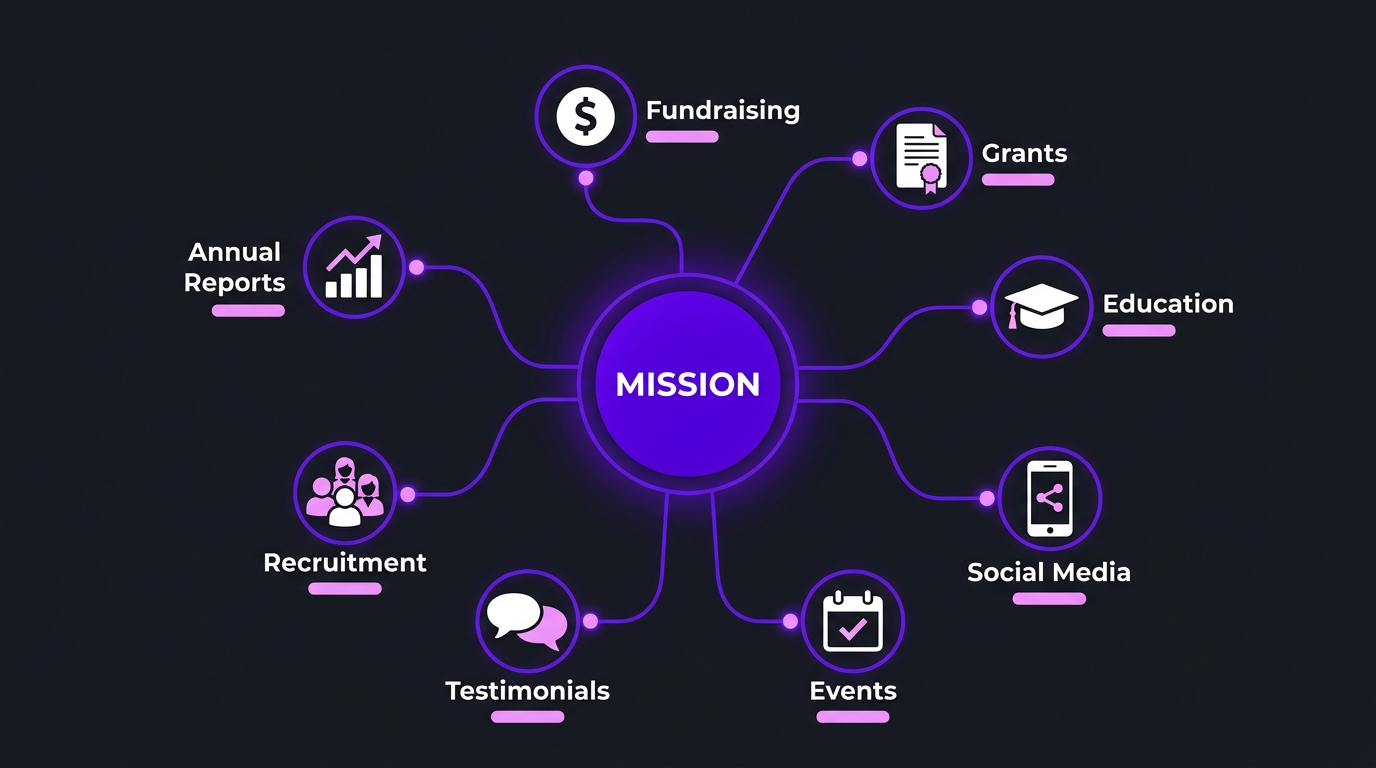
- The 8 Video Types Every Nonprofit Needs
- Video Editing for Educational Institutions
- Impact Storytelling: The Art of Mission-Driven Video
- Making It Work on a Nonprofit Budget
- Funding Video Through Grants
- Case Study: eSafety First Canada
- Choosing the Right Editing Partner
- Common Mistakes Nonprofits Make With Video
- FAQ
Why Video Matters More for Nonprofits Than Anyone
Commercial brands use video to sell products. Nonprofits use video to move hearts, change minds, and mobilize action. The stakes are fundamentally different — and, arguably, higher.
Consider the data:
- Fundraising emails with video generate 2-3x more donations than text-only emails, according to M+R Benchmarks’ 2025 nonprofit digital report.
- Grant applications with video components are 40% more likely to advance past initial screening, based on research from the Foundation Center.
- Online courses with professionally edited video have 60% higher completion rates than those with raw, unedited lecture recordings (per Coursera’s internal data).
- Social media posts with video receive 48% more engagement than image-only posts, with nonprofits seeing even higher lifts due to the emotional nature of their content.
These aren’t theoretical benefits. They translate directly to more donations, more grant wins, better educational outcomes, and greater organizational reach. Every dollar spent on professional video editing is a multiplier for dollars raised and impact delivered.
The Credibility Problem
There’s a subtler reason video quality matters for nonprofits: credibility. When a potential major donor visits your website and sees a poorly edited video with bad audio, inconsistent branding, and amateur graphics — they question your organizational competence. Unfair Maybe. Real Absolutely.
Donors, grantmakers, and institutional partners make unconscious judgments about your operational capacity based on your communications quality. A polished video signals that your organization is professional, well-managed, and worthy of investment. A rough video signals the opposite — regardless of how effective your programs actually are.
This is especially true for nonprofits competing for corporate partnerships, government contracts, and foundation grants where you’re evaluated alongside dozens of other applicants. Your video content is often the first (and sometimes only) impression a decision-maker gets of your organization.
The 8 Video Types Every Nonprofit Needs
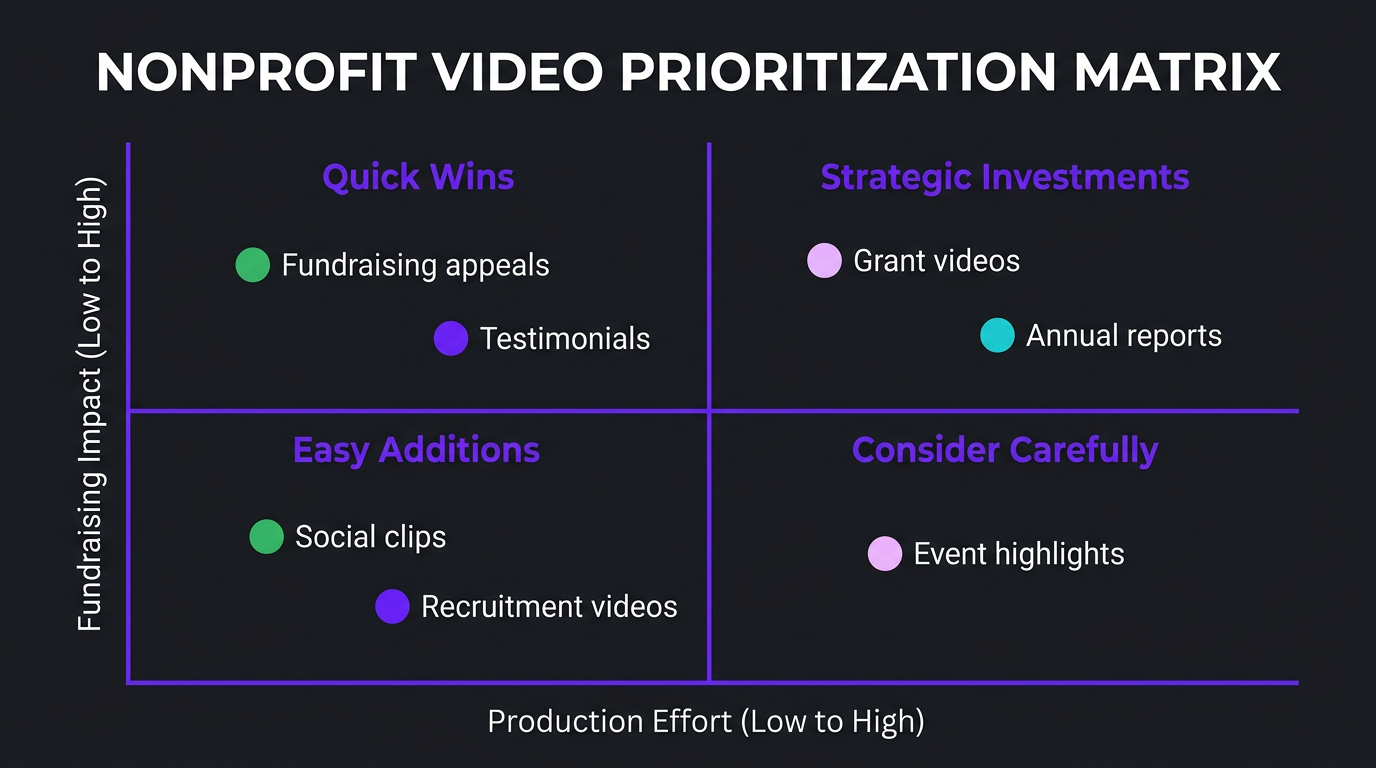
Not every video is equally important. Here are the eight types that deliver the most value, ranked by fundraising and mission impact:
1. Fundraising Appeal Videos
The single highest-ROI video any nonprofit can produce. A 2-3 minute fundraising video used in email campaigns, on donation pages, and across social media can generate hundreds of thousands in donations when done well.
What makes them work: Personal beneficiary stories (with consent and dignity), clear demonstration of impact, specific ask with urgency, emotional arc from problem to solution, and a strong call to action.
Editing requirements: Emotional pacing, music selection that enhances without manipulating, clean audio (especially for testimonials), branded lower thirds, and optimized versions for different platforms (16:9 for YouTube, 9:16 for social, 1:1 for email).
2. Grant Application Videos
Many grants now accept or require video submissions. A 5-10 minute video can convey program design, organizational capacity, and community impact far more effectively than a written narrative alone.
Editing requirements: Professional but not overly slick (grantmakers can be skeptical of expensive-looking content from organizations claiming budget constraints), clear data visualization, interview segments with program leaders, and B-roll showing programs in action.
3. Impact/Annual Report Videos
Replace your 40-page PDF annual report with a compelling 5-8 minute video. Board members, donors, and stakeholders will actually watch it — unlike that PDF, which has a 5% read-through rate.
4. Program Explainer Videos
Short (1-3 minute) videos that clearly explain what your programs do, who they serve, and what outcomes they produce. Essential for website landing pages, funder meetings, and onboarding new board members.
5. Testimonial & Beneficiary Story Videos
First-person accounts from the people your organization serves. These are the most emotionally powerful content type, but they require careful editing to respect dignity, ensure consent, and avoid “poverty porn” tropes that exploit vulnerability.
6. Social Media Awareness Campaigns
Social media video is where nonprofits can punch above their weight. A well-edited 30-60 second video about your cause can reach millions organically — something that would cost tens of thousands in paid advertising.
7. Event Highlight Reels
Galas, conferences, community events, and volunteer days — every event is content that extends your reach beyond the room. A 3-5 minute highlight reel serves double duty: it thanks participants and shows potential donors/volunteers what they’re missing.
8. Volunteer & Staff Recruitment Videos
Show, don’t tell. A video of your team in action, your work environment, and the real impact of the role is far more effective than a text job posting — especially for attracting mission-driven talent willing to accept nonprofit salaries.
| Video Type | Length | Editing Cost | Fundraising Impact | Priority |
|---|---|---|---|---|
| Fundraising appeal | 2-3 min | $300–$800 | Direct — drives donations | 🔴 Critical |
| Grant application | 5-10 min | $500–$1,500 | Direct — wins grants | 🔴 Critical |
| Impact/annual report | 5-8 min | $500–$1,200 | Indirect — retains donors | 🟡 High |
| Program explainer | 1-3 min | $200–$600 | Indirect — educates prospects | 🟡 High |
| Testimonials | 2-5 min | $250–$700 | Strong — emotional engagement | 🟡 High |
| Social media campaigns | 30-90 sec | $75–$250 | Awareness — grows audience | 🟢 Medium |
| Event highlights | 3-5 min | $300–$700 | Indirect — community building | 🟢 Medium |
| Recruitment | 2-4 min | $200–$500 | Indirect — builds team | 🟢 Medium |
Video Editing for Educational Institutions
Education has undergone a permanent shift toward video-first content delivery. The pandemic forced the transition; students and institutions discovered they prefer it. According to Kaltura’s 2025 State of Video in Education report, 87% of higher education institutions now use video as a primary content delivery method, up from 54% in 2019.
But there’s a quality gap. Most educational video is still raw lecture recordings — a webcam pointed at a professor for 60 minutes with zero editing. Students tolerate it, but they don’t engage with it. Completion rates for unedited lecture recordings average 35-40%. Professionally edited educational video sees completion rates of 65-80%.
Online Course Production
Whether you’re a university launching a Coursera specialization, a K-12 district building a remote learning library, or an EdTech startup producing curriculum content — professional editing transforms the learning experience.
Key editing elements for educational video:
- Chapter markers and visual navigation: Students don’t watch educational video linearly. They jump to specific topics, rewatch sections, and skip what they know. Editing that includes clear chapter markers, on-screen topic titles, and visual transitions between sections supports this behavior.
- Screen + camera synchronization: Most educational content combines a presenter with screen recordings, slides, or demonstrations. Professional editing seamlessly switches between these sources, using picture-in-picture, split screens, and focused zooms to direct attention.
- Graphic overlays and data visualization: Abstract concepts become concrete when visualized. Editing that adds diagrams, process flows, and annotated illustrations during explanation segments dramatically improves comprehension.
- Pacing optimization: Unedited lectures include pauses, tangents, and dead air. Professional editing tightens pacing to 10-15 minutes per module (the research-supported optimal length for learning) without losing content integrity.
Student Recruitment and Admissions
For universities and private schools, recruitment video is a competitive weapon. Prospective students compare institutions partly based on how they present themselves digitally. A virtual campus tour, student life video, or program overview that looks polished and current signals a forward-thinking institution.
Research Communication
Funding agencies increasingly expect researchers to communicate findings through video — for public engagement, congressional briefings, and interdisciplinary conferences. A 3-minute research summary video that makes complex findings accessible can generate more public interest than a peer-reviewed paper with 50 reads.
Accessibility Compliance
Educational video editing must account for accessibility: accurate closed captions (not auto-generated), audio descriptions for visual content, appropriate contrast ratios for on-screen text, and transcript availability. Under Section 508, ADA, and increasingly under state legislation, educational institutions can face legal consequences for inaccessible video content.
| Education Video Type | Typical Volume | Per-Video Cost | Key Editing Elements |
|---|---|---|---|
| Course modules | 20-100+ per course | $100–$400/lesson | Screen sync, chapters, graphics, captions |
| Lecture enhancement | Weekly per class | $75–$200/lecture | Tightening, slide sync, captions |
| Recruitment/admissions | 3-10 per year | $500–$2,000 | Cinematic editing, interviews, campus footage |
| Research communication | Per project | $400–$1,200 | Data visualization, animation, VO sync |
| Training modules (staff) | 10-50 per year | $150–$500 | Screen recording, compliance content, quizzes |
Impact Storytelling: The Art of Mission-Driven Video
This is where nonprofit video editing diverges most sharply from commercial editing. Impact storytelling isn’t about selling — it’s about showing the real, human consequences of your work. Done well, it’s the most powerful content any organization can produce. Done poorly, it exploits vulnerability and erodes trust.
The Impact Storytelling Framework
The most effective nonprofit videos follow a consistent narrative structure:
- Context (30 seconds): Establish the problem. Not statistics — a human face. “Maria is a single mother of three in rural Guatemala. She walks 4 miles to the nearest water source every day.”
- Deepening (60 seconds): Show the complexity. What does this problem actually look like daily What are the cascading consequences This is where B-roll, environmental footage, and observational moments build empathy.
- Intervention (45 seconds): Your organization enters the story — but as a facilitator, not a hero. Show the program, the partnership, the community-led solution. The beneficiary is the protagonist; your organization is the enabler.
- Transformation (45 seconds): The change. Concrete, visible, ideally in the beneficiary’s own words. “Now my children go to school instead of carrying water.” Show, don’t just tell.
- Invitation (30 seconds): The call to action. Connect the viewer’s potential contribution to the transformation they just witnessed. Make it specific: “Your $50 provides clean water for one family for a year.”
This 3.5-minute structure is the backbone of high-performing fundraising and awareness videos. The editing must serve this arc — every cut, every music transition, every text overlay should advance the emotional journey from empathy to action.
Ethical Considerations in Nonprofit Video
Professional nonprofit video editing requires ethical awareness that commercial editing doesn’t:
- Informed consent: Every person appearing on camera must give informed consent, understanding where the video will be published and for how long. Editors must flag any footage that appears to lack clear consent.
- Dignity over drama: Resist the temptation to maximize emotional manipulation. Showing a child crying makes people feel bad, but it doesn’t build the respect-based donor relationships that sustain organizations long-term.
- Representation accuracy: Editing choices — which clips you include, how you frame them, what music you overlay — shape perception. Editing that makes communities look helpless or dependent reinforces harmful stereotypes, even when the footage itself is neutral.
- Cultural sensitivity: When editing content from international programs, consult with local partners about what’s appropriate to show. Practices, environments, and social norms that seem noteworthy to Western audiences may be private or sacred to the community.
Need Video That Moves People to Acta
We edit for nonprofits and education organizations that need professional quality on mission-driven budgets. Let’s talk about your goals and build a plan that works.
Making It Work on a Nonprofit Budget
Let’s be real: most nonprofits aren’t spending $5,000/month on video editing. But “we can’t afford it” is often a framing problem, not a budget problem. Here’s how to get professional results at nonprofit-friendly price points.
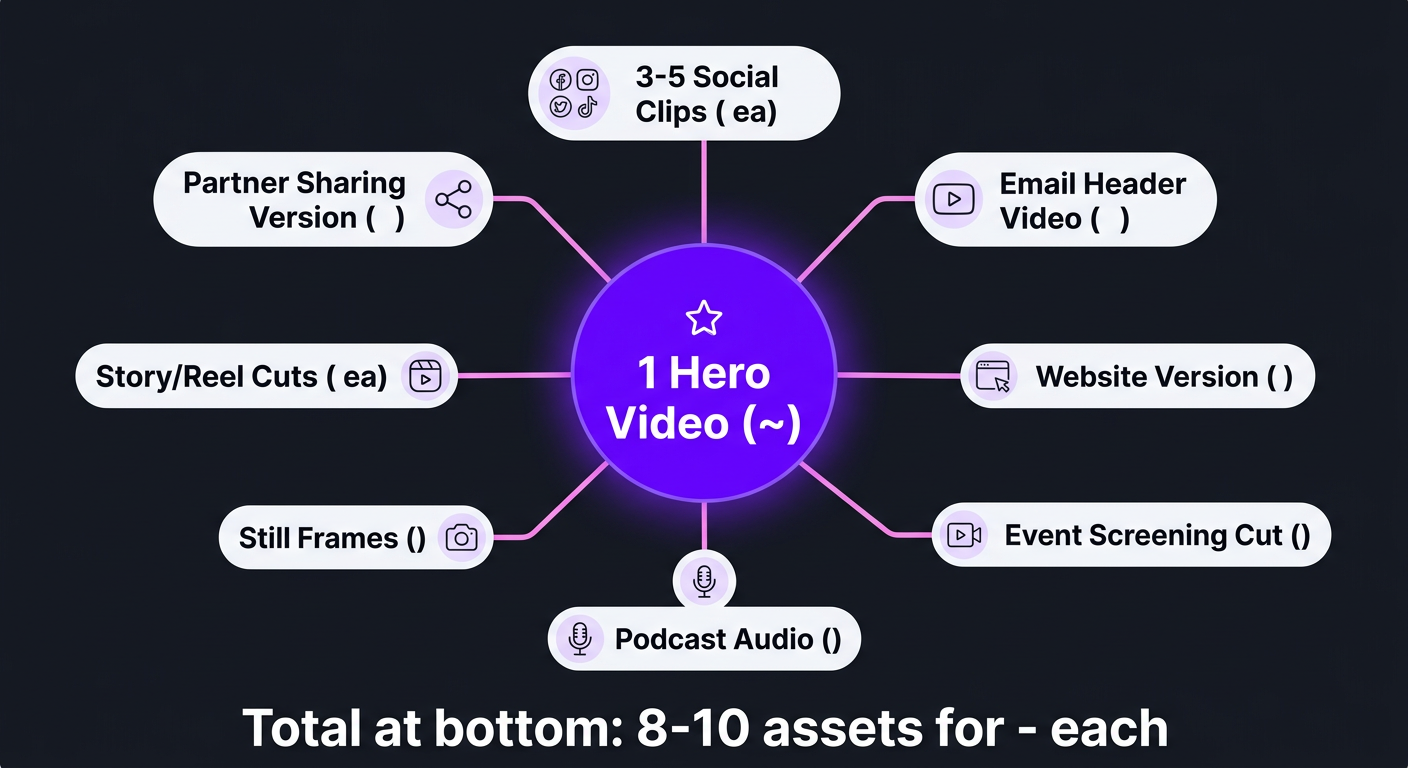
Strategy 1: The Repurposing Multiplier
One professionally shot and edited 5-minute fundraising video can be repurposed into:
- 3-5 social media clips (30-60 seconds each)
- 1 email header video (15-30 seconds)
- 1 website homepage version (90 seconds)
- 1 gala/event screening version (3 minutes)
- Audio extracted for podcast/radio
- Still frames for print and social graphics
From one editing investment of $500-$800, you get 8-10 content assets. The per-asset cost drops to $50-$100 — affordable for virtually any nonprofit.
Strategy 2: Template-Based Recurring Content
Monthly donor updates, program highlights, and social posts don’t need custom editing every time. By investing in branded templates once ($300-$500 to create), subsequent videos using those templates cost 40-60% less because the design work is already done.
Think of it like a newsletter template — you create the framework once, then populate it with new content each month. The per-video cost for templated edits typically drops to $75-$150, making weekly or biweekly video updates realistic even on tight budgets.
Strategy 3: Batch Production
Instead of editing one video at a time (which is the most expensive way to buy editing), batch your production around events, campaigns, or quarterly milestones. Shoot 3-5 testimonials in one day. Film all your program overviews in a single week. Then send the batch to your editor.
Batch production typically reduces per-video costs by 25-35% because of shared setup, consistent assets, and reduced back-and-forth.
Strategy 4: Retainer Over Per-Video
If you produce 4+ videos per month, a monthly retainer with an editing partner saves 20-40% versus per-video pricing. At Increditors, our nonprofit-friendly packages provide dedicated editing support at rates that respect mission-driven budgets while maintaining the quality your organization deserves.
Budget Framework: What to Spend at Each Stage
| Annual Budget Range | Monthly Video Budget | Recommended Approach | Expected Output |
|---|---|---|---|
| Under $500K | $200–$500 | Templated social clips + 1 hero video/quarter | 4-6 videos/month + 1 flagship/quarter |
| $500K–$2M | $500–$1,500 | Monthly retainer with repurposing | 6-12 videos/month across types |
| $2M–$10M | $1,500–$4,000 | Dedicated editing partner, full content strategy | 12-25 videos/month + campaign bursts |
| $10M+ | $4,000–$10,000 | Dedicated team, multi-format production | 25-50+ videos/month at scale |
Funding Video Editing Through Grants
This is the most underutilized strategy in nonprofit video production. Most organizations don’t realize that video editing costs are legitimate, fundable expenses in a wide range of grant categories.
Where Video Editing Fits in Grant Budgets
- Communications and outreach: Any grant with a dissemination or outreach component can include video production costs. This covers fundraising videos, awareness campaigns, and community education content.
- Program delivery: If your program includes educational content (training videos, instructional materials, webinars), editing is a direct program cost, not overhead.
- Evaluation and reporting: Impact videos and data visualization can be budgeted under evaluation, especially for grants that require multimedia reporting.
- Capacity building: Grants focused on organizational development can fund the creation of video infrastructure — templates, style guides, and the initial investment in a production workflow.
Grant Types That Commonly Fund Video
| Grant Category | Video Budget Line Item | Typical Allowance | Examples |
|---|---|---|---|
| Federal education grants | Curriculum materials, instructional media | $5,000–$50,000 | NIH, NSF, Dept. of Education |
| Foundation program grants | Communications, outreach, dissemination | $2,000–$20,000 | Ford, Gates, MacArthur, local foundations |
| Corporate CSR grants | Community engagement, content creation | $1,000–$15,000 | Google.org, Salesforce Foundation |
| Government health/safety | Public education materials | $5,000–$100,000 | CDC, FEMA, state health departments |
| International development | Knowledge management, reporting | $10,000–$75,000 | USAID, World Bank, UNDP |
How to Write Video Editing Into a Grant Proposal
Grant reviewers approve video budgets when they see clear connections between the video and program outcomes. Here’s a template approach:
- Justify the medium: “Video is the most effective format for [reaching target audience / demonstrating program impact / training participants] because [specific evidence].”
- Specify deliverables: “The project will produce X videos: [list types, lengths, and purposes]. Each video serves [specific program objective].”
- Break down costs: “Video editing: $X per video × Y videos = $Z. This includes professional editing, motion graphics, captioning, and platform optimization.”
- Connect to outcomes: “These videos will be distributed to [channels] reaching an estimated [audience], supporting the program goal of [measurable outcome].”
The key is positioning video not as a marketing expense but as a program delivery tool. When your grant application video or educational content directly serves the funded program’s objectives, it’s an easy budget approval.
Case Study: eSafety First Canada — Scaling Safety Education Through Video
eSafety First Canada is a Canadian organization that produces workplace safety training content — WHMIS, workplace violence prevention, emergency procedures, and dozens of other compliance-required training modules. Their mission is simple but vital: reduce workplace injuries and deaths through accessible, engaging safety education.
When they came to Increditors, the challenge was massive in scope: 30 complete training courses needed professional editing, and each course required 3 promotional ad videos to drive enrollment.
The Challenge
Safety education content has unique editing requirements:
- Accuracy is non-negotiable. A mistake in a WHMIS training video isn’t a quality issue — it’s a safety liability. Every on-screen procedure, statistic, and protocol must be verified.
- Engagement matters as much as information. Workers required to complete safety training are among the most reluctant learners. If the video looks like a PowerPoint slideshow from 2005, they’ll click through without absorbing anything — which defeats the entire purpose.
- Consistency across courses. A worker completing multiple safety courses should have a seamless experience. Inconsistent styling, different interface patterns, or varying audio quality disrupts the learning experience and reduces institutional credibility.
- Scale. 30 courses × multiple lessons each + 90 promotional ads = 100+ individual video deliverables. This wasn’t a project you could hand to a single freelancer.
The Approach
We treated this like a production operation, not a creative project:
- Dedicated team: 4 editors, 1 motion designer, 1 PM, 1 QC lead — all assigned exclusively to eSafety for the engagement duration.
- Course clustering: The 30 courses were grouped into thematic categories (chemical safety, physical safety, workplace conduct, etc.). Editor pairs specialized in specific categories, building subject-matter familiarity that improved both speed and accuracy.
- Master templates: We created After Effects templates for course lessons and separate templates for promotional ads. This ensured visual consistency across all 30 courses while allowing content-specific customization.
- Tiered quality control: Every video went through editor self-check → peer review → QC lead review → client approval. The three internal layers caught 95% of issues before eSafety ever saw a draft.
- Parallel production: At peak capacity, 4 editors worked simultaneously on different courses while completed courses flowed through QC.
The Result
All 30 courses and 90 promotional ads delivered on schedule, with an average of 0.8 revision rounds per video. eSafety reported that the editing quality was “indistinguishable between courses” — exactly the goal for educational content that needs to feel like a unified learning platform, not 30 disconnected projects.
The promotional ads, built to drive enrollment, gave eSafety a marketing asset library they could deploy across social media, email, and partner channels — extending the reach of their safety education mission far beyond direct outreach.
Choosing the Right Editing Partner for Nonprofits & Education
Not every video editing service understands the nonprofit and education sector. Here’s what to look for — and what to avoid.
What to Look For
- Nonprofit experience: Ask for examples of work with mission-driven organizations. Editors who’ve only worked on commercial content may struggle with impact storytelling, ethical considerations, and the tonal nuances of nonprofit communications.
- Flexible pricing: The best partners for nonprofits offer retainer packages, volume discounts, or custom pricing that reflects budget constraints. Rigid per-video pricing at commercial rates doesn’t work for organizations that need 10+ videos/month on a $2,000 budget.
- Accessibility expertise: Captioning, audio descriptions, and ADA-compliant formatting should be standard offerings, not expensive add-ons. For educational institutions, this is a legal requirement.
- Content sensitivity: Your editing partner will handle footage of vulnerable populations, sensitive topics, and emotional content. They need to approach this material with the same care and ethical standards you would.
- Repurposing capability: A partner who can take one hero video and create 5-8 derivative assets maximizes your budget in ways that single-format editors can’t.
What to Avoid
- “We treat all clients the same”: Nonprofits and commercial brands have different needs. A partner who doesn’t acknowledge that will deliver corporate-style videos that feel wrong for your audience.
- No QC process: At nonprofit budgets, you can’t afford to be the quality control layer. If the editing service doesn’t have internal review before delivery, you’ll waste hours on revisions that shouldn’t be your problem.
- No understanding of grant compliance: If your videos are grant-funded, the editing partner should understand deliverable requirements, reporting needs, and the documentation your funder expects.
| Evaluation Criteria | Budget Freelancer | General Agency | Mission-Aligned Partner |
|---|---|---|---|
| Nonprofit experience | ❌ Rare | ⚠️ Sometimes | ✅ Core competency |
| Budget flexibility | ✅ Cheap | ❌ Commercial rates | ✅ Custom packages |
| Accessibility/captions | ❌ Extra cost | ⚠️ Available | ✅ Standard inclusion |
| Ethical editing awareness | ❌ Not trained | ⚠️ Varies | ✅ Built into process |
| Repurposing capability | ❌ One format | ✅ Multi-format | ✅ Multi-format + strategy |
| Quality consistency | ⚠️ Variable | ✅ Consistent | ✅ Consistent + QC |
Common Mistakes Nonprofits Make With Video
Mistake 1: Treating Video as a One-Time Project
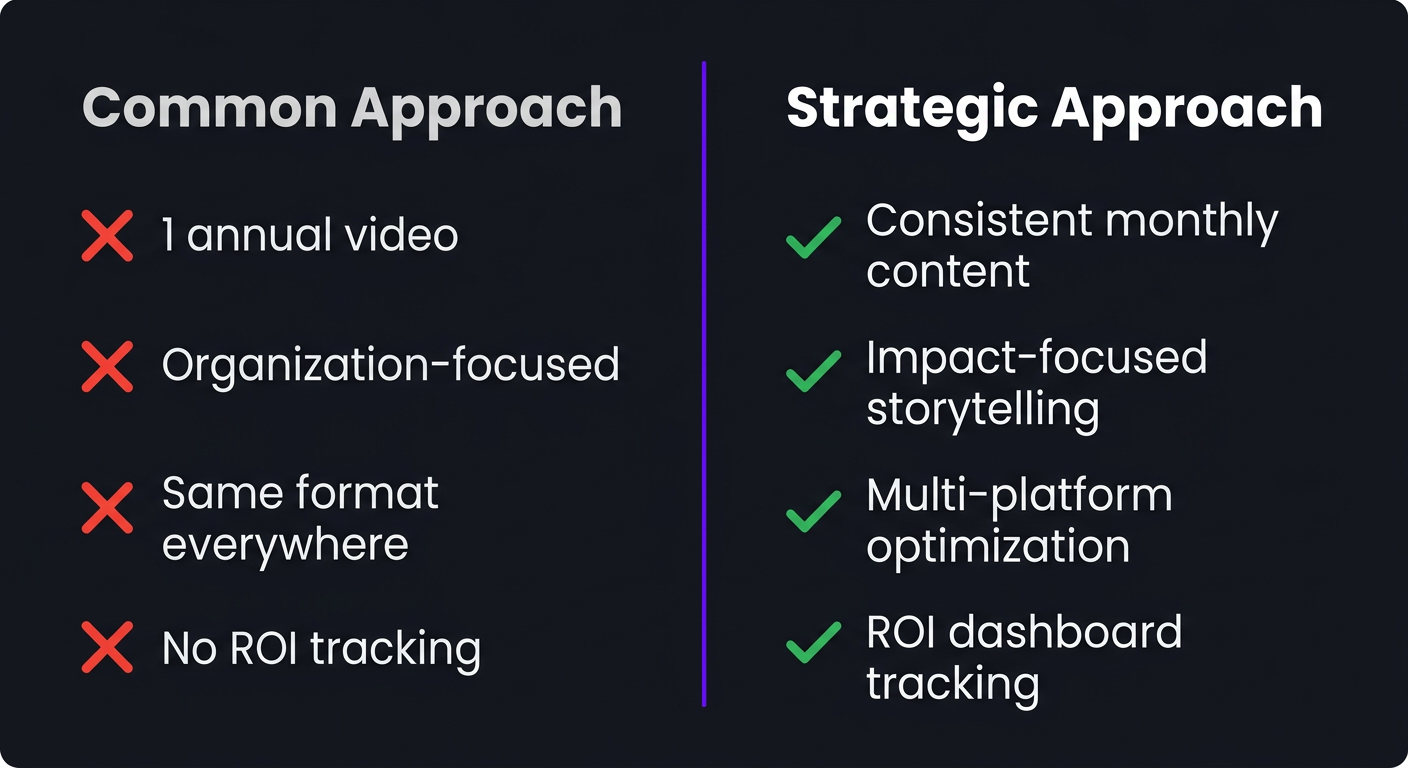
The nonprofit that produces one great video per year gets far less return than the one producing consistent monthly content. Video works through repetition and presence. A single annual report video might get 2,000 views. Twelve monthly impact updates might get 1,000 views each — 12,000 total, with ongoing engagement throughout the year.
Mistake 2: Over-Investing in Production, Under-Investing in Editing
Nonprofits often spend $5,000-$10,000 on a professional video shoot, then hand the footage to an intern for editing. The result: $10,000 footage that looks like $500 content. Editing is where raw footage becomes a story. Budget at least 40-60% of your total video investment for post-production.
Mistake 3: Making Videos About the Organization Instead of the Impact
Donors don’t give to organizations — they give to outcomes. Videos that spend 80% of runtime showing your office, your team, and your processes miss the point. Lead with impact. Show the change. Feature the people served, not the people serving.
Mistake 4: Ignoring Platform Optimization
A 5-minute fundraising video optimized for YouTube is different from a 30-second version optimized for Instagram Reels. Nonprofits often create one video and post it everywhere unchanged, which means it performs poorly everywhere. Professional editing includes platform-specific optimization — different cuts, ratios, and pacing for different channels.
Mistake 5: Not Tracking Video ROI
If you can’t measure what your videos produce (donations driven, grants won, enrollment increased, volunteers recruited), you can’t justify the budget to your board. Every video should have a measurable objective and a tracking mechanism. This is how you turn “we spent money on video” into “our video investment generated 5x return.”
Frequently Asked Questions
Nonprofit video editing typically costs $150–$500 per video for standard content, or $1,500–$4,000/month for retainer packages covering 6-15 videos. Grant video production (with higher production value) runs $500–$2,000 per video. Many agencies offer reduced rates for mission-driven organizations when approached with clear budgets and volume commitments.
The highest-impact types are: fundraising/donation appeal videos, grant application videos, impact/annual report videos, program explainer videos, testimonial/beneficiary stories, social media awareness campaigns, event highlight reels, and volunteer recruitment videos. Start with fundraising appeals and grant videos — they generate the most direct financial return.
Yes, and it should be. Most grants allow video production costs under communications, outreach, or program delivery line items. Federal grants (NIH, NSF, USAID), private foundations, and corporate CSR grants commonly fund video production. Budget it as a line item tied directly to program outcomes for the strongest justification.
Online course production, lecture recording enhancement, student recruitment campaigns, alumni engagement, research dissemination, virtual campus tours, staff training modules, and accessibility compliance. The shift to hybrid learning has made video editing a core operational need for schools at every level.
Nonprofit editing prioritizes emotional storytelling and impact demonstration over sales conversion. It requires sensitivity to vulnerable populations, ethical representation, accessibility compliance, and the ability to work with limited budgets and varied footage quality. The best editors understand donor psychology and mission-driven messaging.
Key strategies: include video production in grant budgets, use retainer packages for volume discounts (30-40% savings), repurpose one hero video into 8-10 derivative assets, batch production around events, use templated editing for recurring content, and partner with agencies that offer nonprofit-specific pricing.
Your Mission Deserves Professional Storytelling
We work with nonprofits and education organizations at every budget level. Let’s find the right approach for your goals — whether that’s one flagship video or 30 courses.
Data cited in this article comes from M+R Benchmarks 2025, the Foundation Center, Coursera research, and Kaltura’s State of Video in Education report. Pricing reflects 2026 market rates. For current Increditors pricing, visit our pricing page or schedule a call.